
1. Киришүү
The Astrum PB070 10400mAh Mini UPS Power Bank is designed to provide reliable backup power for various electronic devices. It features auto-start functionality during AC recovery and incorporates protection mechanisms against overload, short-circuit, over-charge, and over-discharge. This device offers flexible output voltage settings (5V, 9V, 12V DC) and Power over Ethernet (POE) output options (15V, 24V) via a selector switch, ensuring uninterrupted power for your essential electronics.

Image 1.1: Astrum PB070 Mini UPS Power Bank overview, highlighting its role in providing uninterrupted power.
2. Продукциянын өзгөчөлүктөрү
- Микропроцессордук башкаруу: Ensures high reliability and stable performance.
- Жогорку кубаттуулуктагы батарея: Equipped with a 10400mAh lithium battery for extended backup time.
- LED көрсөткүчтөрү: Provide visual status updates for power and battery charge levels.
- Кол менен өчүргүч: Allows control over the power bank, aiding in battery life management.
- Көп функциялуу кубаттуулук: Supplies power to various devices including Wi-Fi routers, modems, security cameras, and smartphones.
- USB кубаттоо порту: A built-in 5V 2A USB port for charging mobile devices.
- Smart Circuit Protection: Safeguards the power bank and connected devices against over-voltage, over-temperature, over-current, and short-circuit damages.
- Selectable POE Output: Offers 15V or 24V Power over Ethernet output for compatible devices.

Image 2.1: Built-in safety features of the Astrum PB070, including protection against various electrical issues.
3. Пакеттин мазмуну
The standard package for the Astrum PB070 Mini UPS Power Bank typically includes:
- Astrum PB070 Mini UPS Power Bank
- AC кубат кабели
- DC Output Cables (various connectors)
- User Manual
Note: Specific cable types and quantities may vary. Please check the product packaging for exact contents.
4. Продукт бүтүп калдыview
Familiarize yourself with the various ports and indicators on your Astrum PB070 Mini UPS Power Bank.

Сүрөт 4.1: Алдыңкы жана үстү view of the Astrum PB070 Mini UPS, displaying its ports and LED indicators.
4.1. Порттор жана туташтыргычтар
- INPUT 85-265Vac: AC power input port for charging the UPS and providing pass-through power.
- DC Output Ports (5V, 9V, 12V): Multiple DC output jacks for connecting various devices.
- USB (5V 2A): Standard USB-A port for charging smartphones and other USB-powered devices.
- POE: Power over Ethernet output port.
- LAN: Ethernet data port.
- SELECTOR (15V / 24V): Switch to select the output voltage for the POE port.
- КАЛТЫРУУ: Түзмөктү баштапкы абалга келтирүү баскычы.

Сүрөт 4.2: Детальдуу view of the power supply ports, showing the input AC port and various DC output options.
4.2. LED көрсөткүчтөрү
- АБАЛЫ: Indicates the operational status of the UPS.
- КҮЧ: Indicates if the unit is powered on.
- Charge Level Indicators (25%, 50%, 75%, 100%): Батареянын калган кубаттуулугун көрсөтүңүз.
5. Орнотуу нускамалары
Follow these steps to set up your Astrum PB070 Mini UPS Power Bank:
- Charge the UPS: Connect the provided AC power cable to the INPUT 85-265Vac port on the UPS and then to a wall outlet. The LED charge indicators will illuminate to show charging progress. Ensure the unit is fully charged before first use.
- Determine Device Voltage: Identify the required input voltage for the device you intend to power (e.g., your Wi-Fi router, modem). This information is usually found on the device's power adapter or label.
- Output Voltage (for DC devices): If your device requires 5V, 9V, or 12V DC, select the corresponding output port on the UPS. Use the appropriate DC output cable to connect the UPS to your device.
- Select POE Output Voltage (for POE devices): If your device uses Power over Ethernet (POE), connect it to the POE портун колдонуңуз. SELECTOR switch to choose between 15V or 24V POE output, matching your device's requirements.
- USB түзмөктөрүн туташтыруу: For charging smartphones or other USB-powered devices, connect them to the USB (5V 2A) port using a standard USB cable.
- Күйгүзүү: басыңыз КҮЧ button to turn on the UPS. The power indicator LED will light up.
6. Иштөө нускамалары
6.1. Нормалдуу иштөө
Once set up, the Astrum PB070 operates automatically. When AC power is present, it charges its internal battery and passes power through to connected devices. In the event of a power outage, the UPS will automatically switch to battery power, providing uninterrupted operation for your connected devices.
6.2. Күйгүзүү / Өчүрүү
- Күйгүзүү үчүн: басып, кармап туруңуз КҮЧ button until the power indicator LED illuminates.
- Өчүрүү үчүн: басып, кармап туруңуз КҮЧ button until the power indicator LED turns off.
6.3. LED индикаторлорун түшүнүү
- STATUS LED: Indicates the operational status. Refer to the specific light patterns in the troubleshooting section if issues arise.
- POWER LED: Solid green when the unit is powered on.
- Кубаттоо деңгээлинин светодиоддору (25%, 50%, 75%, 100%): These LEDs light up progressively during charging and indicate the remaining battery capacity when operating on battery power.
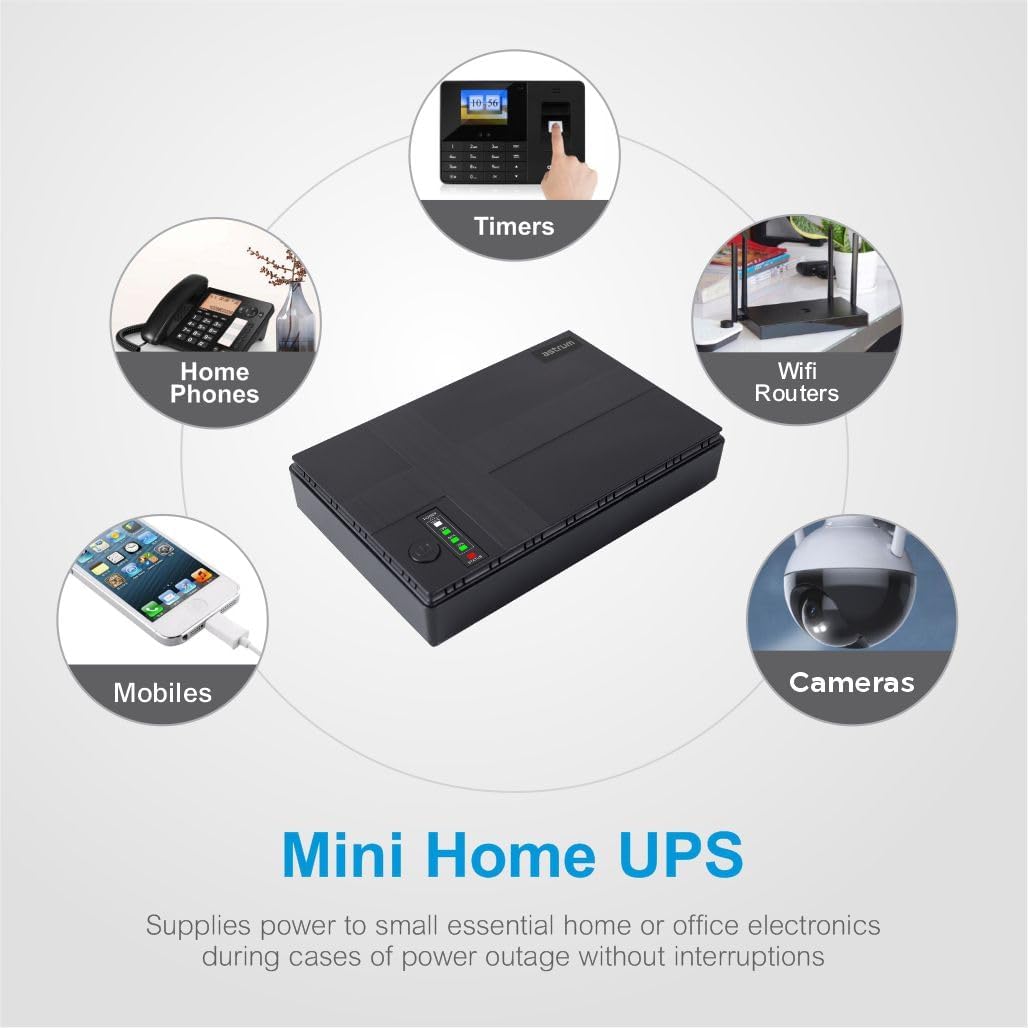
Сүрөт 6.1: Мисamples of devices that can be powered by the Mini UPS, such as Wi-Fi routers, security cameras, and mobile phones.
7. Техникалык тейлөө
Proper maintenance ensures the longevity and optimal performance of your Astrum PB070 Mini UPS Power Bank.
- Тазалоо: Use a soft, dry cloth to clean the exterior of the unit. Do not use liquid cleaners or aerosols. Ensure all ports are free from dust and debris.
- Сактагыч: If storing the UPS for an extended period, ensure it is fully charged. Recharge the unit every 3-6 months to prevent battery degradation. Store in a cool, dry place away from direct sunlight and extreme temperatures.
- Батареяга кам көрүү: Avoid completely draining the battery frequently. For optimal battery life, keep the unit connected to AC power when not in use as a portable power bank.
8. Кыйынчылыктарды
If you encounter issues with your Astrum PB070, refer to the following common problems and solutions:
| Көйгөй | Мүмкүн себеп | Чечим |
|---|---|---|
| UPS does not power on. | Батарея толугу менен түгөнүп калган. | Connect the UPS to AC power and allow it to charge for several hours. |
| Туташкан түзмөк электр кубатын албай жатат. | Туура эмес чыгаруу томtage тандалган. | Verify the required voltage for your device and ensure the correct DC output port or POE selector setting is used. |
| Туташкан түзмөк электр кубатын албай жатат. | Кабелдер коопсуз туташтырылган эмес. | Check all cable connections between the UPS and your device. |
| UPS battery drains quickly. | High power consumption by connected devices. | Reduce the number of connected devices or ensure they are not drawing excessive power. |
| UPS is not charging. | AC power cable is loose or wall outlet is faulty. | Ensure the AC cable is firmly connected and test the wall outlet with another device. |
Бул чечимдерди колдонуп көргөндөн кийин көйгөй чечилбесе, кардарларды колдоо менен байланышыңыз.
9. Техникалык шарттар
| Өзгөчөлүк | Спецификация |
|---|---|
| Бренд | АСТРУМ |
| Модель номери | A91507-B |
| Батарея сыйымдуулугу | 10400mAh |
| Батарея клеткасынын курамы | Литий ион |
| AC Input Voltage | 85-265 Вольт |
| DC Output Voltage | 5В, 9В, 12В |
| USB чыгышы | 5V 2A |
| POE Output Voltage | 15V, 24V (selectable) |
| Max Output Wattage | 18 Ватт |
| Продукциянын өлчөмдөрү | 16D x 32W x 10H сантиметр |
| Элемент Салмагы | 0.37 килограмм |
| Материал | Пластик |
| Түс | Кара |
| Өндүрүүчү | Astrum Peripherals Pty Ltd |
10. Кепилдик маалыматы
The Astrum PB070 Mini UPS Power Bank comes with a 1 жылдык Чектелген Кепилдик сатып алынган күндөн тартып. Бул кепилдик өндүрүштүк кемчиликтерди жана нормалдуу колдонуудагы бузулууларды камтыйт. Бул туура эмес пайдалануудан, кырсыктардан, уруксатсыз өзгөртүүлөрдөн же табигый кырсыктардан келтирилген зыянды камтыбайт.
Кепилдик дооматтары үчүн сатып алганыңыздын далилин сактап коюңуз.
11. Колдоо
For technical assistance, warranty claims, or further inquiries regarding your Astrum PB070 Mini UPS Power Bank, please contact Astrum customer support through their official webсайтка же продуктуну сатып алган сатуучуга.
When contacting support, please have your product model number (A91507-B) and proof of purchase readily available.
For the most up-to-date support information, visit the official ASTRUM webсайт.