
Introduction
The Astrum KT210 is a versatile wireless keyboard featuring a multi-mode connection, integrated touchpad, and RGB backlighting. It is designed for seamless use across multiple devices such as laptops, PCs, tablets, and smartphones, supporting both Bluetooth and 2.4GHz wireless connections. This manual provides detailed instructions for setting up, operating, and maintaining your keyboard.
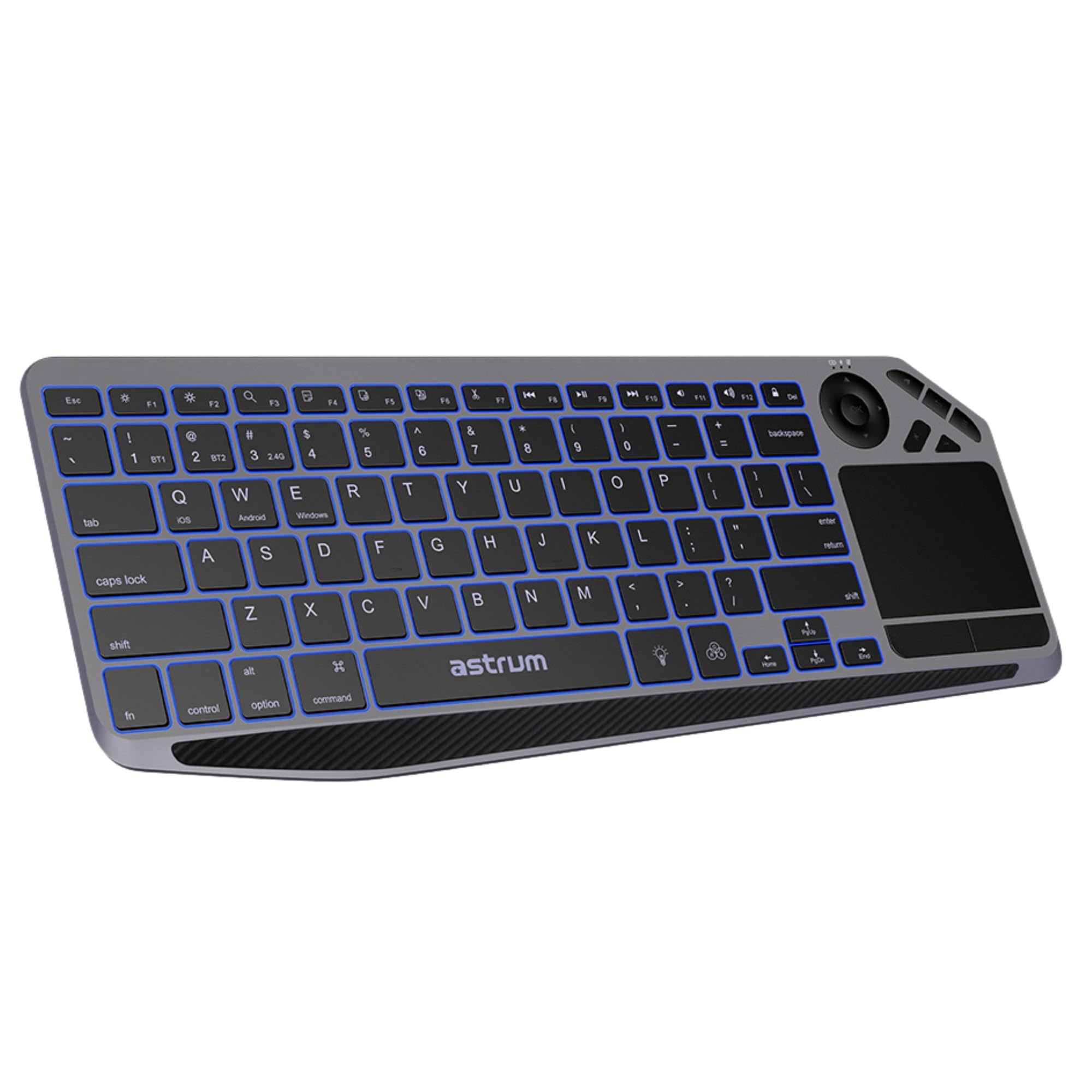
Сүрөт: Жогорку view of the Astrum KT210 Wireless Touch Multi-mode Keyboard, showcasing its full layout including the integrated touchpad and multimedia keys.
Орнотуу нускамалары
Пакеттин мазмуну
- Astrum KT210 Wireless Touch Multi-mode Keyboard
- USB заряддоо кабели
- User Manual
Баскычтопту заряддоо
Before first use, fully charge the keyboard. Connect the provided USB charging cable to the keyboard's charging port and to a USB power source (e.g., computer USB port, USB wall adapter). The charging indicator light will show the charging status and turn off when fully charged. A full charge provides up to 160 hours of working time.

Image: Close-up of the Astrum KT210 keyboard showing the USB charging port with a cable connected, indicating the charging process.
Күйгүзүү/өчүрүү
Locate the power switch on the keyboard. Slide the switch to the "ON" position to power on the keyboard. Slide it to "OFF" when not in use to conserve battery life.

Image: Illustration showing the location of the On/Off switch on the Astrum KT210 keyboard, emphasizing battery saving.
Connecting to Devices (Multi-mode Pairing)
The keyboard supports connecting up to three devices via Bluetooth. Use the dedicated function keys to switch between paired devices.
- Bluetooth жупташууда:
- Басып кармап туруңуз Fn + BT1 (же BT2, BT3) тиешелүү индикатор жарыгы тез күйгөнгө чейин 3-5 секунд басып туруңуз. Бул клавиатура жупташтыруу режиминде экенин билдирет.
- On your device (laptop, tablet, smartphone), enable Bluetooth and search for available devices.
- Select "Astrum KT210" from the list of found devices.
- Жупташтыруу процессин аяктоо үчүн экрандагы көрсөтмөлөрдү аткарыңыз. Туташтырылгандан кийин индикатор жарыгы күйүп-өчүүнү токтотот.
- Түзмөктөрдүн ортосунда которулуу:
- Once paired, simply press Fn + BT1, Fn + BT2, же Fn + BT3 to switch between your connected devices. The indicator light will illuminate steadily for the active connection.
Иштөө нускамалары
Сенсордук панелдин функциялары
The integrated multipoint touchpad allows for precise navigation and gesture control. Refer to your operating system's settings for specific multi-touch gesture configurations.
- Бир манжа менен таптоо: Сол чыкылдатуу.
- Эки манжа менен таптоо: Оң чыкылдатыңыз.
- Эки манжа менен жылдыруу: Өйдө/төмөн же солго/оңго сыдырыңыз.
- Чоңойтуу үчүн чымчыңыз: Zoom in/out (if supported by application).

Image: The Astrum KT210 keyboard highlighting the multipoint touchpad and dedicated multimedia hotkeys for seamless control.
RGB арткы жарыкты башкаруу
The keyboard features multi-color LED backlighting with adjustable brightness levels.
- басыңыз light bulb icon key (usually near the spacebar) to cycle through different backlight colors or turn the backlight on/off.
- Басыңыз Fn + Light Brightness Up/Down keys (often F11/F12 or dedicated keys) to adjust the backlight brightness through 3 levels.

Image: The Astrum KT210 keyboard displaying its multi-color LED backlighting feature with different color options.
Мультимедиялык баскычтар
The keyboard includes dedicated multimedia hotkeys for quick access to media controls. These are typically located in the function key row (F1-F12) and may require pressing the Fn ачкыч бир эле учурда.
- Fn + F1-F12: Control media playback, volume, and other system functions. Refer to the key legends for specific functions.
Операциялык системанын шайкештиги
The Astrum KT210 keyboard is compatible with a wide range of operating systems:
- Windows
- Mac OS
- Chrome OS
- Linux
- Android
Some keys may have dual legends (e.g., Windows/Android, iOS/Mac). The keyboard automatically adapts to the connected operating system or can be manually switched using Fn + Q (iOS), Fn + W (Android), Fn + E (Windows).
Техникалык тейлөө
Тазалоо
Клавиатураны тазалоо үчүн, аны өчүрүп, бардык кабелдерди сууруп алыңыз. Жумшак, түксүз чүпүрөктү бир аз сүртүңүз.ampened with water or a mild cleaning solution. Avoid excessive moisture and harsh chemicals. Do not immerse the keyboard in liquid.
Төгүлүүгө туруктуулук
The keyboard features a spill-resistant design, offering protection against accidental liquid spills. In case of a spill, immediately power off the keyboard, disconnect it, and gently wipe away the liquid. Allow it to dry completely before powering on again. While spill-resistant, it is not waterproof; avoid intentional exposure to liquids.
Проблемаларды чечүү
| Көйгөй | Чечим |
|---|---|
| Баскычтоп күйбөйт. | Ensure the power switch is in the "ON" position. Charge the keyboard fully using the provided USB cable. |
| Bluetooth аркылуу жупташтыруу мүмкүн эмес. |
|
| Ачкычтар жооп бербей жатат же туура эмес терип жатат. |
|
| Арткы жарык иштебейт же күңүрт. |
|
| Сенсордук панел жооп бербей жатат. |
|
Техникалык шарттар
| Бренд | АСТРУМ |
| Модель номери | A51021-B (KT210) |
| Байланыш технологиясы | Bluetooth (Multi-mode) |
| Шайкеш түзмөктөр | Ноутбук, ЖК, Планшет, Смартфон |
| Операциялык системанын шайкештиги | Windows, Mac OS, Chrome OS, Linux, Android |
| Өзгөчөлүктөр | Multi-Device Pairing and Switching, RGB Backlight (3 levels), Integrated Multipoint Touchpad, Spill-Resistant Design, Rechargeable Battery |
| Батарея түрү | Литий ион |
| Батареянын иштөө мөөнөтү | Up to 160 hours (working time) |
| Түс | Кара |
| Материал | Пластик |
Кепилдик маалымат
The Astrum KT210 Wireless Touch Multi-mode Keyboard comes with a 12 ай чектелген кепилдик from the manufacturer. This warranty covers defects in materials and workmanship under normal use. It does not cover damage caused by misuse, accident, unauthorized modification, or external causes such as spills (beyond spill resistance), drops, or extreme temperatures.
Please retain your proof of purchase for warranty claims. For detailed warranty terms and conditions, refer to the warranty card included with your product or visit the official Astrum webсайт.
Кардарларды колдоо
For technical assistance, troubleshooting, or warranty inquiries, please contact Astrum customer support through their official webсайт же продукт таңгагында көрсөтүлгөн байланыш маалыматы.
Официалдуу Webсайт: www.astrum.com
Please have your product model number (A51021-B) and proof of purchase ready when contacting support.