
OSALO OS 82ES 2nd Edition
OSALO Scientific Calculator User Manual
Brand: OSALO
Model: OS 82ES 2nd Edition
Introduction
Thank you for choosing the OSALO Scientific Calculator. This manual provides detailed instructions on how to set up, operate, and maintain your calculator. Designed for students and professionals, this calculator offers 252 functions to support a wide range of mathematical and scientific calculations.
Please read this manual carefully to ensure proper use and to maximize the functionality of your device.
Негизги өзгөчөлүктөрү
- 252 Функциялар: Comprehensive functions including fractions, matrix calculations, statistics, calculus, complex numbers, equations, standard deviation, vector calculations, permutations, and combinations.
- 2-Line Written Display: Input expressions and view results in a natural, textbook-like format.
- Жарыктыкты жөндөө: Optimize display visibility for various lighting conditions and reduce eye fatigue.
- Кош кубат булагы: Operates on both solar power and battery (LR44 included) for reliable, uninterruptible use.
- Көп кайталоо функциясы: Easily recall and edit previously executed formulas.
- List-Based STAT-Data Editor: View and edit input data in list format for statistical analysis.
- Туруктуу дизайн: Features ABS plastic keys with clear print and a curved edge for comfortable handling. Includes a slide-on hard case for protection.
- Жеңил жана портативдик: Compact design for easy carrying.

Сүрөт: бүттүview of the OSALO Scientific Calculator highlighting its 252 functions, including multi-replay, combination and permutation, statistics, fraction calculation, 9 variable memories, and the included slide-on hard case.
Жайгашуу
Батарея орнотуу
Your OSALO Scientific Calculator comes with an LR44 battery pre-installed. The calculator also utilizes solar power for extended battery life and operation in well-lit environments.
- Калькулятордун ӨЧҮК экенин текшериңиз.
- Калькулятордун артындагы батарея бөлүкчөсүн табыңыз.
- Батарея бөлүкчөсүнүн капкагын ачуу үчүн кичинекей бурагычты колдонуңуз.
- If replacing, remove the old LR44 battery.
- Жаңы LR44 батареясын оң (+) тарабын өйдө каратып салыңыз.
- Батарея уясынын капкагын ордуна коюңуз жана аны бурама менен бекитиңиз.
Note: The solar panel assists in powering the calculator in sufficient light, reducing reliance on the battery.
Иштөө нускамалары
Calculator Layout

Image: Detailed diagram of the OSALO Scientific Calculator showing the solar panel, extra large display, control keys, SHIFT key, MODE key, Power ON button, function keys, DEL (Delete) key, and ANS (Last Answer) key.
- ON Key: Press to turn the calculator on.
- ӨЧҮРҮҮ баскычы: Басыңыз SHIFT анда AC to turn the calculator off.
- AC ачкычы: Clears all calculations and returns to the initial display.
- DEL Key: Deletes the last entered character.
- SHIFT баскычы: Activates the secondary functions (indicated in yellow above the keys).
- ALPHA Key: Activates the alpha functions (indicated in red above the keys).
- MODE/SETUP Key: Changes the calculator's mode (e.g., COMP, STAT, TABLE) or settings.
Негизги операциялар
Enter numbers and operations as you would write them. Press = натыйжаны алуу үчүн.
- Кошуу, кемитүү, көбөйтүү, бөлүү: колдонуу +, -, ×, ÷ ачкычтар.
- Бөлчөктөр: колдонуу ab/c key to input fractions. For mixed numbers, input integer, then ab/c, then numerator, then ab/c, then denominator.
- Күчтөр жана тамырлар: Колдонуу x² for square, SHIFT x² for square root, x³ for cube, SHIFT x³ for cube root, and x■ for custom powers.
Written Display and Natural Input/Output
The calculator features a 2-line display that shows expressions as they are written in textbooks, making complex calculations easier to understand and verify.
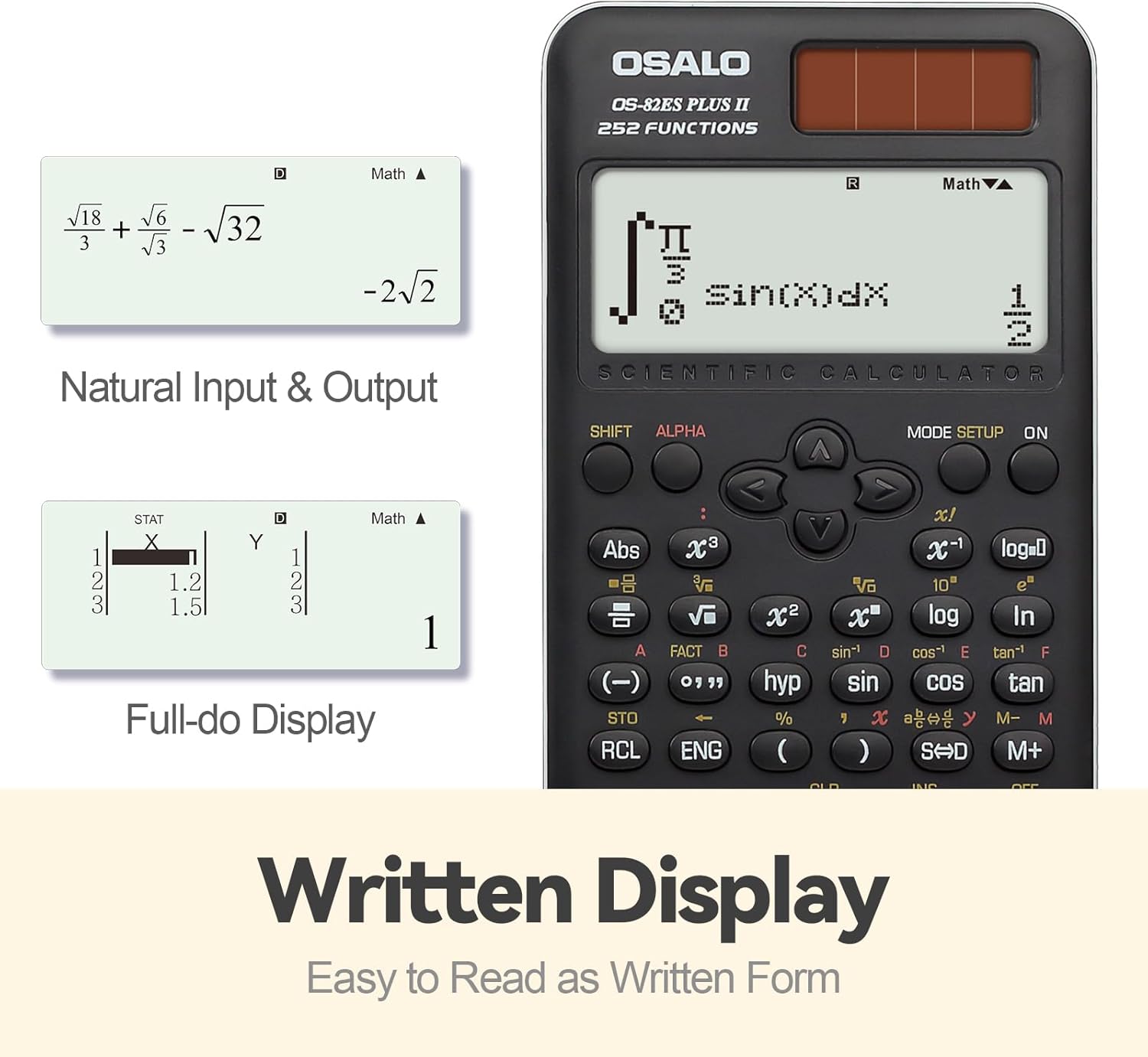
Image: Demonstrates the calculator's natural input and output display, showing complex expressions like integrals and square roots as they would appear in a textbook, along with a full-dot display for data entry.
Brightness Adjustment Function
You can adjust the screen brightness to suit your environment and reduce eye strain. Refer to the specific key combination for brightness adjustment, typically found in the SETUP menu or by pressing SHIFT followed by a specific key (e.g., MODE/SETUP and then navigating options).

Image: Comparison of the calculator display in dark (relieving visual fatigue) and bright (clear and intuitive) settings, illustrating the brightness adjustment function.
Өркүндөтүлгөн функциялар (252 функция)
The OSALO Scientific Calculator offers a wide array of advanced functions. To access these, you will often use the SHIFT key (for yellow functions) or the ALPHA key (for red functions) before pressing the desired function key.
- Тригонометриялык функциялар: күнөө, cos, тан жана алардын тескери функциялары (SHIFT sin-1, жана башкалар.).
- Логарифмдик функциялар: журнал (10-база) жана ln (натурал логарифм).
- Статистикалык эсептөөлөр:
- Басыңыз MODE/SETUP and select STAT mode.
- Enter your data using the list-based editor.
- Perform calculations for mean, standard deviation, regression analysis, etc.
- Комплекстүү сандарды эсептөө: Access this mode via MODE/SETUP.
- Equation Solving: Use the Equation mode to solve linear equations, quadratic equations, etc.
- Пермутациялар жана комбинациялар: Колдонуу nPr жана nCr функциялары.
- Эстутум функциялары: Store and recall values using СТО жана RCL keys. The calculator supports 9 variable memories.
For detailed instructions on each specific function, please refer to the comprehensive user guide provided with your calculator, which covers all 252 functions in detail.
Техникалык тейлөө
- Тазалоо: Wipe the calculator with a soft, dry cloth. For stubborn dirt, slightly dampчүпүрөктү суу менен. Катуу химиялык заттарды же абразивдүү тазалагычтарды колдонбоңуз.
- Сактагыч: Store the calculator in its slide-on hard case when not in use to protect it from dust, scratches, and impacts. Avoid exposing the calculator to extreme temperatures, humidity, or direct sunlight for prolonged periods.
- Батареяга кам көрүү: If the calculator will not be used for an extended period, it is recommended to remove the LR44 battery to prevent leakage.
Проблемаларды чечүү
| Көйгөй | Мүмкүн себеп | Чечим |
|---|---|---|
| Калькулятор күйбөйт. | Low or dead battery; insufficient light for solar power. | Replace the LR44 battery. Ensure adequate lighting for solar operation. |
| Дисплей күңүрт же окулбайт. | Low battery; brightness setting too low. | Adjust display brightness using the brightness adjustment function. Replace battery if needed. |
| Туура эмес эсептөө натыйжалары. | Incorrect mode setting; input error; syntax error. | Учурдагы режимди текшериңиз (мисалы, DEG/RAD, COMP/STAT). Кайраview your input. Clear the calculation and re-enter. |
| Калькулятор катып калат же жооп бербей калат. | Убактылуу программалык ката. | басыңыз ON key. If unresponsive, remove the battery for a few seconds and reinsert it to perform a hard reset. Note that this may clear memory. |
If you encounter issues not listed here, please refer to the full user guide or contact customer support.
Техникалык шарттар
- Модел: OS 82ES 2nd Edition
- Функциялары: 252
- Дисплей: 2-Line Written Display, 10-digit mantissa / 2-digit exponential
- Кубат булагы: Solar and LR44 Battery (included)
- Материал: ABS пластик
- Өлчөмдөрү: Болжол менен 164 x 80 x 20 мм (6.46 x 3.15 x 0.79 дюйм)
- Салмагы: Болжол менен 141г (4.93 унция)
- Камтылган аксессуарлар: Slide-on hard case, User Guide (Five Languages Version)

Image: Visual representation of the calculator's dimensions (0.79"/20mm thickness, 3.15"/80mm width, 6.46"/164mm length) and net weight (4.9oz/140g).
Кепилдик жана колдоо
For warranty information and customer support, please refer to the specific terms outlined in the full user guide included with your product. You may also visit the official OSALO webсайтка кайрылыңыз же өнүм боюнча суроо, көйгөйлөрдү чечүү же кепилдик дооматтары боюнча жардам алуу үчүн түздөн-түз кардарларды тейлөө кызматына кайрылыңыз.
Эскертүү: Disassembly of the calculator should only be performed by qualified professionals.
Ask a question about this manual
Ask about setup, troubleshooting, compatibility, parts, safety, or missing instructions. Manuals+ will review the question and use this page’s manual context to help answer it.