
Introduction
Thank you for choosing MANKIW D06 Wireless Earbuds. This manual provides essential information for setting up, operating, and maintaining your earbuds to ensure optimal performance and longevity. Please read these instructions carefully before use.
Кутуда эмне бар

Image: Contents of the MANKIW D06 Wireless Earbuds package.
The MANKIW D06 Wireless Earbuds package includes the following items:
- Зымсыз кулакчындар (1 жуп)
- Заряддоо кутусу (1 бирдик)
- Type-C заряддоо кабели (1 бирдик)
- Колдонуучунун колдонмосу (1 бирдик)
- Ear Tips (3 pairs: Small, Medium, Large)
Продукт бүттүview

Image: MANKIW D06 Wireless Earbuds and charging case.
The MANKIW D06 Wireless Earbuds are designed for a superior audio experience with convenience and durability. Key features include:
- Bluetooth 5.3 технологиясы: Ensures faster speed and more stable connections up to 10 meters.
- LED Digital Power Display: Shows the battery level of both the charging case and individual earbuds.
- Иммерсивдүү стерео үн: Delivers enhanced bass and crystal-clear audio.
- Smart Touch Control: Intuitive touch sensors for managing music playback, calls, and voice assistants.
- Батареянын узак иштөө мөөнөтү: Up to 8 hours of continuous playback per charge, extending to 32 hours with the charging case.
- IPX5 сууга туруктуулугу: Protects against sweat and splashes, suitable for workouts and outdoor activities.
- Компакт жана жеңил дизайн: Easy to carry and comfortable for extended wear.
- Камтылган микрофон: Колсуз так чалуулар үчүн.
Жайгашуу
1. Кулакчындарды жана кутуну кубаттоо
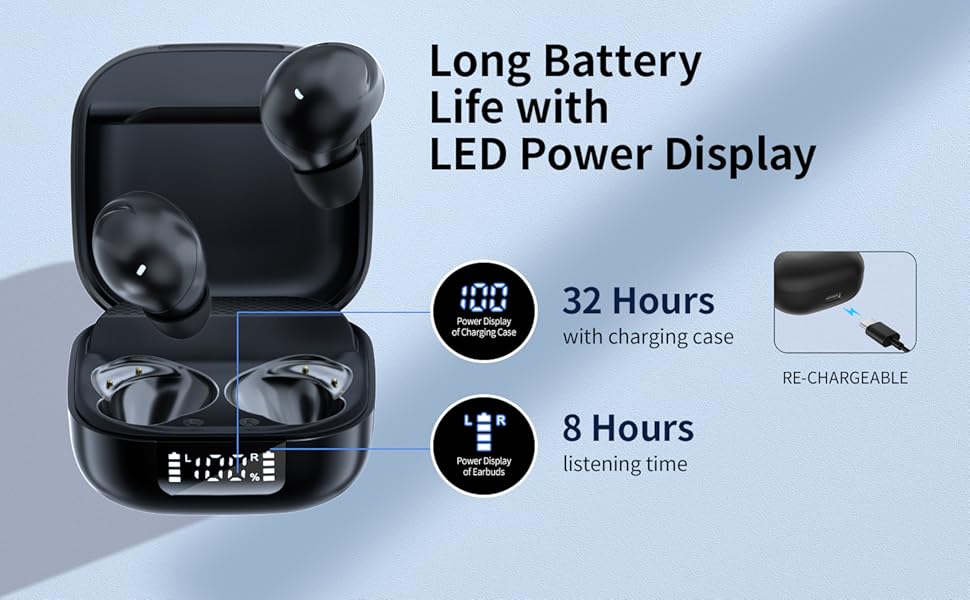
Image: Charging the earbuds and case.
- Биринчи колдонуудан мурун, кулакчындарды жана заряддоо кутучасын толук заряддаңыз.
- Кулакчындарды заряддоо кутусуна салыңыз. Алардын туура отурганын текшериңиз.
- Connect the provided Type-C charging cable to the charging port on the case and plug the other end into a USB power source (e.g., wall adapter, computer).
- The LED digital display on the case will show the current battery percentagкутучанын жана ар бир кулакчындын кубаттоо абалынын e.
- Once fully charged, the display will show 100%.
2. Түзмөгүңүз менен жупташтыруу (бир кадамдуу жупташтыруу)
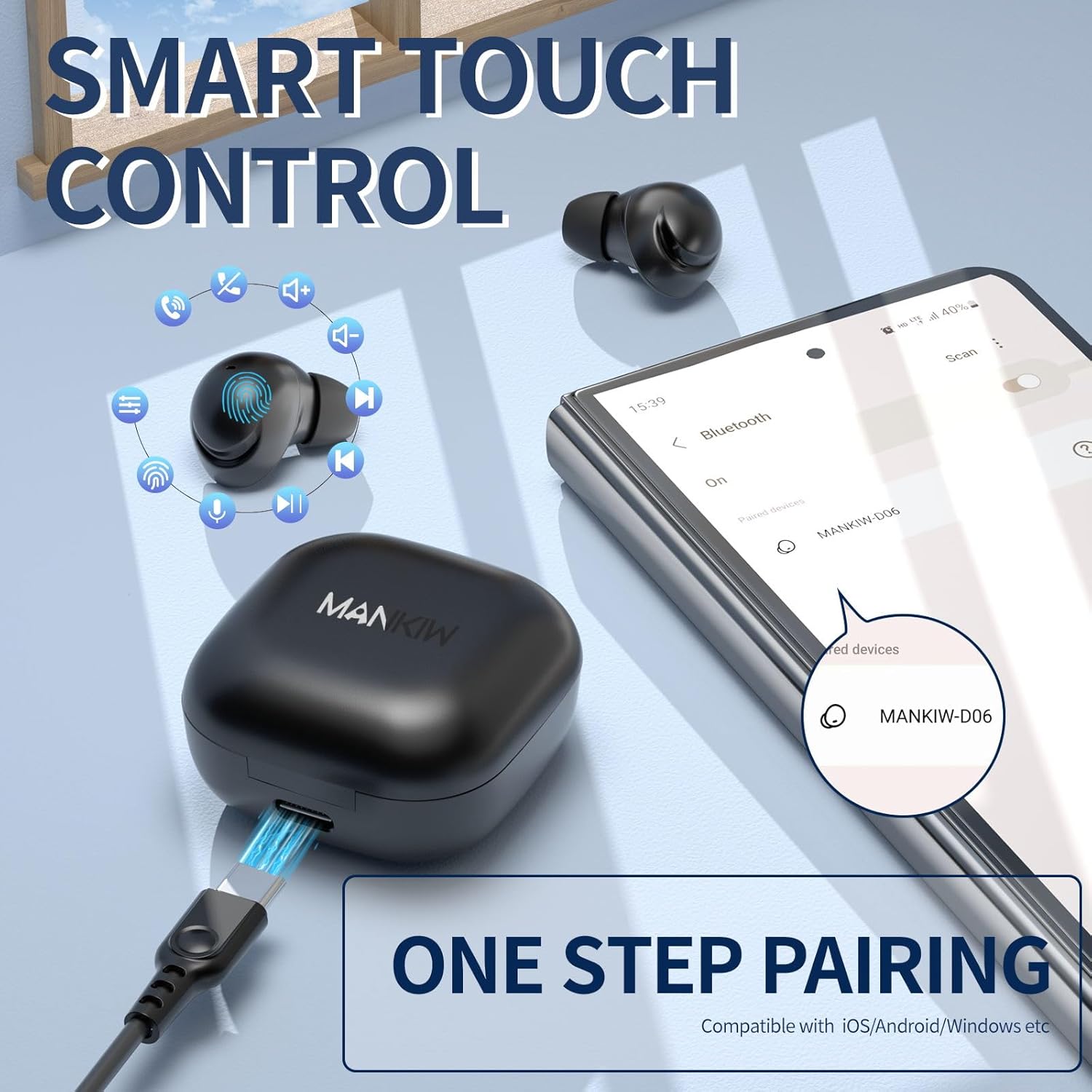
Image: One-step pairing process.
The MANKIW D06 earbuds feature one-step automatic pairing:
- Заряддоо кутучасын ачыңыз. Кулакчындар жупташтыруу режимине автоматтык түрдө кирет.
- On your device (smartphone, tablet, TV, computer), go to Bluetooth settings.
- Издөө available devices and select "MANKIW-D06" from the list.
- Туташкандан кийин, сиз ырастоо үнүн угасыз жана кулакчындар колдонууга даяр болот.
- The earbuds are compatible with iOS, Android, and Windows devices.
3. Кулак үчүн туура кеңештерди тандоо

Image: Selecting the correct ear tip size.
For optimal sound quality and comfort, choose the ear tips that best fit your ears. Three sizes (Small, Medium, Large) are provided. A snug fit helps with noise isolation and bass response.
Иштөө нускамалары
Touch Controls

Image: MANKIW D06 Earbuds touch control guide.
| Функция | Акция |
|---|---|
| Көлөм + | тийиңиз L (Left) earbud touch area twice in a row. |
| Көлөмү - | тийиңиз R (Right) earbud touch area twice in a row. |
| Ойнотуу/Тыныгуу | тийиңиз L/R earbud touch area once. |
| Мурунку ыр | тийиңиз L (Left) earbud touch area three times in a row. |
| Кийинки трек | тийиңиз R (Right) earbud touch area three times in a row. |
| Чакырууга жооп бер | тийиңиз L (Left) earbud touch area twice in a row. |
| Чакырууну токтотуу | тийиңиз R (Right) earbud touch area twice in a row. |
| Call Siri / Voice Assistant | басып, кармап туруңуз L button for 3 seconds when not in music mode. |
Бир жана кош кулакчын режими
You can use both earbuds together for stereo sound or use a single earbud independently for mono audio. Simply remove one earbud from the case to use it in single mode. The other earbud can remain in the case or be used later.
Техникалык тейлөө
Тазалоо
- Кулакчындарды жана заряддоо кутусун жумшак, кургак, түксүз чүпүрөк менен дайыма тазалап туруңуз.
- Катуу химиялык заттарды, тазалоочу эриткичтерди же күчтүү жуучу каражаттарды колдонбоңуз.
- Gently remove ear tips and clean them with water if necessary, ensuring they are completely dry before reattaching.
- Clean the charging contacts on both the earbuds and the case with a dry cotton swab to ensure proper charging.
Сууга туруктуулук (IPX5)
The MANKIW D06 earbuds are IPX5 water-resistant, meaning they can withstand sweat and light splashes. They are not designed for swimming, showering, or submersion in water. Ensure the charging port is dry before charging.
Техникалык шарттар
| Өзгөчөлүк | Деталь |
|---|---|
| Модель номери | D06 |
| Bluetooth версиясы | 5.3 |
| Bluetooth диапазону | 10 метрге чейин (33 фут) |
| Батареянын иштөө мөөнөтү (наушник) | 8 саатка чейин үзгүлтүксүз ойнотуу |
| Жалпы ойноо убактысы (Кеп менен) | 32 саатка чейин |
| Заряддоо порту | USB Type-C |
| Сууга туруктуулук рейтинги | IPX5 (Sweat & Water Resistant) |
| Башкаруу ыкмасы | Touch Control |
| Камтылган микрофон | Ооба |
| Шайкеш түзмөктөр | Smartphones, Tablets, TVs, Computers (iOS, Android, Windows) |
| Элемент Салмагы | 2.89 унция |
| Пакеттин өлчөмдөрү | 4.09 x 2.76 x 1.46 дюйм |
Проблемаларды чечүү
If you encounter any issues with your MANKIW D06 Wireless Earbuds, please refer to the following common solutions:
- Кулакчындар жупташтырылбай же туташтырылбай жатат:
- Эки кулакчындын тең кубатталганын текшериңиз.
- Түзмөгүңүздөгү Bluetooth'ду өчүрүп, кайра күйгүзүңүз.
- Delete "MANKIW-D06" from your device's Bluetooth list and attempt to re-pair.
- Place earbuds back in the charging case, close the lid, wait a few seconds, then open to re-initiate pairing mode.
- Бир гана кулакчын иштейт:
- Эки кулакчындын тең кубатталганын текшериңиз.
- Try placing both earbuds back into the charging case, closing the lid, and then taking them out again.
- Reset the earbuds (refer to the full user manual for specific reset instructions if available).
- Көлөмү төмөн же үн сапаты начар:
- Түзмөгүңүздөгү жана гарнитураңыздагы үндү тууралаңыз.
- Ensure the ear tips are clean and provide a snug fit in your ears.
- Кулакчын динамиктериндеги калдыктарды тазалаңыз.
- Түзмөгүңүз менен кулакчындардын ортосунда эч кандай тоскоолдуктар жок экенин текшериңиз.
- Заряддоо маселелери:
- Заряддоо кабелин жана адаптердин бузулганын текшериңиз.
- Кулакчындардын жана кутучанын кубаттоочу контакттары таза жана таштандылардан таза экенин текшериңиз.
- Башка USB кубат булагын байкап көрүңүз.
Расмий продукт Video
Video: MANKIW D06 Wireless Bluetooth Earbuds product overview. This video demonstrates the features and design of the earbuds.
Кепилдик жана колдоо
MANKIW products are designed with quality and reliability in mind. For specific warranty information, please refer to the documentation included with your purchase or visit the official MANKIW website. If you require further assistance or have questions not covered in this manual, please contact MANKIW customer support.
Көбүрөөк маалымат алуу үчүн, киргиле MANKIW Store on Amazon.