1. Киришүү
Thank you for choosing the Generic Smart Multifunction Recliner Chair. This manual provides essential information for the safe assembly, operation, maintenance, and troubleshooting of your new recliner. Please read this manual thoroughly before use and retain it for future reference.

A blue upholstered recliner chair, featuring a plush design and a visible cable connection on the side, likely for a USB charging port or control.
2. Коопсуздук нускамалары
Коопсуз иштөөнү камсыз кылуу жана жаракат алуунун же бузулуунун алдын алуу үчүн төмөнкү коопсуздук көрсөтмөлөрүн сактаңыз:
- 120 кг (265 фунт) максималдуу салмактан ашпаңыз.
- Keep children and pets away from the moving parts of the recliner.
- Ensure adequate space around the chair for reclining to avoid obstruction or damage.
- Avoid placing liquids directly on the chair, especially near electrical components.
- Стулга турбаңыз же аны тепкич катары колдонбоңуз.
- If the chair includes electrical components (e.g., USB port), ensure the power cord is not pinched or damaged. Disconnect from power when not in use or during cleaning.
- Do not attempt to disassemble or repair the chair yourself. Contact qualified personnel for service.
3. Пакеттин мазмуну
Монтаждоону баштоодон мурун бардык компоненттердин бар экендигин текшериңиз:
- Recliner Seat Base
- Арткы таяныч
- Armrests (if separate)
- Power Adapter (for USB port, if applicable)
- Монтаждоо жабдыктары (буроолор, шайбалар, аллен ачкычы)
- User Manual
4. Орнотуу жана чогултуу
Follow these steps to assemble your recliner chair:
- Компоненттерди таңгактан чыгаруу: Таңгактан кылдаттык менен бардык бөлүктөрүн алып салыңыз. Чийилбеш үчүн аларды жумшак, таза бетке кой.
- Арткы таянычты бекитүү: Align the metal brackets on the backrest with the receivers on the seat base. Slide the backrest down firmly until it locks into place. You may hear a click.
- Attach Armrests (if separate): If your model has separate armrests, attach them to the seat base using the provided hardware. Ensure all screws are tightened securely.
- Кубатты туташтыруу (эгер бар болсо): If your chair includes a USB charging port or other electrical features, connect the power adapter to the chair's power input and then plug it into a wall outlet.
- Акыркы текшерүү: Колдонуудан мурун бардык байланыштар бекем жана отургучтун туруктуу экенин текшериңиз.
5. Иштөө нускамалары
5.1 Жатуу функциясы
This recliner features a manual reclining mechanism. To recline:
- Жаталуу үчүн: Lean back into the chair and push firmly on the backrest. The footrest will extend, and the backrest will recline.
- Тике кайтуу үчүн: Push down on the footrest with your legs while leaning forward. The footrest will retract, and the backrest will return to its upright position.
5.2 USB Charging Port (if applicable)
If your chair is equipped with a USB charging port:
- Locate the USB port, typically on the side of the chair.
- Plug your USB charging cable into the port to charge compatible devices.
- Ensure the chair is connected to a power source for the USB port to function.
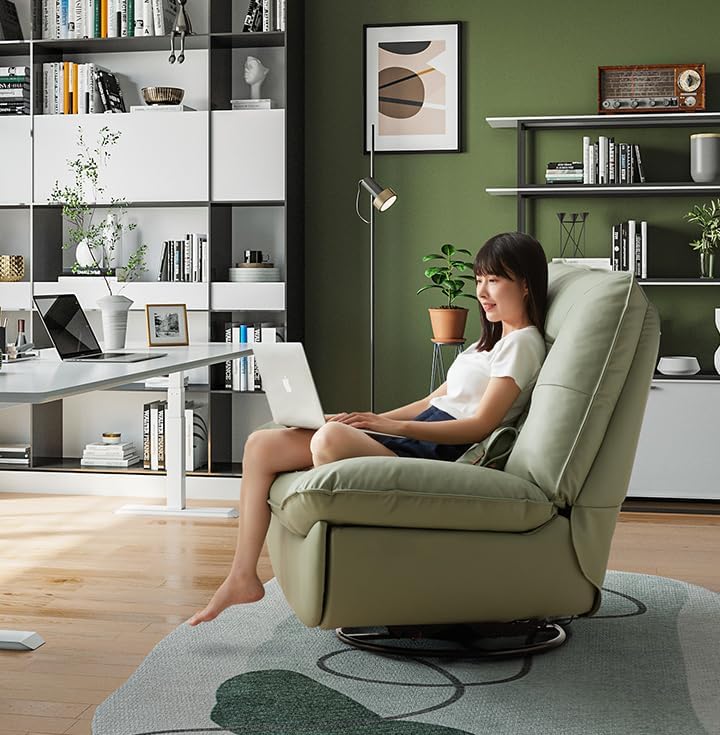
A person seated comfortably in the green recliner chair, using a laptop, highlighting the chair's ergonomic design suitable for work or leisure.

Two individuals relaxing together on the green recliner chair, showcasing its spaciousness and comfort for shared leisure.
6. Техникалык тейлөө
Proper care will extend the life and appearance of your recliner chair:
- Тазалоо: For textile upholstery, vacuum regularly to remove dust and debris. For spills, blot immediately with a clean, dry cloth. For stubborn stains, use a mild fabric cleaner according to the product instructions, testing on an inconspicuous area first.
- кадр: Мезгил-мезгили менен бардык болтторду жана бурамалар бекемдигин текшерип туруңуз. Зарылчылыкка жараша кайра тартыңыз.
- Кыймылдуу бөлүктөр: The reclining mechanism is designed for smooth operation. Avoid forcing the mechanism. If it becomes stiff, a small amount of silicone-based lubricant can be applied to pivot points, avoiding contact with upholstery.
- Түздөн-түз күндүн нурунан качуу: Prolonged exposure to direct sunlight can cause fading of the upholstery.
7. Кыйынчылыктарды
If you encounter issues with your recliner, refer to the following common problems and solutions:
- Chair does not recline smoothly:
- Check for any obstructions around or under the chair.
- Бардык монтаж жабдыктары бекем бекемделгенин текшериңиз.
- Apply a small amount of silicone lubricant to the reclining mechanism's pivot points.
- USB порту кубатталбай жатат:
- Verify that the chair's power adapter is securely plugged into both the chair and a working wall outlet.
- Test the USB port with a different device and cable to rule out device/cable issues.
- Check for any visible damage to the power cord or USB port.
- Отургуч титиреп:
- Ensure all assembly bolts and screws are tightened.
- Check that the chair is placed on a flat, even surface.
8. Техникалык шарттар
| Өзгөчөлүк | Спецификация |
|---|---|
| Бренд | Жалпы |
| Модель аты | living-room-chairs |
| Түс | Көк көк |
| Материал | Текстиль |
| Продукциянын өлчөмдөрү (D x W x Y) | 43.3"D x 39.3"W x 39"H |
| Элемент Салмагы | 119 фунт |
| Салмак сыйымдуулугу | 120 кг / 265 фунт |

An infographic displaying the chair's dimensions and the recommended floor area for its placement, including examples for different room types like small apartments, study rooms, balconies, and game rooms.
9. Кепилдик жана колдоо
For warranty information and customer support, please refer to the documentation provided at the time of purchase or contact your retailer directly. Keep your purchase receipt as proof of purchase.


