
1. Киришүү
Thank you for choosing the Conambo K10C Bluetooth Headset. This manual provides detailed instructions for setting up, operating, and maintaining your headset to ensure optimal performance and longevity. The K10C headset features Bluetooth 5.2 connectivity, CVC8.0 dual-mic noise cancellation, and comes with a 750mAh charging case for extended talk time.
2. Пакеттин мазмуну
Пакетиңизде бардык буюмдар бар экенин текшериңиз:
- Conambo K10C Bluetooth Headset
- 750mAh кубаттагыч
- C түрүндөгү кубаттоочу кабель
- 9 Pieces Ear Tips (various sizes)
- Колдонуучунун Колдонмосу (бул документ)
3. Продукт бүтүп калдыview
Familiarize yourself with the components and controls of your Conambo K10C headset and charging case.

3.1-сүрөт: Conambo K10C Headset with labeled controls. This image displays the headset with callouts indicating the Power On/Off switch, Volume +/- buttons, Mute button, and the area for activating Siri/Google Assistant. It also highlights the Qualcomm QCC3040 Chip and IPX4 Water Resistance.

3.2-сүрөт: Conambo K10C Headset securely placed within its charging case. The charging case features a digital LED display for battery status.
4. Заряддоо
Ensure your headset and charging case are fully charged before first use.
4.1 Гарнитураны заряддоо
Place the headset into the charging case. The headset will begin charging automatically. The LED display on the charging case will show the battery level.
4.2 Заряддоо кутучасын заряддоо
Connect the provided Type-C cable to the charging port on the case and to a USB power source. The LED digital display will indicate the charging progress. A full charge takes approximately 3 hours.
The 750mAh charging case provides up to 64 additional hours of talk time, extending the headset's 16 hours to a total of 80 hours.
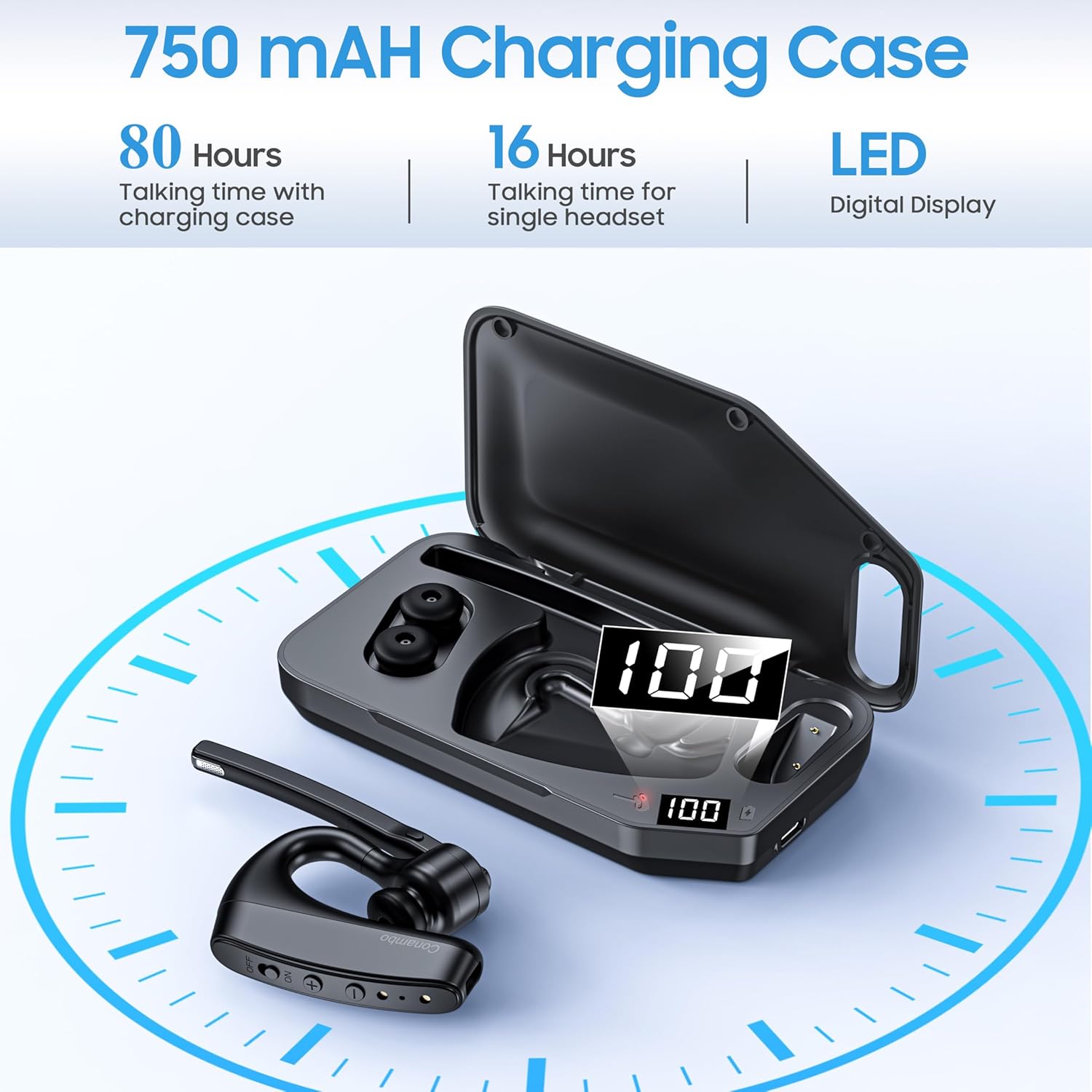
4.1-сүрөт: Бүттүview of the 750mAh charging case, highlighting its capacity to provide 80 hours of total talk time (16 hours from headset, 64 hours from case) and its LED digital display for battery status.
5. Жупташуу
Follow these steps to pair your Conambo K10C headset with your device.
5.1 Баштапкы жупташтыруу
- Гарнитура заряддалганын жана өчүрүлгөнүн текшериңиз.
- Press and hold the Power On/Off button until the indicator light flashes red and blue, indicating pairing mode.
- Түзмөгүңүздө (смартфон, ноутбук, планшет) Bluetooth'ду күйгүзүп, жеткиликтүү түзмөктөрдү издеңиз.
- Select "K10C-CBOX" from the list of found devices.
- Once connected, the indicator light on the headset will flash blue slowly.
5.2 Multipoint Technology
The K10C headset supports multipoint technology, allowing it to connect to two Bluetooth devices simultaneously. After pairing with the first device, disable Bluetooth on that device, then pair with the second device. Re-enable Bluetooth on the first device, and the headset should connect to both.
The headset utilizes Bluetooth 5.2 for a faster, more efficient, and stable connection, with an operating range of up to 59 feet (18 meters).

5.1-сүрөт: The Conambo K10C headset demonstrating multipoint technology, connecting to both a smartphone and a laptop simultaneously. This image also highlights fast pairing and a 59ft/18m range.
6. Операция
6.1 Күйгүзүү/өчүрүү
- Күйгүзүү: Slide the Power On/Off switch to the 'ON' position. The indicator light will flash blue.
- Өчүрүү: Slide the Power On/Off switch to the 'OFF' position. The indicator light will turn off.
6.2 Чалууларды башкаруу
- Чалууга жооп берүү/аяктоо: Көп функциялуу баскычты бир жолу басыңыз.
- Чакырууну четке кагуу: Көп функциялуу баскычты 2 секунд басып туруңуз.
6.3 Үнсүз кылуу функциясы
The headset features an independent mute button on the microphone boom.
- During a call, press the mute button once to activate/deactivate mute.

6.1-сүрөт: A user demonstrating the one-button mute feature on the Conambo K10C headset, emphasizing easy call management.
6.4 Үндү башкаруу
- Үнүн жогорулатуу үчүн '+' баскычын басыңыз.
- Үндү азайтуу үчүн '-' баскычын басыңыз.
6.5 Үн жардамчысын жандыруу
Hold the mute button for 3 seconds to activate your device's voice assistant (Siri or Google Assistant).
6.6 ызы-чууну жокко чыгаруу
The Conambo K10C headset incorporates CVC8.0 Dual Mic and ENC (Environmental Noise Cancellation) technology. This system is designed to reduce up to 96% of background noise, ensuring clear voice quality during calls, even in noisy environments.
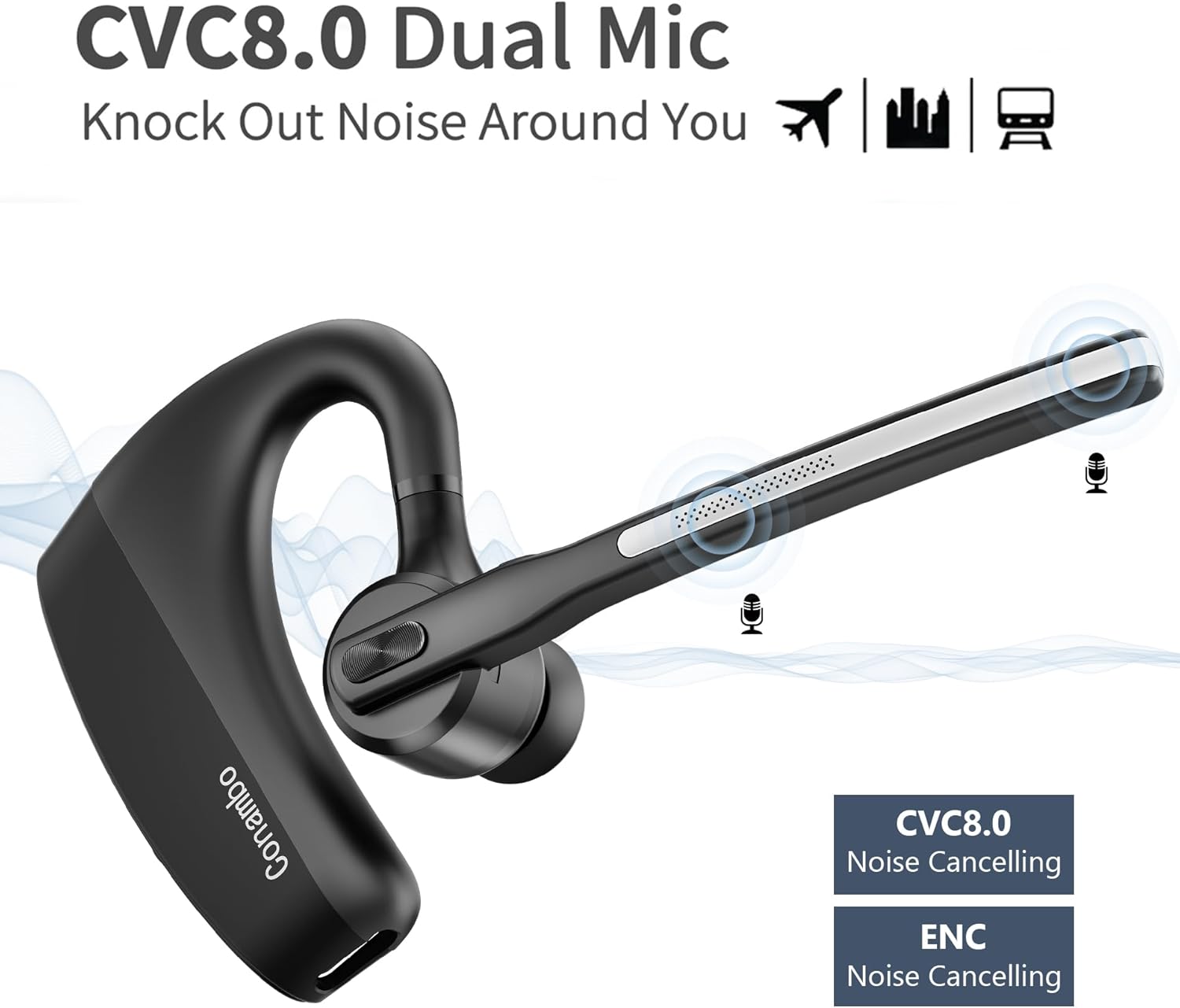
6.2-сүрөт: Visual representation of the CVC8.0 Dual Mic and ENC Noise Cancelling technology in the Conambo K10C headset, illustrating its ability to block out surrounding noise.
7. Техникалык тейлөө
Proper maintenance helps extend the life of your headset.
7.1 Тазалоо
- Gently wipe the headset and charging case with a soft, dry, lint-free cloth.
- Кулактын учтары үчүн, зарыл болсо, аларды алып салып, жумшак самын эритмеси менен тазалаңыз, андан кийин кайра орнотуудан мурун жакшылап чайкап, толугу менен кургатыңыз.
- Avoid using harsh chemicals, abrasive cleaners, or getting moisture into any openings.
7.2 Сактоо
- Колдонулбай турган учурда, гарнитураны чаңдан жана бузулуудан коргоо үчүн кубаттоочу кутучасында сактаңыз.
- Салкын, кургак жерде, экстремалдык температурадан жана түз күндүн нурунан алыс сактаңыз.
8. Кыйынчылыктарды
If you encounter issues with your headset, refer to the following common problems and solutions.
| Көйгөй | Чечим |
|---|---|
| Гарнитура күйбөйт. | Ensure the headset is charged. Check the charging case battery level. |
| Түзмөк менен жупташтыруу мүмкүн эмес. | Ensure the headset is in pairing mode (flashing red and blue). Turn off and on your device's Bluetooth. Forget previous pairings on your device and try again. |
| Үн жок же үнү төмөн. | Adjust the volume on both the headset and your connected device. Ensure the headset is properly connected. |
| Чалуу сапаты начар. | Ensure the headset is within range of your device. Avoid physical obstructions. Check for interference from other wireless devices. |
| Үнсүз функция иштебей жатат. | Ensure you are pressing the dedicated mute button on the microphone boom. |
If problems persist, try restarting both the headset and your connected device. For further assistance, please refer to the support information.
9. Техникалык шарттар
| Өзгөчөлүк | Деталь |
|---|---|
| Модель аты | K10C-CBOX |
| Байланыш технологиясы | Bluetooth 5.2 |
| Зымсыз байланыш технологиясы | Bluetooth |
| Noise Control | Active Noise Cancellation (CVC8.0 Dual Mic) |
| Аудио драйвер түрү | Динамикалык драйвер |
| Bluetooth диапазону | 18 метр (59 фут) |
| Гарнитуранын батареянын иштөө мөөнөтү | 16 саатка чейин сүйлөшүү убактысы |
| Заряддоо корпусунун батареясынын сыйымдуулугу | 750 мАч |
| Charging Case Additional Talk Time | 64 саатка чейин |
| Total Talk Time (with case) | 80 саатка чейин |
| Заряддоо убактысы | Болжол менен 3 саат |
| Сууга туруктуулук деңгээли | Сууга туруктуу (IPX4) |
| Шайкеш түзмөктөр | Cellphones, Laptops, Tablets, iPhone |
| Башкаруу түрү | Башкаруу баскычы |
| Материал | Пластик |
| Элемент Салмагы | 7.2 унция |
10. Кепилдик жана колдоо
The Conambo K10C Bluetooth Headset typically comes with a 2-year warranty. Please refer to your purchase documentation for specific warranty terms and conditions.
For technical support or warranty claims, please contact Conambo customer service through the retailer where the product was purchased or visit the official Conambo webбайланыш маалыматы үчүн сайт.