
1. Киришүү
Thank you for choosing the VOLT PLUS TECH Pro Earbuds Wireless V5.3 LED. This manual provides essential information for the safe and efficient use of your new earbuds. Please read it thoroughly before use and retain it for future reference.
Негизги өзгөчөлүктөрү:
- туруктуу жана натыйжалуу зымсыз байланыш үчүн Bluetooth 5.3.
- Digital LED display on charging case for battery status.
- Quad Microphones with CVC 8.1 noise reduction for clear calls.
- IPX4 water and sweat resistance (earbuds only).
- Интуитивдик сенсордук башкаруу элементтери.
- Portable charging case with power bank function.
2. Пакеттин мазмуну
Пакетиңизде бардык буюмдар бар экенин текшериңиз:
- VOLT PLUS TECH Pro Earbuds (Left and Right)
- LED дисплей менен заряддоо кутусу
- USB-C заряддоо кабели
- Колдонуучунун Колдонмосу (бул документ)
- Кулак учтары (Чакан, Орто, Чоң)

Image: The VOLT PLUS TECH Pro Earbuds shown with their charging case, featuring a digital LED battery display.
3. Орнотуу жана биринчи колдонуу
3.1 Алгачкы заряддоо
Биринчи колдонуудан мурун, кулакчындарды жана заряддоо кутучасын толук заряддаңыз.
- Кулакчындардын экөөнү тең зарядкага салыңыз.
- Connect the USB-C charging cable to the charging port on the case and to a compatible USB power source (e.g., wall adapter, computer USB port).
- The LED display on the charging case will show the charging status. A full charge typically takes approximately 2 hours.

Image: The charging case with its USB-C port connected to a charging cable, illustrating the charging process.
3.2 Кулак учтарын тандоо
For optimal sound quality and comfort, choose the ear tips that best fit your ears. The package includes Small, Medium, and Large sizes. Experiment to find the most secure and comfortable fit.
3.3 Сиздин аппаратыңыз менен жупташуу
Кулакчыныңызды Bluetooth иштетилген түзмөк менен жупташтыруу үчүн төмөнкү кадамдарды аткарыңыз:
- Күйгүзүү: Open the charging case. The earbuds will automatically power on, and a blue indicator light will flash to confirm. If they do not power on automatically, press and hold the touch area on both earbuds for 3-5 seconds until the blue indicator light flashes.
- Bluetooth иштетүү: On your smartphone, tablet, or computer, go to the Bluetooth settings and ensure Bluetooth is enabled.
- Издөө Түзмөк: In the list of available Bluetooth devices, search for "YD03".
- Туташуу: Select "YD03" to pair. Once connected, you will hear a voice prompt "Connected" from the earbuds.
- Жалгыз кулакчын колдонуу: The earbuds support independent use. You can use either the left or right earbud alone. Simply take one earbud out of the case, and it will connect.
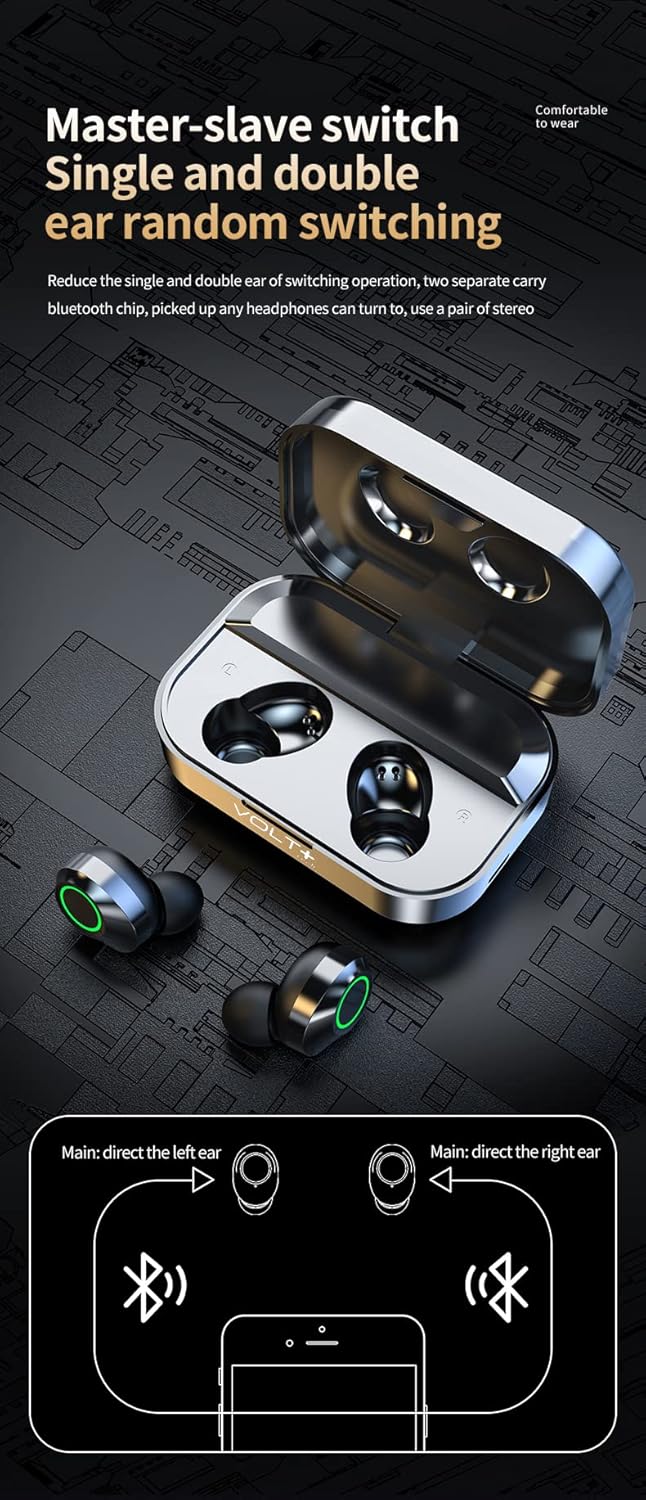
Image: A diagram illustrating the flexibility of using either the left or right earbud independently, or both together for stereo sound.
4. Иштөө нускамалары
4.1 Сенсордук башкаруу
The earbuds feature touch-sensitive controls on their outer surface. Refer to the following table for common functions:
| Акция | Сол кулакчын (L) | Оң кулакчын (R) |
|---|---|---|
| Музыканы ойнотуу/тындыруу | Single Tap | |
| Мурунку ыр | Эки жолу таптаңыз | Жок |
| Кийинки ыр | Жок | Эки жолу таптаңыз |
| Үндү төмөндөтүү | Үч жолу таптаңыз | Жок |
| Үндү көтөрүү | Жок | Үч жолу таптаңыз |
| Чалууга жооп берүү/аяктоо | Single Tap | |
| Чакырууну четке кагуу | 2 секунд басып туруңуз | |
| Үн жардамчысын иштетүү (Siri/Google Жардамчы) | 1.5 секунд басып туруңуз | |
| Switch Game/Music/Video Mode | Quadruple Tap (4 taps) | |

Image: Visual representation of the touch control functions for the left and right earbuds.
4.2 Күйгүзүү/өчүрүү
- Күйгүзүү: Кубаттоочу кутучаны ачыңыз же эки кулакчындын тең тийүү аймагын 3-5 секунд басып туруңуз.
- Өчүрүү: Place the earbuds back into the charging case and close the lid. They will automatically disconnect and power off. Alternatively, if disconnected from a device for 5 minutes, they will power off automatically.
4.3 LED Display on Charging Case
The digital LED display on the charging case provides real-time battery information:
- The large central number indicates the charging case's battery percentage.
- "L" and "R" indicators show the individual battery levels of the left and right earbuds.

Image: The charging case's LED display clearly showing the battery percentage for the case and individual earbuds (L and R).
5. Техникалык тейлөө жана кам көрүү
- Тазалоо: Кулакчындарды жана заряддоо кутусун жумшак, кургак, түксүз чүпүрөк менен дайыма тазалап туруңуз. Катуу химиялык заттарды же абразивдүү материалдарды колдонбоңуз.
- Суу каршылык: The earbuds are IPX4 water and sweat resistant, suitable for workouts and light rain. The charging case is NOT waterproof. Do not submerge the earbuds or expose the charging case to water.
- Сактагыч: Колдонулбаганда, кулакчындарды коргоо жана кубаттоо үчүн кубаттоочу кутучага сактаңыз. Салкын, кургак жерде, экстремалдык температурадан алыс сактаңыз.
- Батареяга кам көрүү: Батареянын иштөө мөөнөтүн узартуу үчүн, бат-баттан батарейканы толук зарядсыздандырбаңыз. Аппаратты узак убакыт бою колдонбосо дагы, үзгүлтүксүз заряддаңыз.
6. Кыйынчылыктарды
Эгерде кулакчындарыңыз менен көйгөйлөргө туш болсоңуз, төмөнкү кеңири таралган чечимдерди караңыз:
- Кулакчындар жупташкан жок:
- Эки кулакчындын тең кубатталганын текшериңиз.
- Place earbuds back in the case, close the lid, then open it again to reset.
- Түзмөгүңүздөгү Bluetooth'ду өчүрүп, кайра күйгүзүңүз.
- Delete "YD03" from your device's Bluetooth list and attempt to pair again.
- Башка Bluetooth түзмөктөрү тоскоолдук кылбасын текшериңиз.
- Бир гана кулакчын иштейт:
- Эки кулакчындын тең кубатталганын текшериңиз.
- Эки кулакчынды тең кубаттоочу кутуга кайра салып, капкагын жаап, бир нече секунд күтүп, андан кийин кайра ачыңыз.
- Check your device's audio settings to ensure stereo output is selected.
- Кулакчындар кубатталбай жатат:
- Заряддоо кабели корпуска да, кубат булагына да бекем туташтырылганын текшериңиз.
- Check if the charging case itself has power (indicated by the LED display).
- Кулакчындардагы жана корпустун ичиндеги заряддоо контакттары таза жана таштандыдан таза экенин текшериңиз.
- Башка USB-C кабелин же кубат адаптерин колдонуп көрүңүз.
- Үн сапатынын начардыгы же байланыш үзүлүшү:
- Кулакчындар толук заряддалганын текшериңиз.
- Тоскоолдукту азайтуу үчүн жупташкан түзмөгүңүзгө жакыныраак жылыңыз.
- Check for physical obstructions between the earbuds and your device.
- Кулактардын учтарын жана динамиктин торду тазалаңыз.
- Кулакчындарды кутуга салып, кайра жупташтырып, баштапкы абалга келтирип көрүңүз.
7. Техникалык шарттар
| Өзгөчөлүк | Деталь |
|---|---|
| Модель аты | YD03 |
| Bluetooth версиясы | 5.3 |
| Зымсыз диапазон | 33 фут (10 метр) чейин |
| Наушниктин батареясынын иштөө мөөнөтү | Approximately 5+ hours (single charge) |
| Жалпы ойноо убактысы (заряддоо кутусу менен) | 25+ саатка чейин |
| Заряддоо корпусунун батареясынын сыйымдуулугу | 2000mAh (provides multiple recharges) |
| Заряддоо убактысы | Болжол менен 2 саат (кулакчындар жана кутуча) |
| Заряддоо порту | USB-C |
| Сууга туруктуулук рейтинги | IPX4 (наушнактар гана) |
| Noise Control | CVC 8.1 Noise Reduction (Quad Mics) |
| Аудио драйверинин өлчөмү | 26 мм |
| Сезимталдуулук | 103 дБ |
| Импеданс | 25.94 Ом |
| Шайкеш түзмөктөр | Android, iOS, Mac, Windows (including Lenovo IdeaPad Miix 300) |
| Буюмдун салмагы (наушник + куту) | Болжол менен 4 унция (113 грамм) |
| Корпустун өлчөмдөрү (L x W x Y) | 2.7 x 1.3 x 1.2 дюйм |
8. Кепилдик жана колдоо
Specific warranty information is not provided in the product details. For warranty claims or technical support, please contact the retailer or VOLT PLUS TECH customer service through their official channels. Retain your proof of purchase for any warranty inquiries.
For further assistance, please refer to the contact information provided with your purchase or visit the VOLT PLUS TECH official webсайт.