
Introduction
Welcome to the user manual for your VOLT PLUS TECH Pro Wireless Earbuds, Model YD03. These earbuds feature advanced Bluetooth 5.3 connectivity, an intuitive LED digital display, IPX3 water and sweat resistance, noise reduction technology, and quad microphones for clear communication. This manual provides detailed instructions for setup, operation, maintenance, and troubleshooting to ensure optimal performance and longevity of your device.

Image: The VOLT PLUS TECH Pro Wireless Earbuds YD03, showing both earbuds and the charging case with its LED display.
Кутуда эмне бар
Upon unboxing your VOLT PLUS TECH Pro Wireless Earbuds YD03, please ensure all the following components are present:
- VOLT PLUS TECH Pro Wireless Earbuds (Left and Right)
- Charging Case with Digital LED Display
- USB-C заряддоо кабели
- User Manual
- Кулак учтары (Чакан, Орто, Чоң)
Жайгашуу
1. Баштапкы заряддоо
Биринчи колдонуудан мурун, кулакчындарды жана заряддоо кутучасын толук заряддаңыз.
- Кулакчындардын экөөнү тең зарядкага салыңыз.
- USB-C заряддоо кабелин корпустагы заряддоо портуна жана кубат булагына туташтырыңыз.
- The LED digital display on the case will show the charging status. Ensure both earbuds and the case are fully charged for optimal battery life.

Image: The charging case of the VOLT PLUS TECH Pro Wireless Earbuds YD03 connected to a USB-C charging cable, illustrating the charging process.
2. Күйгүзүү
The earbuds will automatically power on when removed from the charging case. A blue indicator light will confirm they are on. If they do not power on automatically, press and hold the touch area on each earbud for 3-5 seconds until the blue indicator light flashes.
3. Bluetooth Жупташтыруу
Кулакчындарыңызды түзмөгүңүз менен жупташтыруу үчүн бул кадамдарды аткарыңыз:
- Ensure the earbuds are powered on and in pairing mode (indicator lights flashing).
- Смартфонуңузда же Bluetooth иштетилген түзмөгүңүздө Bluetooth жөндөөлөрүнө өтүңүз.
- Bluetooth күйгүзүү.
- Издөө available devices and select "YD03" from the list.
- Once connected, the earbuds will provide a voice prompt stating "Connected".
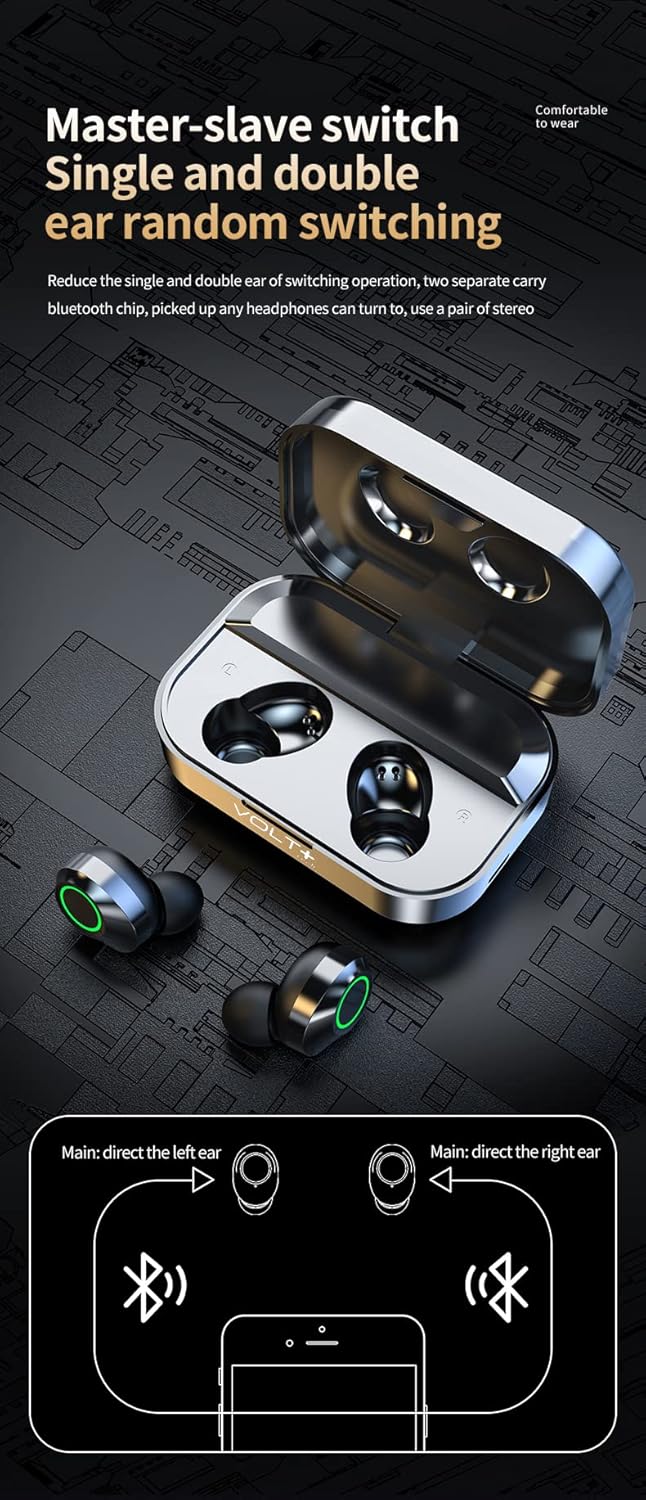
Image: Diagram illustrating the "Master-slave switch" functionality, showing how the VOLT PLUS TECH Pro Wireless Earbuds YD03 can be used individually or as a pair, and the Bluetooth pairing process.
4. Бир кулакчын колдонуу
The earbuds support independent use. You can use either the left or right earbud individually. Simply remove one earbud from the case, and it will automatically connect to your previously paired device.
Иштөө нускамалары
Touch Controls
The VOLT PLUS TECH Pro Wireless Earbuds feature intuitive touch controls on each earbud. The touch-sensitive area is located on the outer surface of each earbud.
- Ойнотуу/тындыруу: Кулакчындарды бир жолу таптаңыз.
- Кийинки ыр: Оң кулакчынды эки жолу таптаңыз.
- Мурунку ыр: Сол кулакчынды эки жолу таптаңыз.
- Көлөмү: Оң кулакчынды үч жолу таптаңыз.
- Үнүн азайтуу: Сол кулакчынды үч жолу таптаңыз.
- Чалууга жооп берүү/аяктоо: Кирүүчү чалуу учурунда гарнитураны бир жолу таптаңыз.
- Чакырууну четке кагуу: Кирүүчү чалуу учурунда кулакчындын бирин 1.5 секунд басып туруңуз.
- Үн жардамчысын иштетүү (Siri/Google Жардамчысы): Press and hold either earbud for 1.5 seconds (after rejecting a call or when not on a call).
- Game/Video/Music Mode: Touch switch under 4 (This instruction is unclear from the source, assuming it refers to a specific touch gesture or mode selection not fully detailed).

Image: Visual guide detailing the touch controls for the VOLT PLUS TECH Pro Wireless Earbuds YD03, showing gestures for music playback, volume adjustment, and call management.
LED санарип дисплей
The charging case features an intelligent digital LED display that shows the battery level of the charging case and each individual earbud (Left 'L' and Right 'R'). This allows you to monitor power levels accurately.

Image: An illustration explaining the "AI light intelligent digital display" on the VOLT PLUS TECH Pro Wireless Earbuds YD03 charging case, indicating battery levels for the case and individual earbuds.
Техникалык тейлөө
Туура тейлөө кулакчындарыңыздын узак иштөөсүн жана оптималдуу иштешин камсыз кылат.
- Тазалоо: Кулакчындарды жана заряддоо кутусун жумшак, кургак, түксүз чүпүрөк менен дайыма тазалап туруңуз. Абразивдүү материалдарды же катуу химиялык заттарды колдонуудан алыс болуңуз.
- Суу каршылык: The earbuds are IPX3 water-resistant, meaning they are protected against spraying water. They are suitable for light rain, sweat, and splashes. Эскертүү: Заряддоо кутусу суу өткөрбөйт. Кулакчындарды же заряддоо кутучасын сууга салбаңыз.
- Сактагыч: Колдонулбаганда, кулакчындарды коргоо жана кубаттоо үчүн кубаттоочу кутучага сактаңыз. Салкын, кургак жерде, экстремалдык температурадан алыс сактаңыз.
- Заряддоо: Use only the provided USB-C cable for charging. Avoid using damaged cables or chargers.
Проблемаларды чечүү
Эгерде кулакчындарыңыз менен көйгөйлөргө туш болсоңуз, төмөнкү кеңири таралган чечимдерди караңыз:
- Кулакчындар жупташкан жок:
- Эки кулакчындын тең кубатталганын текшериңиз.
- Түзмөгүңүздө Bluetooth иштетилгенин текшериңиз.
- Түзмөгүңүздөгү Bluetooth'ду өчүрүп, кайра күйгүзүңүз.
- Forget "YD03" from your device's Bluetooth list and attempt to pair again.
- Башка Bluetooth түзмөктөрү тоскоолдук кылбасын текшериңиз.
- Үн жок же үнү төмөн:
- Check the volume level on both your earbuds (via touch controls) and your connected device.
- Кулакчындар кулагыңызга туура орноштурулганын текшериңиз.
- Кулакчын динамиктериндеги калдыктарды тазалаңыз.
- Кулакчындарды түзмөгүңүзгө кайра туташтырыңыз.
- Кулакчындар кубатталбай жатат:
- Заряддоо кабели корпуска да, кубат булагына да бекем туташтырылганын текшериңиз.
- Verify that the charging case has power (check its LED display).
- Make sure the earbuds are correctly placed in the charging case, and the charging contacts are clean.
- Башка USB-C кабелин же кубат адаптерин колдонуп көрүңүз.
- Бир кулакчын иштебей жатат:
- Эки гарнитураны тең заряддоо кутусуна салып, капкагын жаап, бир нече секунд күтө туруңуз, анан кайра чыгарыңыз.
- Эки кулакчындын тең кубатталганын текшериңиз.
- Try resetting the earbuds (refer to the manufacturer's website if a specific reset procedure is available, as it's not detailed in the provided description).
Техникалык шарттар
| Өзгөчөлүк | Деталь |
|---|---|
| Модель аты | YD03 |
| Байланыш технологиясы | Зымсыз (Bluetooth) |
| Зымсыз байланыш | Bluetooth 5.3 |
| Наушник уясы | USB-C (заряддоо кутусу үчүн) |
| Башкаруу ыкмасы | Сенсордук, медиа башкаруу |
| Noise Control | Активдүү ызы-чууну жокко чыгаруу (CVC 8.1) |
| Сууга туруктуулук рейтинги | IPX3 (Кулакчындар гана) |
| Батареянын иштөө мөөнөтү (наушник) | 5+ саат (бир жолу кубаттоо менен) |
| Жалпы ойноо убактысы (капсула менен) | 25+ саатка чейин |
| Заряддоо корпусунун батареясы | 2,000mAh |
| Материал | ABS, Hi-Impact Plastic, Stainless Steel, Titanium |
| Элемент Салмагы | 4 унция |
| Продукциянын өлчөмдөрү | 1.5 x 1 x 1.5 дюйм |
| Frequency Response | 48000 KHz |
Кепилдик жана колдоо
Information regarding product warranty and customer support was not provided in the product details. For any warranty claims or technical assistance, please refer to the contact information provided with your purchase or visit the official VOLT PLUS TECH webсайт.