
1. Киришүү
Thank you for choosing the VOLT PLUS TECH Pro Earbuds Wireless V5.3 LED. These earbuds are designed to provide a superior audio experience with advanced features such as Bluetooth 5.3 connectivity, active noise cancellation, and a convenient digital LED display charging case. This manual will guide you through the setup, operation, and maintenance of your new earbuds to ensure optimal performance and longevity.

Image 1.1: The Pro Earbuds Wireless V5.3 LED, showcasing both earbuds and the charging case with its digital LED display.
2. Кутуда эмне бар
Сураныч, пакеттин мазмунун текшерип, бардык буюмдар бар экенин текшериңиз:
- VOLT PLUS TECH Pro Earbuds (Left and Right)
- Charging Case with Digital LED Display
- USB-C заряддоо кабели
- Ear Tips (Small, Medium, Large sizes)
- Колдонуучунун Колдонмосу (бул документ)
3. Продукт бүтүп калдыview
The VOLT PLUS TECH Pro Earbuds are equipped with several advanced features for an enhanced audio experience:
- Bluetooth 5.3: Зымсыз байланыштын туруктуу жана натыйжалуу иштешин камсыз кылат.
- Digital LED дисплей: Кубаттоочу кутучанын жана ар бир кулакчындын батарея деңгээлин көрсөтөт.
- Quad Noise-Cancelling Microphones: Two microphones per earbud with CVC 8.1 technology for clear calls.
- Батареянын узак иштөө мөөнөтү: Up to 5+ hours of playtime per charge, with an additional 20+ hours from the 2000mAh charging case.
- IPX3 Суу өткөрбөйт: Resistant to sweat and light splashes, suitable for sports (charging case is NOT waterproof).
- Сенсордук башкаруу каражаттары: Intuitive touch sensors for music, calls, and voice assistant.
- Single/Dual Earbud Operation: Use one or both earbuds independently.
- 8D стерео көлөмдүү үн: Immersive audio quality.

Image 3.1: An infographic highlighting key features such as Game/Video/Music modes, Bluetooth 5.3 chip, Type-C quick charge, intelligent digital display, HiFi stereo sound, smart noise reduction, emergency charging, dual host switching, and carving breathing lamp эффект.
4. Орнотуу
4.1 Алгачкы заряддоо
Биринчи колдонуудан мурун, кулакчындарды жана заряддоо кутучасын толук заряддаңыз.
- Кулакчындардын экөөнү тең зарядкага салыңыз.
- USB-C кубаттоочу кабелин корпустагы кубаттоо портуна туташтырып, экинчи учун USB кубат адаптерине (кошулмага кирбейт) сайыңыз.
- The digital LED display on the case will show the charging status and battery levels. Ensure both earbuds and the case are fully charged before proceeding.

Image 4.1: The charging case connected via USB-C cable, illustrating the charging process and the digital display indicating battery levels.
4.2 Сиздин аппаратыңыз менен жупташуу
- Күйгүзүү: Remove both earbuds from the charging case. They will automatically power on. A blue indicator light will flash to confirm. If they do not power on automatically, press and hold the touch area on both earbuds for 3-5 seconds until the blue indicator light flashes.
- Bluetooth жандыруу: On your smartphone or audio device, go to the Bluetooth settings and ensure Bluetooth is turned on.
- Издөө Түзмөк: In the list of available Bluetooth devices, search for "YD03".
- Туташуу: Select "YD03" to pair. Once connected, the earbuds will provide a voice prompt "Connected".
- Жалгыз кулакчын режими: You can use either earbud independently. Simply remove one earbud from the case, and it will automatically connect. The other earbud can remain in the case or be used later.
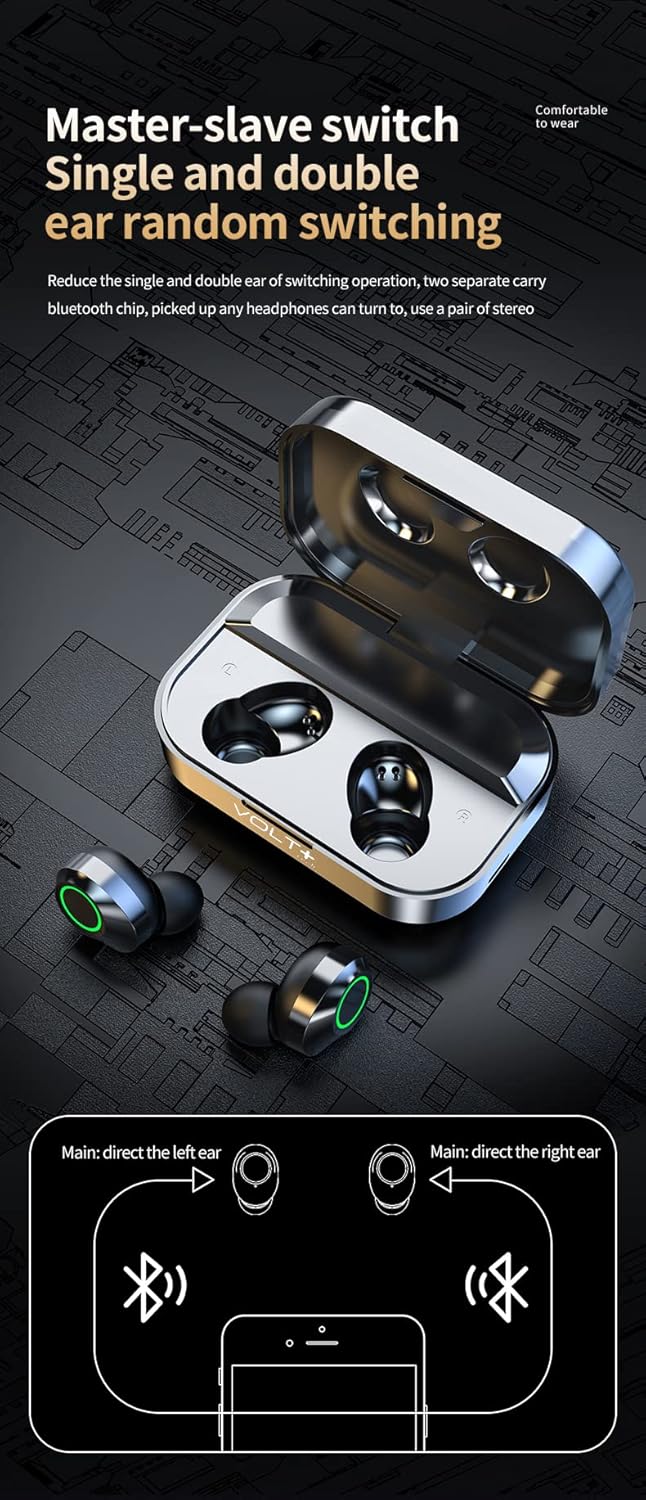
Image 4.2: A diagram explaining the "Master-slave switch" functionality, allowing for single or dual earbud operation by directing the left or right earbud as the main unit.
5. Иштөө нускамалары
The earbuds feature intuitive touch controls on their outer surface. Refer to the diagram below for specific functions:

Image 5.1: A visual guide to the touch controls on the earbuds. It shows double-click on the left earbud for previous song and triple-click for volume reduction, and double-click on the right earbud for next song and triple-click for volume increase. It also illustrates long press for calls (short press to answer, 1.5 seconds to reject), short press for play/pause, and long press for 1.5 seconds to activate voice assistant (eSiri).
5.1 Музыканы ойнотуу
- Ойнотуу/тындыруу: Кулакчындарды бир жолу таптаңыз.
- Кийинки ыр: эки жолу басыңыз Туура кулакчын.
- Мурунку ыр: эки жолу басыңыз Солго кулакчын.
- Көлөмү: үч жолу басыңыз Туура кулакчын.
- Үнүн азайтуу: үч жолу басыңыз Солго кулакчын.
5.2 Чалууларды башкаруу
- Чакырууга жооп берүү: Short press on either earbud.
- Чакырууну четке кагуу: Кулакчындардын бирин 1.5 секунд басып туруңуз.
- Чакырууну аяктоо: Short press on either earbud during a call.
5.3 Үн жардамчысы
- Үн жардамчысын иштетүү (мисалы, Siri): Long press on either earbud for 1.5 seconds (when not on a call).
5.4 Күйгүзүү/өчүрүү
- Күйгүзүү: Remove from charging case, or long press for 3-5 seconds.
- Өчүрүү: Place back into the charging case, or long press for 5 seconds.
6. Техникалык тейлөө
Туура кам көрүү кулакчыныңыздын иштөө мөөнөтүн узартат:
- Тазалоо: Use a soft, dry, lint-free cloth to clean the earbuds and charging case. Do not use harsh chemicals or abrasive materials. Gently clean ear tips with a damp зарыл болсо, кездеме жана жумшак самын менен сүртүңүз, кайра орнотуудан мурун алардын толугу менен кургаганын текшериңиз.
- Сактагыч: Колдонулбай турганда, кулакчындарды коргоо жана кубаттоо үчүн аларды кубаттоо кутучасында сактаңыз. Салкын, кургак жерде, экстремалдык температурадан алыс сактаңыз.
- Суу каршылык: The earbuds are IPX3 waterproof, meaning they are resistant to light splashes and sweat. Do not submerge them in water. The charging case is NOT waterproof; keep it dry.
7. Кыйынчылыктарды
| Көйгөй | Мүмкүн себеп | Чечим |
|---|---|---|
| Кулакчындар түзмөк менен жупташкан жок. | Bluetooth is off; earbuds are out of charge; earbuds are already paired to another device; pairing mode not activated. | Ensure Bluetooth is on your device. Charge earbuds. Disconnect from other devices. Remove earbuds from case to activate pairing mode, or manually power on. |
| Бир гана кулакчын иштеп жатат. | One earbud is out of charge; earbuds are not properly synced; single earbud mode is active. | Place both earbuds back into the charging case, then remove them together. Ensure both are charged. If still an issue, try resetting the earbuds (refer to manufacturer support if needed). |
| Кулакчындар заряддалбай жатат. | Charging cable is faulty; charging port is dirty; earbuds not seated correctly in case. | Try a different USB-C cable and power adapter. Clean the charging contacts on the earbuds and in the case. Ensure earbuds are properly seated in the case. |
| Үн сапаты начар же байланыш үзүлөт. | Түзмөктөн аралык; тоскоолдук; батареянын заряды аз. | Move closer to your device. Avoid areas with strong Wi-Fi or other Bluetooth signals. Ensure earbuds are fully charged. |
8. Техникалык шарттар
| Модель аты | YD03 |
| Bluetooth версиясы | 5.3 |
| Байланыш технологиясы | Зымсыз |
| Зымсыз байланыш технологиясы | Bluetooth |
| Noise Control | Активдүү ызы-чууну жокко чыгаруу (CVC 8.1) |
| Сууга туруктуулук деңгээли | IPX3 (Earbuds only, charging case not waterproof) |
| Батареянын сыйымдуулугу (заряддоо кутусу) | 2000mAh (approx. 20+ hours additional playtime) |
| Бир зарядка ойноо убактысы | 5 XNUMX+ саат |
| Жыштык диапазону | 20Hz - 120Hz (Music), 150Hz (Phone Calls) |
| Башкаруу ыкмасы | тийүү |
| Кулак жайгаштыруу | Кулакта |
| Материал | Acrylonitrile Butadiene Styrene (ABS), Hi-Impact Plastic, Stainless Steel, Titanium |
| Продукциянын өлчөмдөрү | 1.5 x 1 x 1.5 дюйм |
| Элемент Салмагы | 4 унция |

Image 8.1: A visual representation emphasizing the Bluetooth 5.3 core upgrade chip for more stable transmission and simpler connection.

Image 8.2: An illustration detailing the graphene composite diaphragm, highlighting its light quality and fast response for high fidelity audio and abundant detail.
9. Коопсуздук маалыматы
- Do not expose earbuds or charging case to extreme temperatures, direct sunlight, or fire.
- Продукцияны ажыратууга же өзгөртүүгө аракет кылбаңыз.
- Балдардан жана үй жаныбарларынан алыс кармаңыз.
- Avoid using earbuds at high volume for extended periods to prevent hearing damage.
- Кулакчындарды айланадагы үндөрдү уга албаганыңыз кооптуу болушу мүмкүн болгон учурларда (мисалы, унаа айдоо, велосипед тебүү, жол тыгынында жөө басуу) колдонбоңуз.
10. Кепилдик жана колдоо
For warranty information and customer support, please refer to the documentation provided at the time of purchase or contact your retailer. You may also visit the official VOLT PLUS TECH webкошумча жардам үчүн сайт.
Техникалык колдоо же суроо үчүн төмөнкү дарекке кайрылыңыз:
- Өндүрүүчү: VOLT PLUS TECH
- Модел: YD03
- ASIN: B0CP8HHQWK