
1. Киришүү
This manual provides essential information for the safe and efficient use of your Amazon Basics 24 Inch FHD 100Hz Monitor. Please read these instructions carefully before operating the device and retain them for future reference.
The Amazon Basics 24 Inch Monitor features a 23.8-inch viewable IPS panel with Full HD (1080p) resolution and a maximum refresh rate of 100Hz. It includes built-in speakers and is VESA compatible for flexible mounting options. The monitor is designed for various uses, including office work, entertainment, and gaming.

Фронт view of the Amazon Basics 24 Inch FHD 100Hz Monitor.
2. Пакеттин мазмуну
Пакетте бардык буюмдар бар экенин текшериңиз:
- Amazon Basics 24 Inch Monitor
- Стенд базасы
- Stand Neck
- Кубаттуу адаптер
- HDMI кабели

Image showing the monitor's package contents: stand base, stand neck, power adapter, and HDMI cable.
3. Орнотуу нускамалары
3.1 Стендди бекитүү
- Insert the stand neck into the stand base until it clicks securely into place.
- Align the assembled stand with the mounting slot on the back of the monitor. Push the stand into the slot until it locks. Ensure it is firmly attached.
3.2 Туташтыруучу кабельдер
The monitor features multiple input ports for connectivity:
- DP 1.2: DisplayPort input for high-resolution video and audio.
- HDMI1.4: HDMI input for video and audio from compatible devices.
- VGA: VGA input for analog video signals.
- AUDIO IN: 3.5mm audio input for external audio sources.
- АУДИО ЧЫГЫШ: 3.5mm audio output for headphones or external speakers.
- Connect the provided HDMI cable from your computer's video output port to the HDMI input port on the monitor. Alternatively, use a DisplayPort or VGA cable if your device supports those connections.
- Connect the power adapter to the monitor's power input port, then plug the power adapter into a wall outlet.
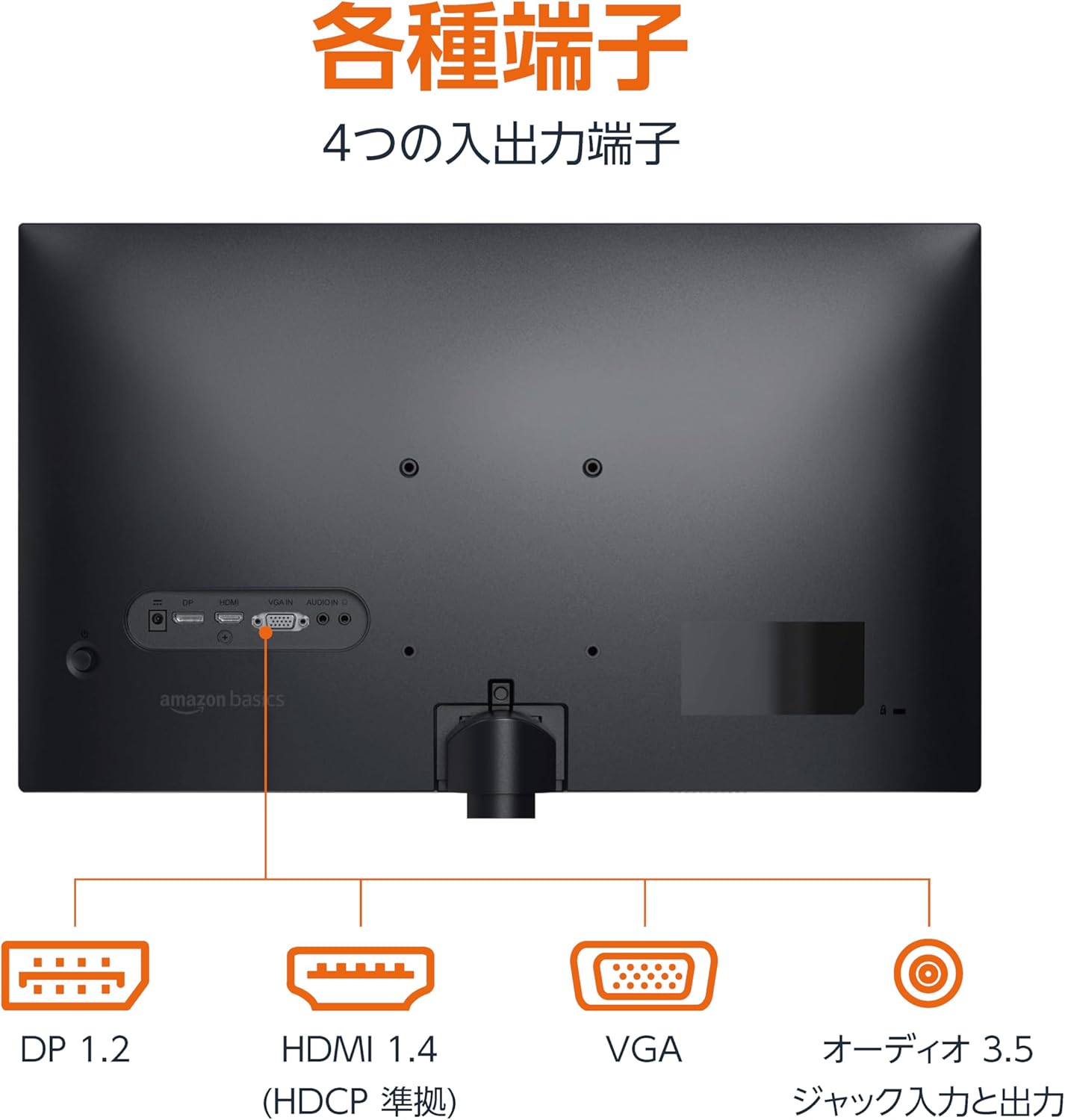
Арткы view of the monitor displaying various input and output ports.
3.3 Күйгүзүү
Press the power button located on the back or bottom of the monitor to turn it on. The monitor will automatically detect the active input signal.
3.4 Эңкейүүнү тууралоо
The monitor allows for tilt adjustment to achieve an optimal viewing angle. Gently hold the top and bottom edges of the monitor and tilt it forward or backward. The tilt range is approximately -5° to 20°.

Monitor demonstrating its tilt adjustment capability.
3.5 Optional: VESA Mounting and Cable Lock
The monitor is VESA compatible, allowing it to be mounted on a wall or an adjustable arm (mounting hardware sold separately). Refer to the VESA mount's instructions for installation.
An optional cable lock slot is available on the rear of the monitor to secure it to a stable object, preventing theft.
3.6 Видеону орнотуу
For a visual guide on setting up your Amazon Basics monitor, please watch the video below:
This video demonstrates the assembly of the stand, connecting cables, and basic adjustments for the Amazon Basics monitor.
4. Иштөө нускамалары
4.1 Экрандагы дисплей (OSD) менюсу
The monitor features an On-Screen Display (OSD) menu for adjusting various settings. Use the buttons located on the back or bottom of the monitor to navigate the menu. Common settings include:
- Жарыктык/Контраст: Дисплейдин жарыктыгын жана контрастын тууралаңыз.
- Түс жөндөөлөрү: Түс температурасын, өңүн жана каныккандыгын өзгөртүү.
- Киргизүүнү тандоо: Manually switch between DP, HDMI, and VGA inputs.
- Аудио: Камтылган динамиктер же туташкан гарнитуралар үчүн үнүн тууралаңыз.
- Сүрөт режими: Select from preset display modes (e.g., Standard, Game, Movie).
4.2 Using Built-in Speakers
The monitor includes integrated speakers. Audio will be played through these speakers when connected via HDMI or DisplayPort. If using a VGA connection, ensure an audio cable is connected to the 'AUDIO IN' port on the monitor and your computer's audio output.
5. Техникалык шарттар
| Өзгөчөлүк | Спецификация |
|---|---|
| Бренд | Amazon негиздери |
| Модель номери | 24M2020DJP |
| Screen Size | 24 Inches (23.8 inch viewжөндөмдүү) |
| Панел түрү | IPS |
| Резолюция | FHD 1080p (1920 x 1080) |
| Жаңыртуу ылдамдыгы | Макс 100 XNUMX Гц |
| Аспект катышы | 16:9 |
| Камтылган динамиктер | Ооба |
| VESA шайкештиги | Ооба |
| Киргизүү порттору | 1x DisplayPort 1.2, 1x HDMI 1.4, 1x VGA, 1x Audio In (3.5mm) |
| Output Ports | 1x Audio Out (3.5mm) |
| Продукт Салмагы | 2.8 кг |
| Беттин калыңдыгы | 1.44 mm (slim bezel) |
| Кепилдик | 1 жылдык чектелген кепилдик |
5.1 Өлчөмдөр
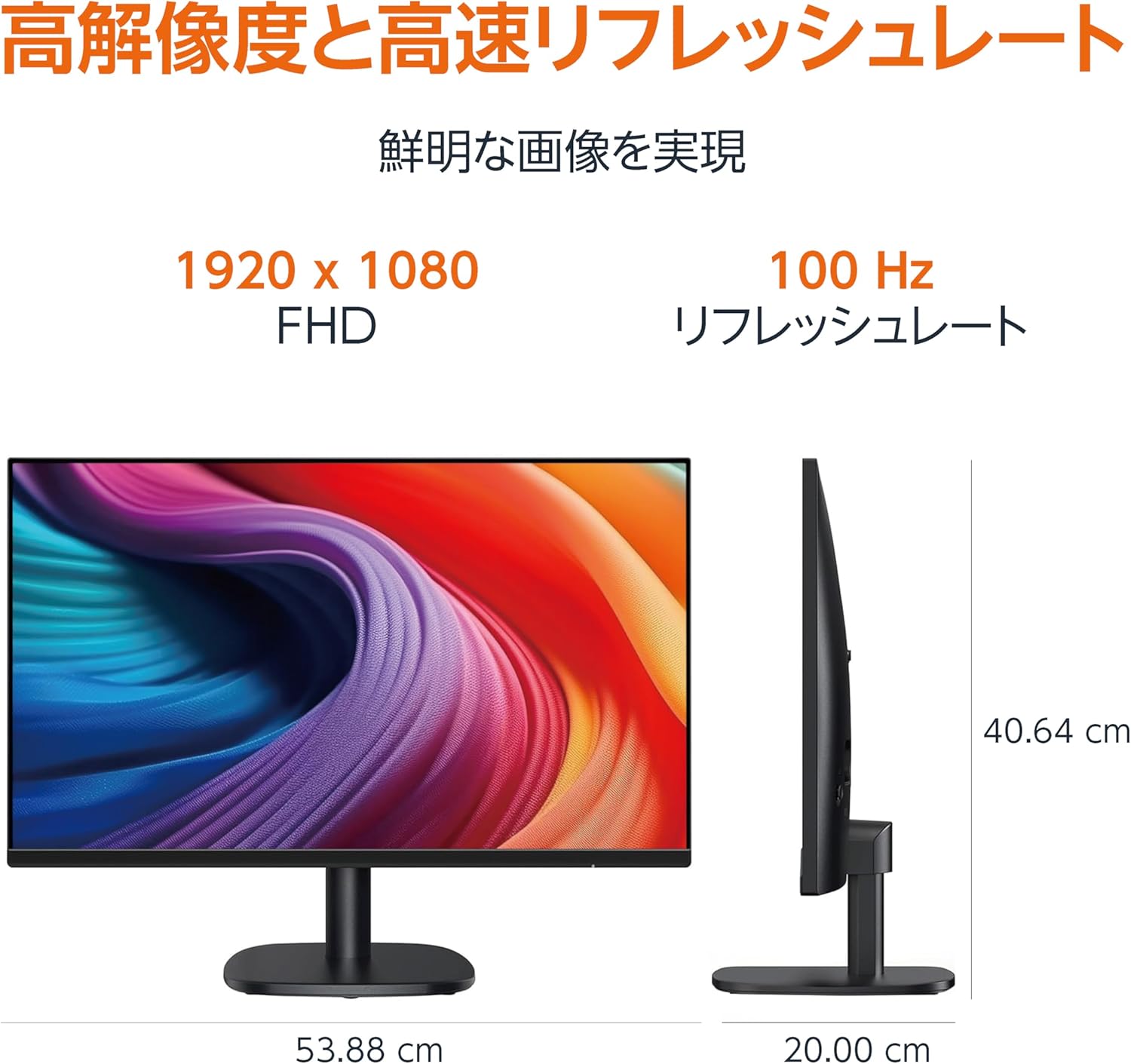
Diagram showing the monitor's dimensions (Width: 53.88 cm, Height: 40.64 cm, Depth: 20.00 cm).
5.2 Slim Bezel Design

Detail showing the monitor's slim bezel design, measuring 1.44 mm.
6. Кыйынчылыктарды
Мониторуңузда көйгөйлөргө туш болсоңуз, төмөнкү жалпы чечимдерди караңыз:
- Кубат жок: Ensure the power cable is securely connected to both the monitor and a working power outlet. Check if the power adapter's indicator light is on.
- Сигнал жок: Verify that the video cable (HDMI, DP, or VGA) is firmly connected to both the monitor and your computer. Ensure the correct input source is selected in the monitor's OSD menu. Try restarting your computer.
- Жаркылдаган экран: Check the video cable for damage or loose connections. Ensure your computer's graphics driver is up to date. Adjust the refresh rate in your computer's display settings.
- Динамиктерден аудио жок: If using HDMI or DisplayPort, ensure the audio output is set to the monitor in your computer's sound settings. If using VGA, confirm the 3.5mm audio cable is connected. Check the volume level on both the monitor and your computer.
- Сүрөттүн сапаты маселелери: Adjust brightness, contrast, and color settings via the OSD menu. Ensure the display resolution on your computer matches the monitor's native resolution (1920 x 1080).
If the problem persists after trying these steps, contact customer support.
7. Техникалык тейлөө
Proper maintenance helps ensure the longevity and performance of your monitor:
- Экранды тазалоо: Экранды жумшак, түксүз чүпүрөк менен акырын сүртүңүз. өжөр белгилери үчүн, жеңил гampчүпүрөккө суу же атайын экран тазалоочу каражат. Катуу химиялык заттарды, спиртти же абразивдүү материалдарды колдонуудан алыс болуңуз.
- Тазалоо Casing: Мониторду сүртүү үчүн жумшак, кургак чүпүрөктү колдонуңуз casing.
- Вентиляция: Ашыкча ысып кетүүнүн алдын алуу үчүн монитордун желдетүү тешиктери жабылбагандыгын текшериңиз.
- Колдонулбаганда өчүрүү: Энергияны үнөмдөө жана анын иштөө мөөнөтүн узартуу үчүн мониторду узак убакытка колдонбогондо өчүрүңүз.
8. Кепилдик жана колдоо
This Amazon Basics monitor comes with a 1 жылдык чектелген кепилдик сатып алынган күндөн тартып. Бул кепилдик өндүрүштүн кемчиликтерин жана нормалдуу колдонуудагы чеберчиликти камтыйт.
For warranty claims, technical support, or further assistance, please refer to the Amazon Basics support page or contact Amazon customer service directly. Keep your proof of purchase for warranty validation.