
1. Киришүү
This manual provides essential information for setting up, operating, maintaining, and troubleshooting your Xiaomi Redmi 13C smartphone. Please read this guide carefully to ensure proper use and optimal performance of your device.
The Xiaomi Redmi 13C is a new product featuring 128GB storage and 6GB RAM, with Dual SIM capability, in Midnight Black. This device is supplied by a specialized distributor.
2. Кутуда эмне бар
Upon unboxing your Xiaomi Redmi 13C, verify that all the following items are included:
- Xiaomi Redmi 13C смартфону
- USB кабели
- Заряддагыч
- SIM лоток чыгаруучу курал
3. Түзмөк бүттүview
Familiarize yourself with the key components of your Redmi 13C.

Figure 3.1: ашыкview of Xiaomi Redmi 13C key features, including its 6.74-inch 90Hz display, 50MP AI triple camera, 5000mAh battery with 18W fast charging, and powerful octa-core processor.
The Redmi 13C features a large 6.74-inch display with a 90Hz refresh rate for smooth visuals. It is equipped with a 50MP AI triple camera system and a robust 5000mAh battery supporting 18W fast charging. The device is powered by an octa-core processor, ensuring efficient performance.
4. Орнотуу
4.1. SIM жана SD картаны салуу
Your Redmi 13C supports Dual SIM cards and expandable storage via a microSD card (up to 128GB). Use the provided SIM tray ejector tool to open the SIM card slot.
- Телефонуңуздун капталындагы SIM салгычты табыңыз.
- SIM чыгаруучу куралды лотоктун жанындагы кичинекей тешикке киргизип, лоток чыгып кеткенче бекем басыңыз.
- Nano-SIM картаңызды(ларыңызды) жана/же microSD картаңызды лотоктогу белгиленген уячаларга салыңыз. Алтын контакттары ылдый караганын текшериңиз.
- Телефонго лотокту кылдаттык менен кайра салыңыз.
4.2. Баштапкы күйгүзүү жана конфигурация
- Xiaomi логотиби пайда болгонго чейин Кубат баскычын басып, кармап туруңуз.
- Тилди, аймакты тандоо, Wi-Fi'га туташуу жана Google аккаунтуңузду орнотуу үчүн экрандагы көрсөтмөлөрдү аткарыңыз.
- You can also set up fingerprint recognition for enhanced security during this initial setup.
5. Аппаратыңызды иштетүү
5.1. Дисплей өзгөчөлүктөрү

Figure 5.1: The Redmi 13C features an immersive 6.74-inch display, providing a fluid visual experience.
The Redmi 13C boasts a 6.74-inch display with a 90Hz refresh rate, offering a smooth and immersive viewing experience for all your content. The maximum display resolution is 720x1600 pixels with a 16:9 aspect ratio.
5.2. Камераны колдонуу
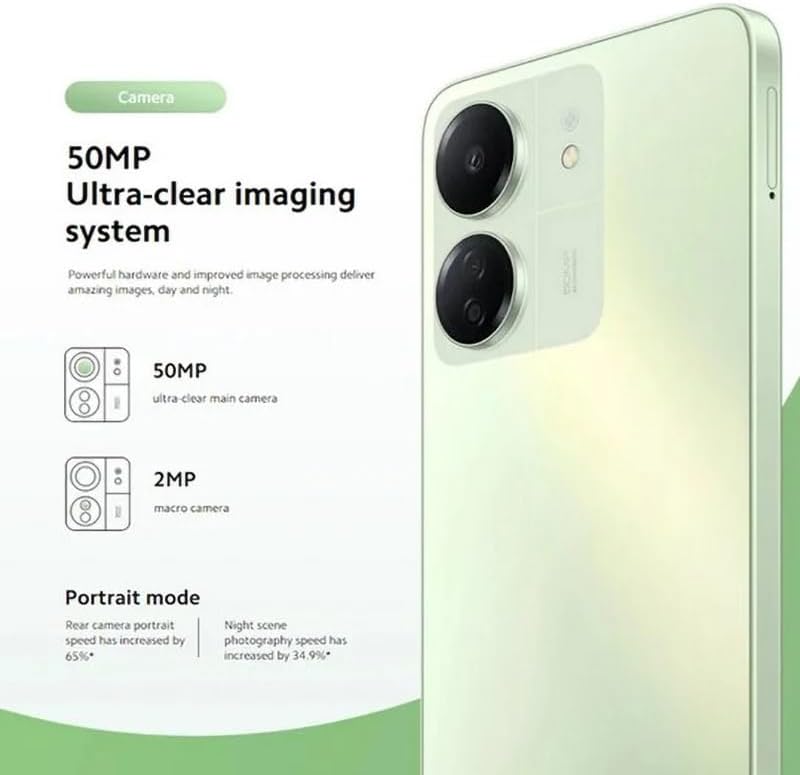
Figure 5.2: The Redmi 13C's 50MP Ultra-clear imaging system includes a 50MP main camera and a 2MP macro camera, supporting Portrait and Night modes.
The device is equipped with a 50MP Ultra-clear imaging system. The rear camera setup includes a 50MP main sensor and a 2MP macro camera. The front camera has an 8MP sensor. Utilize various shooting modes such as Portrait mode and Night mode to capture high-quality photos in different conditions.
5.3. Батареяны башкаруу
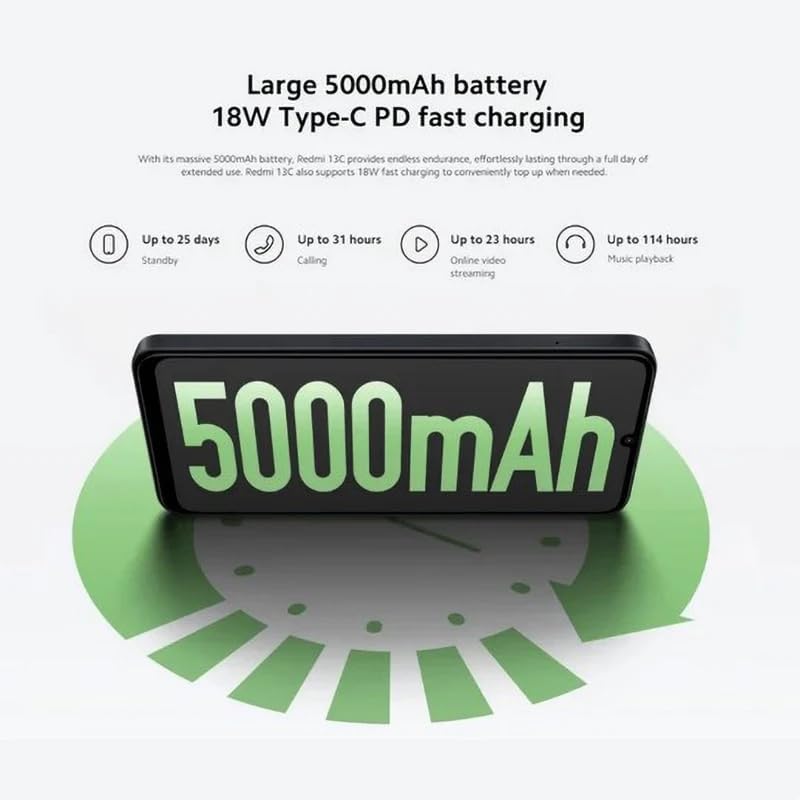
Figure 5.3: The Redmi 13C features a large 5000mAh battery with 18W Type-C PD fast charging, offering extended usage times.
Your Redmi 13C comes with a large 5000mAh Lithium-ion battery, providing extended usage. It supports 18W Type-C PD fast charging, allowing for quick power-ups. For optimal battery life, use the provided charger and avoid extreme temperatures.
- Up to 25 days standby
- Up to 31 hours calling
- Up to 23 hours online video streaming
- Up to 114 hours music playback
5.4. Performance

Figure 5.4: The Redmi 13C is powered by an Octa-core MediaTek Helio G85 processor, delivering smooth and stable performance.
The Redmi 13C is powered by a MediaTek Helio G85 octa-core processor, ensuring smooth and stable performance for daily tasks and applications. It comes with 6GB of RAM and 128GB of internal storage, expandable up to 1TB with a microSD card.
5.5. Байланыш жана коопсуздук
The device supports Wi-Fi, Bluetooth, and 4G cellular technology. It is an unlocked phone, allowing use with various wireless carriers. For security, the Redmi 13C includes a fingerprint recognition feature.
6. Техникалык тейлөө
6.1. Аппаратыңызды тазалоо
To clean your Redmi 13C, use a soft, lint-free cloth. Avoid using harsh chemicals or abrasive materials, as these can damage the screen and finish. The device is not water-resistant, so avoid exposure to liquids.
6.2. Программалык камсыздоону жаңыртуу
Regularly check for and install software updates to ensure your device has the latest features, security patches, and performance improvements. You can usually find this option in the phone's settings under "About phone" or "System updates."
6.3. Батареяга кам көрүү
To prolong battery life, avoid fully discharging the battery frequently. Charge your phone using the original charger and cable. Do not expose the device to extreme heat or cold.
7. Кыйынчылыктарды
Бул бөлүмдө Redmi 13C телефонуңуз менен кездешиши мүмкүн болгон жалпы көйгөйлөр каралат.
- Түзмөк күйбөй жатат: Батарея заряддалганын текшериңиз. Телефонду заряддагычка туташтырыңыз жана аны кайра күйгүзүүдөн мурун бир нече мүнөт күтүңүз.
- Колдонмолор бузулуп же катып жатат: Close background apps. Clear the cache of the problematic app or reinstall it. If the issue persists, consider a factory reset (back up your data first).
- Батареянын иштөө мөөнөтү начар: Reduce screen brightness, disable unnecessary features like GPS or Bluetooth when not in use, and check for apps consuming excessive power in battery settings.
- Тармакка туташуу көйгөйлөрү: Ensure your SIM card is properly inserted. Try restarting the device. Check your network settings and contact your carrier if problems persist.
- Манжа изинин сенсору иштебей жатат: Манжаңыздын таза жана кургак экенин текшериңиз. Коопсуздук жөндөөлөрүндө манжа издериңизди кайра каттаңыз.
8. Техникалык шарттар
| Өзгөчөлүк | Спецификация |
|---|---|
| Бренд | XIAOMI |
| Модель аты | Redmi 13C |
| Операция системасы | Android |
| Орнотулган RAM өлчөмү | 6 ГБ |
| Эстутум сактоо сыйымдуулугу | 128 ГБ (1 ТБ чейин кеңейтүүгө болот) |
| CPU модели | MediaTek Helio G85 (Octa-core) |
| CPU ылдамдыгы | 2.0 ГГц чейин |
| Дисплей түрү | AMOLED |
| Дисплей өлчөмү | 6.74 дюйм |
| Max Display Resolution | 720x1600 |
| Жаңыртуу ылдамдыгы | 90 Гц |
| Rear Camera Sensor Resolution | 50 Megapixels (Main), 2 Megapixels (Macro) |
| Front Camera Sensor Resolution | 8 мегапиксел |
| Батарея сыйымдуулугу | 5000 мАч (Литий-ион) |
| Заряддоо | 18W Type-C PD Fast Charging |
| Байланыш технологиясы | Bluetooth, Wi-Fi, 4G LTE |
| SIM карта уячалары | Dual SIM (Nano) |
| Биометрикалык коопсуздук | Манжа изин таануу |
| Наушник уясы | USB Type-C |
| Түс | Midnight Black |
| Элемент Салмагы | 410 грамм |
| Сууга туруктуулук деңгээли | Сууга чыдамдуу эмес |
| Модель жылы | 2023 |
9. Кепилдик жана колдоо
9.1. Кепилдик маалыматы
The Xiaomi Redmi 13C comes with a standard manufacturer's warranty. Please refer to the warranty card included with your product for specific terms and conditions. Spare parts availability is stated as 2 years.
9.2. Official Documents and Support
For additional information and support, you can refer to the official user guide and data transparency statement:
For further assistance, please visit the official XIAOMI support webсайтка же кардарларды тейлөөгө кайрылыңыз.