
1. Киришүү
The ZK-PP4K is a versatile PWM (Pulse Width Modulation) pulse generator designed for controlling LED lighting, motor speed, and other applications requiring precise dimming or speed regulation. It features a digital LCD display for clear parameter viewing and supports slow start and slow stop functions for smooth operation. This manual provides essential information for the proper setup, operation, and maintenance of your ZK-PP4K device.
2. Продукт бүтүп калдыview
The ZK-PP4K unit consists of a main control module with an LCD display, a rotary encoder for adjustments, and terminal blocks for electrical connections.
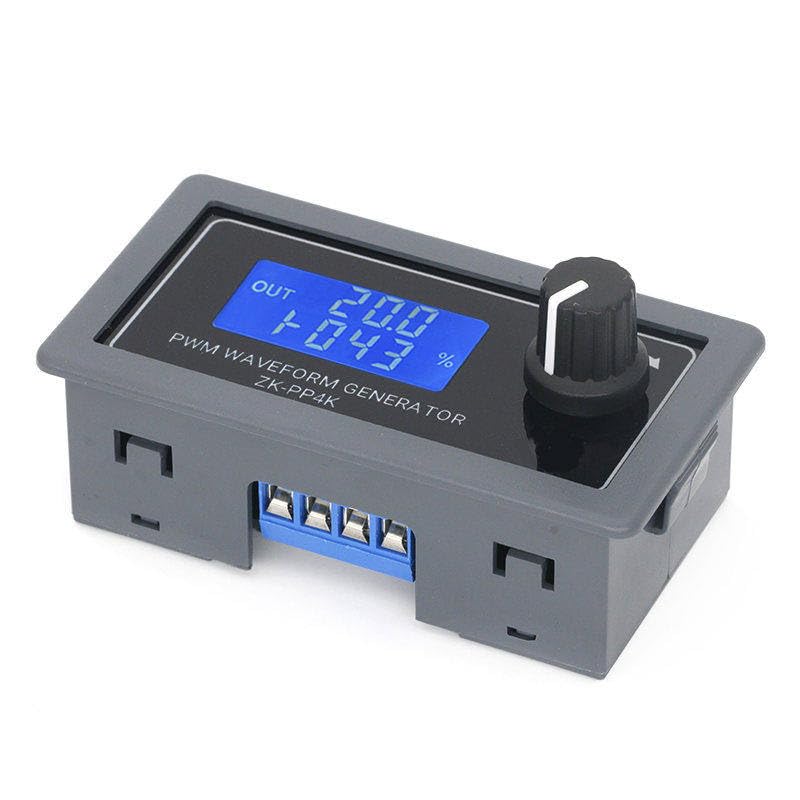
2.1-сүрөт: Фронт view of the ZK-PP4K PWM Pulse Generator. The LCD displays output status, frequency, and duty cycle. A rotary encoder knob is visible on the right for parameter adjustment.

2.2-сүрөт: Dimensions of the ZK-PP4K PWM Pulse Generator. The unit measures approximately 79mm in length, 43mm in width, and 26mm in height.
3. Орнотуу жана зымдар
Proper wiring is crucial for safe and effective operation. Ensure the device is powered off before making any connections.
3.1 Терминалдык байланыштар
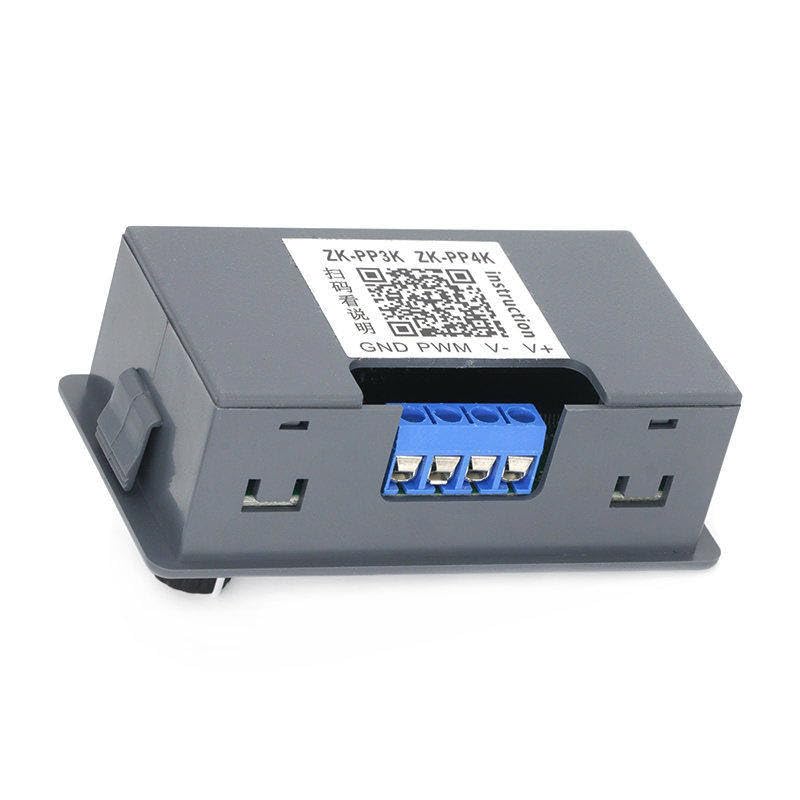
3.1-сүрөт: Арткы view of the ZK-PP4K showing the terminal block. From left to right, the terminals are labeled GND, PWM, V-, and V+.
- V+: Positive power input (DC).
- V-: Negative power input (DC).
- PWM: PWM signal output to the load.
- GND: Ground connection for the PWM signal.
3.2 Электр энергиясы менен камсыздоого талаптар
Connect a stable DC power supply to the V+ and V- terminals. Refer to the specifications section for the acceptable voltage range. Ensure correct polarity to prevent damage to the device.
3.3 Жүктөө Байланыш
Connect your load (e.g., LED strip, DC motor) to the PWM and GND terminals. The PWM output provides the modulated signal to control the connected device.
4. Иштөө нускамалары
Once wired, power on the device. The LCD will illuminate, displaying the current frequency and duty cycle settings.
4.1 Adjusting Frequency and Duty Cycle
- Бюрократия коддогуч: Rotate the knob to adjust the displayed parameter.
- Кыска басуу: A short press of the rotary encoder button will switch between adjusting the frequency and the duty cycle. The active parameter will typically blink or be highlighted.
- Узак басуу: A long press of the rotary encoder button may enter or exit advanced settings or save current settings, depending on the firmware version. Refer to the on-screen prompts.
4.2 Slow Start and Slow Stop Functions
The ZK-PP4K supports slow start and slow stop features, which allow the PWM output to gradually increase or decrease to the set value. This is particularly useful for applications requiring smooth transitions, such as dimming LEDs or gradually accelerating motors. These functions are typically configured within the advanced settings menu, accessible via a long press of the rotary encoder.
5. Техникалык тейлөө
The ZK-PP4K is designed for reliable operation with minimal maintenance.
- Тазалоо: Use a dry, soft cloth to clean the device. Do not use liquid cleaners or solvents.
- Курчап турган чөйрө: Operate the device in a clean, dry environment, away from excessive dust, moisture, and extreme temperatures.
- Байланыштары: Periodically check all electrical connections to ensure they are secure.
6. Кыйынчылыктарды
If you encounter issues with your ZK-PP4K, consider the following common problems and solutions:
- Дисплей жок/кубат жок:
- Check power supply connections (V+, V-).
- Кубат менен камсыздоону текшериңизtage белгиленген диапазондо.
- Туура полярдуулукту камсыз кылыңыз.
- PWM чыгаруусу жок:
- Check connections to the load (PWM, GND).
- Verify that the duty cycle is set to a non-zero value.
- Түзмөктүн туура кубатталганын текшериңиз.
- Incorrect Output/Unstable Operation:
- Ensure the load is compatible with the PWM output specifications.
- Check for loose connections or interference.
- Reset the device to factory settings if possible (refer to advanced settings).
7. Техникалык шарттар
| Өзгөчөлүк | Description |
|---|---|
| Модел | ZK-PP4K |
| Функция | PWM Pulse Generator, LED Motor Speed Control, Dimming Controller |
| Дисплей | Санарип LCD |
| Башкаруу ыкмасы | Rotary Encoder with Push Button |
| Өзгөчөлүктөр | Slow Start, Slow Stop |
| Өлчөмдөрү (болжол менен) | 79 мм x 43 мм x 26 мм (Узундугу x Туурасы x Бийиктиги) |
8. Колдоо жана кошумча ресурстар
For further assistance or detailed technical documentation, please refer to the manufacturer's resources. A relevant link found on the product packaging is provided below:
Additional instructions may be available at: http://www.qingdaowuzhi.com/DownLoad/60302.html?a=download
8.1 Кепилдик маалыматы
Specific warranty details for this product are not provided in the available documentation. Please consult your retailer or the manufacturer's webкепилдик шарттары жана эрежелери менен таанышуу үчүн сайтты караңыз.