
1. Киришүү
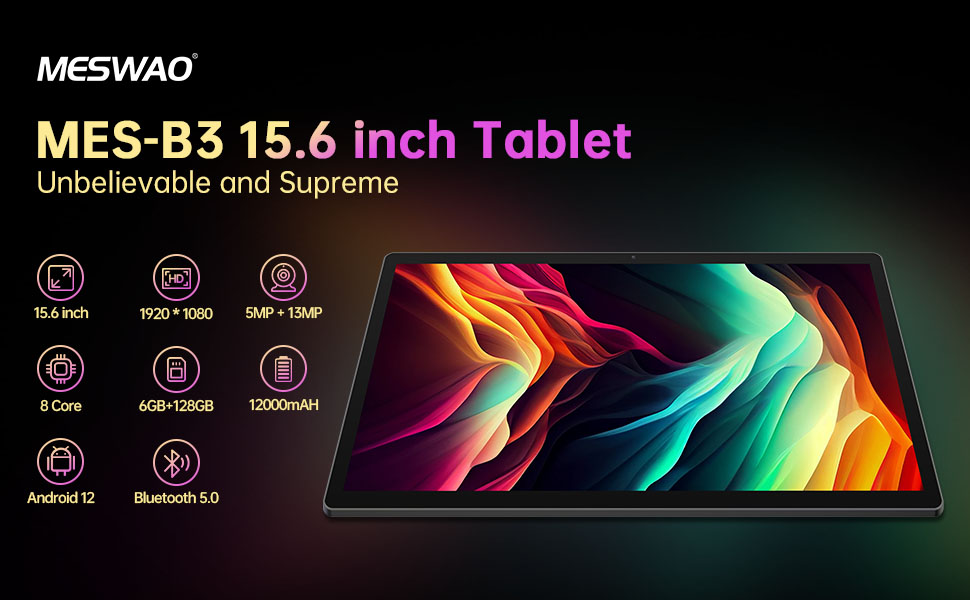
Welcome to the user manual for your MESWAO MES-B3 15.6-inch Android 13 Tablet. This document provides essential information for setting up, operating, maintaining, and troubleshooting your device. The MES-B3 tablet features a large 15.6-inch IPS HD display, an Octa-Core processor, 6GB RAM, 128GB internal storage (expandable), and a 12000mAh battery, designed for a versatile user experience.

Figure 1: MESWAO MES-B3 Tablet Overview
2. Коопсуздук маалыматы
Please read all safety instructions carefully before using your tablet to prevent injury or damage to the device. Keep this manual for future reference.
- Батареянын коопсуздугу: Do not attempt to replace the battery yourself. Do not expose the tablet to extreme temperatures, direct sunlight, or fire. Do not puncture, drop, or disassemble the battery.
- Суу жана ным: This tablet is not waterproof. Avoid exposing it to water, rain, or high humidity.
- Тазалоо: Use a soft, dry cloth to clean the tablet. Do not use liquid cleaners or aerosols.
- Колдонуу: Планшетти түшүрүүдөн же катуу таасирлерден сактаныңыз.
- Угуу коргоо: When using headphones, set the volume to a moderate level to avoid hearing damage.
3. Пакеттин мазмуну
Пакетте бардык буюмдар бар экенин текшериңиз:
- MESWAO MES-B3 15.6-inch Android 13 Tablet
- Кубаттуу адаптер
- USB-C Cable
- Колдонуучунун Колдонмосу (бул документ)
4. Түзмөк бүттүview
Familiarize yourself with the physical components of your MESWAO MES-B3 tablet.

Figure 2: Buttons and Connectors
- Кубат баскычы: Press and hold to turn the tablet on or off. Press briefly to turn the screen on or off.
- Үн баскычтары: Аудионун үнүн тууралаңыз.
- Алдыңкы камера: Видео чалуулар жана селфилер үчүн (5 мегапиксел).
- Rear Camera with Flashlight: For taking photos and videos (13MP).
- Тип-C Port: Планшетті кубаттоо жана компьютерге туташтыруу үчүн.
- TF карта уячасы: Insert a MicroSD card to expand storage.
- Стерео динамиктер: Аудио чыгарууну камсыз кылуу.
5. Орнотуу
5.1 Планшетти заряддоо
Before first use, fully charge your tablet. Connect the USB-C cable to the tablet's Type-C port and the other end to the power adapter. Plug the adapter into a wall outlet. The battery indicator on the screen will show charging status.
5.2 Күйгүзүү/өчүрүү
- Күйгүзүү үчүн: Press and hold the Power Button until the MESWAO logo appears.
- Өчүрүү үчүн: Press and hold the Power Button until the power options appear, then select 'Power off'.
- Кайра баштоо үчүн: Press and hold the Power Button until the power options appear, then select 'Restart'.
5.3 Баштапкы орнотуу устасы
Upon first power-on, the tablet will guide you through an initial setup process:
- Каалаган тилиңизди тандаңыз.
- Wi-Fi тармагына туташыңыз.
- Google аккаунтуңуз менен кириңиз же жаңысын түзүңүз.
- Review жана шарттарды кабыл алуу.
- Экран кулпусун орнотуу (PIN, үлгү, сырсөз).
5.4 MicroSD картасын салуу
To expand the tablet's storage, you can insert a MicroSD card (up to 256GB, as per some product information, though 1TB is also mentioned in images, please verify with product packaging for exact maximum). Locate the TF card slot on the side of the tablet. Gently insert the MicroSD card with the gold contacts facing down until it clicks into place.

Figure 3: Storage Expansion with MicroSD Card
6. Планшетиңизди иштетүү
6.1 Негизги навигация
The MESWAO MES-B3 runs on Android 13, offering an intuitive touch interface.
- таптаңыз: Бир нерсени тандаңыз же колдонмону ачыңыз.
- Серпүү: Navigate through screens, scroll lists, or dismiss notifications.
- Чымчып-кичирейтүү: Экрандагы мазмунду чоңойтуңуз же кичирейтиңиз.
- Башкы экран: Access your apps and widgets. Swipe down from the top for notifications and quick settings.
4-сүрөт: Android 13 интерфейси
6.2 Wi-Fi туташуусу
- барыңыз Орнотуулар > Тармак жана интернет > Интернет.
- Wi-Fi күйгүзүңүз.
- Тизмеден каалаган тармакты тандап, суралса сырсөздү киргизиңиз.
6.3 Bluetooth жупташтыруу
The tablet supports Bluetooth 5.0 for connecting wireless accessories.
- барыңыз Орнотуулар > Туташкан түзмөктөр > Туташуу артыкчылыктары > Bluetooth.
- Bluetooth күйгүзүү.
- Bluetooth түзмөгүңүз жупташтыруу режиминде экенин текшериңиз.
- Select your device from the 'Available devices' list and follow on-screen prompts to pair.
6.4 Колдонмо башкаруу
- Колдонмолорду орнотуу: Google Play дүкөнүн ачып, каалаган колдонмоңузду таап, "Орнотуу" баскычын басыңыз.
- Колдонмолорду чыгарып салуу: Press and hold an app icon on the home screen or app drawer, then drag it to 'Uninstall' or select 'App info' and choose 'Uninstall'.
- Колдонмолорду башкаруу: барыңыз Орнотуулар > Колдонмолор чейин view, force stop, or clear data for installed applications.
6.5 Дисплей орнотуулары
Сиздин жекелештирүү viewтажрыйбасы:
- барыңыз Орнотуулар > Дисплей.
- Тууралоо Жарыктык деңгээли.
- коюу Экранды күтүү (sleep duration).
- өзгөртүү Арип өлчөмү жана Дисплей өлчөмү.
- Иштетүү Караңгы тема for reduced eye strain.
6.6 Батареяны башкаруу
The MES-B3 features a 12000mAh battery for extended use.

5-сүрөт: Батареянын иштөө мөөнөтү узартылган
- барыңыз Орнотуулар > Батарея чейин view usage and optimize settings.
- Иштетүү Батареяны үнөмдөгүч mode to extend battery life when needed.
- Фондо иштеп жаткан колдонулбаган колдонмолорду жабыңыз.
- Экран жарыктыгын азайтыңыз.
7. Техникалык тейлөө
7.1 Тазалоо
- Экранды жана корпусту акырын сүртүү үчүн жумшак, мамыксыз чүпүрөктү колдонуңуз.
- өжөр тактар үчүн, бир аз гampчүпүрөккө суу же электроника үчүн атайын иштелип чыккан экран тазалагыч.
- Avoid using abrasive materials, alcohol, or chemical solvents.
7.2 Сактоо
- Планшетти күн нурунан жана экстремалдык температурадан алыс салкын, кургак жерде сактаңыз.
- If storing for an extended period, ensure the battery is charged to about 50% to prolong its lifespan.
7.3 Программалык камсыздоо жаңыртуулары
Оптималдуу иштөөнү жана коопсуздукту камсыз кылуу үчүн программалык камсыздоонун жаңыртууларын үзгүлтүксүз текшерип туруңуз.
- барыңыз Орнотуулар > Система > Системаны жаңыртуу.
- The tablet will check for available updates. Follow the on-screen instructions to download and install any updates.
8. Кыйынчылыктарды
Бул жерде сиз кабылышы мүмкүн болгон жалпы маселелерди чечүү жолдору бар:
| Көйгөй | Чечим |
|---|---|
| Планшет күйбөйт | Ensure the tablet is charged. Connect it to the charger for at least 30 minutes, then try powering it on again. |
| Wi-Fi туташуу маселелери | Restart your Wi-Fi router and the tablet. Go to Settings > Network & internet > Internet, forget the network, and reconnect. |
| Жай аткаруу | Close unused apps. Clear cache for frequently used apps (Settings > Apps > [App Name] > Storage & cache > Clear cache). Restart the tablet. |
| Батарея бат эле түгөнөт | Reduce screen brightness. Disable Wi-Fi/Bluetooth when not in use. Close background apps. Check battery usage in Settings > Battery to identify power-hungry apps. |
| Колдонмолор бузулуп же катып калууда | Force stop the app (Settings > Apps > [App Name] > Force stop). Clear the app's cache. If the problem persists, uninstall and reinstall the app. |
9. Техникалык шарттар
Detailed technical specifications for the MESWAO MES-B3 tablet:

6-сүрөт: Негизги өзгөчөлүктөр жана спецификациялар
| Өзгөчөлүк | Спецификация |
|---|---|
| Бренд | МЕСВАО |
| Модель номери | MES-B3 |
| Операция системасы | Android 13 |
| Процессор | MediaTek Octa-Core (MTK6789) |
| RAM | 6 ГБ |
| Ички сактагыч | 128 ГБ |
| Кеңейтүүчү сактагыч | Up to 256 GB (via TF/MicroSD card) |
| Screen Size | 15.6 дюйм |
| Screen Resolution | 1920 x 1080 Pixels (IPS HD) |
| Алдыңкы камера | 5 депутат |
| Арткы камера | 13 депутат |
| Батарея сыйымдуулугу | 12000 мАч |
| Батареянын иштөө мөөнөтү | Approximately 10 hours (usage dependent) |
| Байланыш | Bluetooth 5.0, Wi-Fi (802.11ac, 2.4G/5G) |
| Порттар | USB Type-C, TF Card Slot |
| Түс | Боз |
| Өлчөмдөрү (L x W x Y) | 36.85 x 22.25 x 0.93 см |
| Салмагы | 1.1 килограмм |
10. Кепилдик жана колдоо
Your MESWAO MES-B3 tablet is covered by a standard manufacturer's warranty. Please refer to the warranty card included in your package for specific terms and conditions, including warranty duration and coverage details.
For technical support, troubleshooting assistance beyond this manual, or warranty claims, please contact MESWAO customer service through the retailer where you purchased the product or visit the official MESWAO webбайланыш маалыматы үчүн сайт.