
1. Киришүү
This manual provides detailed instructions for the setup, operation, maintenance, and troubleshooting of your Cleer ARC II Open Ear Headphones. Please read this manual thoroughly before using the product to ensure proper function and longevity.
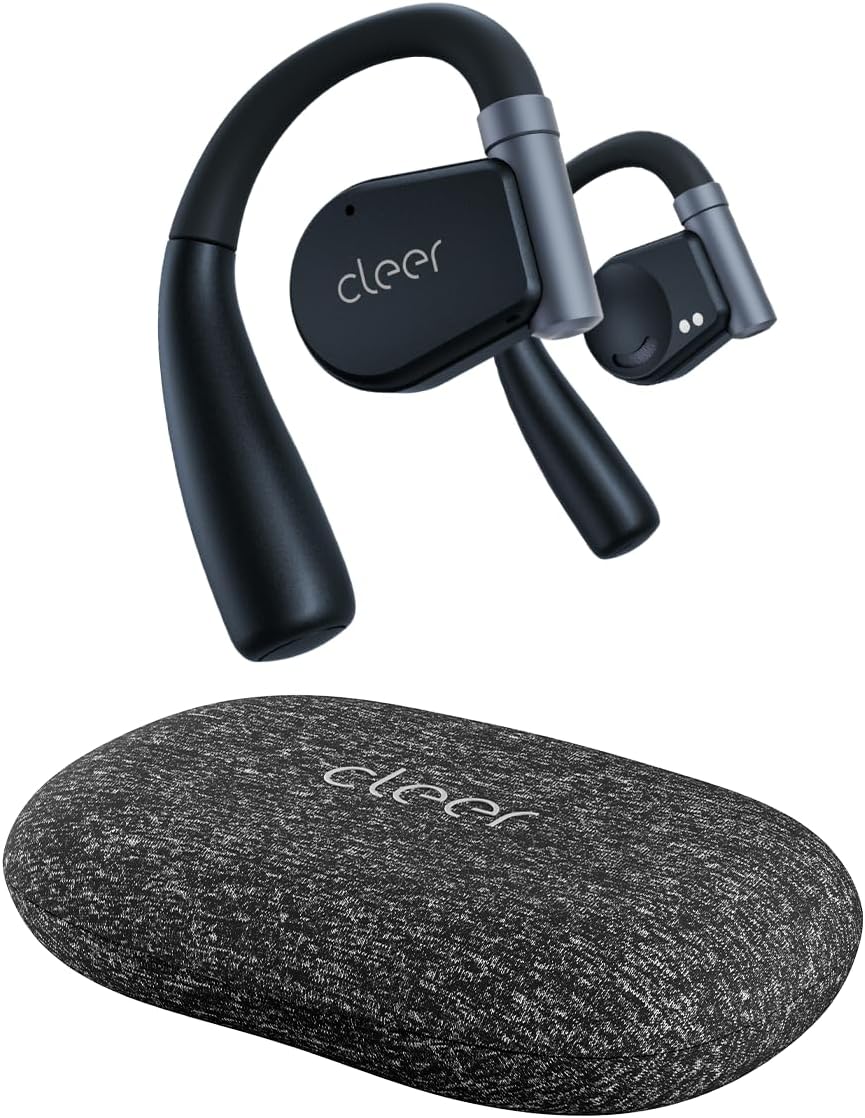
Image: Cleer ARC II Open Ear Headphones and their charging case. The headphones feature an open-ear design with ear hooks, and the case is a compact, textured grey oval.
2. Пакеттин мазмуну
Пакетте бардык буюмдар бар экенин текшериңиз:
- Cleer ARC II Open-Ear Headphones
- Charging Case with Built-in Fast Charging
- USB-Cден USB-Aга чейин кубаттоочу кабель
- Колдонуучунун Колдонмосу (бул документ)
3. Продукт бүтүп калдыview
The Cleer ARC II headphones are designed for comfort and awareness, featuring an open-ear design that allows you to hear your surroundings while enjoying audio. Key features include:
- Ачык кулак дизайны: Allows ambient sound awareness.
- Эргономикалык ылайыктуу: Ultra-lightweight with flexible ear hooks for secure and comfortable wear.
- Bluetooth 5.3: Туруктуу жана натыйжалуу зымсыз байланыш үчүн.
- Көп чекиттүү туташуу: Seamlessly switch between two paired devices.
- Узартылган ойноо убактысы: Up to 8 hours per charge, with an additional 27 hours from the charging case (total 35 hours).
- IPX5 Sweat Resistance: Suitable for workouts and outdoor activities.
- Премиум үн: Equipped with 16.2mm dynamic drivers for clear audio.
- Чалууларды тазалоо: Dual microphones with cVc (Clear Voice Capture) technology for enhanced voice clarity.
- Ыңгайлаштырылган EQ: Үн про жөндөөfiles via the Cleer+ App.
- Интуитивдик башкаруулар: Touch controls and optional head motion controls for playback, calls, and volume.

Image: A man wearing the Cleer ARC II headphones, highlighting the open-ear design that allows for environmental awareness.
4. Орнотуу жана биринчи колдонуу
4.1. Наушникти жана капты заряддоо
Биринчи колдонуудан мурун, наушникти жана кубаттоочу кутучаны толук заряддаңыз.
- Кулакчындардын экөөнү тең зарядкага салыңыз.
- USB-C кубаттоочу кабелин корпустагы кубаттоо портуна, ал эми экинчи учун USB кубат булагына (мисалы, компьютер, дубал адаптери) туташтырыңыз.
- Корпустагы LED индикаторлору кубаттоо абалын көрсөтөт. Толук кубаттоо болжол менен 2 саатты талап кылат.

Image: The Cleer ARC II headphones and charging case, visually representing the total battery life of 35 hours (8 hours from earbuds + 27 hours from case).
4.2. Fitting the Headphones
Proper fit ensures optimal sound and comfort.
- 1-кадам: Adjust the ear hook to fit your ear's contour.
- 2-кадам: Place the earbud above your ear, ensuring the speaker rests near your ear canal.
- 3-кадам: Rotate the earbud backward along the auricle until it sits comfortably and securely in position.
- 4-кадам: Verify the correct fitting position for both earbuds.

Image: A four-step diagram illustrating how to correctly adjust and wear the Cleer ARC II open-ear headphones for a secure and comfortable fit.
4.3. Bluetooth Жупташтыруу
Pair your Cleer ARC II headphones with your device using one of the following methods:

Image: A diagram detailing three different methods for Bluetooth pairing the Cleer ARC II headphones with a mobile device.
- Option 1 (Initial Pairing):
- Open the charging case for the first time. The LEDs on the earbuds will start flashing red and white, indicating automatic pairing mode.
- On your mobile device, select "Cleer ARC II" from the Bluetooth pairing list.
- Option 2 (Manual Pairing - Earbuds Out of Case):
- If the earbuds are out of the charging case, tap either the left or right earbud 5 times to activate pairing mode.
- On your mobile device, select "Cleer ARC II" from the Bluetooth pairing list.
- Option 3 (Manual Pairing - Earbuds in Case):
- When both earbuds are in the charging case, long-press the Multi-Function Button (MFB) on the case until the LEDs of the earbuds start flashing red and white to signal pairing mode.
- On your mobile device, select "Cleer ARC II" from the Bluetooth pairing list.
4.4. Cleer+ App Installation
For full customization and firmware updates, download the free Cleer+ App from the Apple App Store or Google Play Store.

Image: Screenshots of the Cleer+ App interface, showing options for equalizer adjustments and general control of the Cleer ARC II headphones.
5. Иштөө нускамалары
5.1. Наушниктин сенсордук башкаруу элементтери
The earbuds feature touch-sensitive areas for controlling playback, calls, and volume. These controls can be customized via the Cleer+ App.

Image: A diagram illustrating the touch control functions on the Cleer ARC II earbuds for managing music playback, calls, and volume adjustments.
| Акция | Function (Music) | Function (Call) | Function (Volume) |
|---|---|---|---|
| Single tap (x1) | Ойнотуу/Тыныгуу | - | - |
| Double tap (x2) | Кийинки трек | Чалууну кабыл алуу/коюу | Right earbud: Volume up continuously Left earbud: Volume down continuously (hold on 2nd tap) |
| Triple tap (x3) | Мурунку трек | - | - |
| таптап, кармап туруңуз | Trigger default voice assistant | Чакырууну четке кагуу | - |
5.2. Head Motion Control
The ARC II supports head motion controls for music and calls. This function is deactivated by default and can be activated in the Cleer+ App.

Image: A diagram illustrating various head movements and their corresponding control functions for music and calls on the Cleer ARC II headphones.
- Nod (x2): Чакырууну алыңыз
- Shake head (x2): Hang up/Reject call
- Turn head left (x1): Мурунку трек
- Turn head right (x1): Кийинки трек
5.3. Көп чекиттүү туташуу
The Cleer ARC II headphones can connect to two Bluetooth devices simultaneously. This allows you to seamlessly switch between audio sources, for example, from your phone to your laptop.
- Гарнитураны биринчи шайман менен жупташтырыңыз.
- Put the headphones into pairing mode again (refer to Section 4.3).
- Наушниктерди экинчи аппарат менен жупташтырыңыз.
- The headphones will now be connected to both devices. Audio will automatically switch to the device playing content or receiving a call.
6. Техникалык тейлөө жана кам көрүү
To ensure the longevity and optimal performance of your Cleer ARC II headphones, follow these maintenance guidelines:
- Тазалоо: Кулакчындарды жана кубаттоочу кутучаны дайыма жумшак, кургак, түксүз чүпүрөк менен сүртүп туруңуз. Абразивдүү материалдарды же катуу химиялык заттарды колдонуудан алыс болуңуз.
- Тер каршылык: While IPX5 rated for sweat and water resistance, avoid submerging the headphones in water. After intense workouts, gently wipe away sweat before placing them back in the charging case.
- Сактагыч: Колдонбогондо, наушниктерди чаңдан жана бузулуудан коргоо үчүн заряддоо кутучасында сактаңыз. Күн нурунан жана экстремалдык температурадан алыс салкын, кургак жерде сактаңыз.
- Батареяга кам көрүү:
- Батареяны бат-баттан толук кубаттап калуудан алыс болуңуз.
- Батареянын ден соолугун сактоо үчүн, узак убакыт бою колдонулбаса дагы, гарнитураны үзгүлтүксүз заряддаңыз.
- Батареяны ашыкча ысыкка же муздатпаңыз.
7. Кыйынчылыктарды
If you encounter issues with your Cleer ARC II headphones, refer to the following common solutions:
| Көйгөй | Мүмкүн себеп | Чечим |
|---|---|---|
| Кулакчындар жупташкан жок | Not in pairing mode; Bluetooth off on device; previously paired device interfering. |
|
| Үн жок же үнү төмөн | Volume too low; headphones not selected as audio output; earbud fit. |
|
| Intermittent connection/audio dropouts | Түзмөктөн аралык; тоскоолдук; батареянын заряды аз. |
|
| Заряддоо маселелери | Cable/charger fault; dirty charging contacts; earbuds not seated correctly. |
|
| Head motion control not working | Feature disabled; app not configured. |
|
7.1. Заводдук абалга кайтаруу
If problems persist, a factory reset may resolve the issue. Consult the Cleer+ App or the official Cleer support webмоделиңиз үчүн заводдук абалга кайтаруу нускамалары үчүн сайт.
8. Техникалык шарттар
| Өзгөчөлүк | Деталь |
|---|---|
| Модель аты | ARC II |
| Байланыш технологиясы | Зымсыз (Bluetooth 5.3) |
| Bluetooth диапазону | 10 метр |
| Аудио драйвер түрү | Динамикалык драйвер |
| Аудио драйверинин өлчөмү | 16.2 миллиметр |
| Жыштык диапазону | 20 Гц - 20 000 Гц |
| Импеданс | 16 Ом |
| Батареянын иштөө мөөнөтү (наушник) | 8 саатка чейин |
| Батареянын иштөө мөөнөтү (заряддоо кутусу менен) | Жалпысынан 35 саатка чейин |
| Заряддоо убактысы | Болжол менен 2 саат |
| Сууга туруктуулук деңгээли | IPX5 (терге туруктуу) |
| Буюмдун салмагы (кулакчын) | Not specified individually, total item weight 4.8 ounces |
| Көтөрүү кутусунун салмагы | 136 грамм |
| Башкаруу ыкмасы | Touch, Head Motion (customizable via app) |
| Өзгөчөлүктөр | Integrated Equalizer, Lightweight, Multipoint Pairing, Sweatproof, Volume Control, cVc Microphones |
| Камтылган компоненттер | Cleer ARC II Open-Ear Headphones, Charging Case, USB-C to USB-A Charging Cable, User Manual |
9. Кепилдик жана колдоо
Cleer products are designed and manufactured to the highest quality standards. For detailed warranty information, please refer to the warranty card included with your product or visit the official Cleer webсайт.
Кошумча жардам, техникалык колдоо же үчүн view FAQs, please visit the official Cleer store or support page: