
1. Киришүү
The Sygonix SY-5044422 Digital Timer Switch is designed for easy programming and operation, helping to manage power consumption for various appliances. This device features 20 ON/OFF programs, 3 random settings, and a countdown function, with switching intervals as short as 1 minute. Programs can be set for specific days, combinations of days, or daily. Its IP44 splash-proof rating allows for outdoor use, and an integrated battery retains settings during power outages. The timer supports a maximum switching capacity of 1800 W and includes enhanced touch protection.
2. Коопсуздук нускамалары
- Колдонуудан мурун бардык нускамаларды кунт коюп окуп чыгыңыз.
- This device is rated IP44, making it splash-proof for outdoor use. However, do not immerse it in water or expose it to direct jets of water.
- Ensure the total load of connected appliances does not exceed 1800 W.
- Do not open the device housing. Repairs should only be performed by qualified personnel.
- Keep out of reach of children. The device features enhanced touch protection.
- Always unplug the timer from the power outlet before cleaning.
3. Пакеттин мазмуну
- Sygonix SY-5044422 Digital Timer Switch
- Instruction Manual
- Кепилдик маалымат
4. Продукт бүтүп калдыview
Familiarize yourself with the components and controls of your digital timer switch.
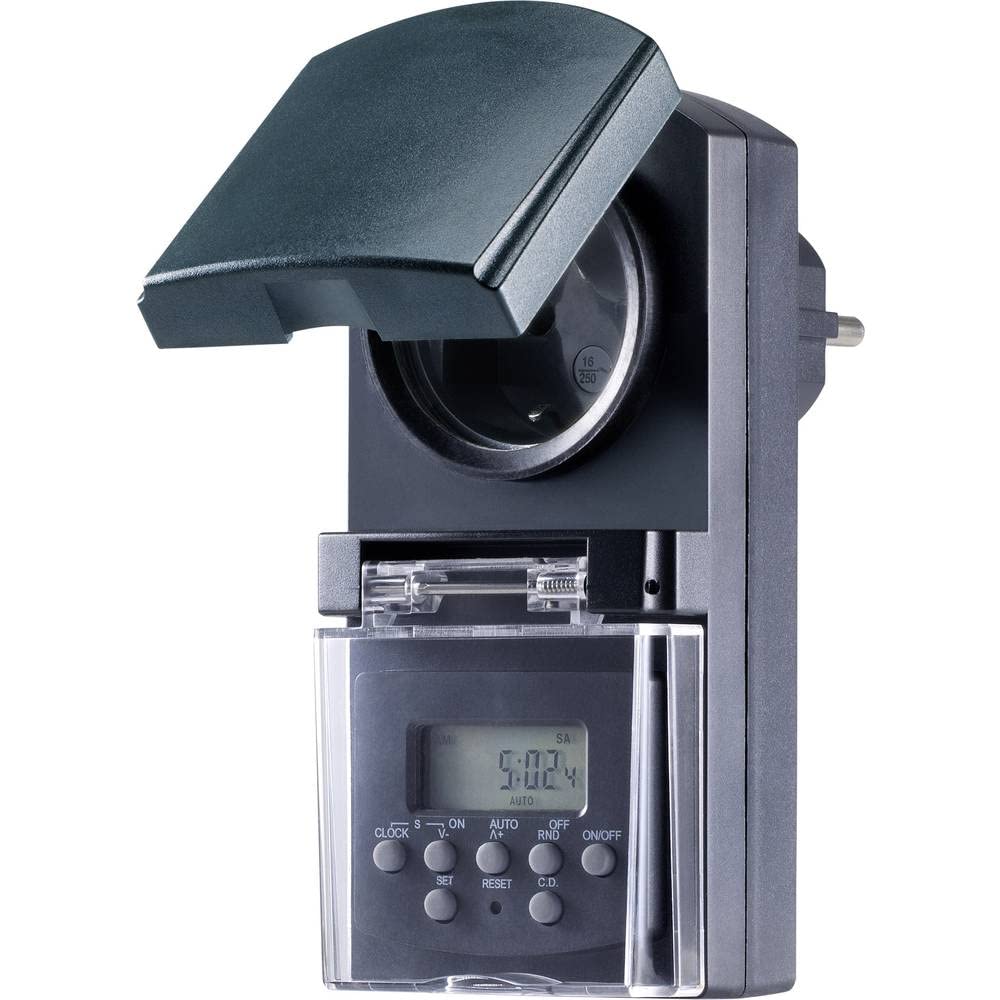
1-сүрөт: Фронт view of the Sygonix SY-5044422 Digital Timer Switch. This image displays the LCD screen, which shows the current time and day, along with various control buttons including CLOCK, ON/OFF, SET, RESET, AUTO/A+, OFF/RND, and C.D. (Countdown).

2-сүрөт: Фронт view of the timer with the protective cover opened, showing the integrated power socket. The display and control buttons are visible below the socket.
Башкаруу баскычтары:
- СААТ: Учурдагы убакытты жана күндү коюу үчүн колдонулат.
- КҮЙГҮЗҮҮ/ӨЧҮРҮҮ: Manually switches the timer output ON or OFF.
- ЖӨНДӨӨ: Программалоо режимине кирип, жөндөөлөрдү ырастайт.
- КАЛТЫРУУ: Clears all settings and resets the timer to factory defaults.
- AUTO/A+: Cycles through automatic mode, program settings, and adjusts values.
- OFF/RND: Activates or deactivates the Random function.
- C.D. (Countdown): Activates or deactivates the Countdown function.
5. Орнотуу
5.1 Алгачкы заряддоо
Before first use, plug the timer into a power outlet for approximately 30 minutes to charge the internal battery. This ensures the display is active and settings are retained during power outagже розеткадан суурулганда.
5.2 Учурдагы убакытты жана күндү орнотуу
- басып, кармап туруңуз СААТ баскычы.
- Кармап жатканда СААТ, басыңыз AUTO/A+ repeatedly to set the current day (MO, TU, WE, TH, FR, SA, SU).
- Кармап жатканда СААТ, басыңыз SET repeatedly to set the current hour.
- Кармап жатканда СААТ, басыңыз OFF/RND repeatedly to set the current minute.
- бошотуңуз СААТ орнотууларды сактоо үчүн баскыч.
5.3 Summer Time Adjustment
The timer supports a summer time function. To activate or deactivate:
- басып, кармап туруңуз СААТ баскычы жана КҮЙГҮЗҮҮ/ӨЧҮРҮҮ button simultaneously for 3 seconds. The display will show "SUMMER" or "WINTER" to indicate the mode.
6. Иштөө нускамалары
6.1 Programming ON/OFF Times (Weekly Program)
The timer allows for up to 20 ON/OFF programs. Each program can be set for specific days or combinations of days.
- басыңыз SET button once to enter program mode. The display will show "1 ON".
- Басыңыз AUTO/A+ to select the desired day(s) for the program (e.g., MO, TU, WE, TH, FR, SA, SU, MO-FR, SA-SU, MO-SA, etc.).
- Басыңыз SET to confirm the day selection.
- Басыңыз AUTO/A+ каалаган КҮЙГҮЗҮҮ саатын коюу үчүн.
- Басыңыз OFF/RND каалаган КҮЙГҮЗҮҮ МҮНӨТҮН коюу үчүн.
- Басыңыз SET again. The display will now show "1 OFF".
- Ошол эле программа үчүн ӨЧҮРҮҮ убактысын коюу үчүн 2-5 кадамдарды кайталаңыз.
- Басууну улантыңыз SET to cycle through all 20 ON/OFF programs. To exit program mode at any time, press the СААТ баскычы.
Эскертүү: After programming, ensure the timer is in АВТО mode for the programs to execute. Press КҮЙГҮЗҮҮ/ӨЧҮРҮҮ repeatedly until "AUTO" is displayed.
6.2 Артка саноо функциясы
The countdown function allows you to switch the connected appliance ON or OFF after a set duration.
- басыңыз CD button once. The display will show "CD ON" or "CD OFF".
- Басыңыз AUTO/A+ каалаган артка эсептөө саатын коюу.
- Басыңыз OFF/RND to set the desired countdown minute.
- Басыңыз CD again to start the countdown. The display will show the remaining time.
- Артка саноону жокко чыгаруу үчүн, баскычын басыңыз CD дагы бир жолу.
6.3 Random Function (Presence Simulation)
The random function simulates presence by randomly switching the connected appliance ON and OFF within a set time window, deterring potential intruders.
- Таймердин күйүп турганын текшериңиз АВТО режими.
- басыңыз OFF/RND button. The display will show "RND" to indicate the random function is active.
- The timer will now randomly switch the output ON and OFF for short periods within the programmed ON/OFF times.
- To deactivate the random function, press OFF/RND again. "RND" will disappear from the display.
6.4 Кол менен күйгүзүү/өчүрүү функциясын өзгөртүү
Программаланган жөндөөлөрдү каалаган убакта кол менен өзгөртө аласыз.
- басыңыз КҮЙГҮЗҮҮ/ӨЧҮРҮҮ button repeatedly to cycle through "ON", "OFF", and "AUTO" modes.
- "ON" means the output is continuously ON.
- "OFF" means the output is continuously OFF.
- "AUTO" means the timer will follow the programmed settings.
7. Техникалык тейлөө
- Before cleaning, always unplug the timer from the power outlet.
- Аппаратты жумшак, кургак чүпүрөк менен сүртүңүз. Абразивдүү тазалагычтарды же эриткичтерди колдонбоңуз.
- Аппараттын ичине суюктуктардын кирбегенин текшериңиз.
8. Кыйынчылыктарды
| Көйгөй | Мүмкүн себеп | Чечим |
|---|---|---|
| Дисплей бош же күңүрт. | Ички батарейка зарядсызданды. | Plug the timer into a live power outlet for at least 30 minutes to charge the battery. |
| Программалар ишке ашпай жатат. | Таймер АВТО режиминде эмес. | басыңыз КҮЙГҮЗҮҮ/ӨЧҮРҮҮ button repeatedly until "AUTO" is displayed. |
| Туура эмес убакыт же күн көрсөтүлдү. | Убакыт/күн туура эмес коюлган же баштапкы абалга келтирилген. | Refer to Section 5.2 "Setting Current Time and Day" to re-set. |
| All settings lost after power outage. | Internal battery not charged or faulty. | Ensure the timer is regularly plugged in to keep the internal battery charged. If the issue persists, contact support. |
9. Техникалык шарттар
| Модель номери: | SY-5044422 |
| Max. Switching Capacity: | 1800 Вт |
| Коргоо классы: | IP44 (чачууга каршы) |
| Дисплей түрү: | Санарип |
| Программалар: | 20 күйгүзүү/өчүрүү программалары |
| Minimum Switching Interval: | 1 мүнөт |
| Өзгөчөлүктөр: | Countdown function, Random function (presence simulation), Summer time, Integrated battery for settings retention, Enhanced touch protection. |
| Продукциянын өлчөмдөрү: | 14 x 10 x 6 см |
| Өндүрүүчү: | Sygonix |
| Келип чыккан өлкө: | Кытай |
10. Кепилдик жана колдоо
This product comes with a minimum 2-year warranty from the date of purchase. In case of any issues or defects, please contact your retailer or Sygonix customer support for assistance. Keep your proof of purchase for warranty claims.