
Introduction
Thank you for choosing the LIORQUE S7509 Projection Alarm Clock. This manual provides detailed instructions for setting up and operating your new device. Please read it carefully to ensure proper use and to fully utilize all features.
Пакеттин мазмуну
Таңгактан чыгаргандан кийин, төмөнкү нерселердин бардыгы бар экенин текшериңиз:
- LIORQUE S7509 Projection Alarm Clock
- Кубаттуу адаптер
- USB кубат кабели
- User Manual

Image: The LIORQUE S7509 Projection Alarm Clock, its power adapter, USB cable, and user manual are displayed next to the product box. Product dimensions are indicated as 18cm (7.1in) width, 9.8cm (3.9in) height, and 5cm (2in) depth.
Продукт өзгөчөлүктөрү бүттүview
The LIORQUE S7509 Projection Alarm Clock is designed to enhance your daily routine with its versatile features:
- 180° Rotatable Projection: Project the time onto your ceiling or wall with adjustable brightness.
- Чоң LED дисплей: Clear time display with 4 adjustable brightness levels.
- Кош ойготкучтар: Ар кандай графиктер үчүн эки башка ойготкучту коюңуз.
- FM радиосу: Enjoy your favorite radio stations with 15 preset memory slots and 15 adjustable volume levels.
- Чырым Function: Provides an extra 9 minutes of sleep.
- Уйку таймери: Automatically turns off the radio after a set duration (5-90 minutes).
- 12/24 саат форматы: Easily switch between time formats.
- Камтылган батарея: У учурунда резервдик күч үчүнtages.

Image: The LIORQUE S7509 Projection Alarm Clock is shown with its digital display set to 22:30. Surrounding icons highlight key features including 12/24 hour time, adjustable brightness, FM radio, snooze function, dual alarms, time projection, built-in battery, and a sleep timer.
Орнотуу нускамалары
1. Power Connection
Connect the provided USB power cable to the alarm clock and plug the adapter into a standard wall outlet. The display will light up, indicating the device is powered on.

Image: The LIORQUE S7509 Projection Alarm Clock is shown on a bedside table, connected to a wall outlet via its power adapter. The clock displays 8:30, illustrating its readiness for use after power connection.
2. Баштапкы убакытты орнотуу
- басып, кармап туруңуз УБАКЫТТЫ ОРНОТУУ button (usually labeled with a clock icon) for 3 seconds to enter time setting mode.
- колдонуу HOUR жана MINUTE buttons (often labeled with '+' and '-' or arrows) to adjust the current time.
- Басыңыз УБАКЫТТЫ ОРНОТУУ ырастоо жана чыгуу үчүн кайра.
3. 12/24 саат форматы
While in time setting mode, or by a dedicated button (refer to specific button labels on your device), you can toggle between 12-hour (with AM/PM indicator) and 24-hour formats.
Иштөө нускамалары
1. Сигналдарды коюу
Саат эки көз карандысыз ойготкучту (1-ойготкуч жана 2-ойготкуч) колдойт.
- басып, кармап туруңуз 1-ДАБЛ or 2-ДАБЛ button for 3 seconds. The alarm time will flash.
- колдонуу HOUR жана MINUTE каалаган ойготкуч убактысын коюу үчүн баскычтарды басыңыз.
- басыңыз АЛАРМ убакытты ырастоо үчүн баскычын кайра басыңыз.
- You can then select the alarm sound (buzzer or FM radio) and alarm volume.
- басыңыз АЛАРМ button one more time to save settings and activate the alarm. An alarm icon will appear on the display.

Image: Two LIORQUE S7509 Projection Alarm Clocks are displayed side-by-side. One shows an alarm set for 8:30, labeled 'Workday', and the other shows 10:00, labeled 'Weekend', demonstrating the dual alarm capability.
2. Projection Function
The projector allows you to display the time on your ceiling or wall.
- Жандыруу/өчүрүү: басыңыз ПРОЕКЦИЯ button (often labeled with a projection icon) to turn the projection on or off.
- Жарыктыкты жөндөө: кайра-кайра басыңыз ПРОЕКЦИЯ button to cycle through 3 brightness levels (Low, Medium, High) or turn it off.
- Проекцияны айлантуу: The projector lens can be physically rotated 180° to adjust the angle of the projected time.

Image: The LIORQUE S7509 Projection Alarm Clock is shown in a bedroom, projecting the time '22:30' onto the ceiling. Below, three smaller images illustrate the three adjustable brightness levels for the projection.

Image: The LIORQUE S7509 Projection Alarm Clock is depicted with its projection arm extended, casting the time '12:45' onto a nearby surface. This image demonstrates the adjustable angle and direction of the projection feature.
3. Жарыкты көрсөтүү
Adjust the main display brightness to your preference.
- басыңыз DIMMER button (or similar, often labeled with a sun icon) to cycle through 4 levels of display brightness.
- The levels typically range from brightest to off, allowing for comfortable viewкүнү-түнү.

Image: The LIORQUE S7509 Projection Alarm Clock shows the time 22:30. Below, four distinct panels illustrate the four adjustable levels of screen brightness, ranging from completely off to maximum illumination, allowing users to select the appropriate brightness for night vision.
4. FM радиосу
Сүйүктүү FM радиостанцияларыңызды угуңуз.
- Күйгүзүү/өчүрүү: басыңыз РАДИО FM радиосун күйгүзүү же өчүрүү үчүн баскыч.
- Автоматтык түрдө скандоо: басып, кармап туруңуз РАДИО button for 3 seconds to automatically scan and save up to 15 FM stations.
- Станцияларды алмаштыруу: колдонуу АЛГА/КИЙИНКИ buttons (or '+' and '-') to switch between saved stations.
- Үндү тууралоо: колдонуу VOLUME +/- buttons to adjust the radio volume through 15 levels.

Image: The LIORQUE S7509 Projection Alarm Clock displays 'FM 7.84' on its screen, surrounded by graphic representations of radio waves indicating different FM frequencies (e.g., FM90.2, FM95.6, FM96.8, FM97.5, FM98.5). The image also highlights that the device can store 15 favorite radio stations and has 15 adjustable volume levels.
5. Тындырма функциясы
Ойготкуч чыкканда чоң баскычты басыңыз SNOOZE / LIGHT сааттын үстүндөгү баскычты басыңыз. Ойготкуч 9 мүнөткө тындырылып, андан кийин кайра иштейт.
6. Уйку таймери
Уйку таймери радионун автоматтык түрдө өчүшүнөн мурун белгиленген убакытка чейин ойнотулушуна мүмкүндүк берет.
- Радио ойноп жатканда, баскычын басыңыз УЙКУ button (or similar).
- кайра-кайра басыңыз УЙКУ button to cycle through preset sleep times (e.g., 5, 10, 15, 30, 60, 90 minutes).
- Тандалган убакыттан кийин радио автоматтык түрдө өчөт.
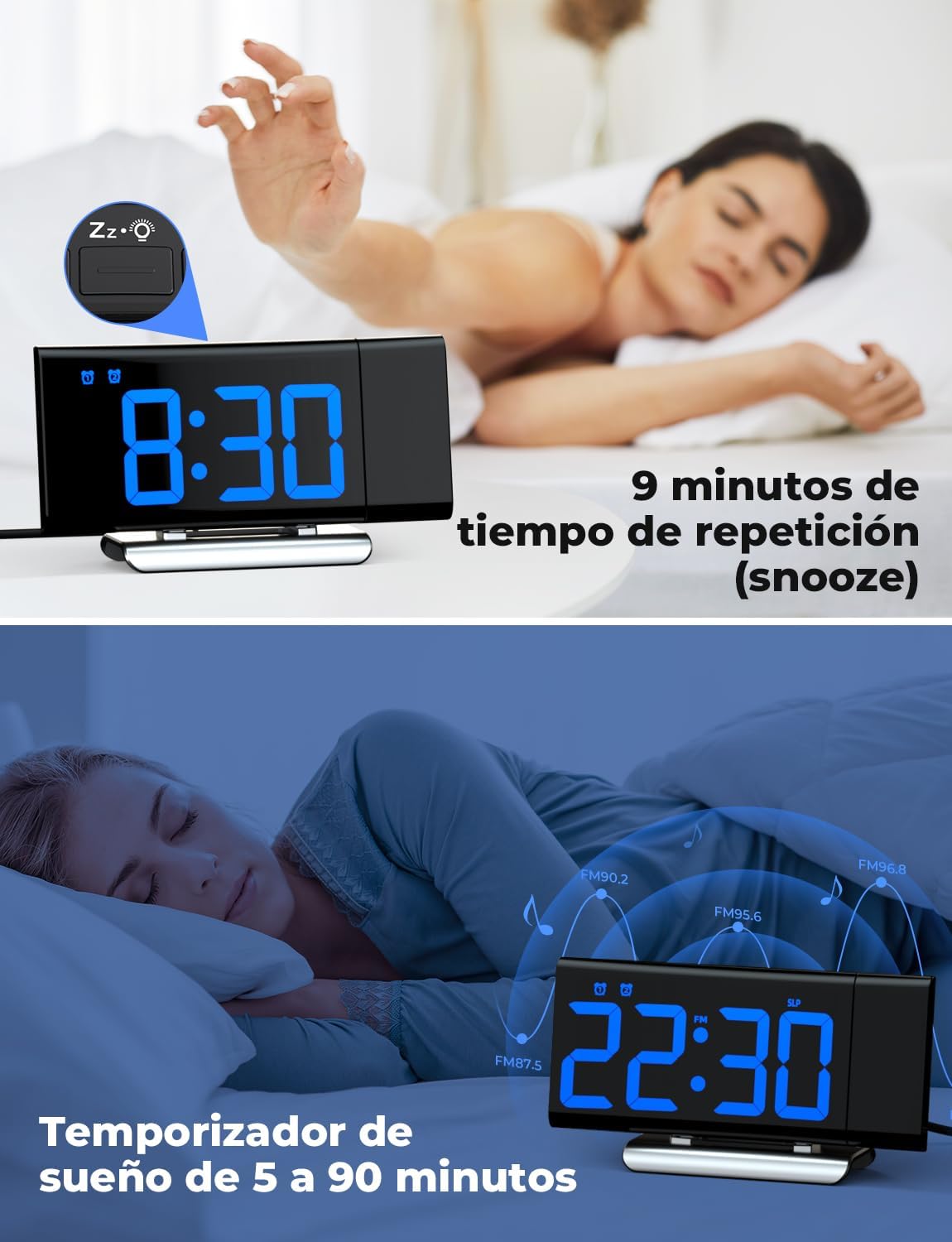
Image: The top section shows a person reaching for the snooze button on the LIORQUE S7509 Projection Alarm Clock, which displays 8:30, indicating a 9-minute snooze period. The bottom section features the clock displaying 22:30 with radio waves, illustrating the sleep timer function which can be set from 5 to 90 minutes, with a person sleeping peacefully in the background.
Техникалык тейлөө
To ensure the longevity and optimal performance of your LIORQUE S7509 Projection Alarm Clock, follow these simple maintenance guidelines:
- Тазалоо: Use a soft, dry cloth to wipe the surface of the clock. Do not use abrasive cleaners, solvents, or chemical sprays, as these can damage the finish and electronic components.
- Чаңды тазалоо: Gently wipe the projector lens with a soft, lint-free cloth to maintain clear projection quality.
- Жайгашкан жери: Саатты күн нурунан, жылуулук булактарынан жана ашыкча нымдуулуктан алыс, туруктуу, жалпак бетке кой.
- Күч: Always use the provided power adapter. If the clock is not used for an extended period, you may unplug it. The built-in battery will retain settings for a short duration.
Проблемаларды чечүү
Эгерде сиз ойготкуч саатыңыз менен кандайдыр бир көйгөйлөргө туш болсоңуз, төмөнкү кеңири таралган көйгөйлөрдү жана чечимдерди караңыз:
| Көйгөй | Мүмкүн себеп | Чечим |
|---|---|---|
| Сааттын дисплейи бош. | Эч кандай күч же күчtage. | Ensure the power adapter is securely plugged into the clock and a working outlet. Check if the display brightness is set to 'off'. |
| Проекция бүдөмүк же так эмес. | Incorrect focus or distance. | Adjust the distance of the clock from the projection surface. Ensure the projector lens is clean. |
| Ойготкуч угулбайт. | Ойготкуч иштетилген эмес же үнү өтө төмөн. | Verify that the alarm icon is displayed on the screen. Check the alarm volume setting. Ensure the alarm time is correctly set. |
| FM радиосун кабыл алуу начар. | Сигналдын же антеннанын начар абалы. | Extend the FM antenna fully. Reposition the clock to improve reception. |
| Баскычтар жооп бербейт. | Убактылуу программалык ката. | Unplug the power adapter for a few seconds, then plug it back in to reset the device. |
Техникалык шарттар
| Өзгөчөлүк | Деталь |
|---|---|
| Продукциянын өлчөмдөрү | 10.5 x 3.81 x 6.2 см; 340 г |
| Модель номери | S7509 |
| Бренд | ЛИОРК |
| Түс | Көк |
| Дисплей түрү | Санарип |
| Power Source | Both: Battery and AC power (with adapter) |
| Форма | Төрт бурчтуу |
| Колдонуу | Indoor |
| Frame Material | Металл |
| Батареялар камтылган | Ооба |
| Монтаж түрү | Стол үстү |
| Ойготкуч саат | Ооба |
| Элементтердин саны | 1 |
Кепилдик жана колдоо
The LIORQUE S7509 Projection Alarm Clock comes with a manufacturer's warranty. For specific details regarding warranty coverage and duration, please refer to the warranty card included in your package or contact LIORQUE customer support.
If you require further assistance, have questions, or encounter issues not covered in this manual, please contact LIORQUE customer support. Contact information can typically be found on the product packaging, the official LIORQUE webсайты же сатуучу аркылуу.