
1. Киришүү
This manual provides essential information for the installation, operation, and maintenance of your SYLVOX 43-inch Outdoor Signage TV (Model SS43A0KAGD). Please read this manual thoroughly before using the product to ensure proper function and safety. This television is designed for commercial outdoor use, offering high brightness and robust weather protection.
2. Коопсуздук маалыматы
Буюмга зыян келтирбөө жана колдонуучунун коопсуздугун камсыз кылуу үчүн төмөнкү коопсуздук чараларын сактаңыз:
- Электр камсыздоо: Кубат булагы томго дал келишин текшериңизtagе талаптар продуктунун этикеткасында көрсөтүлгөн.
- Суу жана ным: While the TV is IP55 waterproof, avoid direct high-pressure water jets. Ensure all port covers are securely closed when not in use.
- Вентиляция: Желдетүүчү тешиктерди жаппаңыз. Ашыкча ысып кетүүнүн алдын алуу үчүн жетиштүү аба агымы зарыл.
- Монтаждоо: Use appropriate mounting hardware and follow VESA standards (400 x 200 mm) for secure installation. Professional installation is recommended for outdoor environments.
- Тазалоо: Тазалоодон мурун электрди өчүрүңүз. жумшак колдонуу, damp кездеме. Катуу химиялык заттардан алыс болуңуз.
- Температура: Operate the TV within the specified temperature range (-4°F to 113°F).
3. Пакеттин мазмуну
Пакетте бардык буюмдар бар экенин текшериңиз:
- SYLVOX 43-inch Outdoor Signage TV
- Алыстан башкаруу (2 AAA батарейкасы камтылган)
- Электр кабели
- Колдонуучунун колдонмосу
- Кепилдик картасы
- Screws for mounting (BM8X14MM for full motion cantilever mount, BM8X28MM & Gasket for fixed wall mount)

Figure 3.1: Included accessories with the SYLVOX 43-inch Outdoor Signage TV.
4. Продукт бүтүп калдыview
4.1 Негизги өзгөчөлүктөрү
- Дисплей: 43-inch 4K UHD (3840x2160) LED display with 1000 nits brightness and 1.07 Billion Colors.
- Узактыгы: IP55 waterproof rating, corrosion-resistant and scratch-resistant metal casing. Designed for 7x24 hour operation with temperature protection.
- Операция системасы: Linux-based system with pre-installed applications (Netflix, Pandora, Facebook, YouTube, Twitter). Note: Signage 1.0 series does not support downloading additional apps.
- Байланыш: Built-in ATSC & NTSC tuners, Bluetooth, 2.4G WiFi.
- Аудио: Built-in speakers.

Figure 4.1: SYLVOX 43-inch Outdoor Signage TV in a commercial setting, showcasing its bright 4K display.

Figure 4.2: The TV's IP55 waterproof and wide temperature range capabilities.

Figure 4.3: Visual representation of 4K UHD picture quality and color depth.

Figure 4.4: ашыкview of the Linux system and integrated features.
4.2 Порттор жана туташуулар
The TV offers a variety of input and output ports for versatile connectivity:
- RS232
- USB Input x 2 (USB 1.0, USB 2.0, USB 3.0 compatible)
- RJ45 (Ethernet)
- HDMIx3
- Оптикалык чыгуу
- Audio L/R In
- YPbPr In
- Antenna In (ATSC/NTSC Tuner)
- Кулакчын Чыгуу
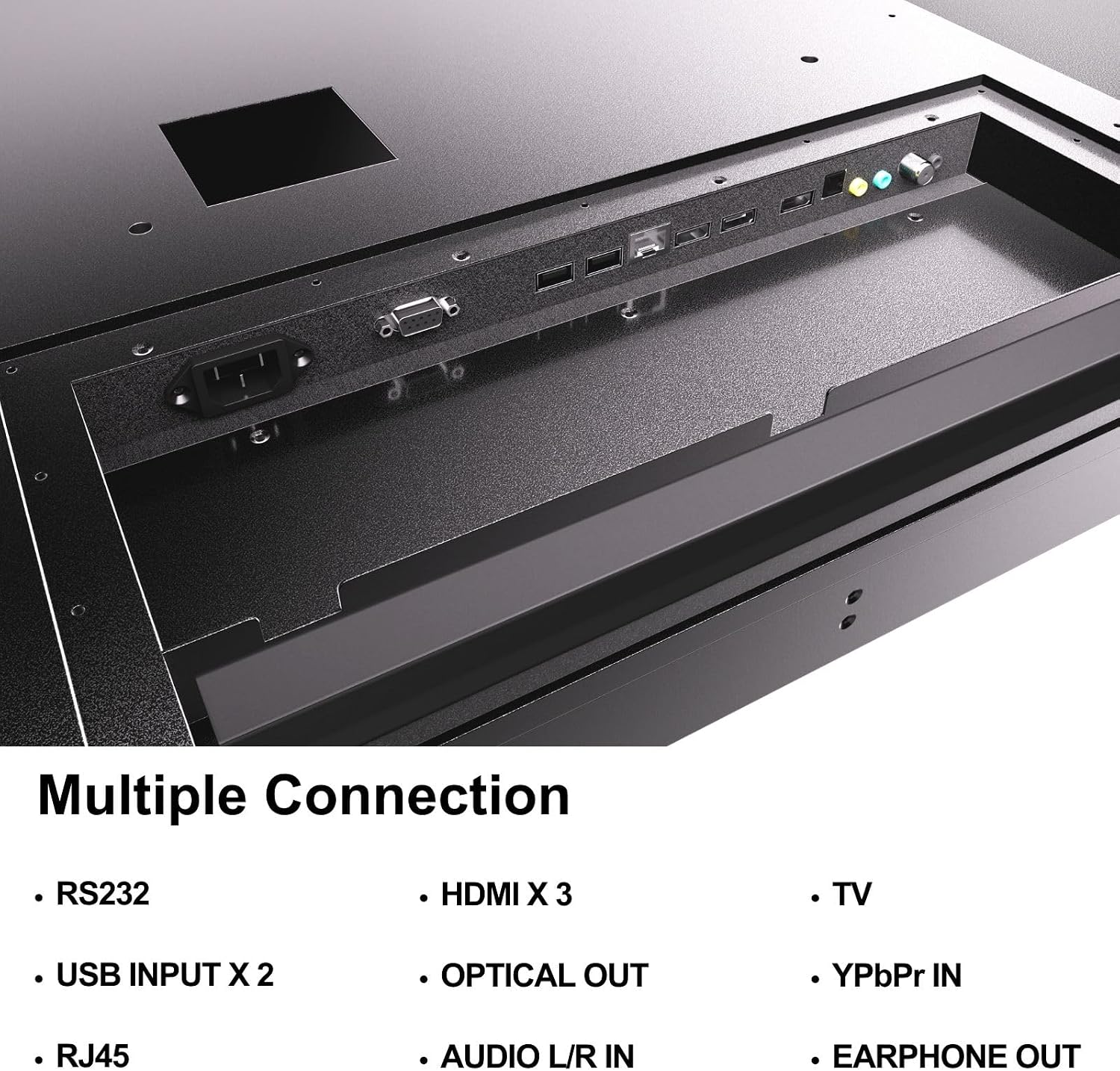
Figure 4.5: Rear panel connections of the SYLVOX Outdoor Signage TV.
5. Орнотуу
5.1 Телевизорду орнотуу
The SYLVOX Outdoor Signage TV supports wall mounting. Ensure the mounting surface is sturdy enough to support the TV's weight and is suitable for outdoor conditions.
- Жайгашкан жерди тандаңыз: Select a location that provides optimal viewing and protection from extreme weather, even with the TV's waterproof rating.
- Дубалга орнотууну орнотуу: Attach a VESA-compatible wall mount (400 x 200 mm) to the desired location according to the mount manufacturer's instructions. Use the provided screws (BM8X14MM for full motion, BM8X28MM with gasket for fixed mount).
- Attach TV to Mount: Carefully lift the TV and secure it to the installed wall mount. Ensure all connections are tight and secure.
5.2 Баштапкы күйгүзүү
- Туташуу кубаты: Plug the power cord into the TV's power input and then into a grounded outdoor-rated power outlet.
- Батареяларды салыңыз: Open the remote control battery compartment and insert the two AAA batteries, observing polarity.
- Күйгүзүү: Пульттун же сыналгыдагы кубат баскычын басыңыз.
- Баштапкы орнотуу устасы: Follow the on-screen instructions to select language, time zone, and perform initial channel scanning.
5.3 Тармактык туташуу
To access smart TV features and streaming applications, connect the TV to your network.
- Wi-Fi туташуусу: Navigate to the TV's settings menu, select 'Network', then 'Wi-Fi'. Choose your network from the list and enter the password.
- Ethernet туташуусу: Connect an Ethernet cable from your router to the RJ45 port on the TV. The TV will automatically detect the wired connection.
- Bluetooth: For connecting audio devices, go to the Bluetooth settings, enable Bluetooth, and pair with your desired device.
6. Иштөө нускамалары
6.1 Телевизордун негизги функциялары
- Күч: басыңыз Күч Телевизорду күйгүзүү же өчүрүү үчүн пульттагы баскычты басыңыз.
- Киргизүү булагы: басыңыз Киргизүү button to cycle through available input sources (HDMI 1/2/3, TV, YPbPr, USB).
- Көлөмү: колдонуу Көлөм +/- үн деңгээлин тууралоо үчүн баскычтар.
- Канал: колдонуу Канал +/- buttons to change channels when using the built-in tuner.
- Навигация: Багыттоочу жебелерди жана колдонуңуз OK менюларда өтүү үчүн баскыч.
6.2 Smart TV өзгөчөлүктөрү
The TV runs on a Linux operating system and comes with several pre-installed applications:
- Access the home screen to view and launch applications like Netflix, Pandora, Facebook, YouTube, and Twitter.
- Use the remote control's dedicated app buttons (if available) for quick access.
- Note that the Signage 1.0 series does not support downloading additional applications.
6.3 Screencasting (Android Only)
The TV supports screencasting from Android mobile phones:
- Ensure your Android device and the TV are connected to the same Wi-Fi network.
- On your Android phone, enable the screen mirroring or screencasting feature (names may vary by device, e.g., 'Smart View', 'Cast', 'Wireless Display').
- Select your SYLVOX TV from the list of available devices.
6.4 Vertical/Horizontal Display
The TV can be installed and operated in both horizontal (landscape) and vertical (portrait) orientations. When using the screen vertically, the display direction is adjusted by the input device or content source.
7. Техникалык тейлөө
Proper maintenance ensures the longevity and performance of your outdoor TV:
- Экранды тазалоо: Экранды жумшак, түксүз чүпүрөк менен акырын сүртүңүз. өжөр белгилери үчүн, бир аз гampкездемени суу менен сүртүңүз. Тазалоочу каражаттарды түз эле экранга чачпаңыз.
- Тазалоо Casing: жумшак колдонуу, damp металлды тазалоо үчүн кездеме casinг. Абразивдүү тазалагычтардан же эриткичтерден качыңыз.
- Порттун капкактары: Regularly check that all unused port covers are securely sealed to maintain the IP55 waterproof rating.
- Экологиялык текшерүүлөр: Periodically inspect the TV and mounting hardware for any signs of wear, corrosion, or damage, especially after severe weather conditions.
- Программалык камсыздоо жаңыртуулары: Check for available software updates through the TV's settings menu to ensure optimal performance and security.
8. Кыйынчылыктарды
If you encounter issues with your SYLVOX Outdoor Signage TV, refer to the following common problems and solutions:
| Көйгөй | Мүмкүн себеп | Чечим |
|---|---|---|
| Күч жок | Power cord disconnected; no power from outlet; remote batteries dead. | Check power cord connection; test outlet; replace remote batteries. |
| Сүрөт жок, бирок үн бар | Туура эмес киргизүү булагы тандалды; тышкы түзмөк маселеси. | Press 'Input' button to select correct source; check external device connections. |
| Үн жок, бирок сүрөт бар | Үнү өчүрүлгөн же өтө төмөн; тышкы аудио түзмөгүндө көйгөй бар. | Unmute volume or increase level; check audio cables for external devices. |
| Wi-Fi байланышы туруксуз же үзүлүп калган | Router issue; TV too far from router; incorrect password. | Restart router; move TV closer or use a Wi-Fi extender; re-enter Wi-Fi password. |
| Пульт иштебей жатат | Batteries dead or incorrectly inserted; obstruction between remote and TV. | Replace batteries; ensure clear line of sight to TV's IR receiver. |
Эгерде бул чечимдерди колдонуп көргөндөн кийин да көйгөй чечилбесе, SYLVOX кардарларды колдоо кызматына кайрылыңыз.
9. Техникалык шарттар
| Модель аты | SS43A0KAGD |
| Screen Size | 43 дюйм |
| Дисплей технологиясы | LED |
| Резолюция | 4K (3840x2160) |
| Жаңыртуу ылдамдыгы | 60 Гц |
| Maximum Display Brightness | 1000 Нит |
| Контраст катышы | 3000:1 |
| Жооп убактысы | 8 Миллисекунд |
| Суу өткөрбөйт рейтинги | IP55 |
| Операция системасы | Linux |
| Байланыш технологиясы | Wireless (Bluetooth, Wi-Fi), Wired (HDMI, USB, RJ45, RS232) |
| Аудио киргизүү | HDMI, Optical, USB, Audio L/R In |
| Сигнал форматы | ATSC, NTSC |
| HDMI портторунун жалпы саны | 3 |
| Жалпы USB порттору | 2 |
| Продукциянын өлчөмдөрү (D x W x Y) | 3.4"D x 38.6"W x 22.4"H |
| VESA тоо стандарты | 400 x 200 мм |
| Ватtage | 120 Ватт-саат |
| Өндүрүүчү | Kontech Electronics Co., Ltd. |
| UPC | 810079224838 |
10. Кепилдик жана колдоо
10.1 Кепилдик маалыматы
SYLVOX provides a 2 жылдык өндүрүүчүнүн кепилдиги бул продукт үчүн. Бул кепилдик кадимки колдонуудагы материалдардагы жана жасалгалоодогу кемчиликтерди камтыйт. Кепилдик дооматтары үчүн сатып алганыңызды тастыктаган документти сактап коюңуз.
10.2 Кардарларды колдоо
If you require assistance with installation, operation, troubleshooting, or warranty service, please contact SYLVOX customer support. We recommend checking the product upon receipt to ensure it is in good condition and functions normally.
For further support, please visit the official SYLVOX webсайтына кириңиз же кепилдик картаңызда көрсөтүлгөн байланыш маалыматын караңыз.