
Geloo B-8415A
Geloo Marine Stereo Radio Nautica B-8415A User Manual
Waterproof AM/FM MP5 Player with 4.1-inch Digital Display
Introduction
This manual provides detailed instructions for the installation, operation, and maintenance of your Geloo Marine Stereo Radio Nautica B-8415A. Please read this manual thoroughly before using the product to ensure proper function and to prevent damage.
The Geloo Marine Stereo Radio Nautica is a versatile and durable audio-visual system designed for marine and various vehicle applications. It features AM/FM radio, MP3/MP5 playback, Bluetooth connectivity, and a 4.1-inch digital display, all within an IPX67 waterproof and dustproof enclosure.
Коопсуздук маалыматы
- Ensure the power supply is disconnected before installation or maintenance to prevent electric shock.
- Install the unit in a location that does not obstruct visibility or interfere with vehicle operation.
- Use appropriate tools and follow wiring diagrams carefully to avoid short circuits or damage.
- This unit is IPX67 waterproof, but avoid submerging it or exposing it to high-pressure water jets.
- Түзмөктү бөлүктөргө бөлүүгө же өзгөртүүгө аракет кылбаңыз. Бул кепилдикти жокко чыгарат жана зыян келтириши мүмкүн.
- Keep the unit away from extreme temperatures, direct sunlight for prolonged periods, and corrosive substances.
Пакеттин мазмуну
Пакетте бардык буюмдар бар экенин текшериңиз:
- Marine Stereo Player
- Instruction Manual
- Алыстан башкаруу
- Кронштейн орнотуу
- Электр кабели
- Long Screws (for mounting)
- Таңгактоочу куту

1-сүрөт: Пакеттин мазмуну
Продукт бүттүview
The Geloo Marine Stereo Radio Nautica B-8415A features a compact design with a 4.1-inch digital display and intuitive controls. Its robust construction ensures durability in marine environments.

Сүрөт 2: Алдыңкы View of the Marine Stereo Player
Негизги өзгөчөлүктөрү:
- Marine Stereo Radio: Wireless AM/FM radio with automatic search, manual fine-tuning, and automatic channel storage.
- Суу жана чаң өткөрбөйт: IPX67 rated for protection against water and dust.
- MP5 ойноткучу: Supports MP3, MP5, and FM functions, including mobile phone connections, USB disk playback, AUX inputs, RCA outputs, and SUB outputs. Supports FLAC lossless audio.
- 4.1 дюймдук LCD экран: High-definition display for MP5 movies and videos.
- Кеңири колдонуу: Suitable for boats, yachts, motorcycles, cars, ATVs, UTVs, SUVs, RVs, golf carts, campers, RZRs, harvesters, and trucks.
Орнотуу
Өлчөмдөрү:
Before installation, ensure adequate space is available for the unit. Refer to the dimensions below:

Сүрөт 3: Продукциянын өлчөмдөрү
Зымдар диаграммасы:
Connect the power cord and audio cables according to the diagram. Ensure all connections are secure and properly insulated.

Figure 4: Basic Key Functions and Wiring Introduction
- Кубат туташуу: Connect the yellow wire to the constant 12V power supply, the red wire to the accessory 12V power supply (switched), and the black wire to ground.
- Динамик байланыштары: Connect speaker wires to the corresponding positive and negative terminals. Ensure correct polarity.
- Антенна: Connect the AM/FM antenna to the designated input.
- AUX киргизүү: Use the AUX input for external audio devices.
- RCA чыгаруу: Тышкы туташуу amplifiers for additional speakers.
- SUB Output: Connect to a subwoofer for enhanced bass.
Иштөө нускамалары
Жалпы көзөмөл:
- Power/SEL/VOL knob: Press to power on/off, rotate to adjust volume, press to select menu options.
- MODE баскычы: Press to cycle through input modes (Radio, Bluetooth, USB, AUX).
- BAND/AV button: In radio mode, press to change radio bands (FM1, FM2, FM3, AM1, AM2). In video mode, press for AV options.
- MENU баскычы: Системанын жөндөөлөрүнө жана параметрлерине кириңиз.
- CH+/CH- buttons: In radio mode, short press to tune to the next/previous preset station; long press to seek. In playback mode, short press for next/previous track.
- Ойнот / Тындыруу баскычы: Медиа файлды ойнотууну же тындырууну токтотуу.
- AMS баскычы: Радиостанциялар үчүн автоматтык эстутум дүкөнү.
Радио операциясы (AM/FM):
- басыңыз РЕЖИМ button to select "Radio" mode.
- басыңыз BAND/AV button to select the desired band (FM1, FM2, FM3, AM1, AM2).
- Автоматтык издөө: көпкө басыңыз CH+ or CH- buttons to automatically search for the next or previous strong station.
- Кол менен жөндөө: баскычын кыска басыңыз CH+ or CH- buttons to manually tune the frequency step by step.
- Store Presets: Long press a number button (1-6) to store the current station to that preset. Short press to recall a stored station.
- Automatic Memory Store (AMS): басыңыз AMS button to automatically scan and store the strongest stations in the current band to presets.
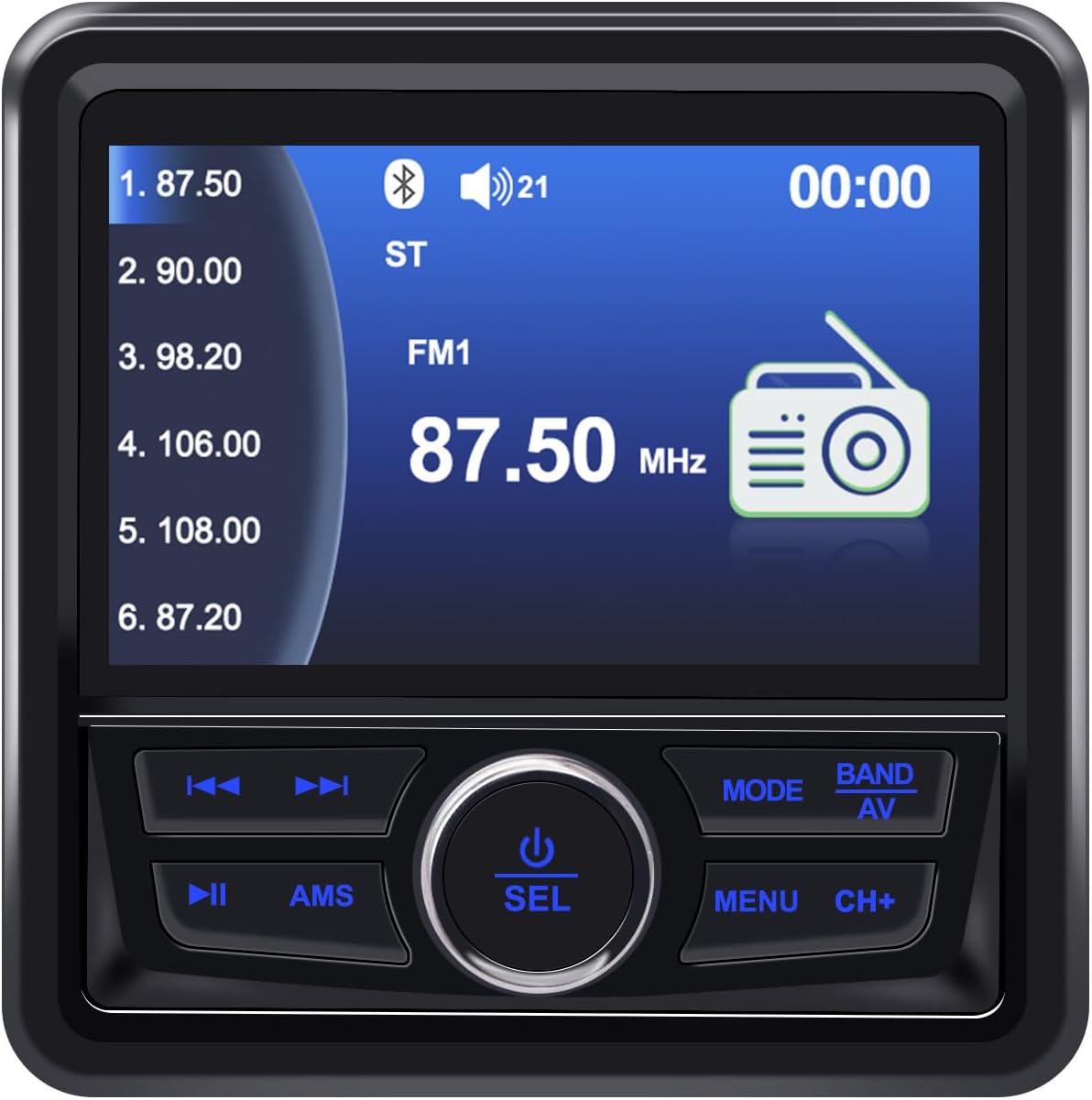
Figure 5: FM Radio Display
Bluetooth операциясы:
- басыңыз РЕЖИМ button to select "BT" (Bluetooth) mode.
- Мобилдик түзмөгүңүздө Bluetooth иштетип, жеткиликтүү түзмөктөрдү издеңиз.
- Select "Geloo Marine Stereo" (or similar name) from the list to pair.
- Once paired, you can play audio from your device through the stereo. Use the CH+, CH-, жана Ойнотуу/Тыныгуу ойнотууну башкаруу үчүн баскычтар.

Сүрөт 6: Bluetooth музыка ойнотуу
USB/MP5 Playback:
- Insert a USB drive containing MP3/MP5 files into the USB port. The unit will automatically switch to USB mode or you can select it using the РЕЖИМ баскычы.
- колдонуу CH+ жана CH- buttons to navigate between tracks or video files.
- басыңыз Ойнотуу/Тыныгуу ойнотууну баштоо же тындыруу үчүн баскыч.
- The 4.1-inch LCD screen will display video content for MP5 files.

Figure 7: MP5 Video Playback
AUX киргизүү:
- Connect an external audio device to the AUX input using a 3.5mm audio cable.
- басыңыз РЕЖИМ баскычы "AUX" режимин тандоо.
- Туташкан тышкы түзмөктөн ойнотууну башкарыңыз.
Техникалык тейлөө
- Тазалоо: жумшак колдонуу, damp cloth to clean the unit's surface. Do not use abrasive cleaners or solvents.
- Экранга кам көрүү: Wipe the screen gently with a microfiber cloth. Avoid pressing hard on the screen.
- Байланыштары: Бардык зымдардын туташууларынын дат баскандыгын же бошоп калгандыгын мезгил-мезгили менен текшерип туруңуз, айрыкча деңиз чөйрөсүндө.
- Сактагыч: If the unit will not be used for an extended period, ensure it is clean and stored in a dry, cool place.
Проблемаларды чечүү
| Көйгөй | Мүмкүн себеп | Чечим |
|---|---|---|
| Күч жок | Incorrect wiring; Blown fuse; Low battery voltage. | Check power connections (yellow, red, black wires). Replace fuse if blown. Verify battery voltage. |
| Үн жок | Volume too low; Mute activated; Speaker wires disconnected; Incorrect input mode. | Increase volume. Deactivate mute. Check speaker connections. Select correct input mode. |
| Радио кабыл алуу начар | Антенна туташкан эмес; Сигнал алсыз аймак; Антенна бузулган. | Ensure antenna is properly connected. Try moving to an area with better signal. Inspect antenna for damage. |
| Bluetooth туташпай жатат | Bluetooth not enabled on device; Unit not in BT mode; Device too far. | Enable Bluetooth on your device. Switch stereo to BT mode. Ensure device is within range. |
| USB ойнотулбай жатат | Колдоого алынбайт file format; USB drive corrupted; USB drive not inserted correctly. | камсыз кылуу files are in supported formats (MP3, MP5, FLAC). Try a different USB drive. Reinsert USB drive. |
| Screen fogging/dust inside | Improper installation; Seal compromised. | Ensure proper sealing during installation. If fogging persists, contact support. |
Техникалык шарттар
| Өзгөчөлүк | Деталь |
|---|---|
| Бренд | Geloo |
| Модель номери | B-8415A |
| Түс | Кара |
| Өзгөчөлүктөр | ARC, FM Tuner |
| Байланыш технологиясы | Bluetooth (BT), USB |
| Tuner Technology | DAB/DAB+ (Broadcast System) |
| Power Source | Электр зымдары |
| Колдоого алынган радио тилкелери | AM (522-1620 кГц), FM (87.5-108 МГц) |
| Камтылган компоненттер | Оюнчу |
| Шайкеш түзмөктөр | Television (likely refers to video output capability) |
| Аудио чыгаруу режими | Стерео |
| Экран түрү | LCD |
| Өндүрүүчү | Geloo |
| Өндүрүүчү бөлүгүнүн номери | B-8415 |
Колдонмо Examples:

8-сүрөт: Колдонмолордун кеңири спектри
Кепилдик маалымат
Geloo products are designed for quality and reliability. Specific warranty terms and conditions may vary by region and retailer. Please retain your proof of purchase for warranty claims.
For detailed warranty information, please refer to the warranty card included with your product or contact Geloo customer support.
Кардарларды колдоо
If you encounter any issues or have questions regarding your Geloo Marine Stereo Radio Nautica B-8415A that are not covered in this manual, please contact our customer support team.
Contact information can typically be found on the product packaging, the official Geloo webсайты же сатуучу аркылуу.
Please have your model number (B-8415A) and purchase details ready when contacting support.
Ask a question about this manual
Ask about setup, troubleshooting, compatibility, parts, safety, or missing instructions. Manuals+ will review the question and use this page’s manual context to help answer it.