
1. Киришүү
This manual provides essential instructions for the safe and effective use of your Canon EF 28-80mm f/3.5-5.6 II lens. Please read this manual thoroughly before using the lens to ensure proper operation and to achieve optimal photographic results. Keep this manual in a safe place for future reference.
2. Продукт бүтүп калдыview
The Canon EF 28-80mm f/3.5-5.6 II is a versatile standard zoom lens designed for Canon EF mount cameras. It offers a flexible focal length range suitable for various photographic situations, from wide-angle landscapes to portraits. This lens features manual focus operation and a variable maximum aperture.

Сүрөт 2.1: Алдыңкы view of the Canon EF 28-80mm f/3.5-5.6 II lens.
Негизги өзгөчөлүктөр төмөнкүлөрдү камтыйт:
- Фокустун узундугу: 28-80mm zoom range.
- Апертура: Variable maximum aperture of f/3.5-5.6.
- Тоо: Compatible with Canon EF mount cameras.
- Фокус: Manual Focus.
- Дизайн: Zoom lens construction.
3. Орнотуу
3.1 Объективди бекитүү
- Арткы линзанын капкагын жана камера корпусунун капкагын алып салыңыз.
- Линзадагы кызыл индекс белгисин камеранын корпусундагы кызыл индекс белгиси менен тегиздеңиз.
- Объективди камера орноткучка кыстарыңыз жана аны чыкылдатканча саат жебеси боюнча буруңуз.
- Ensure the lens is securely locked.
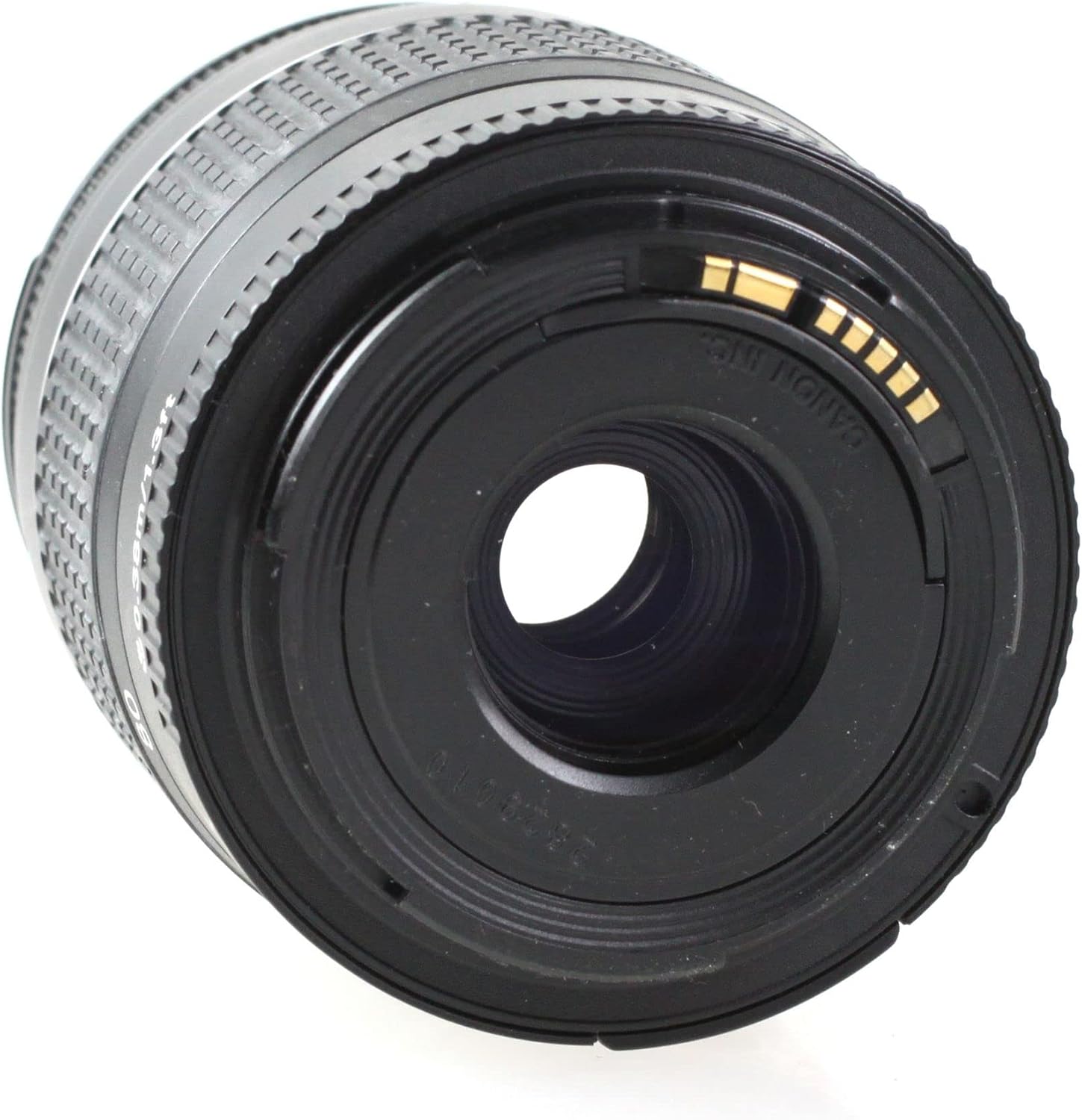
3.1-сүрөт: Арткы view of the lens, showing the EF mount.
3.2 Объективди ажыратуу
- Камераны өчүрүңүз.
- Камера корпусундагы линзаны бошотуу баскычын басып туруп, линзаны саат жебесине каршы токтогонго чейин буруңуз.
- Камерадан линзаны алып салыңыз.
- Attach the rear lens cap to the lens and the body cap to the camera.
4. Объективди иштетүү
4.1 Чоңойтуу
To change the focal length, rotate the zoom ring on the lens. The focal length markings (28, 35, 50, 70, 80mm) indicate the current focal length. Rotate the ring clockwise to zoom in (increase focal length) and counter-clockwise to zoom out (decrease focal length).

Figure 4.1: Zoom ring on the lens.
4.2 Focusing (Manual Focus)
This lens features manual focus. To focus, rotate the focus ring until the subject appears sharp in the viewfinder or on the camera's LCD screen. For precise focusing, use the camera's focus assist features if available.
4.3 Диафрагманы башкаруу
The aperture of this lens is controlled electronically via the camera body. Refer to your camera's instruction manual for details on how to adjust the aperture settings (f-number).
5. Maintenance and Handling
- Тазалоо: Use a lens blower to remove dust from the lens surface. For smudges, use a soft, clean lens cloth and a specialized lens cleaning solution. Never use organic solvents or harsh chemicals.
- Сактагыч: When not in use, attach the front and rear lens caps. Store the lens in a cool, dry, and well-ventilated place, away from direct sunlight and high humidity.
- Колдонуу: Avoid dropping or subjecting the lens to strong impacts. Do not leave the lens in direct sunlight for extended periods, as this can damage internal components.
- Суу каршылык: This lens is not water resistant. Avoid exposure to rain, splashes, or high humidity.
6. Кыйынчылыктарды
If you encounter issues with your lens, please refer to the following common solutions:
- Объектив камерага кошулбайт: Ensure the red index marks on both the lens and camera body are aligned, and rotate until it clicks. Check for any obstructions on the mount.
- Difficulty focusing: Ensure you are rotating the focus ring correctly. Check your camera's manual for manual focus assist features.
- Сүрөттүн сапатындагы көйгөйлөр: Ensure the lens elements are clean. Check camera settings (e.g., ISO, shutter speed, aperture).
For camera-specific issues or persistent problems, consult your camera's instruction manual or contact Canon customer support.
7. Техникалык шарттар
| Өзгөчөлүк | Description |
|---|---|
| Бренд | Canon |
| Модель аты | Canon EF 28-80mm f/3.5-5.6 II |
| Фокустук узундуктун сүрөттөлүшү | 28-80 миллиметр |
| Максималдуу диафрагма | 3.5 f |
| Минималдуу фокус узундугу | 28 миллиметр |
| Максималдуу фокус узундугу | 80 миллиметр |
| Линзанын түрү | Стандарт |
| Шайкеш орнотуулар | Canon EF |
| Фокус түрү | Manual Focus |
| Image Stabilization | Сүрөттү турукташтыруу жок |
| Диафрагма бычактарынын саны | 3 |
| UPC | 657768819438 |
| Өндүрүүчү бөлүгүнүн номери | EF 28-80 1:3,5-5,6 DC-cr |
| Сууга туруктуулук деңгээли | Сууга чыдамдуу эмес |
8. Кепилдик жана колдоо
This Canon EF 28-80mm f/3.5-5.6 II lens comes with a 90 күндүк чектелген кепилдик. Кепилдик дооматтары үчүн сатып алганыңыздын далилин сактап коюңуз.
For technical support, service, or further inquiries, please contact Canon customer support or visit the official Canon website. You may also refer to the Amazon Renewed store for specific return or replacement policies related to renewed products.


