
I-SHUNFA WIFI-E27
I-SHUNFA Wi-Fi Smart E27 LED Bulb User Manual
Model: WIFI-E27
1. Продукт бүтүп калдыview
The I-SHUNFA Wi-Fi Smart E27 LED Bulb offers advanced lighting control for your smart home. Featuring stepless dimming, adjustable color temperature from warm white (2700K) to cool white (6500K), and compatibility with voice assistants like Amazon Alexa, these bulbs provide versatile illumination. Control your lighting remotely via the Smart Life or Tuya Smart app, set schedules, and create custom scenes to enhance your daily life.

Сүрөт: бүттүview of the I-SHUNFA Smart LED Bulbs, showing their design, app control interface on a smartphone, and an icon indicating voice control capability.
Негизги өзгөчөлүктөрү:
- Wi-Fi туташуусу: Connects directly to your 2.4GHz home Wi-Fi network.
- Өчүрүүчү: Жарыктык 1%дан 100%ке чейин жөнгө салынышы мүмкүн.
- Түзүлүүчү ак: Color temperature adjustable from 2700K (warm white) to 6500K (cool white).
- Үн менен башкаруу: Amazon Alexa жана Google Assistant менен шайкеш келет.
- Колдонмону башкаруу: Remote control via Smart Life or Tuya Smart app.
- График жана көрүнүштөр: Set timers, schedules, and pre-defined lighting scenes.
2. Орнотуу колдонмосу
2.1. Орнотуу
- Орнотуудан мурун жарык берүүчү прибордун кубаты өчүрүлгөнүн текшериңиз.
- Carefully screw the I-SHUNFA Smart E27 LED Bulb into a standard E27 light socket.
- Turn on the power to the light fixture. The bulb should flash rapidly, indicating it's in pairing mode. If not, turn the bulb off and on 3-5 times until it flashes.
2.2. Колдонмону жүктөп алуу жана жупташтыруу
To control your smart bulb, you need to download the "Smart Life" or "Tuya Smart" app on your smartphone.
- Download the "Smart Life" or "Tuya Smart" app from the App Store (iOS) or Google Play Store (Android).
- Каттоо же өз эсебиңизге кирүү.
- Ensure your smartphone is connected to a 2.4GHz Wi-Fi network. The smart bulb only supports 2.4GHz Wi-Fi.
- Колдонмодо түзмөк кошуу үчүн "+" сүрөтчөсүн (адатта жогорку оң бурчта) таптаңыз.
- Түзмөктөр тизмесинен "Жарыктандыруу" же "Жарык булагы (Wi-Fi)" тандаңыз.
- Confirm that the bulb is flashing rapidly. If it's not, reset it by turning it off and on 3-5 times until it flashes.
- Суралганда, 2.4 ГГц Wi-Fi тармагыңыздын сырсөзүн киргизиңиз.
- The app will begin pairing with the bulb. Once connected, you can rename the bulb for easier control.

Image: Visual guide to the bulb's features and compatibility, including app logos and Wi-Fi requirements.
3. Иштөө нускамалары
3.1. Колдонмону башкаруу
Once paired, you can control your I-SHUNFA Smart LED Bulb using the Smart Life or Tuya Smart app from anywhere with an internet connection.
- Күйгүзүү/өчүрүү: Аны күйгүзүү же өчүрүү үчүн лампочканын аталышынын жанындагы кубат белгисин таптаңыз.
- Жарыктыкты жөндөө: Slide the brightness bar (1%-100%) to adjust the light intensity.
- Түс температурасын жөндөө: Slide the color temperature bar to switch between warm white (2700K) and cool white (6500K).
- Сахналар: Select from pre-defined scenes like "Reading," "Working," "Good Night," or "Relax," or create your own custom scenes.
- Таймер жана График: Set specific times for the bulb to turn on or off, or to activate certain scenes.

Image: The app interface for adjusting brightness and color temperature, illustrating the range from warm to cool white light.

Image: Setting timers and schedules through the app, allowing automated lighting control for convenience and security.
3.2. Үн менен башкаруу
The I-SHUNFA Smart LED Bulb is compatible with Amazon Alexa and Google Assistant. To enable voice control, link your Smart Life/Tuya Smart account to your voice assistant app (e.g., Alexa app).
- Байланыштырылуучу аккаунт: Open your Alexa or Google Home app, navigate to "Skills" or "Works with Google," search for "Smart Life" or "Tuya Smart," and enable the skill. Log in with your app account credentials.
- Түзмөктөрдү табуу: After linking, ask your voice assistant to "Discover devices" or manually discover them in the app.
- Үн буйруктары Мисamples:
- – Alexa, бөлмөнүн жарыгын күйгүз.
- "Окей Google, уктоочу бөлмөнүн жарыгын 50% чейин азайт."
- "Алекса, ашкананын жарыгын жылуу ак кылып кой."
- "Hey Google, change the office light to cool white."

Image: Demonstrating voice control functionality with Amazon Alexa, allowing hands-free operation of the smart bulbs.
4. Техникалык тейлөө
The I-SHUNFA Smart E27 LED Bulbs are designed for long-term use with minimal maintenance.
- Тазалоо: Before cleaning, ensure the bulb is off and cool. Wipe the bulb with a soft, dry cloth. Do not use liquid cleaners or abrasive materials.
- Сактагыч: Эгерде лампаларды сактасаңыз, аларды күн нурунан жана экстремалдык температурадан алыс, салкын, кургак жерде сактаңыз.
- Алмаштыруу: These LED bulbs have an average lifespan of 30,000 hours. Replacement is only necessary at the end of their operational life.
5. Кыйынчылыктарды
If you encounter issues with your I-SHUNFA Smart E27 LED Bulb, please refer to the following common solutions:
| Көйгөй | Мүмкүн себеп | Чечим |
|---|---|---|
| Bulb not pairing/flashing. | Not in pairing mode; power cycle issue. | Turn the bulb off and on 3-5 times until it flashes rapidly. Ensure your Wi-Fi is 2.4GHz. |
| Wi-Fi'га туташпай жатат. | Incorrect Wi-Fi band; weak signal; wrong password. | Ensure your router is broadcasting a 2.4GHz signal. Move the bulb closer to the router. Double-check your Wi-Fi password. |
| Үн башкаруу иштебейт. | Аккаунт байланышкан эмес; түзмөк табылган жок. | Ensure your Smart Life/Tuya Smart account is correctly linked to Alexa/Google Assistant. Ask your voice assistant to "Discover devices." |
| Bulb unresponsive in app. | Loss of Wi-Fi connection; app glitch. | Check your Wi-Fi connection. Restart the app. Power cycle the bulb. |
| Bulb not dimming or changing color. | Not compatible with external dimmer switches. | These bulbs are controlled via the app or voice assistant. Do not use with traditional dimmer switches. |
6. Техникалык шарттар
| Өзгөчөлүк | Деталь |
|---|---|
| Модель номери | WIFI-E27 |
| Негизги түрү | E27 |
| Энергияны керектөө | 7 Вт (70 Вт ысытуу шамына барабар) |
| Жарык агымы | 800 лм |
| Түс температурасы | 2700K - 6500K (Жылуу актан муздак акка чейин) |
| Күңүртөтүү | 1% - 100% (via app/voice control only) |
| Тtage | AC 220-240V |
| Wi-Fi стандарты | 2.4 ГГц (IEEE 802.11 b/g/n) |
| Өмүр | 30,000 саат |
| Beam Angle | 360 градус |
| Өлчөмдөрү (L x W x Y) | 3 x 3 x 8.45 см |
| Салмагы | 64 грамм |
| Сертификация | Энергияны үнөмдүү |
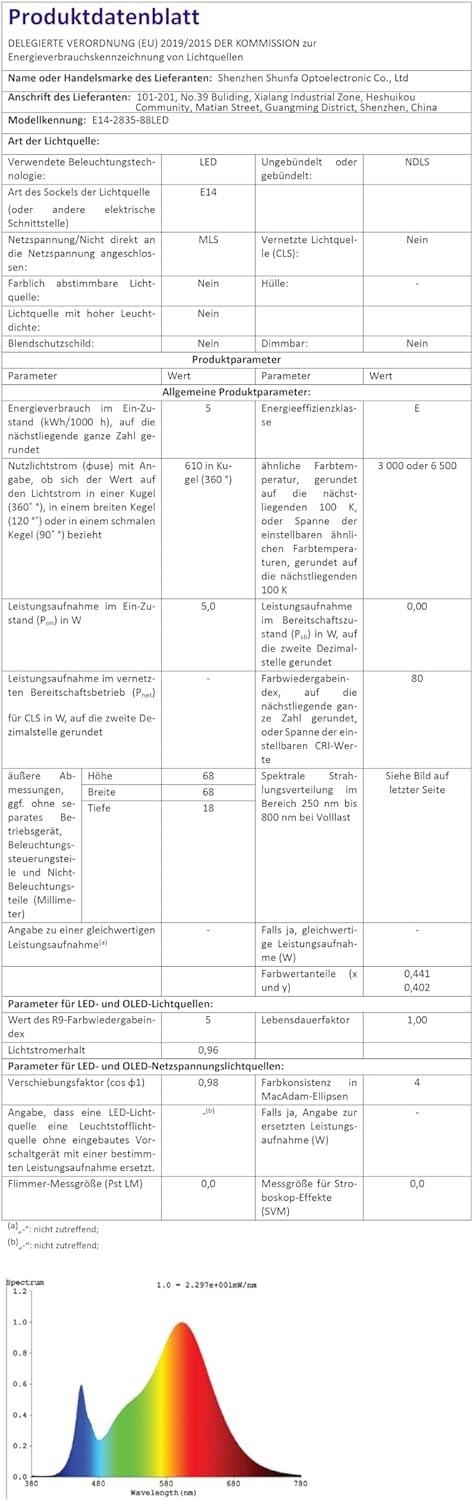
Image: Official product data sheet providing comprehensive technical specifications.
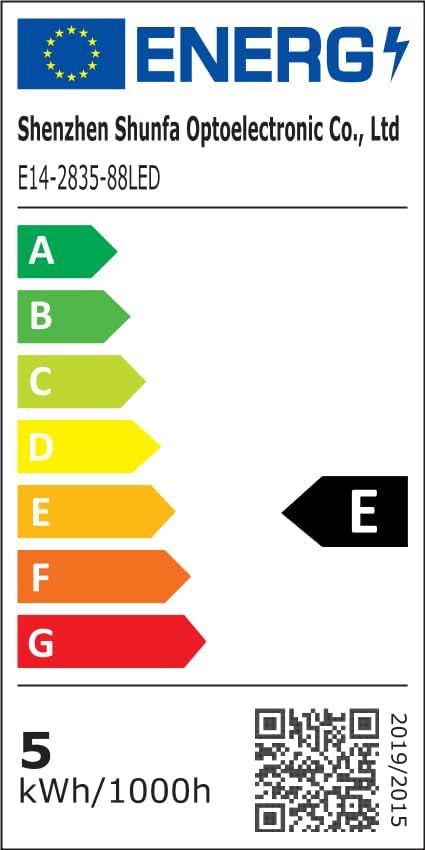
Image: EU Energy Label indicating the bulb's energy efficiency class and consumption. More details can be found via the QR code or by visiting eprel.ec.europa.eu/qr/1250502.
7. Кепилдик жана колдоо
I-SHUNFA is committed to providing high-quality products. For any issues or inquiries regarding your smart LED bulbs, please refer to your purchase documentation or contact our customer support.
- Кепилдик: Please refer to your purchase documentation or the retailer's policy for specific warranty details.
- Кардарларды колдоо: For technical assistance or product support, please visit the I-SHUNFA brand store on Amazon or contact the seller directly.
- Запастык бөлүктөр: Запастык бөлүктөрдүн бар экендиги жөнүндө маалымат берилген жок.

Image: The official I-SHUNFA brand logo.
Ask a question about this manual
Ask about setup, troubleshooting, compatibility, parts, safety, or missing instructions. Manuals+ will review the question and use this page’s manual context to help answer it.