
Introduction
Welcome to the iRobot Roomba i1 (1152) Robot Vacuum user manual. This guide provides essential information for setting up, operating, maintaining, and troubleshooting your robot vacuum. The Roomba i1 is designed to efficiently clean hard floors and carpets, utilizing Wi-Fi connected mapping technology to navigate your home.
Маанилүү коопсуздук маалыматы
Before using your Roomba i1 robot vacuum, please read all safety instructions carefully. Failure to follow these instructions may result in electric shock, fire, or serious injury.
- Бул шайманды 8 жаштан жогорку балдар жана физикалык, сезүү же акыл-эс жөндөмү начар же тажрыйбасы жана билими жок адамдар колдонсо болот, эгерде алар көзөмөлгө алынган же шайманды коопсуз колдонуу боюнча нускама алган болсо жана келтирилген коркунучтарды түшүнсө. .
- Children should not play with the appliance. Cleaning and user maintenance shall not be made by children without supervision.
- Бул колдонмодо сүрөттөлгөндөй гана колдонуңуз.
- Сыртта же нымдуу беттерде колдонбоңуз.
- оюнчук катары колдонууга жол бербеңиз. Балдар тарабынан же алардын жанында колдонулганда кылдат көңүл буруу зарыл.
- Бузулган шнур же сайгыч менен колдонбоңуз. Эгерде шайман керектелип иштебесе, кулап, бузулуп, сыртта калып же сууга түшүп кетсе, аны тейлөө борборуна кайтарыңыз.
- Тартпаңыз же шнур менен көтөрүп жүрбөңүз, шнурду тутка катары колдонбоңуз, шнурга эшикти жаппаңыз же шнурду курч четтеринен же бурчтарынан тартпаңыз. Шайманды шнурдун үстүнөн иштетпеңиз. Шнурды ысытылган беттерден алыс кармаңыз.
- шнурду тартып сууруп албаңыз. Электр розеткасынан сууруп алуу үчүн шнурдан эмес, сайгычтан кармаңыз.
- Штепсель же шайманды нымдуу кол менен кармабаңыз.
- Тешиктерге эч кандай нерсени салбаңыз. Бөгөттөлгөн ачуу менен колдонбоңуз; чаңдан, түктөн, чачтан жана аба агымын азайта турган нерселерден алыс болуңуз.
- Чачты, кенен кийимдерди, манжаларды жана дененин бардык бөлүктөрүн тешиктерден жана кыймылдуу бөлүктөрдөн алыс кармаңыз.
- Тамеки, ширеңке, ысык күл сыяктуу күйүп жаткан же чылым чеккен нерселерди албаңыз.
- Бензин сыяктуу күйүүчү же күйүүчү суюктуктарды алуу үчүн колдонбоңуз же алар болушу мүмкүн болгон жерлерде колдонбоңуз.
- Чаң баштыкчасы жана/же чыпкалары жок колдонбоңуз.
- Кокусунан баштоону алдын алуу. Батарея пакетине туташтыруудан, шайманды көтөрүүдөн же алып жүрүүдөн мурун өчүргүч өчүк абалда экенин текшериңиз.
- Өндүрүүчү көрсөткөн заряддагыч менен гана заряддаңыз. Батарея топтомунун бир түрүнө ылайыктуу заряддагыч башка батарея таңгагы менен колдонулганда өрт чыгуу коркунучун жаратышы мүмкүн.
- Шаймандарды атайын дайындалган батарея топтомдору менен гана колдонуңуз. Башка батарейка топтомдорун колдонуу жаракат алуу жана өрт чыгуу коркунучун жаратышы мүмкүн.
- Батарея таңгагы колдонулбаганда, аны бир терминалдан экинчи терминалга туташтыра турган кагаз клиптер, тыйындар, ачкычтар, мыктар, бурамалар же башка кичинекей металл буюмдар сыяктуу башка металл нерселерден алыс кармаңыз. Батарея терминалдарын кыска тутуу күйүккө же өрткө алып келиши мүмкүн.
- Адепсиз шарттарда батареядан суюктук чыгып кетиши мүмкүн; байланышты болтурбоо. Кокусунан тийип калса, суу менен жууп салыңыз. Эгерде суюктук көзгө тийсе, кошумча медициналык жардамга кайрылыңыз. Батареядан чыккан суюктук дүүлүктүрүүгө же күйүүгө алып келиши мүмкүн.
- Бузулган же өзгөртүлгөн батарея пакетин же шайманды колдонбоңуз. Бузулган же өзгөртүлгөн батарейкалар күтүүсүз жүрүм-турум көрсөтүп, натыйжада өрт, жарылуу же жаракат алуу коркунучу пайда болушу мүмкүн.
- Батарея пакетин же шайманды отко же ашыкча температурага жол бербеңиз. Өрткө же 130 ° Cдан (265 ° F) жогору температурага тийүү жарылууга алып келиши мүмкүн.
- Заряддоо боюнча бардык нускамаларды аткарыңыз жана батареянын пакетин же шайманды нускамада көрсөтүлгөн температура диапазонунан тышкары заряддабаңыз. Туура эмес заряддоо же белгиленген диапазондон тышкаркы температурада батареяны бузуп, өрт чыгуу коркунучун күчөтүшү мүмкүн.
- Тейлөө иштерин квалификациялуу оңдоочу бир гана алмаштыруучу бөлүктөр менен аткарыңыз. Бул продуктунун коопсуздугун камсыз кылат.
- Колдонуу жана кам көрүү боюнча нускамада көрсөтүлгөндөн башка учурларда шайманды же батарейканы (мүмкүн болушунча) өзгөртпөңүз же оңдоого аракет кылбаңыз.
Пакеттин мазмуну
Verify that all original components are included in your package:
- iRobot Roomba i1 Robot Vacuum
- Үйдө заряддоо станциясы
- Line Cord
- 1 Lithium Ion Battery (pre-installed)
- Side Brush
- Filter (Cloth Type)
- Dual Multi-Surface Rubber Brushes
Жайгашуу
Follow these steps to set up your Roomba i1 robot vacuum for first use:
- Choose a Location for the Home Base: Place the Home Base charging station against a wall in an open, uncluttered area. Ensure there is at least 1.5 feet (0.5 meters) of clear space on each side of the Home Base and 4 feet (1.2 meters) in front of it.
- Кубат кабелин туташтыруу: Plug the line cord into the Home Base and then into a wall outlet. Ensure the Home Base is powered on.
- Роботту заряддоо: Place your Roomba i1 onto the Home Base. The robot will emit a tone to confirm it is properly docked and charging. Allow the robot to charge for at least 3 hours before its first cleaning mission. The light ring around the CLEAN button will pulse white while charging and turn solid white when fully charged.
- iRobot Home колдонмосун жүктөп алыңыз: For full functionality, download the iRobot Home App on your smartphone or tablet. The app will guide you through connecting your robot to your Wi-Fi network and setting up cleaning schedules.
- Wi-Fi'га туташуу: Follow the in-app instructions to connect your Roomba i1 to your home Wi-Fi network. This enables smart features like mapping, scheduling, and integration with voice assistants.

Operating Your Roomba i1
Your Roomba i1 is designed for intelligent and efficient cleaning. Here's how to operate it:
Starting a Cleaning Job
- Using the CLEAN Button: Press the large CLEAN button on top of the robot once to wake it up, then press it again to start a cleaning cycle.
- iRobot Home тиркемесин колдонуу: Open the app and tap the "CLEAN" button to start a cleaning job from anywhere. You can also schedule cleaning times and customize cleaning preferences through the app.
- Үн менен башкаруу: The Roomba i1 is compatible with Google Home. Once connected via the iRobot Home App, you can use voice commands like "Hey Google, ask Roomba to start cleaning."
Тазалоо өзгөчөлүктөрү
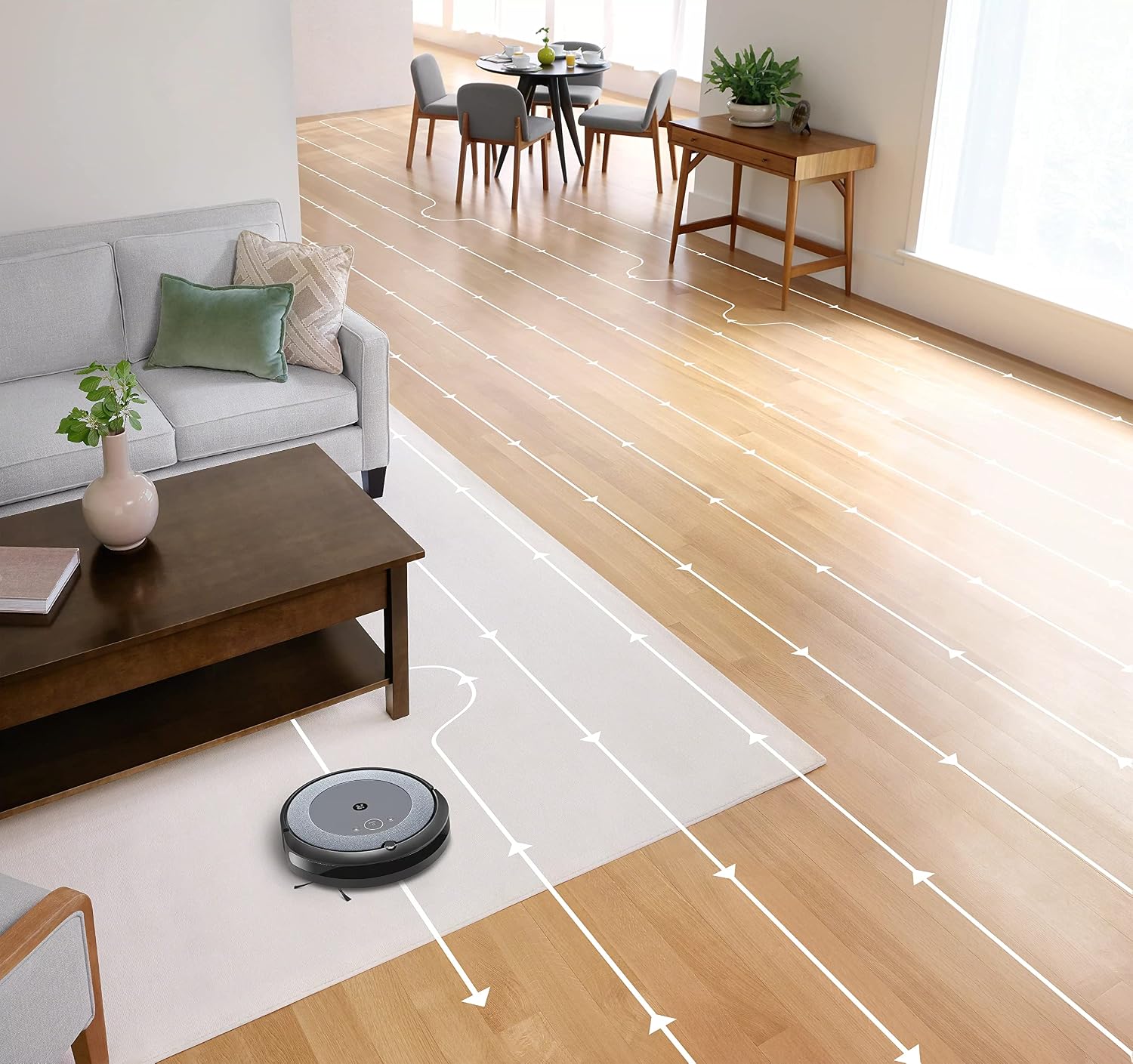
- Интеллектуалдык навигация: The robot cleans in neat, efficient rows, adapting to different floor types including carpets and hard floors.
- Dual Multi-Surface Rubber Brushes: These brushes are designed to prevent tangles with pet hair and effectively pick up dirt and debris from various surfaces.
- Dirt Detect™ Technology: The robot uses acoustic and optical sensors to find dirtier areas and spends more time cleaning them.
- Automatic Dirt Disposal (with compatible Clean Base): If you have a compatible Clean Base (sold separately), the robot will automatically empty its dustbin into an enclosed bag, allowing for weeks of hands-free cleaning.


Техникалык тейлөө
Regular maintenance ensures your Roomba i1 operates at peak performance. Always turn off the robot and disconnect it from the Home Base before performing any maintenance.
Чаң кутучасын бошотуу
- Press the bin release button and pull out the bin.
- Open the bin door and empty debris into a trash can.
- Tap the bin against the trash can to dislodge any trapped debris.
Cleaning the Filter (Cloth Type)
- Чаң урнасынан чыпканы алып салыңыз.
- Таштандыларды кетирүү үчүн чыпканы таштанды челекке уруңуз. Чыпканы жуубаңыз.
- Replace the filter every 2 months, or more frequently if you have pets.
Щеткаларды тазалоо
- Pinch the yellow brush release tabs to lift the brush frame.
- Remove the brushes and remove any hair or debris wrapped around them or trapped beneath the yellow caps.
- Reinstall the brushes, ensuring they click into place.
Каптал щетканы тазалоо
- Use a coin or small screwdriver to remove the screw holding the side brush.
- Remove the side brush and clean any hair or debris from the brush and its post.
- Капталдагы щетканы кайра орнотуп, бураманы бекемдеңиз.
Сенсорлорду жана заряддоо контакттарын тазалоо
- Wipe the charging contacts on the robot and Home Base with a clean, dry cloth.
- Wipe the cliff sensors (located on the bottom of the robot) and the front bumper sensor window with a clean, dry cloth.
Проблемаларды чечүү
If your Roomba i1 encounters an issue, the robot will play an audible alert and the light ring around the CLEAN button will flash. Consult the iRobot Home App for specific error messages and solutions.
Жалпы маселелер жана чечимдер:
- Робот заряддалбай жатат: Ensure the Home Base is plugged in and the robot is properly docked. Clean the charging contacts on both the robot and Home Base.
- Робот тыгылып калган же камалып калган: Clear obstacles from the robot's path. If it frequently gets stuck in the same area, consider using Virtual Wall Barriers (sold separately) or adjusting furniture.
- Начар тазалоо көрсөткүчтөрү: Empty the dust bin, clean or replace the filter, and clean the main brushes and side brush. Ensure the robot's sensors are clean.
- Робот Wi-Fiга туташпай жатат: Ensure your Wi-Fi router is on and within range. Restart your router and the robot. Follow the Wi-Fi setup instructions in the iRobot Home App again.
- Robot making unusual noises: Check the brushes and wheels for any trapped debris or hair. Clean them thoroughly.
For more detailed troubleshooting, refer to the iRobot Home App or the iRobot support webсайт.
Техникалык шарттар
| Бренд | iRobot |
| Модель аты | Roomba i1 (1152) |
| Өзгөчө өзгөчөлүк | Smart, Wi-Fi Connected Mapping |
| Түс | Кара/Боз |
| Камтылган компоненттер | Robot Vacuum, Home Base, Line Cord, Battery, Side Brush, Filter, Dual Multi-Surface Rubber Brushes |
| Чыпка түрү | Кездеме |
| Power Source | Батарея менен иштейт |
| Батареялар | 1 литий-иондук батарейка (кошулган) |
| Башкаруу ыкмасы | Колдонмо |
| Шайкеш түзмөктөр | Google Home |
| Форма фактору | Робот |
| Продукциянын өлчөмдөрү | 13.5 x 3.6 x 13.4 дюйм |
| Элемент Салмагы | 13.2 фунт |
| Surface Recommendation | Килемдер, катуу полдор |
| UPC | 657768820809 |
| ASIN | B0CPQ3RVDK |
Кепилдик жана колдоо
This product is sold as a renewed item. Please refer to the specific warranty terms provided by the seller or Amazon Renewed at the time of purchase. For technical support, troubleshooting assistance, or to purchase replacement parts, please visit the official iRobot support website or contact iRobot customer service. You can also find helpful resources within the iRobot Home App.
Онлайн колдоо: www.irobot.com/support