1. Киришүү
This document provides essential information for the use and maintenance of your replacement remote control for the Fakir Robert II RS 710 Robotic Robot Vacuum Cleaner. This remote is designed to provide core functionalities for operating your vacuum cleaner.

Сүрөт 1: Алдыңкы view of the remote control, showing the display and button layout.
2. Шайкештик
This remote control is specifically designed as a replacement for the Fakir Robert II RS 710 Robotic Robot Vacuum Cleaner. To ensure proper functionality, verify that your vacuum cleaner model matches this specification. This remote is an infrared (IR) replacement.
Эскертүү: If your vacuum cleaner's model number is not explicitly listed, please contact the seller for compatibility verification before use.
3. Орнотуу: Батареяны орнотуу
Алыстан башкаруу пульту иштеши үчүн батареялар керек. Батареялар камтылган эмес with the remote and must be purchased separately. The remote uses 1 AAA батарейка.
- Пульттун артындагы батарея отсегин табыңыз.
- Батарея бөлүмүнүн капкагын ачуу үчүн ылдый же жебе менен көрсөтүлгөн багытта жылдырыңыз.
- Insert 1 AAA battery into the compartment, ensuring the positive (+) and negative (-) terminals align correctly with the markings inside the compartment.
- Батарея бөлүкчөсүнүн капкагын бекем чыккыча ордуна жылдырыңыз.
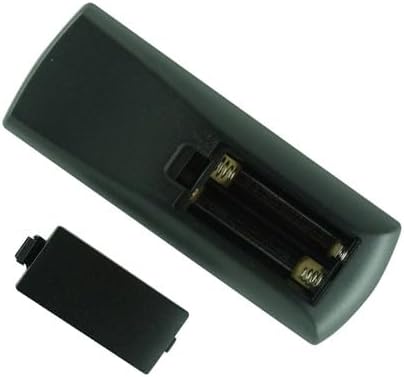
2-сүрөт: Арткы view of the remote control with the battery cover removed, illustrating the battery insertion area.
Маанилүү: Always use new, good quality batteries. Remove batteries if the remote will not be used for an extended period to prevent leakage.
4. Иштөө нускамалары
This replacement remote control provides essential functions for your Fakir Robert II RS 710 Robotic Robot Vacuum Cleaner. The button layout and functions are generally similar to the original remote. Point the remote directly at the vacuum cleaner for optimal signal transmission.
Негизги функциялары:
- Navigation Pad (Center Circle with Arrows): Used for directional control and selection within menus.
- Play/Pause Button (Center of Navigation Pad): Initiates or pauses cleaning cycles.
- Spiral/Spot Clean Button (Bottom Left): Activates a concentrated cleaning mode for specific areas.
- Edge Clean Button (Middle Left): Directs the vacuum to clean along walls and edges.
- Home/Dock Button (Top Right): Sends the vacuum back to its charging dock.
- Schedule Button (Bottom Middle): Likely used for setting or adjusting cleaning schedules.
- Return to Dock Button (Bottom Right): Another button for returning the vacuum to its charging station.
- Time/Clock Button (Middle Right): Likely for setting the current time or scheduling.
For detailed operation of specific cleaning modes or advanced features, please refer to the original user manual of your Fakir Robert II RS 710 Robotic Robot Vacuum Cleaner.
5. Кыйынчылыктарды
If your remote control is not functioning as expected, consider the following common issues and solutions:
- Алыстан жооп бербейт:
- Батареялар туура полярдуулук менен (+/-) туура салынганын текшериңиз.
- Replace the batteries with new ones. Low battery power is a common cause of unresponsiveness.
- Ensure there are no obstructions between the remote control and the vacuum cleaner's IR receiver.
- Confirm you are within the effective range of the remote control (typically up to 15-20 feet).
- Үзгүлтүктүү функция:
- This could indicate weak batteries. Try replacing them.
- Ensure the remote's IR emitter is clean and free from dust or debris.
- Remote Does Not Control Vacuum:
- Double-check the compatibility section to ensure this remote is for your specific vacuum cleaner model (Fakir Robert II RS 710).
- Verify that the vacuum cleaner itself is powered on and in a receptive state.
Эгерде бул кадамдарды жасагандан кийин көйгөйлөр чечилбесе, кошумча жардам алуу үчүн сатуучуга кайрылыңыз.
6. Техникалык шарттар
| Продукт түрү | Алыстан башкарууну алмаштыруу |
| Бренд | Жалпы |
| Шайкеш модель | Fakir Robert II RS 710 Robotic Robot Vacuum Cleaner |
| Power Source | 1 x AAA Батарея (киргизилген эмес) |
| Түс | Кара |
| Өзгөчө өзгөчөлүк | Infrared (IR) Replacement |
7. Кепилдик жана колдоо
Specific warranty information for this replacement remote control is not provided in the product details. For any inquiries regarding warranty, returns, or technical support, please contact the seller directly through the platform where the purchase was made.
Колдоо суроо-талаптары үчүн сатып алуу дүмүрчөгүңүздү же буйрутмаңыздын чоо-жайын сактап коюу сунушталат.


