
1. Киришүү
This manual provides detailed instructions for the installation, operation, and maintenance of your Taffio Android Navigation GPS CarPlay Screen. This advanced in-car entertainment and navigation system is specifically designed for Audi Q2 GA MIB vehicles manufactured between 2016 and 2020, offering a seamless upgrade to your vehicle's multimedia capabilities.
2. Продукциянын өзгөчөлүктөрү
The Taffio Android Navigation GPS CarPlay Screen integrates modern technology with your vehicle's existing systems. Key features include:
- Операция системасы: Android 13
- Процессор: Qualcomm Snapdragon 665 (4x 2 GHz + 4x 1.8 GHz)
- Дисплей: 10.25-inch Full HD (1920x720) Capacitive Touchscreen
- Эстутум: 8GB LPDDR4 RAM
- Сактагыч: 128 ГБ ички эстутум
- Графика: Adreno 610 GPU
- Байланыш: Integrated Wi-Fi, Bluetooth, 4G LTE (via SIM card slot), USB
- Навигация: Integrated GPS receiver with 3D navigation and free map updates
- Смартфон интеграциясы: Built-in Wireless CarPlay and Android Auto
- Унаа интеграциясы: Supports original radio functions, i-Drive, steering wheel controls, and vehicle settings.
- Камераны колдоо: Automatic switching for rearview camera and parking assistance.
- Орнотуу: Plug and Play design, requiring no modification or coding of the original system.
3. Пакеттин мазмуну
Төмөндө тизмеленген нерселердин баары пакетиңизге камтылганын текшериңиз:
- 1 x Taffio Android Navigation Multimedia Screen
- 1 x GPS антеннасы
- 1 x USB Cable (with 2 USB ports)
- 1 x Connection Cable Harness
- 1 x PDF User Manual (this document)
- 1 x Invoice with VAT (for warranty purposes)
4. Орнотуу жана орнотуу
The Taffio system is designed for a straightforward Plug and Play installation. While the process is simplified, professional installation is recommended if you are unfamiliar with car electronics.
4.1. Орнотуу диаграммасы
Refer to the diagram below for a visual guide to connecting the components.

Сүрөт: бүттүview of the system's connections, illustrating where to connect the WiFi antenna, SIM card, GPS antenna, USB ports, rearview camera, LVDS display plug, and the main power/radio harness.
4.2. Туташуу кадамдары
- Унаанын аккумуляторун ажыратыңыз: Ишке кирүүдөн мурун унааңыздын аккумуляторунун терс терминалын электр зымдарынын трикотажын алдын алуу үчүн ажыратыңыз.
- Баштапкы экранды алып салуу: Carefully remove your vehicle's original display unit following your Audi Q2's service manual.
- Connect Display LVDS Plug: Locate the LVDS cable from the new screen and connect it to the corresponding port, typically found behind the original screen's location.
- Connect to Original Radio & Power Plug: Use the provided connection cable harness to integrate the new system with your vehicle's original radio and power supply. This harness is designed for direct compatibility.
- GPS антеннасын туташтыруу: GPS антеннасын ачык жерге орнотуңуз view of the sky (e.g., dashboard, under the windshield) and connect it to the designated port on the new unit.
- WiFi антеннасын туташтыруу: Attach the WiFi antenna to improve wireless connectivity.
- SIM картаны салыңыз (милдеттүү эмес): If you plan to use 4G data, insert a compatible micro SIM card into the provided slot.
- USB кабелдерди туташтыруу: Route the USB cables to an accessible location (e.g., glove compartment) for connecting external devices.
- Арткы камеранын киргизүүсүн туташтыруу (милдеттүү эмес): If installing an aftermarket rearview camera, connect its video output to the designated input on the system.
- Secure Wiring and Reinstall: Neatly arrange all cables, secure them to prevent rattling, and reinstall the new screen into the dashboard.
- Батареяны кайра туташтыруу: Reconnect the vehicle battery and power on the system for initial setup.
5. Иштөө нускамалары
5.1. Негизги операция
The system features an intuitive touchscreen interface. You can also utilize your vehicle's original i-Drive controller and steering wheel buttons for navigation within the Android system.
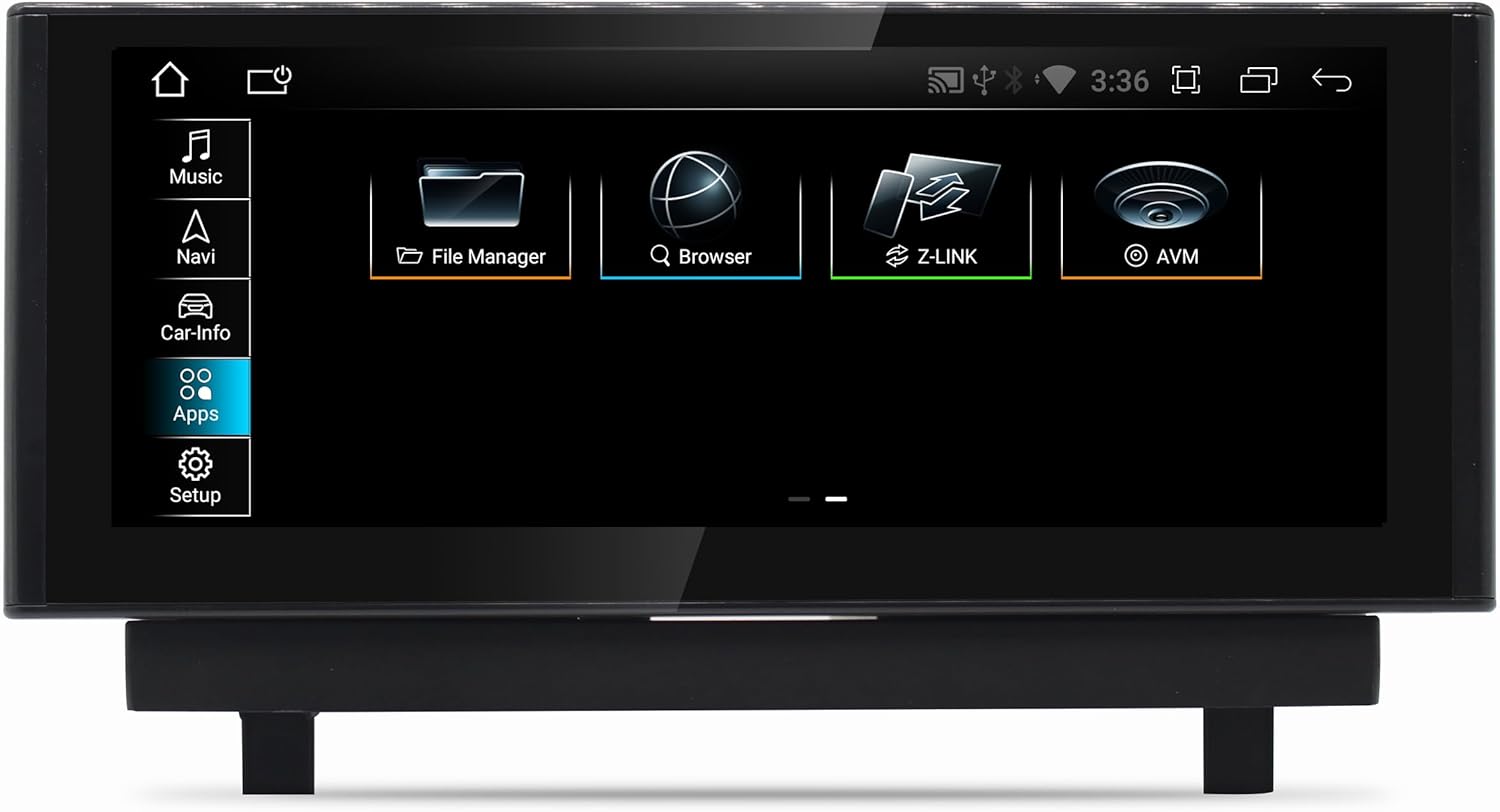
Image: The main Android interface, displaying core functions such as Music, Navigation, Vehicle Information, Applications, and System Setup.
5.2. Системалардын ортосунда которулуу
Easily switch between the original Audi MIB system and the Android system. This allows you to retain all original vehicle functionalities while gaining access to the Android features.
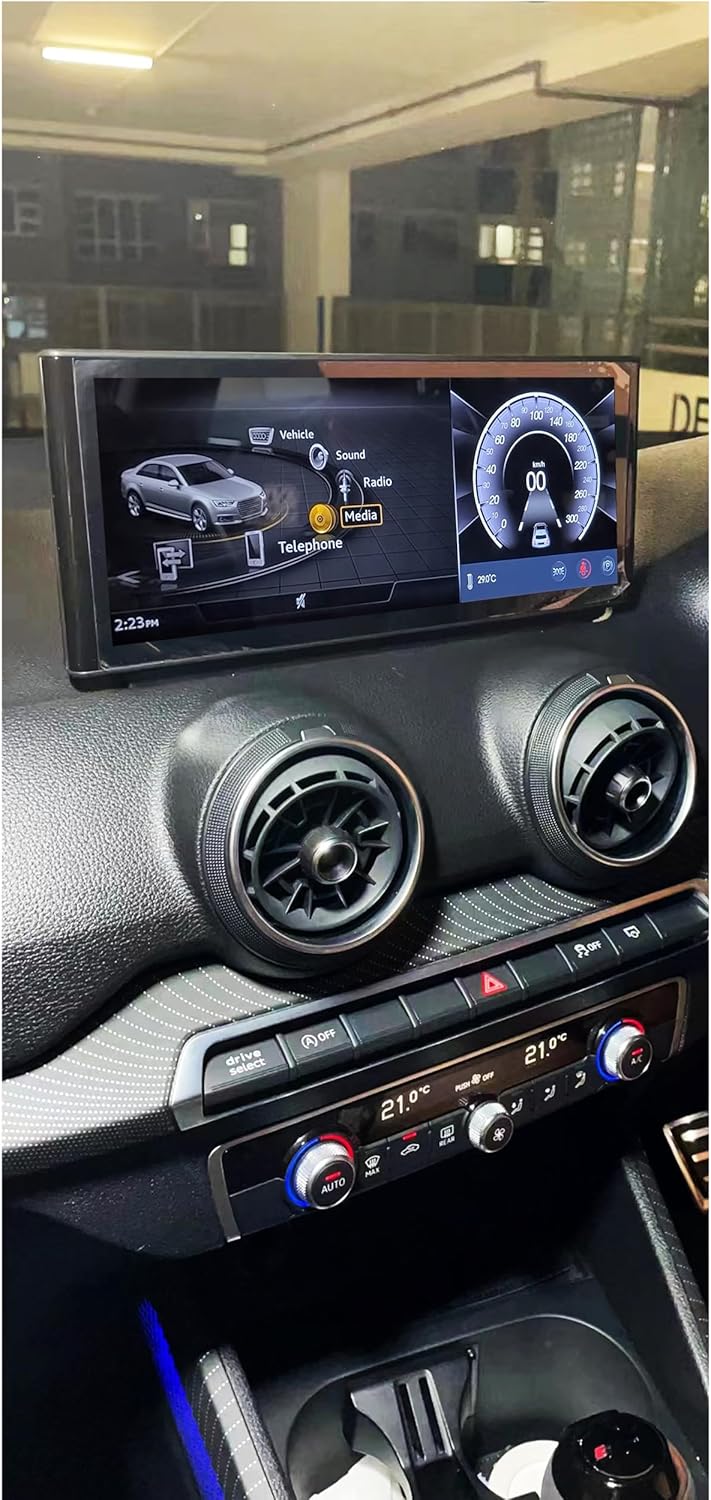
Image: The screen displaying the vehicle's original Audi MMI interface, demonstrating seamless integration and the ability to switch between systems.
5.3. Навигация
The integrated GPS receiver provides accurate positioning. Utilize pre-installed navigation applications or download your preferred navigation apps from the Google Play Store. The system supports 3D navigation and offers free map updates.
5.4. Зымсыз CarPlay жана Android Auto
Connect your smartphone wirelessly to access CarPlay or Android Auto. This allows for seamless integration of your phone's navigation, music, calls, and messaging directly on the car's display.

Image: The Wireless CarPlay interface, showing navigation, media playback, and communication features accessible from your iPhone.

Image: The Android Auto interface, providing access to Google Maps, Spotify, and other Android applications from your compatible smartphone.
5.5. Мультимедиа ойнотуу
The system supports various audio and video formats including 1080p, H264, AVI, RMVB, FLV, MKV for video, and MP3, WMA, FLAC, APE, AAC for audio. Play media from USB drives or stream via Bluetooth.

Image: A selection of Android applications available on the system, including web browsers, media players, and productivity tools.
5.6. Байланыш
- Wi-Fi: Connect to Wi-Fi hotspots or your smartphone's hotspot for internet access.
- 4G LTE: Insert a micro SIM card to enable 4G data connectivity for faster browsing and streaming.
- Bluetooth: Pair your phone for hands-free calling and audio streaming. The system also supports the vehicle's original Bluetooth.
5.7. Арткыview Camera and Parking Assistance
The system supports original and aftermarket rearview cameras. It automatically switches to the camera view when reversing and integrates with parking assistance features.
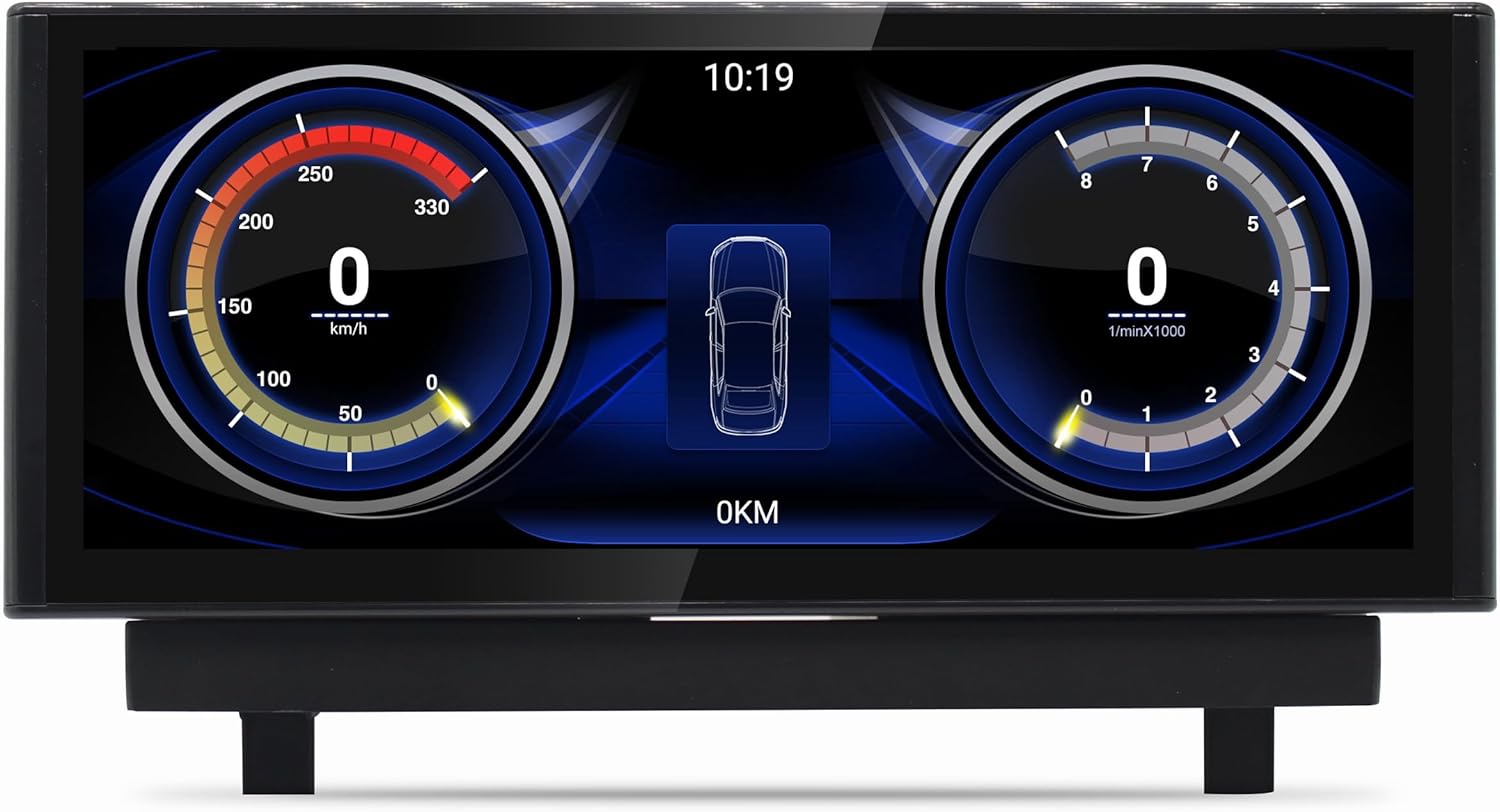
Image: The vehicle information display, showing digital gauges for speed and RPM, providing real-time data from the car's systems.
6. Техникалык тейлөө
- Экранды тазалоо: Бир аз жумшак, түксүз кездемени колдонуңуз dampened with a screen cleaner or water. Avoid harsh chemicals.
- Программалык камсыздоо жаңыртуулары: Оптималдуу аткарууну жана эң акыркы функцияларга жетүүнү камсыз кылуу үчүн орнотуулар менюсунда системанын жаңыртууларын мезгил-мезгили менен текшерип туруңуз.
- Жалпы кам көрүү: Аппаратты экстремалдык температурага же түз күн нуруна узак убакытка калтыруудан сактаңыз.
7. Кыйынчылыктарды
Эгер көйгөйлөргө туш болсоңуз, төмөнкү жалпы көйгөйлөрдү жана чечимдерди караңыз:
- Кубат жок: Ensure all power cables are securely connected. Check vehicle fuses.
- Үн жок: Verify volume settings on both the Android system and your vehicle's original audio system. Ensure AUX mode is correctly selected if required by your vehicle.
- GPS сигналын жоготуу: GPS антеннасы ачык жерге орнотулганын текшериңиз view асмандын жана коопсуз байланышта.
- Сенсордук экран жооп бербейт: Try restarting the system. If the issue persists, perform a factory reset (note: this will erase all user data).
- CarPlay/Android Auto туташпай жатат: Ensure Bluetooth and Wi-Fi are enabled on both the unit and your smartphone. Check for software updates on your phone and the unit.
- System Freezes/Lags: Close unnecessary background applications. Clear cache from time to time in system settings.
Бул жерде каралбаган туруктуу маселелер үчүн кардарларды колдоо кызматына кайрылыңыз.
8. Техникалык шарттар
| Өзгөчөлүк | Спецификация |
|---|---|
| Модель номери | JFQ022 |
| Операция системасы | Android 13 |
| Процессор | Qualcomm Snapdragon 665 (Octa-core: 4x 2 GHz + 4x 1.8 GHz) |
| Дисплей өлчөмү | 10.25 дюйм |
| Display Resolution | 1920 x 720 Full HD |
| Дисплей түрү | Capacitive сенсордук экран |
| RAM | 8 ГБ LPDDR4 |
| Ички сактагыч | 128 ГБ |
| GPU | Adreno 610 |
| LTE модем | X12 |
| DSP | Алты бурчтук 686 |
| Байланыш | Wi-Fi, Bluetooth, 4G LTE (SIM slot), USB |
| Навигация системасы | Интегралдык GPS |
| Смартфон интеграциясы | Зымсыз CarPlay, Android Auto |
| Унаа шайкештиги | Audi Q2 GA MIB (2016-2020) |
9. Кепилдик жана колдоо
Your Taffio Android Navigation GPS CarPlay Screen comes with a 2 жылдык кепилдик from the date of purchase. Please retain your invoice as proof of purchase for warranty claims.
For technical support, troubleshooting assistance, or warranty inquiries, please contact the seller, REALMEDIASHOP, through the platform where you purchased the product. Provide your model number (JFQ022) and a detailed description of the issue to facilitate faster service.