
1. Киришүү
The Barracuda No Break SR600 is an Uninterruptible Power Supply (UPS) and voltage regulator designed to protect your electronic devices from power outages, surges, and voltage fluctuations. With a capacity of 600VA/240W, it provides reliable backup power and stable voltage for computers, monitors, gaming consoles, routers, and other sensitive equipment. This manual provides essential information for the proper setup, operation, maintenance, and troubleshooting of your SR600 unit.

Figure 1: Barracuda SR600 No Break Unit
This image shows the Barracuda SR600 No Break unit from an angled perspective, highlighting its compact design and front panel.
2. Коопсуздук маалыматы
Please read and follow all safety instructions carefully to prevent injury or damage to the unit and connected equipment.
- UPSти ачпаңыз casinг. Ичинде колдонуучу тейлей турган бөлүктөр жок.
- UPSти жамгырдын, нымдуулуктун же ашыкча нымдуулуктун таасирине дуушар кылбаңыз.
- Ensure the UPS is placed in a well-ventilated area, away from direct sunlight or heat sources.
- UPSти жерге туташтырылган AC розеткасына гана туташтырыңыз.
- Do not connect non-computer related equipment (e.g., medical equipment, life support systems) to the UPS.
- In case of fire, use a dry chemical extinguisher. Water may cause electrical shock.
3. Продукт бүтүп калдыview
3.1 алдыңкы панели
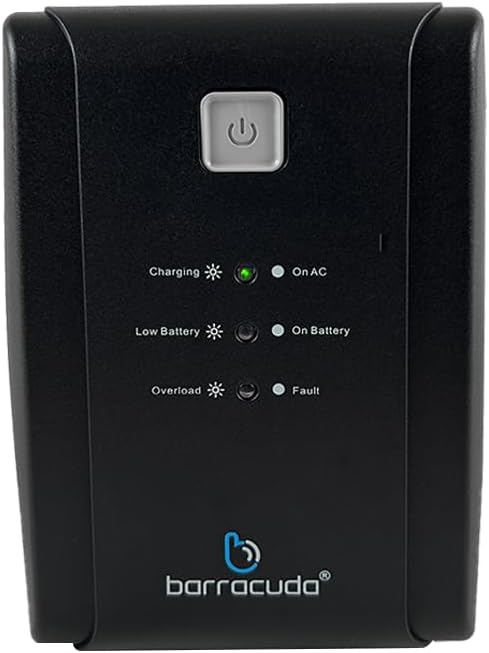
Figure 2: Front Panel of Barracuda SR600
This image displays a close-up of the Barracuda SR600's front panel, showing the power button and LED indicators for Charging, On AC, Low Battery, On Battery, Overload, and Fault.
- Кубат баскычы: UPSти күйгүзүү же өчүрүү үчүн басыңыз.
- LED көрсөткүчтөрү:
- Заряддоо: Батарея заряддалып жатканын көрсөтөт.
- On AC: UPS электр кубаты менен иштеп жатканын көрсөтөт.
- Батарея аз: Indicates the battery level is low.
- Батареяда: Indicates the UPS is operating on battery power.
- Ашыкча жүктөө: Indicates the connected load exceeds the UPS capacity.
- Күнөө: Indicates a system error.
3.2 Арткы панель

Figure 3: Rear Panel of Barracuda SR600
This image shows the rear panel of the Barracuda SR600, detailing the eight power outlets (four for AVR/Backup and four for Surge Only), the circuit breaker, the USB port, and the AC input.
- AVR/Backup Outlets (4): Provide battery backup power and surge protection. Connect critical devices like computers and monitors here.
- Surge Only Outlets (4): Provide surge protection only. Connect non-critical devices like printers or scanners here.
- Ажыраткыч: Кайра жүктөлүүчү ашыкча жүктөлүүдөн коргоону калыбына келтирүү.
- USB порт: For connecting to a computer for monitoring software (if applicable).
- AC киргизүү: UPSти коммуналдык розеткага туташтырат.
4. Орнотуу
4.1 Пакеттен чыгаруу
Carefully remove the UPS from its packaging. Inspect the unit for any shipping damage. Retain the original packaging for future use or return.
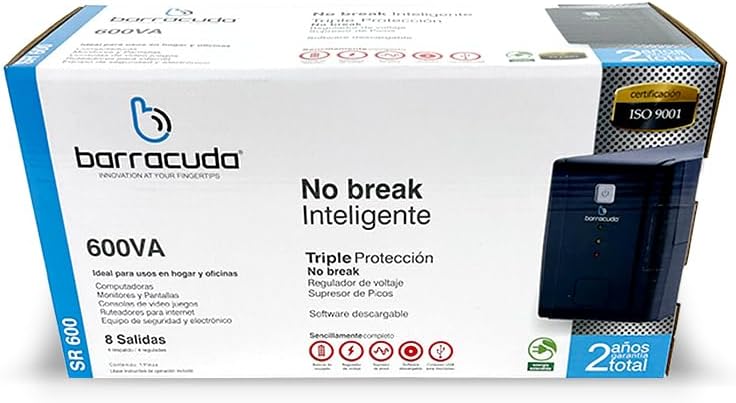
Figure 4: Barracuda SR600 Retail Packaging
This image displays the retail box for the Barracuda SR600, showing product information and branding.
4.2 Орнотуу
Place the UPS on a flat, stable surface in a clean, dry, and well-ventilated area. Avoid placing it near heat-emitting appliances or in direct sunlight. Ensure there is adequate space around the unit for proper airflow.
4.3 Түзмөктөрдү туташтыруу
- Plug the UPS power cord into a grounded 120VAC wall outlet.
- Connect your critical devices (e.g., computer, monitor) to the AVR/Backup Outlets арткы панелде.
- Connect non-critical devices (e.g., printer, scanner) to the Только розеткалар.
- Ensure all connected devices are turned off before plugging them into the UPS.
4.4 Алгачкы заряддоо
For optimal performance, charge the UPS battery for at least 8 hours before initial use. The unit will charge automatically when connected to AC power, even if the UPS is turned off.
5. Операция
5.1 Күйгүзүү/өчүрүү
- Күйгүзүү: Press and hold the power button on the front panel for approximately 3 seconds until you hear a beep and the 'On AC' LED illuminates.
- Өчүрүү: Бип деген үн чыгып, бардык LED жарыктары өчкөнгө чейин кубат баскычын болжол менен 3 секунд басып туруңуз.
5.2 AC режими
When the UPS is connected to utility power and the 'On AC' LED is lit, it is operating in AC mode. In this mode, the UPS provides regulated power to connected devices and charges its internal battery.
5.3 Батарея режими
бийлик учурунда уtage же олуттуу томtage fluctuation, the UPS automatically switches to battery mode. The 'On Battery' LED will illuminate, and the unit will emit an audible alarm (beeping) to indicate it is running on battery power. The alarm will sound more frequently as the battery level becomes critically low.
5.4 LED Indicators Explanation
Refer to Section 3.1 for a detailed description of each LED indicator and its meaning during operation.
6. Техникалык тейлөө
6.1 Батареяга кам көрүү
- To maximize battery life, ensure the UPS is connected to AC power at all times to keep the battery fully charged.
- Батареянын тез-тез терең разряддалышынан алыс болуңуз.
- If the UPS is to be stored for an extended period, fully charge the battery and then disconnect it from AC power. Recharge the battery every 3 months to prevent permanent damage.
6.2 Тазалоо
Disconnect the UPS from AC power and all connected devices before cleaning. Use a soft, dry cloth to wipe the exterior of the unit. Do not use liquid or aerosol cleaners.
6.3 Сактоо
Store the UPS in a cool, dry place, away from direct sunlight and extreme temperatures. Ensure the battery is fully charged before storage and recharged periodically as mentioned above.
7. Кыйынчылыктарды
If you experience issues with your Barracuda SR600, refer to the table below for common problems and their solutions.
| Көйгөй | Мүмкүн себеп | Чечим |
|---|---|---|
| UPS күйбөйт. | Батарея толугу менен заряды бүттү. | Connect the UPS to AC power and allow it to charge for at least 8 hours. |
| UPS is on but provides no power to outlets. | Ажыраткыч өчүрүлдү. | Reduce the load on the UPS and press the circuit breaker button on the rear panel to reset. |
| UPS constantly beeps in AC mode. | Ашыкча жүктөө абалы. | Disconnect non-essential equipment from the UPS. Ensure total load does not exceed 240W. |
| Кыска камдык убакыт. | Battery not fully charged or battery end-of-life. | Allow the battery to charge for 8 hours. If the problem persists, the battery may need replacement (contact support). |
| Ката LED күйүп турат. | Ички күнөө. | Turn off the UPS, disconnect all devices, and unplug from AC. Wait 5 minutes, then reconnect and restart. If the fault persists, contact customer support. |
8. Техникалык шарттар
Technical specifications for the Barracuda No Break SR600.
| Өзгөчөлүк | Спецификация |
|---|---|
| Кубаттуулугу | 600VA / 240W |
| Киргизүү көлөмүtage | 120VAC |
| Киргизүү көлөмүtage Диапазон | 120VAC -30% +25% |
| Output Voltage | 120VAC |
| Тtage Regulation (typical) | +- 10% |
| Жыштык | 50Гц же 60Гц |
| Жыштыктарды жөнгө салуу | +- 1% |
| Output Contacts | 4 Energy Backup / 4 Surge Protection |
| Батарея түрү | 12V/4.5Ah |
| Убакытты толтуруу | орточо 5 саат |
| Өлчөмдөрү (L x W x Y) | 60 x 30 x 25 см (болжолдуу таңгак өлчөмдөрү) |
| Салмагы | 6 кг (болжолдуу пакеттин салмагы) |
| Материал | Металл |
9. Кепилдик жана колдоо
The Barracuda No Break SR600 comes with a 2 жылдык жалпы кепилдик сатып алынган күндөн тартып, өндүрүштүн кемчиликтерин жана нормалдуу колдонууда бузулууларды камтыйт. Кепилдик дооматтары үчүн сатып алганыңыздын далилин сактап коюңуз.
For technical support, warranty service, or inquiries, please contact Barracuda customer service. Refer to the product packaging or the Barracuda official webакыркы байланыш маалыматы үчүн сайт.