
1. Киришүү
This manual provides instructions for the Jolly Line JL1719/COMP Universal TV Remote Control, designed for compatibility with Philips televisions. This remote is ready to use without requiring any programming.
Негизги өзгөчөлүктөр төмөнкүлөрдү камтыйт:
- Universal replacement remote control for Philips TV.
- Ready to use; no programming required.
- Ыңгайлуу иштетүү үчүн эргономикалык дизайн.
2. Орнотуу
2.1 Батареяны орнотуу
The remote control requires two (2) AAA 1.5V batteries (not included). Follow these steps to install them:
- Пульттун артындагы батарея бөлүкчөсүнүн капкагын табыңыз.
- Капкакты ылдый жылдырыңыз же аны ачуу үчүн бекиткичти басыңыз.
- Insert two AAA batteries, ensuring the positive (+) and negative (-) terminals match the markings inside the compartment.
- Батарея бөлүкчөсүнүн капкагын ордуна коюңуз, аны бекем чыккыча ордуна жылдырыңыз.
Маанилүү: Ensure correct battery polarity. Do not mix old and new batteries, or different types of batteries.
2.2 Алгачкы колдонуу
This Jolly Line remote control is pre-programmed for Philips TVs and does not require any configuration. Once batteries are installed, it is ready for immediate use with your compatible Philips television.
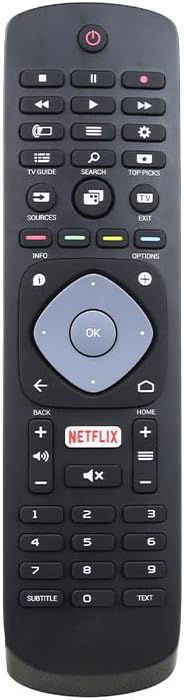
Сүрөт 1: Алдыңкы view of the Jolly Line JL1719/COMP Universal TV Remote Control, showing all buttons and their layout.
3. Иштөө нускамалары
Point the remote control directly at your Philips TV's infrared sensor. Ensure there are no obstructions between the remote and the TV.
3.1 Баскычтын жалпы функциялары
- Күч (⏻): Телевизорду күйгүзөт же өчүрөт.
- Сан баскычтары (0-9): Selects channels directly.
- Канал өйдө/төмөн (▲/▼): Каналдарды ырааттуу түрдө алмаштырат.
- Үнүн жогорулатуу/төмөндөтүү (+/-): Телевизордун үнүн тууралайт.
- Үнүн басуу (🔇): Телевизордун үнүн өчүрөт же өчүрөт.
- Булак/Киргизүү: Selects different input sources (HDMI, AV, etc.).
- Чабыттоо баскычтары (өйдө, ылдый, солго, оңго): Navigates menus and on-screen options.
- OK/Enter: Менюлардагы тандоолорду ырастайт.
- Артка/кайтуу: Мурунку экранга же менюга кайтарат.
- Үй (⌂): Accesses the TV's main menu or smart TV interface.
- Netflix: Direct access button for the Netflix application.
- Маалымат: Учурдагы программа же киргизүү жөнүндө маалыматты көрсөтөт.
- Параметрлер: Accesses context-sensitive options for the current screen.
- TV Guide: Электрондук программа колдонмосун ачат.
- издөө: Initiates a search function on the TV.
- Мыкты тандоолор: Accesses recommended content or features.
- Чыгыңыз: Учурдагы менюдан же колдонмодон чыгат.
- Play/Pause, Stop, Rewind, Fast Forward: Медиа ойнотууну башкарат.
- Субтитр: Субтитрлерди күйгүзөт/өчүрөт.
- Текст: Accesses teletext or similar text-based services.
Note: Specific button functionalities may vary slightly depending on your Philips TV model.
4. Техникалык тейлөө
4.1 Алыстан башкарууну тазалоо
Пультту тазалоо үчүн жумшак, кургак чүпүрөктү колдонуңуз. өжөр кир үчүн, бир аз гampкездемени суу же жумшак, абразивдүү эмес тазалоочу каражат менен сүртүңүз. Катуу химиялык заттарды же абразивдүү материалдарды колдонуудан алыс болуңуз, анткени алар пульттун бетине же ички компоненттерине зыян келтириши мүмкүн.
4.2 Батареяны алмаштыруу
Replace batteries when the remote control's response becomes sluggish or stops working. Refer to Section 2.1 for battery installation instructions. Always dispose of used batteries responsibly according to local regulations.
5. Кыйынчылыктарды
Эгерде сиз алыстан башкаруу пультуңузда көйгөйлөргө туш болсоңуз, төмөнкү көйгөйлөрдү чечүү кадамдарын колдонуп көрүңүз:
- Пульт жооп бербей жатат:
- Батареялар туура полярдуулук менен туура салынганын текшериңиз.
- Батареяларды жаңы AAA батарейкалары менен алмаштырыңыз.
- Алыстан башкаруу куралы менен сыналгынын инфракызыл сенсорунун ортосунда эч кандай тоскоолдуктар жок экенин текшериңиз.
- Телевизордун сенсорунун эффективдүү диапазонунда экениңизди текшериңиз.
- Кээ бир баскычтар иштебейт:
- This remote is designed for Philips TVs. Ensure your TV is a Philips model.
- Кирди же таштандыларды кетирүү үчүн алыстан башкаруу пультун, айрыкча жооп бербей турган баскычтардын айланасын тазалаңыз.
- Some advanced functions might not be supported by all Philips TV models.
- Телевизор үзгүлтүк менен жооп берет:
- Бул батареянын кубаты аз экенин билдириши мүмкүн. Батареяларды алмаштырыңыз.
- Телевизордун көрүнөө жери так болушун камсыз кылыңыз.
If the problem persists after trying these steps, please refer to the support information in Section 7.
6. Техникалык шарттар
| Өзгөчөлүк | Деталь |
|---|---|
| Модель номери | JL1719/COMP (Manufacturer Part Number), 33-03-0034 (Item Model Number) |
| Бренд | GBC (Jolly Line Compatible Series) |
| Шайкештик | Philips сыналгы |
| Батареялар талап кылынат | 2 x AAA 1.5V (киргизилген эмес) |
| Продукциянын өлчөмдөрү | 7.09 x 1.97 x 0.79 дюйм (1.5 x 5.3 x 20 см) |
| Элемент Салмагы | 3.52 унция |
| Түс | Кара |
| Өзгөчө өзгөчөлүк | Ergonomic, Pre-Programmed |
| Макс колдоого алынган түзмөктөр | 1 (Телевидение) |

Figure 2: The Jolly Line JL1719/COMP Universal TV Remote Control shown within its retail packaging.
7. Кепилдик жана колдоо
7.1 Кепилдик маалыматы
Specific warranty details for the Jolly Line JL1719/COMP remote control are typically provided at the point of purchase or within the product packaging. Please retain your proof of purchase for any warranty claims. For detailed warranty terms, contact the seller or manufacturer directly.
7.2 Кардарларды колдоо
For further assistance, technical support, or inquiries regarding your Jolly Line JL1719/COMP Universal TV Remote Control, please contact the retailer from whom you purchased the product or the manufacturer, GBC. Contact information can usually be found on the product packaging or the seller's webсайт.