
1. Киришүү
This manual provides essential information for the installation, operation, and maintenance of your Blaupunkt 65QD7030 65-inch 4K QLED Google TV. Please read this manual thoroughly before using the product and retain it for future reference.
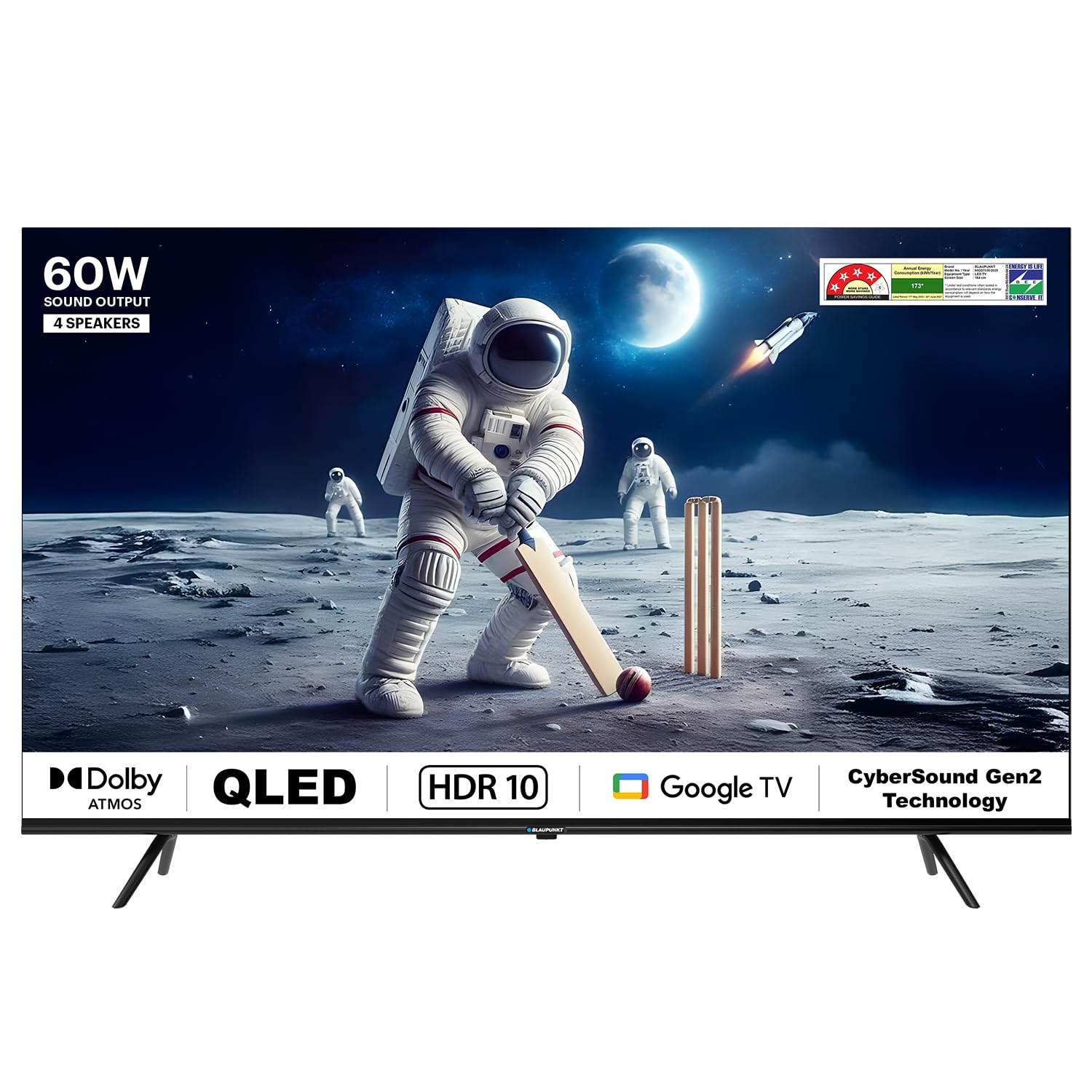
Фронт view of the Blaupunkt 65QD7030 65-inch 4K QLED Google TV.
2. Орнотуу
2.1 Пакеттен чыгаруу
Carefully remove the TV and all accessories from the packaging. Ensure all components listed below are present. Keep the original packaging for potential future transport or service needs.

Contents included in the TV packaging.
Камтылган компоненттер:
- 1 LED телевизор
- 1 Алыстан башкаруу
- 1 Дубалга монтаждоо
- 2 AAA батареялары
- Base Stand (if not wall-mounted)
- Тирөөч бурамалары (x4)
- Электр кабели
2.2 Стендди же дубалга монтаждоо
Choose between using the included base stand or a wall mount. Ensure the TV is placed on a stable, level surface or securely mounted to a wall according to the wall mount instructions.
Стенд орнотуу:
- Сыналгы экранын сызып кетпеш үчүн жумшак, таза бетке ылдый каратып кой.
- Негизги стенддерди телевизордун астындагы бурама тешиктерге тууралаңыз.
- Secure the stands using the provided stand screws.
Дубалга орнотуу:
The TV supports VESA mount standard 200 x 200 mm. Follow the instructions provided with your wall mount bracket. Professional installation is recommended for wall mounting.
2.3 Перифериялык түзүлүштөрдү туташтыруу
Connect your external devices such as set-top boxes, gaming consoles, or Blu-ray players to the TV.

Арткы view of the TV showing various connection ports.
- HDMI порттору: The TV has 3 HDMI ports. Use these for high-definition devices. HDMI 1 supports eARC for enhanced audio return.
- USB порттору: Two USB ports are available for connecting hard drives or other USB devices.
- Ethernet: Connect an Ethernet cable for a stable wired internet connection.
- Күч: Электр шнурду сыналгыга, андан кийин розеткага туташтырыңыз.
3. Иштөө нускамалары
3.1 First Time Setup (Google TV OS)
Upon first power-on, the TV will guide you through the initial setup process for Google TV. This includes language selection, network connection (Wi-Fi or Ethernet), Google account sign-in, and channel scanning.
3.2 Алыстан башкаруу функциялары
The included remote control allows you to navigate the TV's features. Insert the 2 AAA batteries into the remote before use.

Blaupunkt 65QD7030 TV remote control.
- Кубат баскычы: Телевизорду күйгүзөт же өчүрөт.
- Google Жардамчы баскычы: Үн менен башкарууну иштетет.
- Навигация аянтчасы: Менюлар аркылуу жылдыруу жана параметрлерди тандоо үчүн колдонуңуз.
- Үн баскычтары: Үн деңгээлин тууралаңыз.
- Канал баскычтары: Телеканалдарды алмаштырыңыз.
- Колдонмонун кыска баскычтары: Netflix, Prime Video жана YouTube сыяктуу популярдуу агымдык кызматтарга түз жетүү.
3.3 Smart TV өзгөчөлүктөрү
Your Blaupunkt 65QD7030 TV runs on Google TV OS, offering a wide range of smart functionalities.

Voice control via Google Assistant.
- Google Жардамчысы: Мазмун издөө, акылдуу үй түзмөктөрүн башкаруу жана маалымат алуу үчүн үн буйруктарын колдонуңуз.
- Кыналган Chromecast: Cast content from your compatible mobile devices or computer directly to the TV.
- Колдоого алынган колдонмолор: Access a variety of streaming services including Netflix, Prime Video, YouTube, Apple TV, Disney+Hotstar, and more.
- Экранды чагылдыруу: Share your device's screen wirelessly to the TV.
3.4 Audio and Display Settings
Сиздин оптималдаштыруу viewсыналгынын орнотуулар менюсу аркылуу угуу жана угуу тажрыйбасы.

Quantum Dot technology for vivid colors.
- Үн: The TV features 60 Watts output with Dolby Atmos and DTS TruSurround for immersive audio. Adjust sound modes and equalizer settings in the audio menu.
- Дисплей: Enjoy 4K Ultra HD resolution with Quantum Dot technology, HDR 10+, and Dolby Vision for enhanced picture quality. Adjust brightness, contrast, color, and picture modes in the display settings.
4. Техникалык тейлөө
4.1 Экранды тазалоо
- Телевизорду өчүрүп, кубат шнурун сууруп алыңыз.
- Экранды жумшак, түксүз чүпүрөк менен акырын сүртүңүз. өжөр белгилери үчүн, жеңил гampчүпүрөккө суу же атайын экран тазалоочу каражат.
- Do not use harsh chemicals, abrasive cleaners, or alcohol-based solutions, as these can damage the screen.
4.2 Жалпы кам көрүү
- Телевизорду күн нурунан, жылуулук булактарынан жана ашыкча чаңдан алыс кармаңыз.
- Ашыкча ысып кетүүдөн сактануу үчүн телевизордун айланасын туура желдетүүнү камсыз кылыңыз.
- Телевизордун үстүнө оор нерселерди коюудан алыс болуңуз.
- Do not expose the TV to water or high humidity. The TV is not water resistant.
5. Кыйынчылыктарды
Эгер сыналгыңызда көйгөйлөргө туш болсоңуз, кардарларды колдоо кызматына кайрылуудан мурун төмөнкү жалпы көйгөйлөрдү жана аларды чечүү жолдорун караңыз.
| Көйгөй | Мүмкүн себеп | Чечим |
|---|---|---|
| Күч жок | Электр зымы ажыратылган; Электр розеткасынын маселеси | Электр шнурунун бекем сайылганын текшериңиз; Башка түзмөк менен розетка сынагы. |
| Сүрөт жок, бирок үн бар | Туура эмес киргизүү булагы; HDMI/AV кабели бошоп калган | Press the 'Input' button on the remote to select the correct source; Check cable connections. |
| Үн жок, бирок сүрөт бар | Үнү өчүрүлгөн же өтө төмөн; Тышкы аудио системасында көйгөй бар | Үнүн чыгарыңыз же үнүн катуулатыңыз; Тышкы аудио түзмөктөргө туташууларды текшериңиз. |
| Пульт иштебей жатат | Батареялар түгөнгөн; Пульт менен телевизордун ортосундагы тоскоолдук | Батареяларды алмаштырыңыз; тоскоолдуктарды алып салыңыз; Пульттун телевизордун инфракызыл сенсоруна багытталганын текшериңиз. |
| Wi-Fi'га туташпай жатат | Туура эмес сырсөз; Роутердеги көйгөй; Телевизор роутерден өтө алыс | Verify Wi-Fi password; Restart router; Move TV closer to router or use Ethernet. |
6. Техникалык шарттар
Detailed technical specifications for the Blaupunkt 65QD7030 65-inch 4K QLED Google TV.

Dimensions of the Blaupunkt 65QD7030 TV.
| Өзгөчөлүк | Деталь |
|---|---|
| Screen Size | 65 дюйм (164 см) |
| Дисплей технологиясы | QLED |
| Резолюция | 4K Ultra HD (3840 x 2160) |
| Жаңыртуу ылдамдыгы | 60 Гц |
| Операция системасы | Google TV |
| Үн чыгаруу | 60 Ватт |
| Аудио өзгөчөлүктөрү | Dolby Atmos, DTS TruSurround, Dolby Digital Plus |
| Видеонун өзгөчөлүктөрү | Dolby Vision, HDR 10+, Quantum Dot Color |
| Байланыш | Dual Band Wi-Fi, Bluetooth, 3 HDMI ports (eARC), 2 USB ports, Ethernet |
| Эстутум сактоо сыйымдуулугу | 16 ГБ |
| Башкаруу ыкмасы | Voice Control (Google Assistant), Remote Control (IR, Bluetooth) |
| Продукциянын өлчөмдөрү (D x W x Y) | 12.5D x 147W x 83H Сантиметр |
| Элемент Салмагы | 18000 грамм |
| VESA тоо стандарты | 200 x 200 мм |
| Энергияны керектөө | 150 Ватт |
| Модель жылы | 2024 |
7. Кепилдик маалыматы
Your Blaupunkt 65QD7030 TV comes with the following warranty:
- Продукт Кепилдиги: Сатып алган күндөн тартып 1 жыл.
- Аксессуарлар Кепилдик: Сатып алган күндөн тартып 6 ай.
The warranty is provided by the manufacturer. For assistance, please contact the brand's toll-free number or email ID, providing the product's model name and seller's details from your invoice. The service center will schedule a convenient service slot.
8. Кардарларды колдоо кызматы
For any queries, technical support, or warranty claims, please contact Blaupunkt customer service:
- Акысыз номер: 1800-274-4342
- Электрондук почта ID: consumercare@blaupunkttv.in
- Manufacturer/Packer Address: B-29,30,31, Phase-II, Noida, Gautam Buddha Nagar, Uttar Pradesh, 201301
When contacting support, please have your product model name (65QD7030) and purchase invoice readily available.


