
hosabely SK80
hosabely SK80 Audio Interface User Manual
Модели: SK80
1. Киришүү
Thank you for choosing the hosabely SK80 Audio Interface. This device is designed to enhance your audio experience for live streaming, podcasting, recording, and gaming. It features 48V phantom power, noise reduction, customizable sound pads, and various audio effects. Please read this manual carefully to understand the product's functions and ensure proper operation.

Сүрөт 1: Алдыңкы view of the hosabely SK80 Audio Interface.
2. Пакеттин мазмуну
Пакетиңизде бардык буюмдар бар экенин текшериңиз:
- 1 x hosabely SK80 Live Sound Card (Audio Interface)
- 1 x USB заряддоо кабели
- 2 x Audio Cables
- 1 x Англис Колдонуучу Колдонмо (бул документ)
Note: Microphone is not included. The device is not compatible with USB microphones.
3. Продукт бүтүп калдыview
3.1. Башкаруу панелинин жайгашуусу

2-сүрөт: Детальдуу view of the SK80 Audio Interface control panel.
The SK80 features a comprehensive control panel with various knobs and buttons for audio adjustment and effect activation. Key areas include:
- Микрофондун үнүн башкаруу элементтери: Separate knobs for high, middle, and low frequencies, plus overall microphone volume.
- Tone Volume & Recording Controls: Adjust tone and recording levels.
- Line Volume & Instrumental Volume: Controls for line input and instrument input.
- Sound Effects Pads: Buttons for various live sound effects and customizable pads.
- Reverb & Voice Changer Controls: Knobs and buttons for reverb modes and voice modulation.
- 48V Phantom Power баскычы: Конденсатордук микрофондор үчүн фантом кубатын иштетет.
- Шууну азайтуу баскычы: Engages the noise reduction feature.
- Bluetooth (BT) On/Off: Bluetooth байланышын өчүрөт/күйгүзөт.
3.2. Байланыш порттору
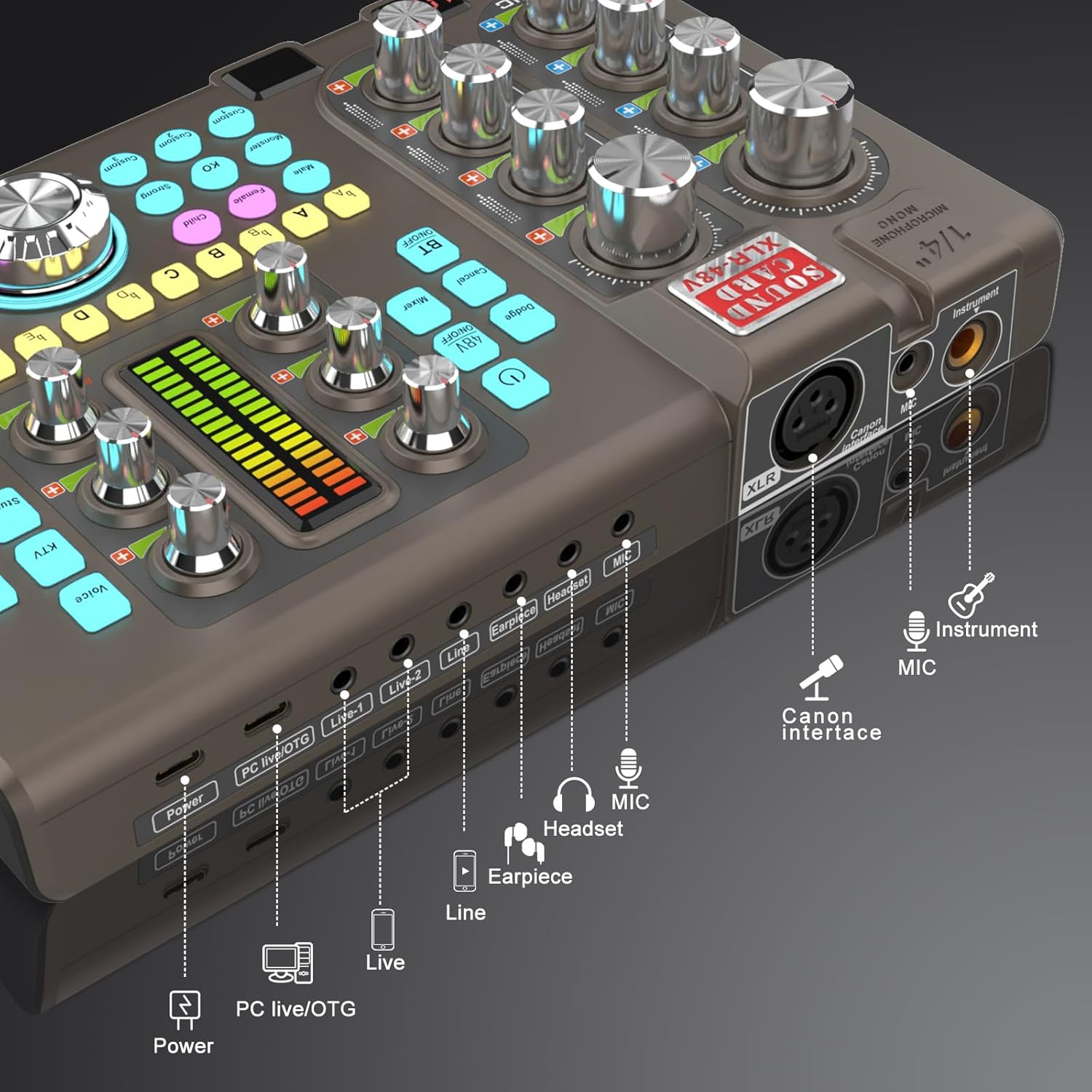
Figure 3: Labeled input and output ports on the SK80 Audio Interface.
Арткы панелде маанилүү туташуу чекиттери бар:
- Электр порту: USB-C for power supply.
- PC Live/OTG Port: USB-C for connection to a computer or OTG-compatible smartphone/tablet.
- Live 1, Live 2, Line-1, Line-2 Ports: 3.5mm audio output ports for connecting to streaming devices or other audio equipment.
- Earpiece Port: 3.5mm output for monitoring audio with an earpiece.
- Гарнитура порту: 3.5mm output for connecting a headset.
- MIC порт: 3.5mm input for a microphone.
- XLR-48V Interface: XLR input for condenser microphones requiring 48V phantom power.
- Instrument Port: 1/4" (6.35mm) input for connecting instruments like guitars.
4. Орнотуу
4.1. Аппаратты күйгүзүү
- Connect the USB Charging Cable to the Күч port on the SK80 and to a USB power adapter (not included) or a computer USB port.
- Press and hold the power button on the control panel to turn on the device.
4.2. Микрофондорду туташтыруу

Figure 4: XLR-48V and Instrument input ports.
- For Condenser Microphones (requiring 48V Phantom Power): Connect your XLR microphone cable to the XLR-48V Interface портун басыңыз. 48V КҮЙГҮЗҮҮ/ӨЧҮРҮҮ button on the control panel to activate phantom power. (Note: 48V is off by default to conserve battery. A light indicator will confirm activation.)
- For Dynamic Microphones or Microphones with 3.5mm Jack: Микрофонуңузга туташтырыңыз MIC портуна 3.5 мм аудио кабелин колдонуп туташтырыңыз.
4.3. Connecting Instruments
Аспапыңызды (мисалы, гитара) туташтырыңыз Инструмент port using a 1/4" (6.35mm) cable.
4.4. Connecting to a Computer or Smartphone
- USB аркылуу: Use the USB Charging Cable to connect the PC Live/OTG port to your computer. The device will be recognized as an audio input/output device.
- Bluetooth аркылуу: басыңыз BT ON/OFF button on the control panel. On your smartphone or tablet, search for and connect to the SK80 via Bluetooth settings.
4.5. Мониторинг түзмөктөрүн туташтыруу
- наушниктерди туташтырыңыз Гарнитура port for monitoring your audio.
- Connect an earpiece to the Кулакчын port for discreet monitoring.
5. Иштөө нускамалары
5.1. Үн деңгээлин жөндөө

Figure 5: Audio adjustment knobs.
- колдонуу MIC VOL knobs (High, Middle, Low) to fine-tune your microphone's equalization.
- тууралаңыз Tone Vol knob for overall microphone tone.
- Control the output level with the Жаздыруу баскыч.
- тууралаңыз Line Vol for line input sources and Instrumental Vol for connected instruments.
- The Monitor Vol knob controls the volume of your monitoring headphones/earpiece.
5.2. Using Reverb Effects
The SK80 offers 6 reverb modes: VOICE, KTV, STUDIO, CONCERT, CORRECT, and MC. Select your desired mode using the dedicated buttons. Adjust the reverb depth and width using the corresponding knobs.
5.3. Customizing Sound Pads

Figure 6: Customizable sound pads.
The SK80 features 3 customizable sound pads. Each pad can record up to 30 seconds of audio. To record:
- Алардын бирин басып, кармап туруңуз Ыңгайлаштырылган buttons (Custom 1, 2, or 3) until it starts blinking.
- Record your desired audio (e.g., from a microphone, connected device, or Bluetooth input).
- Ошол эле бас Ыңгайлаштырылган button again to stop recording. The button will stop blinking.
- басыңыз Ыңгайлаштырылган button once to play the recorded sound. You can adjust the volume of each pad.
5.4. Voice Changer Functions
Transform your voice using the Үн алмаштыргыч feature. Select from Male, Female, Child, or Monster voices. Adjust the ҮН ӨЗГӨРҮҮ knob to modify the pitch and create various vocal effects.
5.5. Ызы-чууну азайтуу

Figure 7: Noise reduction display.
жандырыңыз Noise Reduction button to minimize environmental background noise. The device features a 15-level noise reduction system. The display shows the current noise reduction level.
5.6. Live Sound Effects
The SK80 includes 11 dynamic live sound effects (e.g., Dodge, Muffled, Play In, Laughter, Kiss, Gunfire). Press the corresponding buttons to trigger these effects during your live stream or recording. Each effect typically lasts for approximately 4 seconds.
6. Техникалык тейлөө
- Аппаратты таза, жумшак, кургак чүпүрөк менен сүртүңүз. Суюк тазалагычтарды же эриткичтерди колдонуудан алыс болуңуз.
- Аппаратты түз күн нурунан жана экстремалдык температурадан алыс салкын, кургак жерде сактаңыз.
- Аппаратты түшүрүүдөн же катуу таасирлерден сактаныңыз.
- The built-in 3000mAh battery provides approximately 3-5 hours of operation. Recharge the device when the battery indicator is low.
7. Кыйынчылыктарды
- Үн чыгышы жок:
- Check all cable connections (microphone, headphones, output to PC/streaming device).
- Ensure volume knobs (MIC VOL, Recording, Monitor Vol) are turned up.
- Verify that the correct audio input/output device is selected on your computer or streaming software.
- Микрофон иштебейт:
- If using a condenser microphone, ensure 48V phantom power is activated.
- Check microphone cable integrity.
- Confirm the microphone is properly connected to the correct input port (XLR or 3.5mm MIC).
- Аудиодогу статикалык же ызы-чуу:
- Activate the Noise Reduction feature.
- Кабелдик туташуулардын боштугун текшериңиз.
- Жакын жерде күчтүү электромагниттик тоскоолдук булактары жок экенине ынаныңыз.
- Adjust input gain levels to avoid clipping.
- Bluetooth туташуу маселелери:
- Ensure the BT ON/OFF button is activated.
- Make sure the SK80 is discoverable and within range of your device.
- Түзмөктү жупташып, кайра жупташып көрүңүз.
8. Техникалык шарттар
| Элемент моделинин номери | SK80 |
| Бренд | hosabely |
| Байланыш технологиясы | Bluetooth, USB |
| Каналдардын саны | 4 |
| Элемент Салмагы | 1.67 фунт (0.76 кг) |
| Пакеттин өлчөмдөрү | 12.28 x 7.56 x 2.36 дюйм |
| Батарея түрү | Литий Полимер (3000mAh) |
| Шайкеш түзмөктөр | Smartphone, PC, Guitar |
| Операциялык системаны колдоо | Linux, Windows, macOS |
| Колдоого алынган программалык камсыздоо | Ableton Live, FL Studio, Pro Tools, Logic Pro, Cubase (and others) |
9. Кепилдик жана колдоо
For any questions or issues regarding your hosabely SK80 Audio Interface, please refer to the seller's contact information provided at the point of purchase. Please retain your proof of purchase for warranty claims.
Ask a question about this manual
Ask about setup, troubleshooting, compatibility, parts, safety, or missing instructions. Manuals+ will review the question and use this page’s manual context to help answer it.