
Introduction
This manual provides detailed instructions for the installation, operation, and maintenance of your MekedeTech Android Car Radio Stereo. This head unit is designed for Ford Fiesta models manufactured between 2008 and 2017, offering an enhanced in-car entertainment and navigation experience.
Please read this manual thoroughly before installation and use to ensure proper functionality and to maximize your product's performance.
Орнотуу жана орнотуу
The MekedeTech Android Car Radio Stereo is designed for a plug-and-play installation in compatible Ford Fiesta models (2008-2017). The package includes all necessary accessories for installation, such as the dash kit, power cable, RCA cable, reversing camera cable, and USB cables.
Орнотуу бүттүview
The installation process involves replacing your existing car radio with the new Android head unit. Ensure the vehicle's power is disconnected before beginning the installation.

Image: Comparison of the Ford Fiesta dashboard before and after the installation of the MekedeTech Android Car Radio Stereo. The 'Before' image shows the original car radio, while the 'After' image displays the new 9-inch touch screen head unit seamlessly integrated into the dashboard.
Cooling Fan Setup
The unit features an integrated cooling fan system to manage CPU temperature, especially during prolonged use or in high-temperature environments. Proper setup of the cooling fan ensures optimal performance and longevity of the device.

Image: A detailed diagram showing the internal components of the head unit, including the CPU, RAM, and ROM. It highlights the cooling fan's position and provides a visual guide for connecting and activating the cooling fan through the system settings. The diagram also illustrates temperature differences with and without the cooling fan.
- Туташуу: Ensure the cooling fan cable is securely connected to the designated port on the head unit.
- Жөндөөлөргө кирүү: Navigate to 'Settings' > 'Device' > 'Sound' on the head unit's interface.
- AMP КҮЙҮК: Locate and activate the 'AMP ON' option under 'Device' settings.
- Күйөрманды активдештирүү: The cooling fan will start automatically once activated.
The unit retains all original steering wheel control functions, allowing for easy adjustment of songs, channels, and volume without removing your hands from the steering wheel, enhancing convenience and safety.
Иштөө нускамалары
Your MekedeTech Android Car Radio Stereo offers a range of features for navigation, communication, and entertainment. This section covers the basic operation of key functionalities.
Зымсыз CarPlay жана Android Auto
The head unit comes with built-in wireless CarPlay and wired Android Auto capabilities, providing seamless integration with your smartphone for navigation, music, and communication.

Image: Visual guide demonstrating the connection process for Wireless Car-Play (for iOS devices) and Wireless Auto (for Android devices). It shows the steps: 1. Connect Bluetooth, 2. Click on 'Car Link', and wait for connection. It also notes that Car-Play and Auto can be connected via USB cable.
Туташуу кадамдары:
- Bluetooth туташтыруу: Pair your smartphone with the head unit via Bluetooth.
- Select 'Car Link': On the head unit's screen, select the 'Car Link' application.
- Байланышты күтүңүз: The system will automatically establish the CarPlay or Android Auto connection. For Android Auto, a wired USB connection is also an option.
4G LTE жана Wi-Fi байланышы
The unit supports 4G LTE connectivity via a SIM card and Wi-Fi for internet access. This allows for online navigation, streaming, and app usage directly from the head unit.
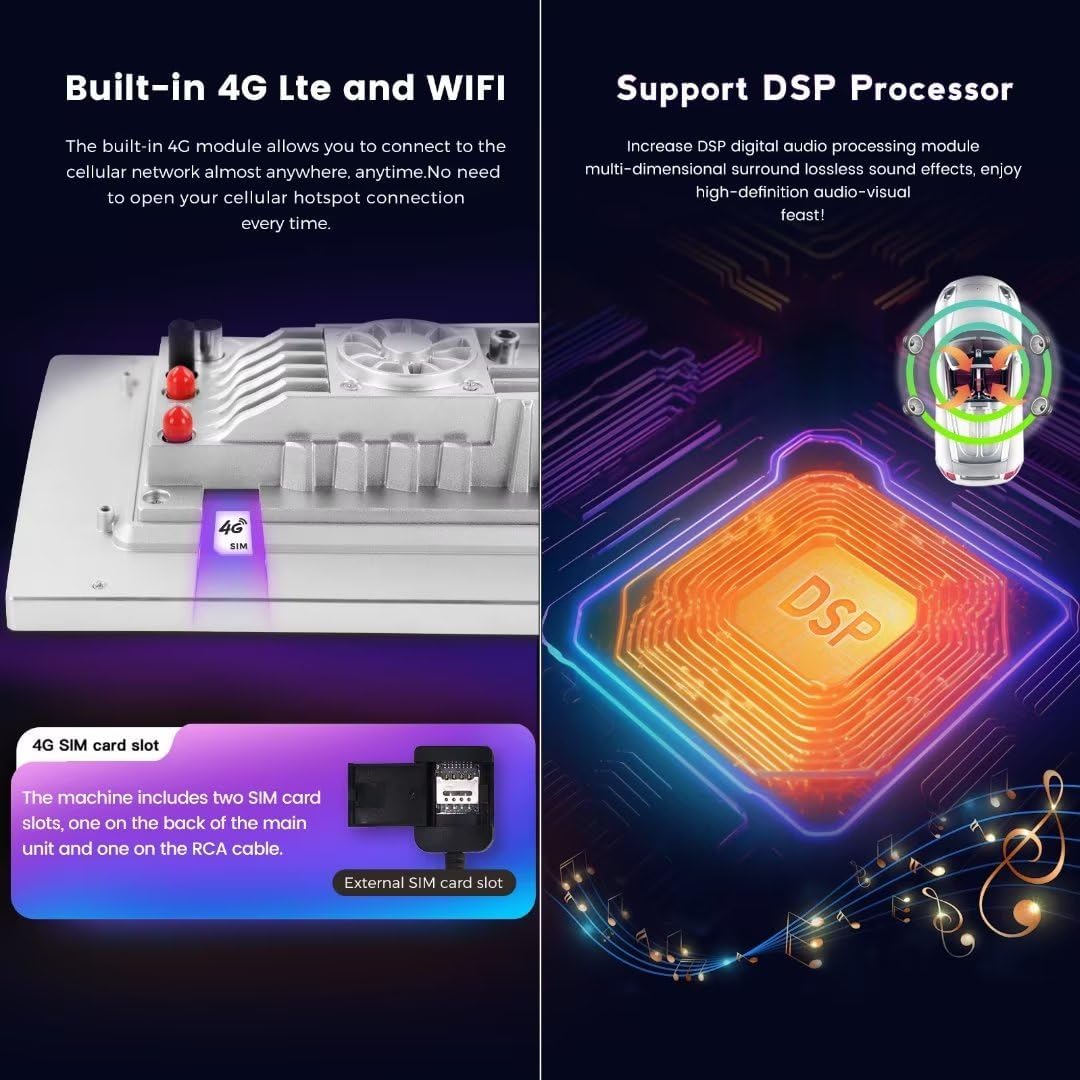
Image: A visual representation of the built-in 4G LTE module and SIM card slot, indicating where to insert a 4G SIM card. It also features a diagram of the Digital Signal Processor (DSP), highlighting its role in enhancing audio quality.
- 4G LTE: Insert a 4G SIM card into the designated slot to access the cellular network. The unit includes two SIM card slots: one on the back of the main unit and one on the RCA cable.
- Wi-Fi: Connect to available Wi-Fi hotspots for internet access.
GPS навигациясы
The head unit features built-in GPS navigation with pre-installed maps, providing accurate directions and real-time traffic information (requires internet connection for real-time data).
Bluetooth 5.0
Utilize Bluetooth 5.0 for high-quality hands-free calls and audio streaming from your paired smartphone.
DSP Sound System
The integrated Digital Signal Processor (DSP) enhances audio quality, providing a multi-dimensional surround sound experience.
Техникалык тейлөө
To ensure the longevity and optimal performance of your MekedeTech Android Car Radio Stereo, follow these maintenance guidelines:
- Экранды тазалоо: Use a soft, lint-free cloth to gently wipe the touch screen. Avoid abrasive cleaners or solvents that may damage the display.
- Программалык камсыздоо жаңыртуулары: Системанын натыйжалуу иштешин жана эң акыркы функциялар менен коопсуздук жаңыртуулары бар экенин текшерүү үчүн программалык камсыздоонун жаңыртууларын мезгил-мезгили менен текшерип жана орнотуп туруңуз.
- Температураны көзөмөлдөө: While the unit has a cooling fan, avoid exposing it to extreme temperatures for extended periods.
- Кабелдик байланыштар: Бардык кабелдер коопсуз туташып калганын текшериңиз. Бошоң байланыштар үзгүлтүксүз көйгөйлөргө алып келиши мүмкүн.
Проблемаларды чечүү
If you encounter issues with your MekedeTech Android Car Radio Stereo, refer to the following common troubleshooting steps:
| Көйгөй | Мүмкүн себеп | Чечим |
|---|---|---|
| Түзмөк күйбөйт | Электр байланышы бош, сактагыч күйүп кетти | Электр кабелдерин жана унаанын сактагычтарын текшериңиз. Туура орнотулганын текшериңиз. |
| Үн чыгышы жок | Incorrect audio settings, loose speaker wires | Verify audio settings (volume, mute). Check speaker wire connections. |
| GPS сигналын жоготуу | Антеннанын тыгылып калышы, спутниктин начар кабыл алынышы | GPS антеннасынын таза болушун текшериңиз view асмандын. Антенна байланышын текшериңиз. |
| CarPlay/Android Auto туташпай жатат | Bluetooth not paired, incorrect app selection, cable issue (for wired) | Re-pair Bluetooth. Ensure 'Car Link' app is selected. Try a different USB cable if using wired connection. |
| Сенсордук экран жооп бербейт | Software glitch, temporary freeze | Restart the unit. If issue persists, perform a factory reset (refer to advanced settings). |
If these steps do not resolve the issue, please contact MekedeTech customer support for further assistance.
Техникалык шарттар
Below are the technical specifications for the MekedeTech Android Car Radio Stereo (Model: 8-Core 8+256G).
| Өзгөчөлүк | Спецификация |
|---|---|
| Бренд | MekedeTech |
| Шайкеш унаалар | Ford Fiesta (2008-2017) |
| Операция системасы | Android 12 OS |
| CPU | 8 ядролуу A53 1.8 ГГц |
| Эстутум (RAM) | 8 ГБ |
| Сактагыч (ROM) | 256 ГБ |
| Screen Size | 9 дюйм |
| Дисплей түрү | IPS LCD |
| Сенсордук экран түрү | Capacitive |
| Резолюция | 1280 * 720 |
| Power Output | 4*50 Вт |
| Байланыш | 4G LTE, Wi-Fi, Bluetooth 5.0 |
| Өзгөчөлүктөр | Wireless CarPlay, Wired Android Auto, Built-in GPS Navigation, DSP Sound System, Steering Wheel Control Support |
| Аудио форматтары | APE/FLAC/WAV/MP3/WMA ж.б. |
| Видео форматтары | MKV/RMVB/AVI/MP4/MDV ж.б. |
| Picture Жылдар | PNG/JPEG/JPG/GIF/WBMP/BNP ж.б. |
| Карта түрү | Бүткүл дүйнөлүк |
| Башкаруу ыкмасы | тийүү |
| Өндүрүүчү | Shenzhen Mekede Technology Co.,Ltd |
Кепилдик маалымат
The MekedeTech Android Car Radio Stereo comes with a 1 жылдык кепилдик сатып алынган күндөн тартып. Бул кепилдик өндүрүштүк кемчиликтерди жана нормалдуу колдонуудагы бузулууларды камтыйт. Кепилдик дооматтары үчүн сатып алганыңыздын далилин сактап коюңуз.
Кепилдик туура эмес орнотуудан, туура эмес колдонуудан, кырсыктардан, уруксатсыз оңдоодон же кадимки эскирүүдөн келип чыккан зыянды камтыбайт.
Кардарларды колдоо
For technical assistance, troubleshooting beyond this manual, or warranty inquiries, please contact MekedeTech customer support.
- Өндүрүүчү: Shenzhen Mekede Technology Co.,Ltd
- Онлайн колдоо: зыярат кылыңыз MekedeTech Store on Amazon продукт маалымат жана колдоо булактары үчүн.
Please have your product model number (8-Core 8+256G) and purchase details ready when contacting support.