
Introduction
This manual provides comprehensive instructions for the installation, operation, and maintenance of the Zapco HB-410-ADSP 10-Channel DSP / 8-Channel Class D Amplifier. The HB-410-ADSP is designed to integrate advanced digital sound processing with efficient amplification, offering a versatile solution for car audio systems. Please read this manual thoroughly before using the device to ensure proper functionality and longevity.

Сүрөт: Фронт view of the Zapco HB-410-ADSP ampкөтөргүч, көрсөтүүчүasing анын компакттуу дизайны жана бренди.
Өзгөчөлүктөрү жана спецификациялары
Негизги өзгөчөлүктөрү:
- 10-Channel Digital Sound Processor (DSP): Equipped with a 31-band equalizer for precise audio tuning.
- 8-канал класс D Ampөмүр берүүчү: Delivers 70 Watts (Max) per channel.
- Киргизүү параметрлери: Includes 4-channel high-level inputs and 2-channel RCA inputs for versatile source connectivity.
- Чыгуу параметрлери: Features 10-channel RCA outputs for system expansion.
- Plug & Play шайкештиги: Designed for straightforward integration into existing audio systems.
- Bluetooth 5.1 аркылуу агым берүү: Enables wireless audio playback from compatible devices.
- Integrated Music Player: Supports various audio formats including MP2, MP3, MP4, WMA, APE, FLAC, AAC, M4A, WAV, AIF, and AIFC.
- DSP Control Tools: Accessible via PC software and a dedicated mobile application.
Техникалык мүнөздөмөлөрү:
| Модель номери | HB-410-ADSP |
| Ampжашоо күч | 8 x 70 Ватт (максималдуу) |
| Каналдардын саны | 10 (DSP), 8 (Ampөмүрлүү) |
| Продукциянын өлчөмдөрү (L x W x Y) | 160 мм x 115 мм x 45 мм (6.3 x 4.53 x 1.77 дюйм) |
| Салмагы | Болжол менен 6 фунт |
| Монтаж түрү | Surface Mount |
| Bluetooth версиясы | 5.1 |
| Колдоого алынган аудио форматтары | MP2, MP3, MP4, WMA, APE, FLAC, AAC, M4A, WAV, AIF, AIFC |
Орнотуу жана орнотуу
Оптималдуу иштөө үчүн туура орнотуу абдан маанилүү. Орнотууну квалификациялуу адис аткаруусу сунушталат. Зымдарды туташтыра баштоодон мурун, унаанын аккумулятору ажыратылганын текшериңиз.
Байланыш бүттүview:
- Кубат туташуулары: Connect the +12V, GND, and REM (Remote Turn-On) wires to the appropriate terminals.
- Жогорку деңгээлдеги киргизүүлөр: Use the 4-channel high-level inputs for direct connection to factory head unit speaker outputs.
- RCA киргизүүлөр: Utilize the 2-channel RCA inputs for aftermarket head units or other audio sources.
- RCA чыгаруулары: The 10-channel RCA outputs allow for connection to additional amplifiers or external audio processors.
- Динамиктин чыгышы: Connect your speakers to the designated speaker output terminals.
- PC USB: Connect to a computer for DSP software control and configuration.

Сүрөт: Деталдаштырылган view of the Zapco HB-410-ADSP's input and output terminals, including RCA, high-level, power, and USB connections.
Иштөө нускамалары
The HB-410-ADSP offers extensive control over your audio system through its Digital Sound Processor and integrated features.
Digital Sound Processor (DSP) Control:
The DSP can be configured using either a PC application or a mobile application. Both interfaces provide access to the 31-band equalizer and other DSP tools for fine-tuning your audio.
- Компьютердик Программалык камсыздоо: туташтыруу amplifier to your computer via the PC USB port. Install the Zapco DSP software to access the full graphical user interface (GUI) for detailed adjustments.
- Мобилдик колдонмо: Download the Zapco Harmony DSP mobile application from your device's app store. Connect via Bluetooth to control basic DSP functions and the integrated music player.
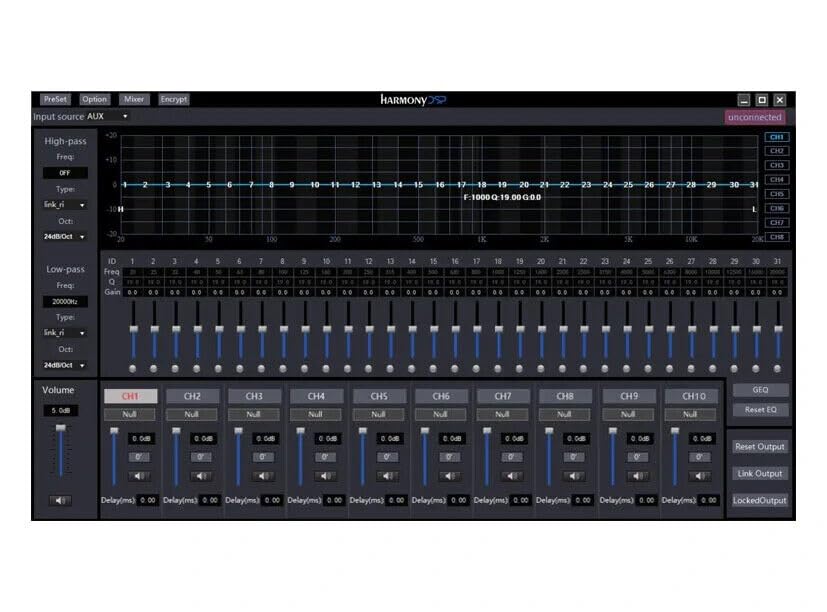
Сүрөт: Screenshot of the Zapco Harmony DSP PC software, showing the 31-band equalizer and channel controls for precise audio tuning.
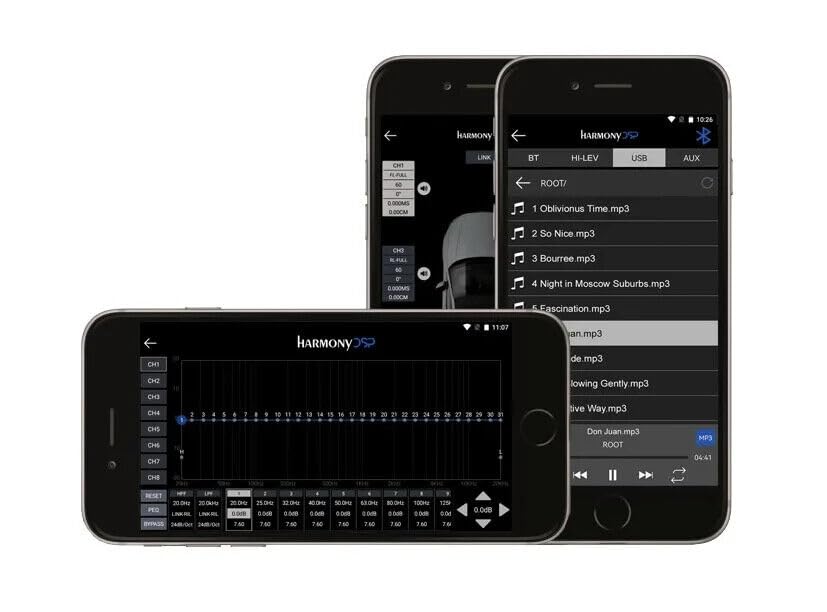
Сүрөт: Screenshots of the Zapco Harmony DSP mobile application on a smartphone, illustrating the interface for Bluetooth streaming and DSP adjustments.
Bluetooth агымы:
To stream audio wirelessly, enable Bluetooth on your mobile device and pair it with the HB-410-ADSP. The device name will typically appear as "Zapco HB-410-ADSP" or similar. Once paired, you can play audio from your device through the ampөмүрлүү.
Integrated Music Player:
The amplifier includes a built-in music player that supports various file formats. You can manage and play music files directly through the mobile application.
Техникалык тейлөө
The Zapco HB-410-ADSP is designed for durability and requires minimal maintenance. Follow these guidelines to ensure its continued performance:
- Тазалоо: Сыртын тазалоо үчүн жумшак, кургак чүпүрөктү колдонуңуз amplifier. Avoid using harsh chemicals or abrasive cleaners.
- Вентиляция: камсыз кылуу ampлифтинин желдетүү тешиктери ысып кетпеши үчүн тосулган эмес.
- Байланыштары: Мезгил-мезгили менен бардык зымдарды байланыштарды текшерип туруңуз, алар бекем жана коррозиядан таза.
- Курчап турган чөйрө: орнотуу amplifier in a location that is protected from excessive moisture, dust, and extreme temperatures.
Проблемаларды чечүү
If you encounter issues with your Zapco HB-410-ADSP, refer to the following common problems and solutions:
- Кубат жок:
- Check all power connections (+12V, GND, REM) for proper contact and voltage.
- Verify that the vehicle's battery is charged.
- Бардык орнотулган сактагычтардын үзгүлтүксүздүгүн текшериңиз.
- Аудио чыгышы жок:
- Бардык киргизүү жана чыгаруу кабелдеринин бекем туташтырылганын текшериңиз.
- Check the source device (head unit, phone) for audio output.
- Verify DSP settings; ensure channels are not muted or gain is not set too low.
- Confirm speaker connections are correct and speakers are functional.
- Бурмаланган аудио:
- Reduce input gain if the signal is clipping.
- Динамиктин импедансынын шайкештигин текшериңиз ampөмүрлүү.
- Review DSP equalizer and crossover settings for anomalies.
- Mobile App Issues (Input/Output Mapping):
- Some users have reported inconsistencies with input channel mapping to outputs when using the mobile application. If precise mapping is required, it is recommended to use the PC software for configuration.
- Мобилдик тиркеменин акыркы версиясына жаңыртылганын текшериңиз.
- Bluetooth туташуу көйгөйлөрү:
- камсыз кылуу amplifier is in pairing mode or discoverable.
- Delete previous pairings on your mobile device and re-attempt pairing.
- Move the mobile device closer to the amplifier to rule out range issues.
Кепилдик жана колдоо
For warranty information, please refer to the documentation provided with your purchase or visit the official Zapco website. If you require technical assistance or have questions not covered in this manual, please contact Zapco customer support through their official channels.
Онлайн ресурстар: For additional support and software downloads, visit the Zapco Store on Amazon or the official Zapco webсайт.