
Introduction
Сатып алганыңыз үчүн рахматasing the 7artisans AF 50mm F1.8 Full Frame Lens. This manual provides essential information for the safe and effective use of your new lens. Please read it thoroughly before use and keep it for future reference.
This 50mm F1.8 lens is designed for Sony E-Mount full-frame cameras, offering a large aperture, fast autofocus, and support for advanced features like face and eye recognition. Its versatile focal length makes it suitable for a wide range of photographic applications, from portraits to street photography.
Коопсуздук маалыматы
- Do not look at the sun or bright light sources through the lens, as this may cause permanent vision impairment.
- Keep the lens away from direct sunlight when not in use to prevent fire hazards or damage to internal components.
- Линзаны өтө жогорку температурага, жогорку нымдуулукка же чаңга дуушар кылбаңыз.
- Линзаны өз алдынча бөлүктөргө бөлүүгө же оңдоого аракет кылбаңыз. Жардам алуу үчүн ыйгарым укуктуу тейлөө кызматына кайрылыңыз.
- Балдар жетпеген жерде сактаңыз.
Пакеттин мазмуну
Пакетиңизде бардык буюмдар бар экенин текшериңиз:
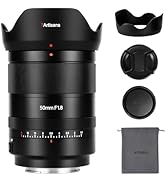
- 7artisans AF 50mm F1.8 Full Frame Lens
- Алдыңкы линзанын капкагы
- Арткы линзанын капкагы
- Линза капкагы
- Линзалык баштык
- Көрсөтмө (бул документ)

Image: The 7artisans AF 50mm F1.8 lens shown with its included accessories: front and rear lens caps, lens hood, and a soft pouch.
Продукт бүттүview
The 7artisans AF 50mm F1.8 lens features a robust metal construction with a sleek black finish. Key components include:
- Фокус шакеги: For manual focusing.
- Диафрагма шакеги: Allows switching between automatic and manual aperture control.
- AF/MF которгучу: Toggles between autofocus and manual focus modes.
- Линзаны орнотуу: Sony E-Mount compatible.
- USB-C порту: Микропрограмма жаңыртуулары үчүн.
Сүрөт: жакын план view of the lens barrel, highlighting the AF/MF switch for mode selection.

Сүрөт: деталдуу view of the lens mount, showing the electronic contacts and the integrated USB-C port for firmware updates.
Жайгашуу
- Линзаны тиркөө:
- Align the white dot on the lens barrel with the white dot on your camera's lens mount.
- Линзаны камеранын бекиткичине акырын киргизиңиз.
- Линзаны саат жебеси боюнча, ал бекем кулпулангандыгын көрсөтүп, ордуна чыкмайынча айлантыңыз.
- Линзаны алып салуу:
- Камераңыздын корпусундагы линзаларды чыгаруу баскычын басып, кармап туруңуз.
- Rotate the lens counter-clockwise until it detaches from the camera mount.
- Линзанын элементтерин коргоо үчүн алдыңкы жана арткы линзанын капкактарын бекитиңиз.
- Линза капкагын бекитүү:
- Линзанын капкагын линзанын алдыңкы тарабына тууралаңыз.
- Twist the hood clockwise until it locks securely.
- The lens hood helps reduce flare and provides physical protection to the front element.

Image: The 7artisans AF 50mm F1.8 lens securely mounted on a Sony mirrorless camera, viewтараптан.
Линзаны иштетүү
1. Focus Mode Selection (AF/MF)
Use the AF/MF switch on the lens barrel to select your desired focus mode:
- Автофокус (автофокус): The camera will automatically focus on the subject. This lens features a high-speed STM stepping motor for quick and accurate autofocus performance.
- MF (Кол менен Фокустоо): You can manually adjust the focus by rotating the focus ring on the lens.
Сүрөт: деталдуу view of the AF/MF switch, allowing users to toggle between autofocus and manual focus modes.
2. Диафрагманы башкаруу
The lens features an aperture ring that can be switched between automatic and manual control:
- Automatic Aperture: Set the aperture ring to the 'A' position. The camera will control the aperture settings.
- Manual Aperture: Rotate the aperture ring to select your desired F-stop (F1.8 to F16). This provides precise control over depth of field and exposure.
The large F1.8 aperture allows for excellent low-light performance and the creation of beautiful background blur (bokeh).
3. Face/Eye Recognition Support
This lens supports your camera's face and eye recognition functions. When enabled on your camera, the lens will automatically set accurate focusing points and exposure for human faces or eyes, ensuring sharp portraits.

Image: A photograph illustrating the camera's eye recognition feature actively focusing on a subject's eye.
4. Микропрограмманы жаңыртуу
The integrated USB-C port allows for easy firmware updates. Connect the lens to your computer using a USB-C cable and follow the instructions provided on the 7artisans official website to update the firmware. This ensures optimal performance and compatibility with future camera models.
Сүрөт: деталдуу view of the lens mount, showing the electronic contacts and the integrated USB-C port for firmware updates.
Техникалык тейлөө
- Тазалоо: Use a soft, lint-free cloth to clean the lens barrel. For lens elements, use a lens brush to remove dust, then gently wipe with a lens cleaning cloth and lens cleaning solution.
- Сактагыч: When not in use, store the lens with both caps attached in a cool, dry place away from direct sunlight and moisture. Consider using a desiccant to prevent mold growth.
- Колдонуу: Avoid dropping or subjecting the lens to strong impacts, as this can damage internal optical elements.
Проблемаларды чечүү
1. Lens not focusing:
- Ensure the AF/MF switch is set to the desired mode (AF for autofocus).
- Check camera settings to ensure autofocus is enabled and the correct focus area is selected.
- Линзанын жана камеранын корпусундагы линзанын контакттарын тазалаңыз.
2. Images are blurry:
- Линзанын туура фокусталганын текшериңиз.
- Check shutter speed to avoid camera shake, especially in low light.
- Ensure the lens elements are clean and free from smudges or dust.
3. Lens not recognized by camera:
- Линзаны алып салып, кайра орнотуңуз, ал ордуна бекем орношун камсыз кылыңыз.
- Линзадагы жана камеранын корпусундагы электрондук контакттарды таза, кургак чүпүрөк менен сүртүңүз.
- Check for available firmware updates for both the lens and your camera.
Техникалык шарттар
| Өзгөчөлүк | Деталь |
|---|---|
| Бренд | 7 кол өнөрчүлөр |
| Модель номери | AF5018EB |
| Фокустун узундугу | 50мм |
| Максималдуу диафрагма | F1.8 |
| Минималдуу диафрагма | F16 |
| Линзанын түрү | Стандарттык Prime Lens |
| Шайкеш орнотуулар | Sony E-Mount |
| Оптикалык структура | 11 тайпадагы 9 элемент |
| Диафрагма бычактары | 11 даана |
| Бурчу View | D:46.8°, H:39.6°, V:27.0° |
| Эң жакын Фокустоо Дистанциясы | 0.5M - ∞ |
| Чыпка өлчөмү | 58мм |
| Элемент Салмагы | 1.78 фунт (болжол менен 807 г) |
| Продукциянын өлчөмдөрү | 40.94 x 28.35 x 28.35 дюйм |
Кепилдик жана колдоо
For warranty information, technical support, or service inquiries, please visit the official 7artisans webсайтка же ыйгарым укуктуу дилериңизге кайрылыңыз. Кепилдик дооматтар үчүн сатып алганыңыздын далилин сактаңыз.
For the latest firmware updates and additional resources, please visit: 7artisans Official Store
Расмий продукт Videos
Watch these official videos for more information on the 7artisans AF 50mm F1.8 lens:
7artisans AF50mm F1.8
Видео: Продукциянын расмий көргөзмөсүasing the features and capabilities of the 7artisans AF 50mm F1.8 lens.
7artisans AutoFocus 50mm F1.8
Video: Another official product video demonstrating the autofocus performance and image quality of the 7artisans 50mm F1.8 lens.