
Introduction
The PETLIBRO PLAF203 Smart Pet Feeder is designed to provide convenient and reliable feeding for your pets. Equipped with a 1080P HD camera, two-way audio, and smart app control, this feeder allows you to monitor and manage your pet's meals remotely. It supports both 2.4GHz and 5GHz WiFi networks for flexible connectivity.
Негизги өзгөчөлүктөр төмөнкүлөрдү камтыйт:
- Колдонмо аркылуу алыстан башкаруу: Manage feeding schedules and dispense food from anywhere using the dedicated PETLIBRO app.
- 1080P HD Camera with Night Vision: Monitor your pet with clear video, even in low light conditions, thanks to infrared night vision.
- Эки тараптуу аудио: Communicate with your pet in real-time.
- Кыймылды жана үндү аныктоо: Receive alerts and record videos when your pet is active (TF card required).
- Anti-Jamming Sensor: Prevents food blockages for consistent feeding.
- Low Food Sensor: Тамак-аштын деңгээли төмөн болгондо сизге кабарлайт.
- Тазалоо оңой: Removable and washable components for hygiene.
Пакеттин мазмуну
- PETLIBRO PLAF203 Smart Pet Feeder
- Дат баспас болоттон жасалган тамак-аш идиш
- Кубаттуу адаптер
- Desiccant баштык
- User Manual
Жайгашуу
1. Пакеттен чыгаруу жана чогултуу
- Таңгактан бардык компоненттерди алып салыңыз.
- Place the stainless steel food bowl into the designated slot at the base of the feeder.
- Ensure the food tank and lid are securely attached.
2. Powering the Feeder
- Кубат адаптерин азыктандыргычка туташтырып, аны розеткага сайыңыз.
- У учурунда резервдик күч үчүнtages, insert 3 D-cell batteries (not included) into the battery compartment at the bottom of the feeder.
3. Колдонмону жүктөп алуу жана орнотуу
- жүктөп алыңыз 'PETLIBRO' App Store (iOS) же Google Play Дүкөнүнөн (Android) колдонмо. Note: Do not download the 'PETLIBRO LITE' app.
- Каттоо эсебиңизге катталыңыз же сизде мурунтан эле бар болсо кириңиз.
4. Wi-Fiга туташуу
- Open the PETLIBRO app and follow the on-screen instructions to add your device.
- The feeder supports both 2.4GHz and 5GHz Wi-Fi networks. Ensure your smartphone is connected to the same network during setup.
- The app will guide you through the pairing process, which typically involves scanning a QR code on the feeder or entering Wi-Fi credentials.
5. Filling the Food Tank
- Фидер капкагын ачыңыз.
- Fill the food tank with dry pet kibble. The feeder has a 5-liter capacity.
- Place the desiccant bag in its designated holder under the lid to maintain food freshness.
- Close the lid securely using the twist-lock mechanism to prevent pets from accessing food.
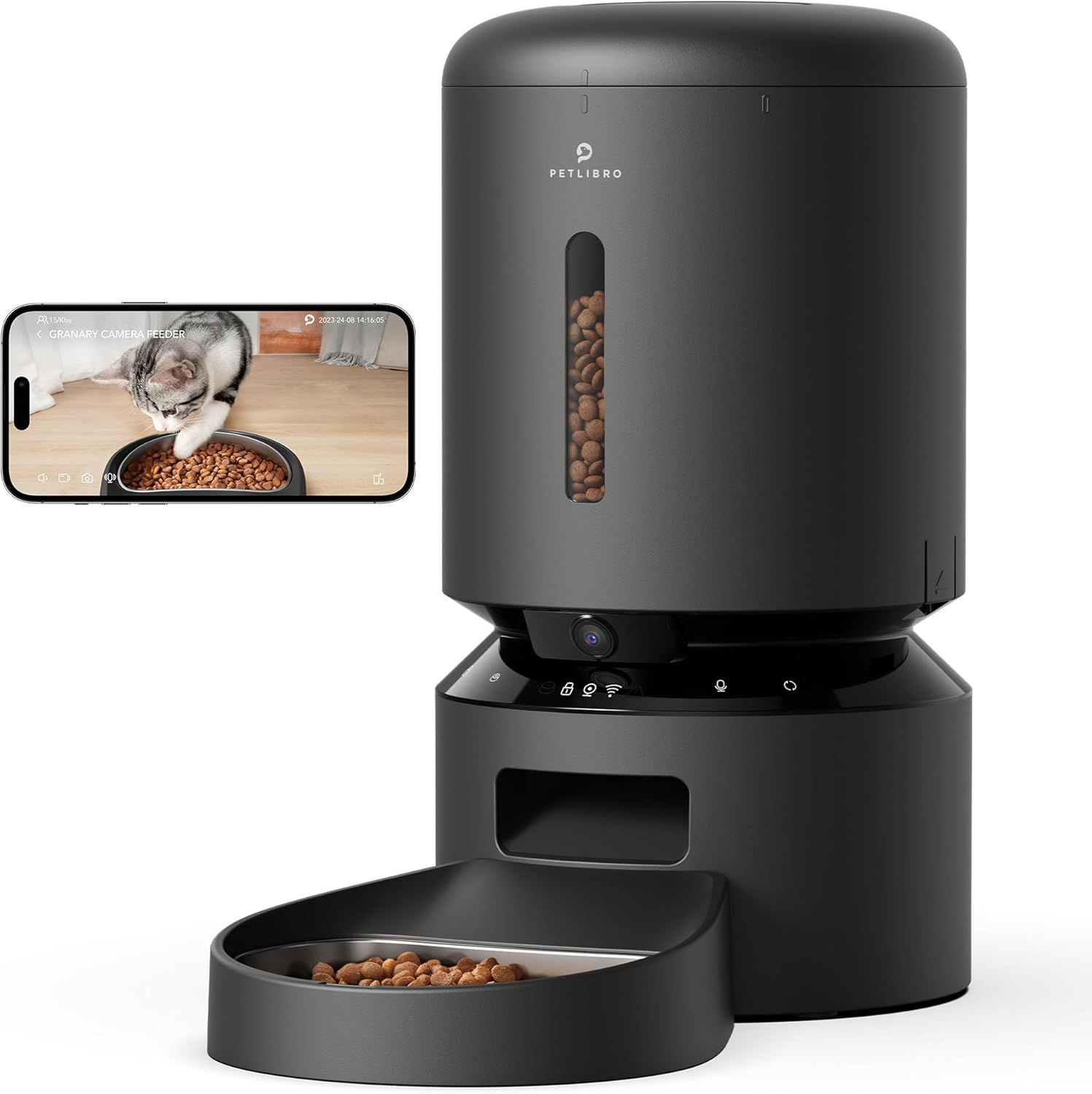
Image: PETLIBRO PLAF203 Smart Pet Feeder with Camera, showing the main unit and food bowl.
Иштөө нускамалары
1. Setting Feeding Schedules
Use the PETLIBRO app to customize your pet's feeding schedule:
- Колдонмону ачып, өзүңүздүн берүүчүнү тандаңыз.
- "График" бөлүмүнө өтүңүз.
- Set desired feeding times and the number of portions for each meal.
- Жөндөөлөрүңүздү сактаңыз. Бергич программаланган убакытта тамакты автоматтык түрдө берет.

Image: Smartphone screen displaying the PETLIBRO app interface for setting feeding schedules and portion sizes.
2. Кол менен тамактандыруу
You can dispense food instantly:
- Колдонмо аркылуу: On the app's main screen, select the 'Feed Now' option to dispense a single portion.
- Түзмөк аркылуу: Press and hold the manual feed button on the feeder (refer to device diagram for location) to dispense food.
3. Түз эфирдеги мониторинг жана жаздыруу
The built-in 1080P HD camera allows you to watch your pet:
- Live View: Access the live video stream through the PETLIBRO app to see your pet in real-time. The 145° wide-angle lens provides a broad view.
- Түнкү көрүнүш: The camera automatically switches to infrared night vision in low light, ensuring clear visibility of your pet's activities 24/7.
- Видео сактагыч: Insert a TF card (up to 256GB, sold separately) into the feeder to record and store videos. You can review playback within the app.

Image: A cat eating from the feeder, with an overlay showing the 1080P camera view from a smartphone, highlighting motion detection.
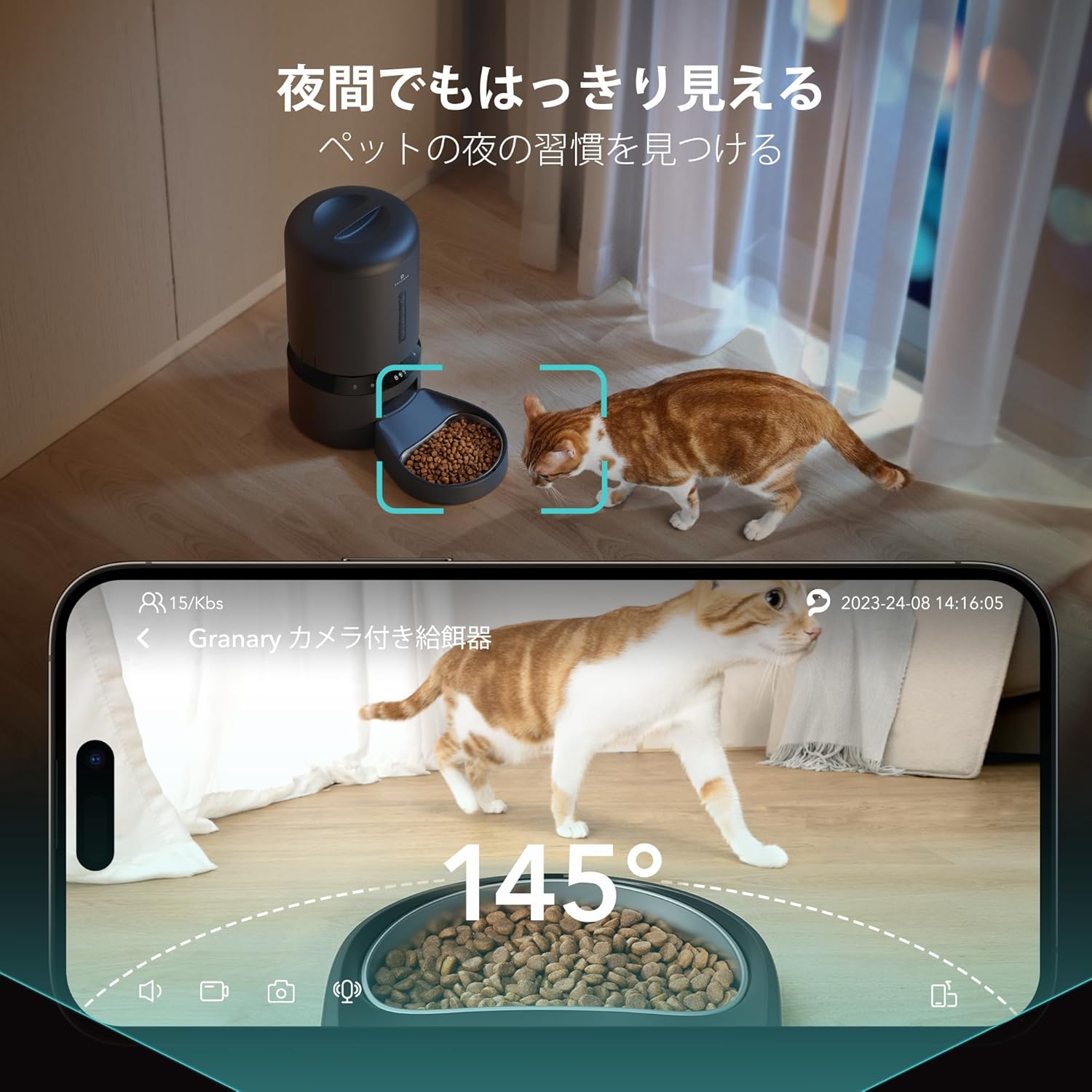
Image: A cat near the feeder at night, demonstrating the clear visibility provided by the 145-degree wide-angle camera with night vision.
4. Two-Way Audio and Voice Recording
- Эки тараптуу сүйлөшүү: Use the microphone and speaker in the app to speak to your pet and hear their responses in real-time.
- Үн жаздыруу: Record a 10-second personalized message that will play automatically at each scheduled feeding time, providing comfort to your pet when you're away.

Image: A person interacting with their pet via the feeder's two-way audio feature, showing a smartphone with a live pet view and speech bubbles.
5. Smart Alerts
- Кыймылды жана үндү аныктоо: The feeder detects your pet's movements and sounds, automatically saving video clips (with TF card) and sending notifications to your smartphone.
- Low Food Alert: Receive notifications on your smartphone when the food level in the tank is running low, prompting you to refill.
- Кептелүүгө каршы: An infrared sensor monitors the food dispenser. If a jam is detected, feeding will automatically pause to prevent issues.
Техникалык тейлөө
Үзгүлтүксүз тазалоо гигиенаны жана фидериңиздин оптималдуу иштешин камсыз кылат.
1. Азыктандыргычты тазалоо
- Алынуучу компоненттер: The feeder lid, food tank, and stainless steel food bowl are designed to be easily removed for cleaning.
- Жуу: Wash these components with mild soap and water. Rinse thoroughly and ensure they are completely dry before reassembling.
- Негизги блок: Негизги блокту жарнама менен сүртүңүзamp кездеме. Негизги блокту сууга салбаңыз.
2. Desiccant Bag Replacement
The desiccant bag helps keep the food fresh. Replace it periodically (e.g., monthly) for best results.
Проблемаларды чечүү
| Көйгөй | Мүмкүн себеп | Чечим |
|---|---|---|
| Бергич Wi-Fi'га туташпай жатат | Incorrect app used; incorrect Wi-Fi band; weak signal. | Ensure you are using the 'PETLIBRO' app (not 'PETLIBRO LITE'). Verify your router supports 2.4GHz or 5GHz and your phone is connected to the correct band during setup. Move the feeder closer to your router. |
| Тамак-аш берилбей жатат | Food jam; empty food tank; power issue. | Check for food blockages in the dispenser. Refill the food tank if empty. Ensure the feeder is powered on and connected to a power source. The anti-jamming sensor should prevent continuous issues. |
| Camera not showing clear image/night vision not working | Low light conditions; camera lens obstructed. | Night vision is infrared and activates automatically in low light. Ensure the camera lens is clean and unobstructed. |
| Билдирмелер алынган жок | App notification settings disabled; feeder not connected to Wi-Fi. | Check your smartphone's notification settings for the PETLIBRO app. Ensure the feeder has a stable Wi-Fi connection. |
| Видео жаздыруу иштебей жатат | No TF card inserted; TF card full or faulty. | Insert a compatible TF card (up to 256GB). Check if the TF card is full and delete old recordings or replace the card. |
Техникалык шарттар
| Өзгөчөлүк | Деталь |
|---|---|
| Модель номери | PLAF203 |
| Бренд | ПЕТЛИБРО |
| Кубаттуулугу | 5 литр |
| Түс | Кара |
| Үй жаныбарларынын түрү | Medium/Small Dogs, Cats |
| Жашоо Сtage | Бардык жашоо Сtages |
| Камеранын чечилиши | 1080P HD |
| Камера бурч | 145° кең бурч |
| Түнкү көрүнүш | Инфракызыл |
| Wi-Fi туташуусу | 2.4 ГГц жана 5 ГГц |
| Колдонмонун шайкештиги | iOS, Android (PETLIBRO App) |
| Видео сактагыч | TF Card (up to 256GB, sold separately) |
| Өзгөчөлүктөр | Motion Detection, Voice Detection, Two-Way Audio, Voice Recording, Feeding Schedule, Anti-Jamming Sensor, Low Food Sensor, BPA-Free |
| Power Source | AC Adapter, 3x D-cell Batteries (backup, not included) |
| Максаттуу колдонуу | Indoor |
Кепилдик жана колдоо
For warranty information, please refer to the product packaging or contact PETLIBRO customer support directly. Keep your purchase receipt for warranty claims.
If you encounter any issues or have questions regarding your PETLIBRO PLAF203 Smart Pet Feeder, please contact PETLIBRO customer support through their official website or the PETLIBRO app. Provide your model number (PLAF203) and a detailed description of the issue for efficient assistance.