
VOLT PLUS TECH F9
VOLT PLUS TECH F9 Wireless V5.3 Bluetooth Earbuds User Manual
Модел: F9
1. Киришүү
Thank you for choosing the VOLT PLUS TECH F9 Wireless V5.3 Bluetooth Earbuds. This manual provides essential information for setting up, operating, and maintaining your new earbuds. Please read it carefully before use.
Пакеттин мазмуну
- 2 x Зымсыз Кулакчын
- 1 x 2000mAh Power Bank Charging Case
- 1 х USB-C кубаттоо кабели
- 3 x Pairs of Ear Adapters (Small, Medium, Large)
- 1 x User Manual

Image 1.1: Contents included in the VOLT PLUS TECH F9 Earbuds package.
2. Продукт бүтүп калдыview
The VOLT PLUS TECH F9 earbuds feature a compact design with a multi-functional charging case that also serves as a power bank. The case includes an LED display to show battery levels.
Кулакчын өзгөчөлүктөрү
- Smart Touch Control: Музыканы, чалууларды жана үн жардамчысын башкаруу үчүн.
- Микрофон: Built-in for calls.
- LED көрсөткүчү: On each earbud for status.
Заряддоонун касиеттери
- 2000mAh Power Bank: Charges earbuds and can provide emergency charge for mobile devices.
- LED санарип дисплей: Батареянын пайызын көрсөтөтtage of the charging case and charging status of individual earbuds.
- USB-C киргизүү: Ишти заряддоо үчүн.

Сүрөт 2.1: Бүттүview of the earbuds and charging case with LED display.

Image 2.2: The bright LED display on the charging case indicates battery levels.
3. Орнотуу жана жупташтыруу
Баштапкы заряддоо
- Биринчи колдонуудан мурун, заряддоо кутусун жана кулакчындарды толук заряддаңыз.
- Connect the USB-C charging cable to the charging case and a power source. The LED display will show the charging progress.
- Place the earbuds into the charging case. They will begin charging automatically. The LED indicators on the earbuds will light up, and the case display will show their charging status.
Bluetooth Жупташтыруу
- Автоматтык күйгүзүү: Кубаттоочу кутучаны ачыңыз, ошондо кулакчындар автоматтык түрдө күйүп, жупташтыруу режимине өтөт.
- Bluetooth иштетүү: On your device (e.g., smartphone), go to Bluetooth settings and enable Bluetooth.
- Түзмөктү тандоо: Look for "F9" or similar in the list of available devices and select it to connect.
- Ырастоо: Once connected, you will hear a confirmation tone, and the earbud LED indicators will change.
The earbuds feature Bluetooth V5.3 for a stable and efficient connection. They will automatically reconnect to the last paired device when taken out of the case.

Image 3.1: Fast Bluetooth auto-pairing process.
4. Иштөө нускамалары
The F9 earbuds utilize smart touch controls for various functions.
Сенсордук башкаруу функциялары
| Акция | Сол кулакчын (L) | Оң кулакчын (R) |
|---|---|---|
| Музыканы ойнотуу/тындыруу | Бир жолу басыңыз | |
| Кийинки ыр | Эки жолу тез басыңыз | Жок |
| Мурунку ыр | Жок | Эки жолу тез басыңыз |
| Үндү көтөрүү | Жок | Үч жолу басыңыз |
| Үндү төмөндөтүү | Үч жолу басыңыз | Жок |
| Чалууга жооп берүү/аяктоо | Click/Double click | |
| Чакырууну четке кагуу | 2 секунд басып, кармап туруңуз | |
| Үн жардамчысын иштетүү (Siri/Google Жардамчы) | Эки жолу тез басыңыз | |

Image 4.1: Smart touch control guide for earbud functions.
5. Заряддоо
Кулакчындарды заряддоо
Place the earbuds into the charging case. They will automatically begin charging. The LED display on the case will show the charging status for each earbud.
Charging the Case (Power Bank)
Connect the provided USB-C cable to the charging port on the case and to a USB power adapter. The LED display will show the battery percentage of the case as it charges.
Using the Case as a Power Bank
The 2000mAh charging case can also be used to provide an emergency charge to your mobile phone or other small devices. Connect your device's charging cable to the USB output port on the charging case.

Image 5.1: Charging your phone using the earbud charging case.
Батареянын иштөө мөөнөтү
A full charge provides approximately 5 hours of music time and 6 hours of talk time for the earbuds. The 2000mAh charging case can recharge the earbuds multiple times, extending total usage to over 24 hours.
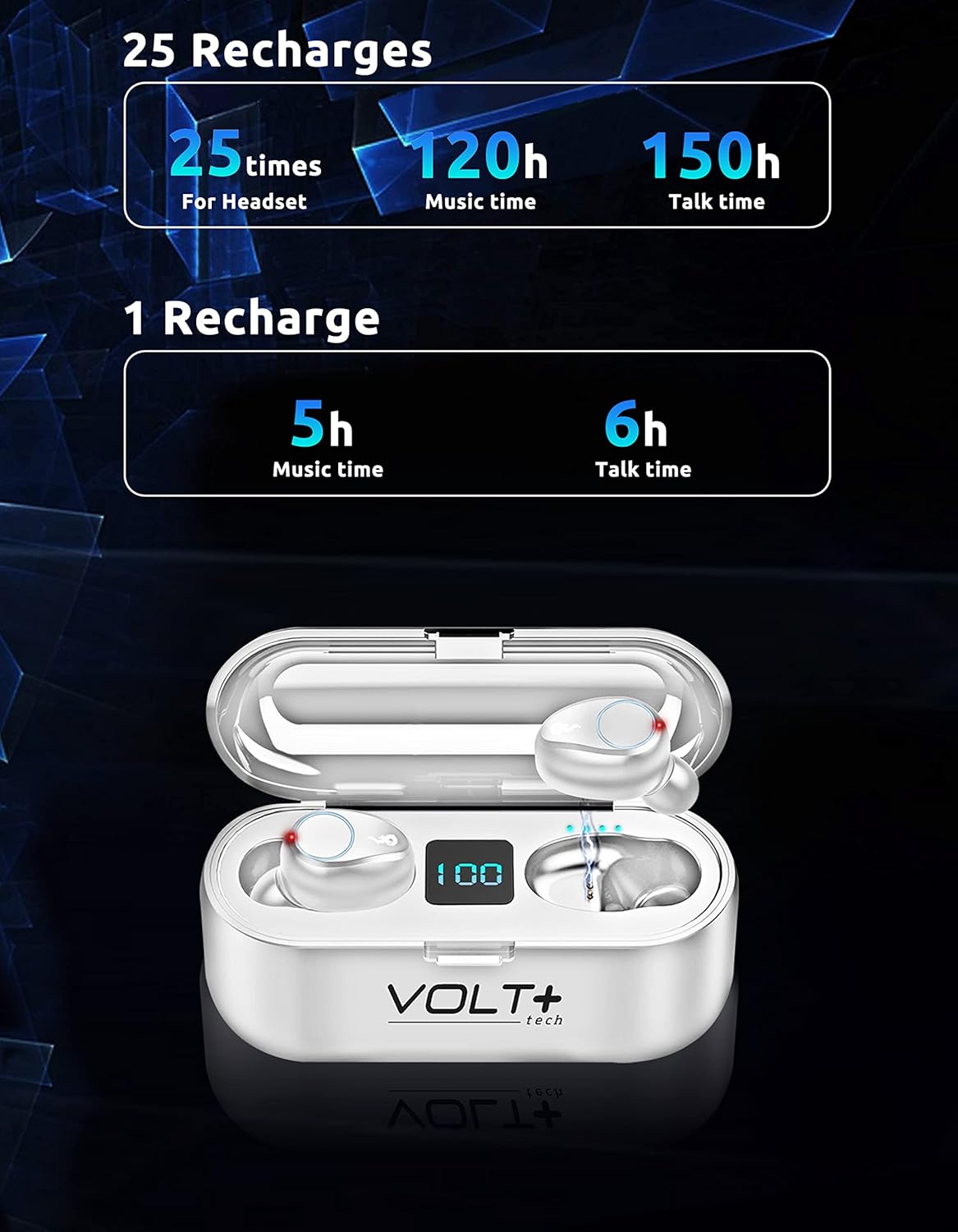
Image 5.2: Battery life and recharge capabilities.
6. Техникалык тейлөө жана кам көрүү
Тазалоо
- Кулакчындарды жана заряддоо кутусун жумшак, кургак, түксүз чүпүрөк менен дайыма тазалап туруңуз.
- Кулагынын учтарын алып салып, жумшак самын жана суу менен тазалаңыз, анан кайра кийер алдында жакшылап кургатып алыңыз.
- Кулакчындардагы жана кутудагы кубаттоо контакттары таза жана калдыктары жок экенин текшериңиз.
Сууга туруктуулук (IPX7)
The earbuds are IPX7 waterproof, meaning they can withstand immersion in water up to 1 meter for 30 minutes. This makes them suitable for rainy outdoor sports and sweating during workouts. However, the charging case is not waterproof. Do not immerse the charging case in water.

Image 6.1: IPX7 waterproof rating of the earbuds.
Сактагыч
Кулакчындарды колдонбогон учурда коргоо жана кубаттоодо кармап туруу үчүн кубаттоочу кутучасында сактаңыз. Ашыкча температурадан жана түз күн нурунан алыс болуңуз.
7. Кыйынчылыктарды
Кулакчындар жупташкан жок
- Эки кулакчындын тең кубатталганын текшериңиз.
- Түзмөгүңүздөгү Bluetooth'ду өчүрүп, кайра күйгүзүңүз.
- Forget the "F9" device in your device's Bluetooth settings and try pairing again.
- Кулакчындарды кайра кутуга салып, капкагын жаап, бир нече секунд күтө туруңуз, анан жупташтыруу режимин кайра баштоо үчүн ачыңыз.
Only One Earbud Working
- Эки кулакчындын тең кубатталганын текшериңиз.
- Try placing both earbuds back into the charging case, close the lid, and then take them out again to allow them to re-sync with each other.
- If the issue persists, try resetting the earbuds (refer to specific reset instructions if available in a full manual, or try forgetting the device and re-pairing).
Заряддоо кутусу заряддалбай жатат
- USB-C кабелин жана кубат адаптерин зыянга учуратпаганын текшериңиз.
- Ensure the cable is securely connected to both the case and the power source.
- Башка USB-C кабелин же кубат адаптерин колдонуп көрүңүз.
Начар үн сапаты
- Ensure earbuds are properly seated in your ears. Try different sized ear tips.
- Момду же таштандыларды кетирүү үчүн кулакчындын торчосун тазалаңыз.
- Ensure your device is within the Bluetooth range (up to 33 feet/10 meters) and there are no significant obstructions.
8. Техникалык шарттар
| Өзгөчөлүк | Деталь |
|---|---|
| Модель аты | F9 |
| Bluetooth версиясы | 5.3 |
| Bluetooth диапазону | 33 Фут (10 метр) |
| Заряддоо корпусунун батареясынын сыйымдуулугу | 2000mAh |
| Кулакчындын батареясынын иштөө мөөнөтү (бир жолу кубаттоо) | Approx. 5 hours music, 6 hours talk time |
| Батареянын жалпы иштөө мөөнөтү (корпусу менен) | 24 XNUMX сааттан ашык |
| Заряддоо убактысы | Approx. 30 minutes (earbuds) |
| Сууга туруктуулук деңгээли | IPX7 (Кулакчындар гана) |
| Noise Control | Active Noise Cancellation, Passive Noise Cancellation, Sound Isolation (CVC 8.0) |
| Аудио драйвер түрү | Динамикалык драйвер |
| Аудио драйверинин өлчөмү | 26 миллиметр |
| Сезимталдуулук | 103 дБ |
| Импеданс | 25.94 Ом |
| Башкаруу ыкмасы | тийүү |
| Шайкеш түзмөктөр | Android, iOS, Mac, Windows, Nubia Red Magic 5G |
| Кулакчындын өлчөмдөрү | Болжол менен 0.9 x 0.5 дюйм |
| Иштин өлчөмдөрү | Окутуу үчүн. 2.7 х 1.3 х 1.2 дюйм |
| Элемент Салмагы | 4 унция (жалпысынан) |

Image 8.1: Physical dimensions of the earbuds and charging case.
9. Кепилдик маалыматы
VOLT PLUS TECH products are designed and manufactured to the highest quality standards. This product is covered by a limited warranty from the date of purchase. Please retain your proof of purchase for warranty claims. The warranty covers manufacturing defects but does not cover damage caused by misuse, accidents, unauthorized modifications, or normal wear and tear.
10. Кардарларды колдоо кызматы
If you encounter any issues or have questions regarding your VOLT PLUS TECH F9 Wireless Bluetooth Earbuds, please contact our customer support team. Refer to the contact information provided on the product packaging or our official webжардам үчүн сайт.
Ask a question about this manual
Ask about setup, troubleshooting, compatibility, parts, safety, or missing instructions. Manuals+ will review the question and use this page’s manual context to help answer it.