
1. Киришүү
The KOSPET Tank T3 is a rugged smartwatch designed for durability and extensive functionality. It features a 1.43-inch AMOLED display, long battery life, and a wide range of health and sports tracking capabilities. This manual provides essential information for setting up, operating, maintaining, and troubleshooting your device.
2. Кутуда эмне бар
- 1 x KOSPET Tank T3 Smart Watch
- 1 х заряддагыч
- 1 x Watch Band (Liquid silicone rubber)
- 1 x User Manual
3. Орнотуу колдонмосу
3.1 Алгачкы заряддоо
Before first use, fully charge your KOSPET Tank T3 Smart Watch using the provided charger. Connect the magnetic end of the charger to the charging points on the back of the watch. The watch display will indicate charging status.

3.2 Колдонмону орнотуу жана жупташтыруу
To unlock the full potential of your KOSPET Tank T3, download and install the 'KOSPET FIT' app on your smartphone. The watch is compatible with Android 5.1+ and iOS 10.0+ devices.
- Download the 'KOSPET FIT' app from the Google Play Store or Apple App Store.
- Телефонуңуздун Bluetooth күйгүзүлгөнүн текшериңиз.
- Open the 'KOSPET FIT' app, go to 'Device', and click 'Add a new device'.
- Confirm the Bluetooth pairing request on both your phone and the watch.
- Enable 'Notifications' permission for the app to receive alerts on your watch.
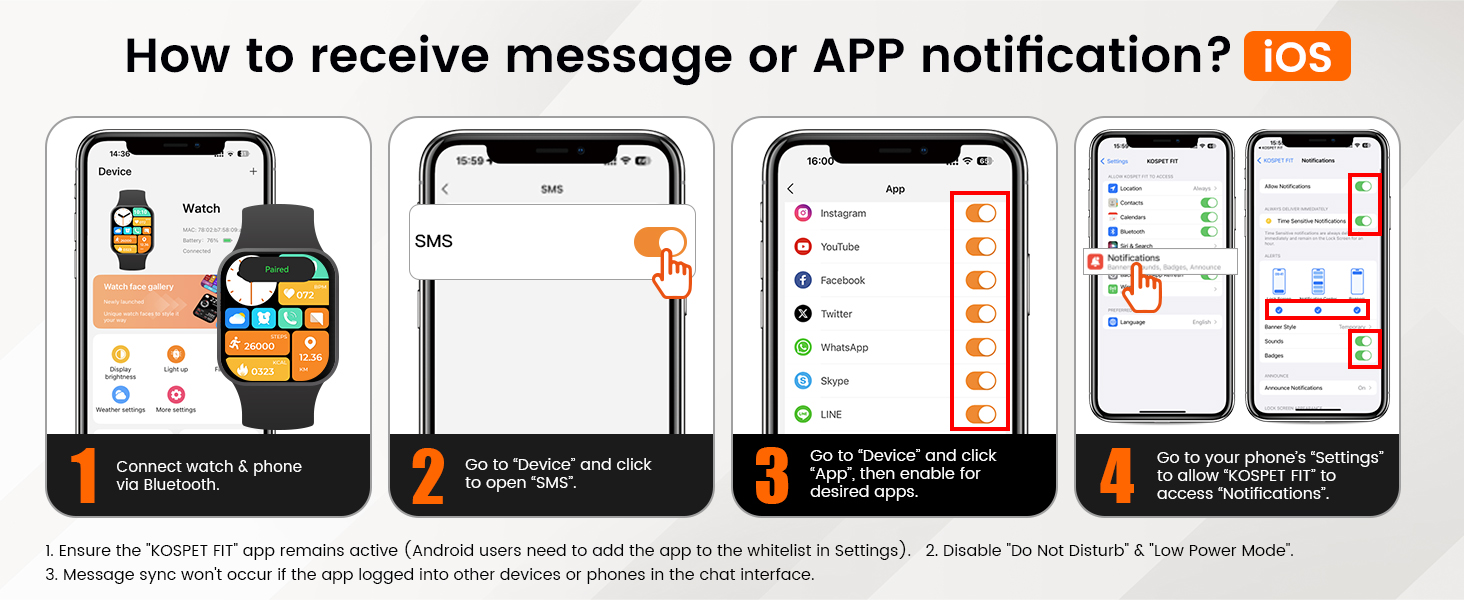
3.3 Receiving Notifications (iOS)
- Саатыңызды жана телефонуңузду Bluetooth аркылуу туташтырыңыз.
- In the 'KOSPET FIT' app, go to 'Device' and click to open 'SMS'.
- In the app, go to 'Device' and click 'App', then enable notifications for desired applications.
- Go to your phone's 'Settings' to allow 'KOSPET FIT' to access 'Notifications'.
Note: Ensure the 'KOSPET FIT' app remains active. Message sync will not occur if the app is logged into other devices or phones in the chat interface. Disable 'Do Not Disturb' and 'Low Power Mode' on your phone for optimal notification delivery.

3.4 Receiving Notifications (Android)
- Саатыңызды жана телефонуңузду Bluetooth аркылуу туташтырыңыз.
- In the 'KOSPET FIT' app, go to 'Device' and click to open 'SMS Reminder'.
- In the app, go to 'Device' and click 'App Reminder', then enable notifications for desired applications.
- Allow 'KOSPET FIT' to access 'Notifications' in your phone's settings.
Note: Ensure the 'KOSPET FIT' app remains active. Android users may need to add the app to the whitelist in Settings. Message sync will not occur if the app is logged into other devices or phones in the chat interface. Disable 'Do Not Disturb' and 'Low Power Mode' on your phone for optimal notification delivery.

4. Акылдуу саатыңызды иштетүү
4.1 Дисплей жана навигация
The KOSPET Tank T3 features a vibrant 1.43-inch AMOLED display with a resolution of 466x466 pixels and a peak brightness of 1000 nits, ensuring clear visibility even in direct sunlight. Navigate through menus by swiping across the touchscreen or using the physical buttons on the side.

4.2 Негизги функциялар
- Bluetooth чалуу: Answer or make calls directly from your watch.
- AI үн жардамчысы: Ар кандай тапшырмалар үчүн үн буйруктарын колдонуңуз.
- Музыкалык башкаруу: Туташкан смартфонуңузда музыка ойнотууну башкарыңыз.
- Алыстан сүрөткө тартуу: Телефонуңуздун камерасын алыстан башкарыңыз.
- Аба ырайы: Реалдуу убакытта аба ырайы жаңыртууларын алыңыз.
- Alarm Clock & Calculator: Essential daily tools.
- Отуруучу эстеткич: Кыймылсыздык мезгилинен кийин сизди жылдырууга чакырат.

4.3 Ден соолуктун мониторинги
The KOSPET Tank T3 provides comprehensive health tracking features:
- Жүрөктүн кагышын көзөмөлдөөчү: Continuous heart rate tracking throughout the day.
- Кандын кычкылтек монитору (SpO2): Кандагы кычкылтектин деңгээлин өлчөйт.
- Уйкуну көзөмөлдөөчү: Уйку режимин көзөмөлдөйтtages (deep, light, REM) and provides analysis.
- Кан басымы: Кан басымынын болжолдуу көрсөткүчүн берет.
- Stress & Emotion Tracking: Helps monitor your mental well-being.
- Дем алуу көнүгүүлөрү: Эс алуу үчүн дем алуу көнүгүүлөрү.


4.4 Sports Modes and Smart Recognition
The watch supports over 170 sports modes, covering a wide array of activities. It also features smart recognition for 6 common sports:
- Жөө жүрүү
- чуркоо
- Велосипед тебүү
- Эллиптикалык
- Как сүзүүчү машина
- Swimming (with professional SWOLF mode)
The smart recognition feature automatically detects when you start one of these activities and begins tracking without manual input.


5. Батареянын иштөө мөөнөтү
The KOSPET Tank T3 is equipped with a 480mAh pure cobalt battery, offering extended usage times:
- AOD (Always-On Display) Mode: 3 күнгө чейин
- Оор колдонуу: 8 күнгө чейин
- Типтүү колдонуу: 15 күнгө чейин
- Low-Battery Mode: 60+ күнгө чейин
Note: Actual battery life may vary based on settings, operation conditions, and other factors.

6. Узактыгы жана сууга туруктуулугу
The KOSPET Tank T3 is built to military standards (U.S. MIL-STD-810H) with a TC4 titanium alloy case and a 1.43" 3rd generation Corning Gorilla screen featuring 9H double-layer glass. It has passed 15 military-grade tests for anti-impact, anti-fluid corrosion, and extreme temperature resistance (-40°C to 70°C).
It boasts 5ATM and IP69K water resistance, allowing it to be submerged in 50 meters of water and withstand high-pressure water jets, making it suitable for swimming, diving, and surfing.


7. Техникалык шарттар
| Өзгөчөлүк | Деталь |
|---|---|
| Модель аты | ТАНК Т3 |
| Операция системасы | Android жана iOS үчүн шайкеш келет |
| Screen Size | 1.43 дюйм |
| Дисплей түрү | AMOLED |
| Резолюция | 466 x 466 пиксель |
| Maximum Display Brightness | 1000 Нит |
| Батарея сыйымдуулугу | 480 миллионamp Саат (Литий Полимер) |
| Батареянын орточо иштөө мөөнөтү | Up to 60 days (low-battery mode) |
| Байланыш технологиясы | Bluetooth |
| GPS | GPS жок |
| Сууга туруктуулук деңгээли | Waterproof (5ATM, 50 Meters depth) |
| Иштин материалдык түрү | Metal (TC4 Titanium Alloy) |
| Band Материал түрү | Liquid silicone rubber |
| Элементтин өлчөмдөрү | 7.68 x 3.43 x 0.71 дюйм |
| Максаттуу аудитория | Эркектер |
Note on Specifications: While the product specifications list "No GPS", some marketing materials and user reviews may suggest GPS functionality. This typically refers to utilizing a connected smartphone's GPS. The display resolution is visually indicated as 466x466 pixels in marketing images, despite a specification listing of 320x320 pixels.
8. Техникалык тейлөө
- Тазалоо: Саат экранын жана боону жумшак, гamp кездеме. Катуу химиялык заттардан алыс болуңуз.
- Кургатуу: After exposure to water, ensure the watch is completely dry before charging or operating buttons.
- Сактагыч: Саатты күн нурунан жана экстремалдык температурадан алыс салкын, кургак жерде сактаңыз.
- Заряддоо: Use only the provided charger to prevent damage to the device.
9. Кыйынчылыктарды
- Күйгүзүлбөй жаткан саат: Саат толук заряддалганын текшериңиз. Аны заряддагычка кеминде 30 мүнөт туташтырыңыз.
- Телефон менен жупташтыруу мүмкүн эмес:
- Телефонуңузда Bluetooth иштетилгенин текшериңиз.
- Саат телефонуңуздун диапазонунда экенин текшериңиз.
- Саатты да, телефонуңузду да өчүрүп күйгүзүңүз.
- Check the 'KOSPET FIT' app for any pending updates or permissions.
- Билдирмелер алынган жок:
- Verify notification permissions are granted to the 'KOSPET FIT' app in your phone's settings.
- Ensure 'Do Not Disturb' or 'Low Power Mode' is not active on your phone.
- Keep the 'KOSPET FIT' app running in the background.
- Туура эмес ден соолук маалыматтары: Сааттын билегиңизге бекем тагылганын, өтө тар же өтө кенен эмес экенин текшериңиз. Сенсорлорду үзгүлтүксүз тазалап туруңуз.
10. Кепилдик жана колдоо
The KOSPET Tank T3 Smart Watch comes with a 2 жылдык чектелген кепилдик. For detailed warranty information, product support, or to explore other KOSPET products, please visit the KOSPET дүкөнү.
11. Расмий продукт Video
Video 11.1: KOSPET TANK T3 Smart Watch for Men - Official Product Overview. Бул видео визуалдык көрүнүштү камсыз кылатview of the KOSPET TANK T3 smartwatch, showcasing анын дизайны, өзгөчөлүктөрү жана функционалдуулугу.


