
Introduction
The Alphacool Core Flat Reservoir 360 Right D5/VPP is an advanced acrylic expansion tank designed for custom liquid cooling loops in high-performance computer systems. This reservoir features a flat, space-saving design, integrated digitally addressable RGB (aRGB) lighting, and five G1/4" connections for versatile integration into your cooling system. It requires a D5 or VPP pump for operation (pump not included). This manual provides essential information for the safe installation, proper operation, and effective maintenance of your Alphacool Core Flat Reservoir.

Image: Alphacool Core Flat Reservoir 360 Right D5/VPP, showcasing its transparent acrylic construction and connection points.
Коопсуздук маалыматы
Please read and understand all safety instructions before installing or operating this product. Failure to follow these instructions may result in property damage, injury, or voiding your warranty.
- Always disconnect power from your computer system before performing any installation, maintenance, or troubleshooting.
- Ensure all liquid cooling components are securely installed and connections are tightened to prevent leaks.
- Use only coolants specifically designed for computer liquid cooling systems. Do not use tap water or automotive coolants.
- Keep liquids away from electrical components during installation and operation.
- Do not operate the pump dry. Ensure the reservoir is filled with coolant before powering on the pump.
- If a leak occurs, immediately shut down your system and disconnect power.
Пакеттин мазмуну
Орнотууну улантуудан мурун бардык компоненттер бар экенин жана бузулбаганын текшериңиз. Пакет төмөнкүлөрдү камтышы керек:
- Alphacool Core Flat Reservoir 360 Right D5/VPP
- Core Push Mounting Kit (metal pins, female sleeves, screws)
- Hex key for installation
- aRGB connection cable
- Required mounting hardware (screws, washers, nuts)
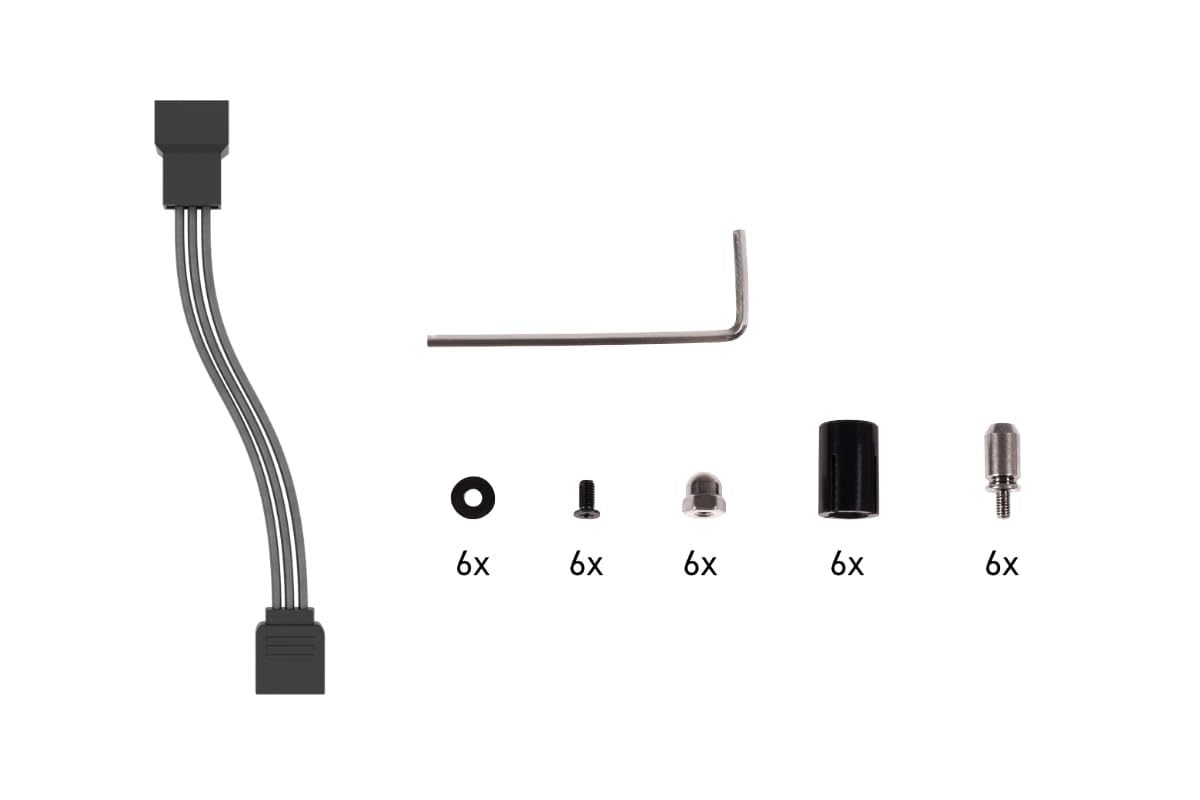
Image: Included mounting hardware and aRGB cable for the Alphacool Core Flat Reservoir.
Орнотуу жана орнотуу
Follow these steps for proper installation of your Alphacool Core Flat Reservoir:
- Насосту даярдоо: This reservoir requires a D5 or VPP pump (not included). Install your compatible pump into the designated pump housing of the reservoir according to the pump manufacturer's instructions. Ensure the O-ring is correctly seated for a watertight seal.
- Mounting the Reservoir: The Core Flat Reservoir can be mounted on a radiator or directly to a PC case panel using the included Core Push Mounting Kit.
- Attach the metal pins of the mounting kit to your radiator or the desired panel of your PC case.
- Secure the matching female sleeves to the Flat Reservoir.
- Align the reservoir with the pins and gently push it into place until it is securely seated.
- Фитингдерди туташтыруу: Install your G1/4" fittings into the five available internal threads and the drain port. Ensure all fittings are tightened securely by hand, then use a tool for a final snug turn. Avoid over-tightening to prevent damage to the acrylic.
- Connect aRGB Lighting: Connect the 3-pin JST + 3-pin 5V power connection from the reservoir's aRGB cable to a compatible aRGB controller or motherboard header. Ensure correct pin orientation to prevent damage.
- Integrate into Loop: Connect the reservoir to your liquid cooling loop components (radiator, CPU/GPU blocks) using appropriate tubing and fittings.

Сүрөт: Мисample of the Alphacool Core Flat Reservoir installed vertically in a PC case, connected to a radiator.
Иштөө нускамалары
Once the reservoir is installed and integrated into your liquid cooling loop, follow these steps for initial operation:
- Fill the Loop: Carefully fill the reservoir with your chosen liquid cooling fluid. Ensure the reservoir is adequately filled before starting the pump to prevent dry running.
- Агышуу тести: Before powering on your entire system, perform a leak test. Power only the pump (and optionally the aRGB lighting) and allow it to run for several hours (e.g., 12-24 hours) while carefully inspecting all connections for any signs of leaks. Place paper towels under potential leak points for easier detection.
- Абаны кандыруу: During the initial operation, air bubbles will circulate through the loop. Gently tilt your PC case in different directions to help dislodge trapped air. Continue to top off the reservoir as the fluid level drops due to air bleeding.
- aRGB Lighting Control: Once your system is powered on, you can control the integrated aRGB lighting via your connected aRGB controller or motherboard software. The reservoir features 12 digitally addressable aRGB LEDs for customizable lighting effects.

Image: Alphacool Core Flat Reservoir 360 Right D5/VPP demonstrating its vibrant aRGB lighting capabilities.
Техникалык тейлөө
Regular maintenance is crucial for the longevity and optimal performance of your liquid cooling system:
- Агышууларды текшерүү: Periodically check all fittings, tubing, and components for any signs of leaks or weeping. Address any issues immediately.
- Муздаткычты алмаштыруу: Replace the coolant in your loop every 6 to 12 months, or as recommended by your coolant manufacturer. Over time, coolants can degrade, leading to particle buildup or biological growth.
- Системаны тазалоо: When replacing coolant, it is recommended to flush the entire loop with distilled water or a dedicated cleaning solution to remove any accumulated debris or residue.
- Компонентти текшерүү: During coolant changes, inspect the reservoir and other components for any signs of wear, discoloration, or damage.
Проблемаларды чечүү
If you encounter issues with your Alphacool Core Flat Reservoir, refer to the following common troubleshooting tips:
- Агышуулар: If a leak is detected, immediately shut down the system. Identify the source of the leak. Check all fittings for tightness and ensure O-rings are properly seated and undamaged. Replace any faulty components or O-rings.
- Насос иштебейт: Ensure the D5/VPP pump is correctly installed and securely connected to its power source. Verify that the pump is compatible with the reservoir and receiving adequate power.
- aRGB Lighting Not Working: Check the 3-pin JST and 3-pin 5V connections to the aRGB controller or motherboard. Ensure the controller is powered and configured correctly. Test with different aRGB ports or controllers if available.
- Poor Flow/Cooling Performance: This could indicate air trapped in the loop, a partially clogged component, or a failing pump. Bleed the system thoroughly. Inspect for blockages in tubing or components.
- Discoloration of Coolant/Reservoir: This may indicate coolant degradation or biological growth. Perform a full system flush and coolant replacement. Consider using a different coolant type if the issue persists.
Техникалык шарттар
| Өзгөчөлүк | Спецификация |
|---|---|
| Модел | 15486 |
| Өлчөмдөрү (L x W x Y) | 360 x 125 x 45mm (14.17"L x 4.92"W x 1.77"H) |
| Volume (Expansion Tank) | 500мл |
| Материал | Акрил |
| Насостун шайкештиги | D5/VPP (pump not included) |
| Байланыштар | 5x G1/4" internal thread / 1x drain port |
| Maximum жумушчу Температура | 60°C |
| Pressure Tested | 0.8 бар |
| Number of Digital aRGB LEDs | 12 |
| Тtage Digital aRGB LEDs | 5V |
| Power Connection (aRGB) | 3-pin JST + 3-pin 5V |
| Түс | Ачык |
| Шайкеш түзмөктөр | Radiator, Desktop, Graphic Cards |
Кепилдик маалымат
This Alphacool Core Flat Reservoir 360 Right D5/VPP is covered by a one-year manufacturer's warranty from the date of purchase. This warranty covers defects in materials and workmanship under normal use. It does not cover damage resulting from improper installation, misuse, unauthorized modifications, or natural disasters. Please retain your proof of purchase for warranty claims.
Колдоо
For technical assistance, troubleshooting guidance, or further product information, please visit the official Alphacool website or contact their customer support directly. You can also find additional resources and product details on the Alphacool Store on Amazon.