1. Продукт бүтүп калдыview
The Douk Audio VU9 is a unique sound level meter that blends vintage Nixie tube aesthetics with modern audio spectrum display technology. It offers versatile audio input options and customizable visual effects, making it an ideal addition to any home, office, or studio audio setup.
Негизги өзгөчөлүктөрү:
- Retro Design with Modern Functionality: вин бириктиретtage charm with contemporary technology for a unique audio-visual experience.
- Versatile Audio Input Options: Equipped with both microphone and 3.5mm AUX inputs for wireless pickup and precise audio level display. Compatible with smartphones, computers, CD players, and speakers.
- Adjustable Visual Effects: Features full-function adjustments including display mode, gain, color, speed, peak color, and brightness for customized audio visualization.
- Energy-Efficient and User-Friendly: Powered by a USB 5V connection. Built-in power-off saving settings retain preferences after restarting.
- Комплекстүү пакет: Includes two tubes, a USB-C cable, a 3.5mm splitter cable, screws, a screwdriver, isolation stand feet, and a user manual.
Video: Demonstration of the Douk Audio VU9 Pixie Tube Sound Level Meter in operation, showcasing its dynamic light display.
2. Пакеттин мазмуну
Төмөндө тизмеленген нерселердин баары пакетиңизге камтылганын текшериңиз:
- 1x Douk Audio VU9 Main Unit
- 2x Pixie Tubes
- 1x USB-C кабели
- 1x 3.5 мм Splitter кабели
- 4x M2 бурамалар
- 1x Screwdriver
- 1 Set Isolation Stand Feet
- 1x Колдонуучунун колдонмосу (бул документ)
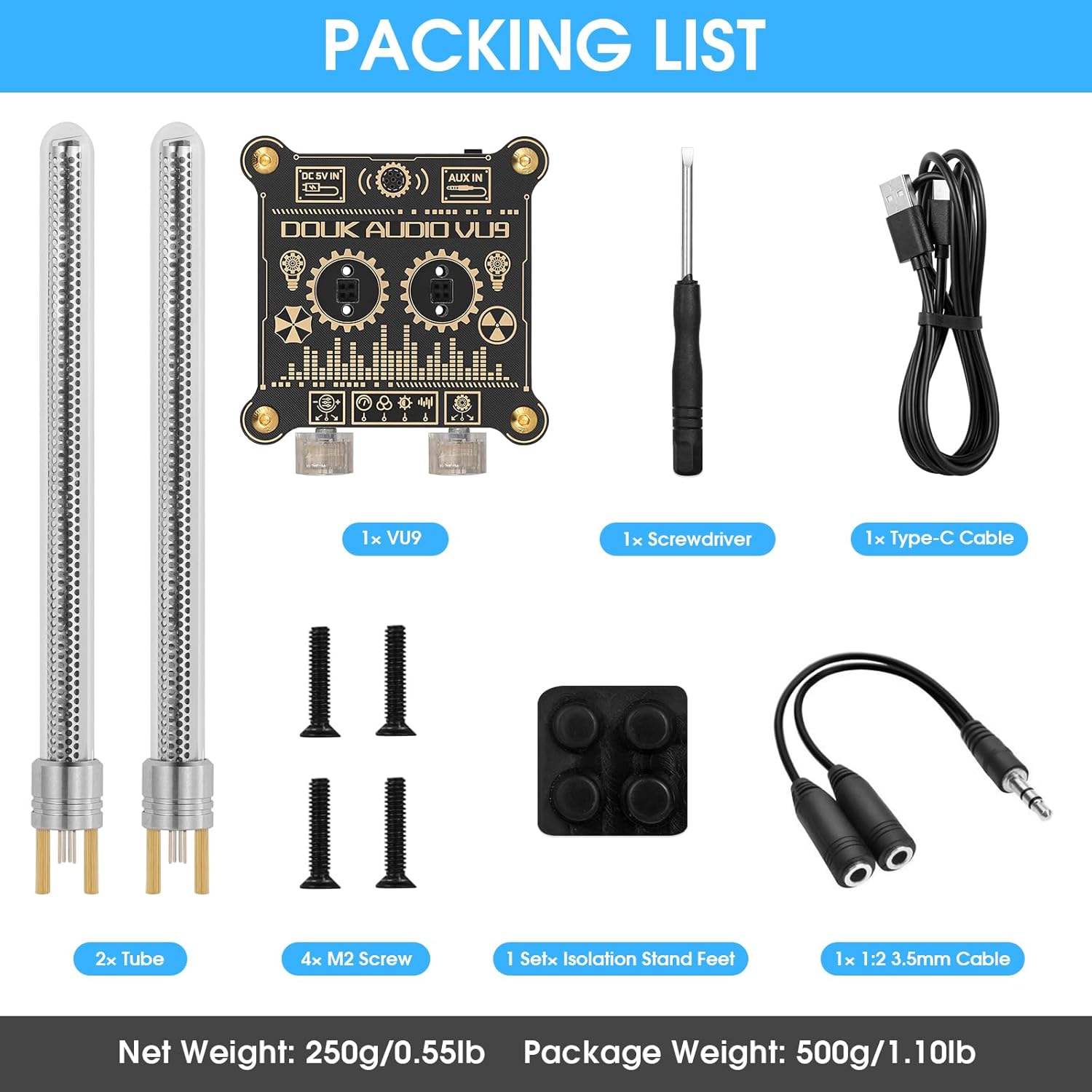
Image: Visual representation of all items included in the Douk Audio VU9 package.
3. Орнотуу нускамалары
3.1 Түтүктү орнотуу
- Carefully unpackage the two Pixie Tubes.
- Insert each tube into the designated tube sockets on the main unit. Ensure they are seated firmly.
- Use the provided M2 screws and screwdriver to secure the tubes in place.
3.2 Кубат туташтыруу
- Connect the supplied USB-C cable to the DC 5V IN port on the back of the VU9 unit.
- Plug the other end of the USB-C cable into a 5V USB power adapter (not included) or a compatible USB port on a computer.
3.3 Аудио киргизүү туташуусу
The VU9 supports two audio input methods: Microphone Pickup and 3.5mm AUX input. The 3.5mm AUX input takes priority if both are connected.
- Микрофонду алуу: The built-in microphone will automatically detect ambient sound and display the audio spectrum.
- 3.5 мм AUX киргизүү: Connect your audio source (e.g., smartphone, computer, CD player) to the AUX IN port using the provided 3.5mm splitter cable or a standard 3.5mm audio cable.

Image: Diagram illustrating the input ports, tube sockets, and control knobs on the Douk Audio VU9 unit.
4. Иштөө нускамалары
The VU9 features two control knobs for adjusting various display parameters.
4.1 Башкаруу баскычтары
- Left Knob (Gain Adjustment): Rotate to adjust the sensitivity of the audio input. This controls how responsive the display is to sound levels.
- Right Knob (Mode/Parameter Adjustment):
- Click: Short press to cycle through setup modes (e.g., display mode, color, speed, peak color, brightness).
- Айлануу: Rotate to change the parameter value within the currently selected setup mode.
4.2 Display Modes and Customization
The VU9 offers multiple display modes and extensive customization options to match your preferences and environment.
- Дисплей режими: Select from various visual patterns for the audio spectrum.
- Түсү: Choose from a wide range of colors for the tube display.
- Ылдамдыгы: Adjust the animation speed of the light effects.
- Peak Color: Customize the color of the peak hold indicators.
- Жарыктык: Control the overall brightness of the display.

Сүрөт: Мисamples of various display modes and color options available on the Douk Audio VU9.

Image: A collage showing the Douk Audio VU9 displaying different color schemes and light patterns.
5. Техникалык шарттар
| Өзгөчөлүк | Деталь |
|---|---|
| Бренд | Douk Audio |
| Модель номери | XX-VU9-2024 |
| Продукциянын өлчөмдөрү | 3.35"W x 6.89"H |
| Элемент Салмагы | 250 грамм (8.8 унция) |
| Power Source | USB 5V |
| Байланыш технологиясы | 3.5mm AUX, USB (for power) |
| Киргизүү параметрлери | Microphone Pickup, 3.5mm AUX |
| Frame Material | Пластик |
| Ички/тышкы колдонуу | Indoor |

Image: Detailed dimensions of the Douk Audio VU9 unit.
6. Техникалык тейлөө
- Аппаратты жумшак, кургак чүпүрөк менен сүртүп, таза кармаңыз. Катуу химиялык заттарды же абразивдүү материалдарды колдонуудан алыс болуңуз.
- Ensure the unit is placed on a stable, flat surface to prevent accidental falls.
- Түзмөктү өтө жогорку температурага, түз күн нуруна же жогорку нымдуулукка дуушар кылбаңыз.
- Do not attempt to disassemble the unit beyond tube installation, as this may void the warranty.
7. Кыйынчылыктарды
- Кубат жок:
- Check if the USB-C cable is securely connected to both the VU9 unit and the power source.
- Ensure the USB power adapter is functioning correctly and providing 5V output.
- No Audio Display:
- If using 3.5mm AUX input, ensure the cable is fully inserted and the audio source is playing.
- If using microphone pickup, ensure there is ambient sound for the unit to detect.
- Adjust the 'Gain Adjustment' knob to increase sensitivity.
- Tubes Not Lighting Up:
- Verify that the Pixie Tubes are correctly installed and secured in their sockets.
- Жогоруда сүрөттөлгөндөй, электр туташуусун текшериңиз.
- Жөндөөлөр сакталбайт:
- The unit has built-in power-off saving settings. If settings are not retained, ensure the unit is powered off correctly (if applicable) or contact support.
8. Кепилдик жана колдоо
For warranty information and customer support, please refer to the official Douk Audio webсайтка же сатуучуга кайрылыңыз. Кепилдик дооматтар үчүн сатып алуу дүмүрчөгүңүздү сактаңыз.
Douk Audio is committed to providing high-quality products and excellent customer service. If you encounter any issues not covered in this manual, please reach out to our support team for assistance.