
Introduction
Thank you for choosing the Vieta Pro Karaoke Party Microphone. This device combines a high-quality microphone with an integrated speaker, designed for an engaging karaoke experience. It features True Wireless technology, allowing two microphones to connect to a single device, and offers various sound modes and connectivity options.
Пакеттин мазмуну
- Vieta Pro Karaoke Party Microphone with Integrated Speaker
- Заряддоо кабели (USB-C)
- User Manual

Image: The retail box of the Vieta Pro Karaoke Party Microphone, showing the product and its features.
Продукт бүттүview
Familiarize yourself with the main components and controls of your Vieta Pro Karaoke Party Microphone.

Сүрөт: алдыңкы view of the Vieta Pro Karaoke Party Microphone, highlighting the control buttons for power, volume, mode, and Bluetooth.
Башкаруу каражаттары жана порттор:
- Кубат баскычы: Күйгүзүү/өчүрүү үчүн басып кармап туруңуз. Режимдерди которуштуруу үчүн кыска басыңыз.
- Үн баскычтары (+/-): Динамиктин үнүн тууралаңыз.
- Режим баскычы (M): Cycle through sound effects or modes.
- Bluetooth баскычы: Bluetooth жупташтырууну баштаңыз.
- USB-C порту: Аппаратты заряддоо үчүн.
- 3.5mm Audio Jack (Input): Тышкы аудио булактарын туташтырыңыз.
- 3.5mm Audio Jack (Output): Наушниктерди же тышкы динамиктерди туташтырыңыз.
- Жарык режим баскычы: Change or turn off LED lighting effects.
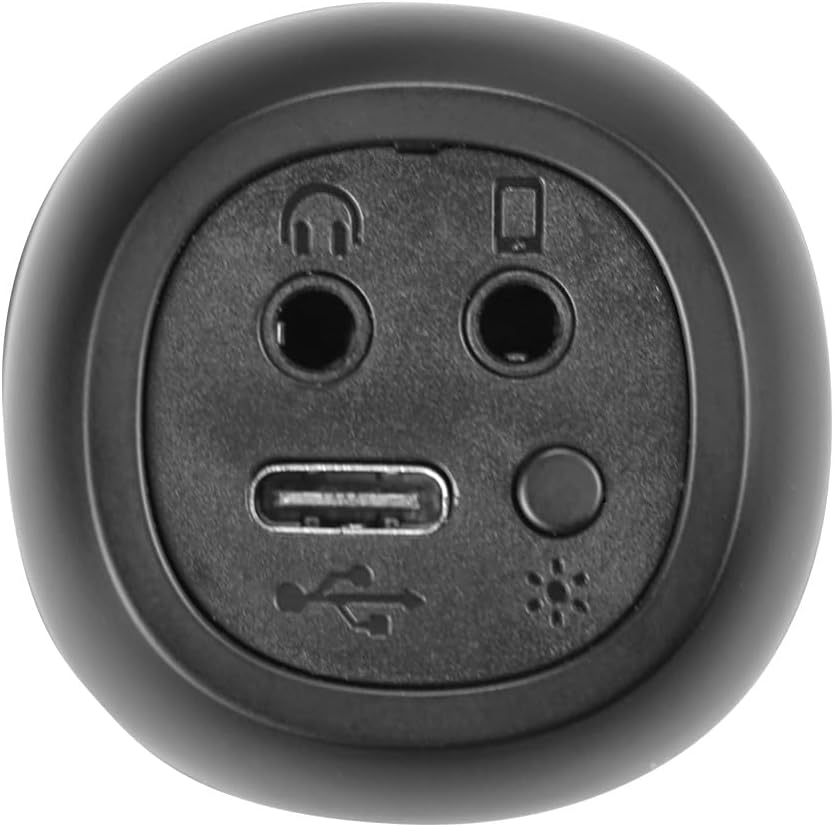
Сүрөт: Жакын план view of the bottom of the microphone, showing the USB-C charging port, 3.5mm audio input/output jacks, and the light mode button.
Орнотуу жана туташуу
1. Микрофонду заряддоо
Before first use, fully charge the microphone. Connect the provided USB-C cable to the microphone's USB-C port and the other end to a USB power adapter (not included) or a computer's USB port. The battery indicator light will show charging status.
2. Күйгүзүү / Өчүрүү
басып, кармап туруңуз Кубат баскычы for approximately 3 seconds to turn the microphone on or off. A sound prompt will indicate the power status.
3. Bluetooth Жупташтыруу
- Turn on the microphone. It will automatically enter Bluetooth pairing mode, indicated by a flashing Bluetooth light.
- Смартфонуңузда, планшетиңизде же компьютериңизде Bluetooth'ду күйгүзүп, жеткиликтүү түзмөктөрдү издеңиз.
- Select "Vieta Pro Karaoke Party" from the list of devices.
- Once connected, a sound prompt will confirm successful pairing, and the Bluetooth light will stop flashing.
4. True Wireless Connection (Connecting Two Microphones)
To use two Vieta Pro Karaoke Party microphones simultaneously with one device:
- Ensure both microphones are powered on and not connected to any other Bluetooth device.
- On one microphone (this will be the primary), double-press the Bluetooth баскычы. It will enter True Wireless pairing mode.
- The primary microphone will search for the second microphone. Once connected, a sound prompt will confirm the True Wireless connection.
- Now, connect the primary microphone to your device via Bluetooth as described in step 3. Both microphones will now output audio from your device.

Image: Two individuals holding and using Vieta Pro Karaoke Party Microphones, demonstrating the True Wireless feature.
5. Зымдуу туташуу (AUX)
Connect an external audio source (e.g., MP3 player) to the microphone using a 3.5mm audio cable (not included) plugged into the 3.5mm audio input jack.
Иштөө нускамалары
1. Үндү тууралоо
колдонуу Көлөм + жана Көлөмү - buttons on the microphone to adjust the speaker output volume. You can also control the volume from your connected device.
2. Changing Sound Modes/Effects
басыңыз Режим баскычы (M) repeatedly to cycle through the four available sound configuration modes or voice effects. Experiment to find your preferred sound.
3. Voice Reduction Feature
This feature allows you to reduce the vocal track of a song, making it easier to sing along. To activate or deactivate this feature, refer to the specific instructions in the full manual or experiment with the Режим баскычы (M) or a dedicated button if present (not explicitly detailed in provided data, but mentioned as a feature).
4. Жаздыруу
The microphone supports one-touch recording. Connect the microphone to a compatible recording device (e.g., smartphone with a recording app) via Bluetooth or the 3.5mm output jack. Press the dedicated Жаздыруу баскычы (if available, or refer to the full manual for specific button assignment) to start and stop recording.
5. LED жарыктандыруу эффекттери
басыңыз Жарык режиминин баскычы (located near the ports at the bottom) to change the LED lighting patterns or turn them off.

Image: Close-up of the Vieta Pro Karaoke Party Microphone's speaker grille, showing the integrated LED lighting effects.
Техникалык тейлөө
- Тазалоо: Use a soft, dry cloth to clean the microphone's surface. Do not use abrasive cleaners or solvents.
- Сактагыч: Микрофонду күндүн тике тийген нурунан жана экстремалдык температурадан алыс, салкын, кургак жерде сактаңыз.
- Батареяга кам көрүү: Батареянын иштөө мөөнөтүн узартуу үчүн, бат-баттан батарейканы толук зарядсыздандырбаңыз. Аппаратты узак убакыт бою колдонбосо дагы, үзгүлтүксүз заряддаңыз.
- Суу таасири: Бул аппарат суу өткөрбөйт. Суунун же жогорку нымдуулуктун таасиринен алыс болуңуз.
Проблемаларды чечүү
| Көйгөй | Мүмкүн себеп | Чечим |
|---|---|---|
| Күч жок | Батарея түгөнүп калды. | USB-C кабели аркылуу микрофонду заряддаңыз. |
| Bluetooth аркылуу туташуу мүмкүн эмес | Bluetooth is off on the device; microphone is already connected to another device; microphone is out of range. | Ensure Bluetooth is enabled on your device. Disconnect from other devices. Move microphone closer to your device (within 10 meters). Restart both devices. |
| Үн чыгышы жок | Volume is too low; microphone is muted; incorrect input source. | Increase volume on both the microphone and your connected device. Check if the microphone is in the correct operating mode. |
| True Wireless connection fails | One or both microphones are already paired; microphones are too far apart. | Ensure both microphones are unpaired from other devices. Place them close to each other during True Wireless pairing. Follow True Wireless pairing steps carefully. |
Техникалык шарттар
| Өзгөчөлүк | Деталь |
|---|---|
| Модель аты | Караоке кечеси |
| Бренд | Vieta Pro |
| Байланыш технологиясы | Чыныгы зымсыз, Bluetooth |
| Туташтыргыч түрү | USB-C, 3.5 мм уяча |
| Power Output | 18 Вт |
| Батареянын иштөө мөөнөтү | 10 саатка чейин |
| Батарея түрү | 1 Литий-ион (кошулган) |
| Жыштык диапазону | 50 - 15,000 Гц |
| Импеданс | 600 Ом |
| Полярдык үлгү | Бир багыттуу |
| Шайкеш түзмөктөр | Персоналдык компьютер, смартфон |
| Өзгөчөлүктөр | Volume Control, 1-Touch Recording, Lighting Modes, Battery Indicator, Radio |
| Салмагы | 337 грамм |
| Материал | Пластик |
Кепилдик жана колдоо
For warranty information and technical support, please contact the manufacturer, FRAMASON AUDIO SA, or your local retailer. Keep your proof of purchase for any warranty claims.
Manufacturer: FRAMASON AUDIO SA