
1. Киришүү
Thank you for choosing the Syinix 55 Inch FHD Smart LED TV, Model 55U51. This manual provides essential information for the safe and efficient use of your new television. Please read it thoroughly before operating the device and retain it for future reference. This television combines a Full High Definition (FHD) display with smart functionalities and a built-in receiver, offering a complete entertainment solution.

Сүрөт 1.1: Алдыңкы view of the Syinix 55 Inch FHD Smart LED TV displaying a vibrant landscape. The TV features a slim bezel and two stand feet.
2. Маанилүү коопсуздук нускамалары
Коопсуз эксплуатацияны камсыз кылуу жана зыян келтирбөө үчүн төмөнкү коопсуздук эрежелерин сактаңыз:
- Кубат булагы: Телевизорду көрсөтүлгөн чоңдуктагы AC розеткага гана туташтырыңызtage (refer to the label on the back of the TV). Ensure the power cord is not damaged or pinched.
- Вентиляция: Do not block ventilation openings. Allow adequate space around the TV for proper airflow. Avoid placing the TV on beds, sofas, rugs, or similar surfaces that may block ventilation.
- Жылуулук: Телевизорду радиаторлор, жылуулук регистрлери, мештер же жылуулук чыгарган башка шаймандар сыяктуу жылуулук булактарынан алыс кармаңыз.
- Суу жана ным: Телевизорду жамгырга же нымга тийгизбеңиз. Сыналгыга ваза сыяктуу суюктуктар толтурулган нерселерди койбоңуз.
- Тазалоо: Unplug the TV from the wall outlet before cleaning. Use a soft, dry cloth for cleaning. Do not use liquid cleaners or aerosol cleaners.
- Объект жана суюк кирүү: Never push objects of any kind into the TV through openings as they may touch dangerous voltagөрткө же электр шокуна алып келиши мүмкүн болгон чекиттер же кыска өчүк бөлүктөр.
- Монтаждоо: When mounting the TV on a wall, ensure the wall mount is securely installed and capable of supporting the TV's weight. Follow the wall mount manufacturer's instructions.
- Балдар: Do not allow children to climb on the TV or stand. Ensure the TV is stable and cannot be easily tipped over.
3. Пакеттин мазмуну
Төмөндө көрсөтүлгөн бардык буюмдар таңгагыңызда бар экенин текшериңиз. Эгерде кандайдыр бир буюмдар жок болсо же бузулуп калса, сатуучуңузга кайрылыңыз.
- Syinix 55 Inch FHD Smart LED TV (Model 55U51)
- Электр кабели
- Алыстан башкаруу
- Телевизор (2 даана)
- Стендди чогултуу үчүн бурамалар
- Колдонуучунун Колдонмосу (бул документ)

Сүрөт 3.1: Каптал view of the Syinix 55 Inch FHD Smart LED TV, highlighting its slim profile and stand design.
4. Орнотуу колдонмосу
4.1 Стендди бекитүү
- Carefully place the TV screen-down on a soft, flat surface (e.g., a blanket or foam) to prevent scratches.
- Identify the left and right stand feet.
- Ар бир стенддик бутту телевизордун түбүндөгү тиешелүү бурамалар тешиктерине тууралаңыз.
- Secure each stand foot using the provided screws. Tighten firmly but do not overtighten.
- Телевизорду этияттык менен тик абалга көтөрүп, туруктуу, тегиз жерге коюңуз.
4.2 Mounting the TV (Optional)
If you intend to wall-mount your TV, you will need a VESA-compatible wall mount (not included). Consult a professional for installation to ensure safety and proper mounting. Refer to the wall mount manufacturer's instructions for specific details.
4.3 Перифериялык түзүлүштөрдү туташтыруу
Your Syinix TV offers various ports for connecting external devices. Refer to the image below for port locations.
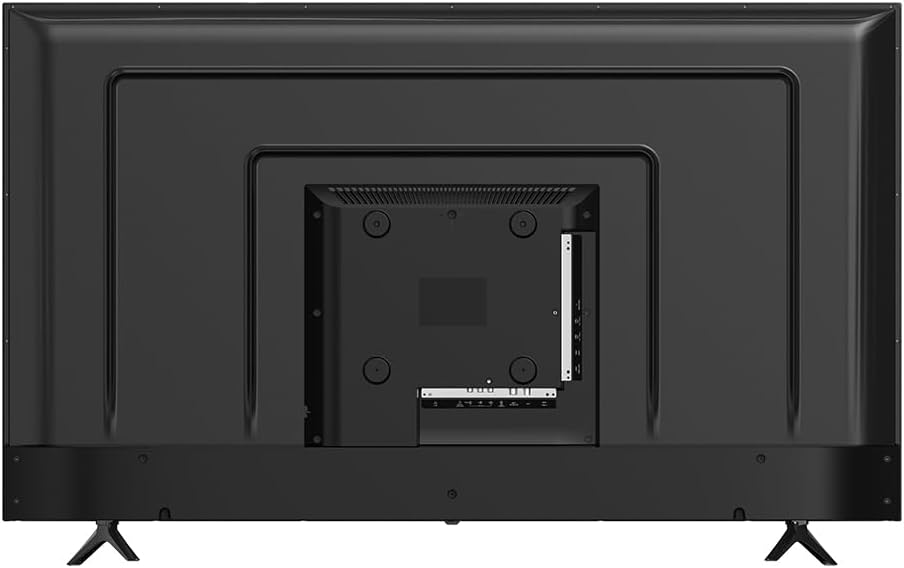
Сүрөт 4.1: Арткы view of the Syinix 55 Inch FHD Smart LED TV, illustrating the arrangement of connectivity ports including HDMI, USB, and antenna input.
- HDMI порттору: Blu-ray ойноткучтарын, оюн консолдорун, приставкаларды же башка HDMI иштетилген түзмөктөрдү туташтырыңыз.
- USB порттору: Медиа ойнотуу үчүн USB сактагыч түзмөктөрдү туташтырыңыз fileс (сүрөттөр, видеолор, музыка).
- Антенна/кабель киргизүү: Connect an antenna or cable TV signal for the built-in receiver.
- Ethernet порту: Зымдуу интернет байланышы үчүн Ethernet кабелин туташтырыңыз.
- Аудио чыгаруу: Connect external audio systems or soundbars.

Сүрөт 4.2: Side profile of the Syinix 55 Inch FHD Smart LED TV, showing accessible side-mounted ports for convenience.
5. Operating Your Syinix Smart LED TV
5.1 Биринчи жолу орнотуу
- Электр кабелин сыналгыга, андан кийин розеткага сайыңыз.
- Пульттагы же сыналгыдагы кубат баскычын басыңыз.
- Тилди, өлкөнү жана убакыт алкагын тандоо үчүн экрандагы нускамаларды аткарыңыз.
- Connect to your Wi-Fi network by selecting your network and entering the password, or connect via an Ethernet cable.
- Complete the initial setup steps, which may include signing into a Google account for Smart TV features.
5.2 Алыстан башкарууview
The remote control allows you to navigate the TV's functions. Familiarize yourself with the main buttons:
- Күч: Телевизорду күйгүзөт/өчөт.
- Булак: Киргизүү булактарын (HDMI, AV, TV) тандайт.
- Чабыттоо баскычтары (өйдө/төмөн/сол/оң/ОК): Менюларды чабыттап, тандоолорду ырастаңыз.
- Көлөм +/-: Үн көлөмүн тууралайт.
- Канал +/-: Каналдарды өзгөртөт.
- Үй: Smart TV башкы экранына жетет.
- Артка: Мурунку экранга кайтат.
- Netflix/YouTube/Other App Buttons: Агымдык кызматтарга түз жетүү.
5.3 Smart TV өзгөчөлүктөрү
Your Syinix Smart LED TV runs on an Android operating system, providing access to a wide range of applications and services.

Image 5.1: The Syinix Smart TV home screen, showing a user-friendly interface with quick access to popular streaming applications and search functions.
- Башкы экран: Access your favorite apps, recommended content, and settings from the customizable home screen.
- App Store: Download and install additional applications from the Google Play Store.
- Кастинг: Use built-in casting features to stream content from your smartphone or tablet to the TV.
- Үн менен башкаруу: If your remote supports it, use voice commands for search and control.
5.4 Built-in Receiver
The integrated receiver allows you to access free-to-air digital television channels without an external set-top box. Connect a suitable antenna to the "ANT IN" port on the TV. Navigate to the TV's settings menu to perform a channel scan and discover available channels.
6. Кароо жана тейлөө
Туура кам көрүү телевизоруңуздун иштөө мөөнөтүн узартат.
- Экранды тазалоо: Экранды жумшак, түксүз чүпүрөк менен акырын сүртүңүз. өжөр белгилери үчүн, бир аз гampчүпүрөккө суу же атайын экран тазалагыч (эч качан түздөн-түз экранга чачпаңыз).
- Денени тазалоо: Телевизордун тырмактарын аарчуу үчүн жумшак, кургак чүпүрөктү колдонуңузasinг. Абразивдүү тазалагычтардан же эриткичтерден качыңыз.
- Чаңдандыруу: Ашыкча ысып кетүүнүн алдын алуу үчүн желдетүү тешиктеринен чаңды дайыма сүртүп туруңуз.
- Электр кабели: Мезгил-мезгили менен электр шнурунун бузулуу белгилерин текшерип туруңуз.
- Сактагыч: If storing the TV for an extended period, unplug it and cover it to protect against dust. Store in a cool, dry place.
7. Кыйынчылыктарды
Кардарларды колдоо кызматына кайрылуудан мурун, жалпы маселелер боюнча төмөнкү чечимдерди колдонуп көрүңүз:
| Көйгөй | Мүмкүн чечим |
|---|---|
| Күч жок |
|
| Сүрөт жок, бирок үн бар |
|
| Үн жок, бирок сүрөт бар |
|
| Пульт иштебей жатат |
|
| Wi-Fi'га туташпай жатат |
|
8. Техникалык шарттар
Below are the key technical specifications for the Syinix 55 Inch FHD Smart LED TV, Model 55U51:
| Өзгөчөлүк | Деталь |
|---|---|
| Модель номери | 55U51 |
| Screen Size | 55 дюйм (140 см көрүнүүчү диагональ) |
| Дисплей технологиясы | LED FHD (Full High Definition) |
| Резолюция | 1080p |
| Жаңыртуу ылдамдыгы | 240 GHz (Note: This value seems unusually high for a 1080p TV and might refer to a motion processing rate rather than native panel refresh rate. Please refer to product packaging for exact native refresh rate.) |
| Өзгөчөлүктөр | Smart Android TV, HDR support, A+ Panel, Built-in Receiver, Wi-Fi |
| Байланыш технологиясы | USB, HDMI, Ethernet, Wi-Fi |
| Аспект катышы | 16:9 |
| Продукциянын өлчөмдөрү (D x W x Y) | 25.7 x 123 x 76.9 см (стенд менен) |
| Элемент Салмагы | 11.2 кг |
| Камтылган компоненттер | Электр кабели, алыстан башкаруу, стенд |
| Өндүрүүчү | Transsion Group |
9. Кепилдик жана колдоо
Syinix products are manufactured to high-quality standards. This product is covered by a limited warranty from the date of purchase. Please refer to the warranty card included in your package for specific terms and conditions, including the warranty period and coverage details.
For technical support, service inquiries, or to report a problem, please contact your local Syinix authorized service center or the retailer from whom you purchased the product. Have your product model number (55U51) and purchase receipt ready when contacting support.