1. Киришүү
Thank you for choosing the Gigaset Pure 100 Cordless Phone. This manual provides essential information for setting up, operating, and maintaining your new phone. Please read these instructions carefully to ensure optimal performance and longevity of your device.
The Gigaset Pure 100 is designed for ease of use, featuring a call blocking button, a 50-contact address book, hearing aid compatibility, and programmable function keys to enhance your communication experience.

Image: The Gigaset Pure 100 cordless phone positioned in a home environment, showcasing анын кооз дизайны.
2. Кутуда эмне бар
Before you begin, please check the contents of your package. Ensure all items listed below are present:
- 1 Телефон
- 1 базалык станция
- 2 AAA кайра заряддалуучу батарейка
- 1 Батарея капкагы
- 1 Кубаттуу адаптер
- 1 Телефон туташтыруучу кабель
- 1 Ыкчам колдонмо
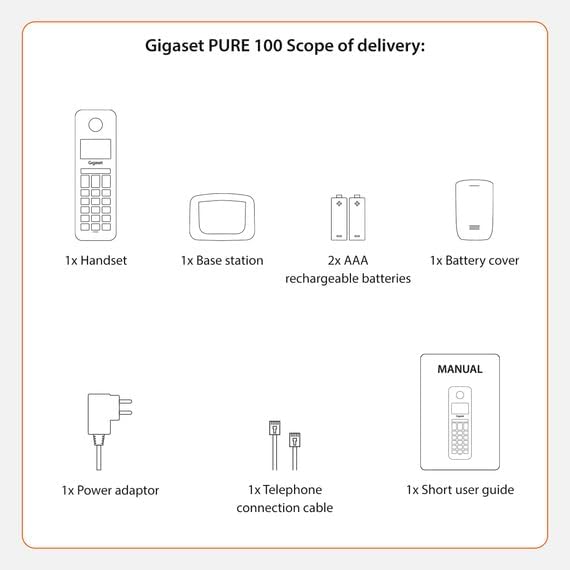
Image: A visual representation of the Gigaset Pure 100's scope of delivery, including handset, base, batteries, and cables.
3. Орнотуу
3.1. Батареяны орнотуу
- Телефондун арткы бетинен батареянын капкагын алып салыңыз.
- Берилген эки AAA кайра заряддоого боло турган батарейканы туура полярдуулукка (+/-) карап кыстарыңыз.
- Батарейканын капкагы ордуна чыккыча ордуна коюңуз.

Image: The rear side of the Gigaset Pure 100 handset, illustrating where the battery cover is located for installation.
3.2. Базалык станцияга туташуу
- Кубат адаптерин базалык станцияга туташтырыңыз жана аны розеткага сайыңыз.
- Connect the telephone connection cable to the base station and plug the other end into your telephone wall socket.
- Базалык станцияны тегиз, туруктуу бетке коюңуз.
3.3. Телефонду каттоо
The handset is usually pre-registered to the base station. If not, or if you are registering an additional handset:
- Телефонду базалык станцияга коюңуз.
- Press and hold the registration/paging button on the base station for approximately 3 seconds. The base station will enter registration mode.
- Follow the on-screen prompts on the handset to complete the registration process. You may need to enter a PIN (default is 0000).

Image: The Gigaset Pure 100 handset securely placed in its charging and communication base station.
4. Иштөө нускамалары
4.1. Чалууларды жасоо
- Телефонду көтөрүңүз же басыңыз Жашыл чакыруу баскычы.
- Каалаган телефон номерин териңиз.
- басыңыз Жашыл чакыруу баскычы кайра чалууну баштоо үчүн.
- Чакырууну аяктоо үчүн басыңыз Кызыл аяктоочу чалуу баскычы же трубканы кайра базалык станцияга коюңуз.
4.2. Чалууларды кабыл алуу
Телефон шыңгыраганда, басыңыз Жашыл чакыруу баскычы чалууга жооп берүү.
4.3. Address Book
The Gigaset Pure 100 can store up to 50 contacts in its address book.
- To access the address book, press the Directory Key (usually an icon resembling an open book or person).
- Use the navigation keys to scroll through your contacts.
- To dial a contact, select their entry and press the Жашыл чакыруу баскычы.
- To add a new contact, navigate to an empty entry or select the 'New Entry' option and follow the on-screen instructions to enter the name and number.
4.4. Чалууларды бөгөттөө
The Gigaset Pure 100 features a dedicated call blocking button to help manage unwanted calls.
- Каалабаган номерден чалуу учурунда, баскычын басыңыз Call Blocking Button (often marked with a shield or 'Block' icon).
- The number will be added to your block list, and subsequent calls from this number will be rejected.
- Refer to the quick guide for detailed instructions on managing your block list.

Image: The Gigaset Pure 100 handset screen showing a 'Blocked Number' notification, highlighting its call blocking feature.
4.5. Программалануучу функциялык баскычтар
The phone includes programmable function keys that can be assigned to frequently used numbers or features. Consult your quick guide for instructions on how to program these keys to suit your needs.

Image: An illustration demonstrating the Gigaset Pure 100's effective range, allowing calls from various locations within a property.
5. Техникалык тейлөө
5.1. Тазалоо
Трубканы жана базалык станцияны жумшак, d менен сүртүңүзamp кездеме. Абразивдүү тазалоочу каражаттарды же эриткичтерди колдонбоңуз. Түзмөктүн тешиктерине суюктук кирбегенин текшериңиз.
5.2. Батареяга кам көрүү
Сунушталган кайра заряддалуучу AAA батареяларын гана колдонуңуз. Эгерде телефон көпкө колдонулбаса, агып кетпеши үчүн батареяларды алып салыңыз. Батареялардын иштеши бир топ начарлаганда, аларды алмаштырыңыз.
6. Кыйынчылыктарды
- Терүү үнү жок:
Check if the power adapter and telephone connection cable are securely plugged into the base station and wall outlets. Ensure the handset is registered to the base. - Чалууларды кабыл алуу/кабыл алуу мүмкүн эмес:
Verify that the telephone line is active. Check if the handset batteries are charged. Ensure the handset is within range of the base station. - Үн сапаты начар:
Базалык станцияга жакыныраак жылыңыз. Башка электрондук шаймандардын кийлигишүүсүн текшериңиз. - Телефондун дисплейи бош:
Place the handset in the base station to charge the batteries. If the issue persists, replace the batteries.
7. Техникалык шарттар
| Өзгөчөлүк | Description |
|---|---|
| Бренд | Gigaset |
| Модель номери | ТАЗА 100 |
| Түс | Кара |
| Экран | 1.5 дюйм |
| Power Type | Батарея |
| Терүү түрү | Жалгыз баскычтоп |
| Чалуучунун идентификациясы | Ооба |
| Материал | Пластик |
| Системанын түрү | Санарип |
8. Кепилдик жана колдоо
For warranty information and technical support, please refer to the quick guide included in your package or visit the official Gigaset webсайт. Кепилдик дооматтар үчүн сатып алганыңыздын далилин сактаңыз.