
Introduction
This manual provides detailed instructions for the installation, operation, and maintenance of your BAISHUN Foldable Tablet Wall Mount. Please read this manual thoroughly before installation and use to ensure proper function and safety. This mount is designed to securely hold tablets and smartphones ranging from 4.7 to 12.9 inches, offering adjustable viewing angles and flexible positioning.
Пакеттин мазмуну
Орнотууну баштоодон мурун бардык компоненттер бар экендигин текшериңиз:
- Foldable Tablet Wall Mount (main unit with two arms and tablet holder)
- Wall mounting base
- Монтаждоо бурамалар (4x)
- Wall anchors (4x, if applicable for your wall type)
- Жөндөөлөр үчүн ачкыч
- Кир жуугучтар (4x)

Image: Components included in the BAISHUN Foldable Tablet Wall Mount package, showing the main mount, wall plate, screws, washers, and an adjustment wrench.
Техникалык шарттар
| Өзгөчөлүк | Деталь |
|---|---|
| Продукциянын өлчөмдөрү | 9.65 x 2.56 x 3 дюйм (бүктөлгөн) |
| Элемент Салмагы | 1.94 фунт |
| Материал | Алюминий эритмеси |
| Түс | Кара |
| Шайкеш түзмөктөр | Tablets, iPad Air, iPad Mini, iPad Pro 12.9 inch, iPhone (4.7-12.9 inch screens) |
| Монтаж түрү | Дубалга орнотуу |
| Жөнгө салуу мүмкүнчүлүгү | 360° rotation, 2-stage extendable arm (up to 17.13 inches / 43.5 cm) |
Орнотуу жана орнотуу
Follow these steps to securely install your tablet wall mount:
- Жайгашкан жерди тандаңыз: Select a sturdy wall surface in your desired area (kitchen, bedroom, office, etc.). Ensure the chosen location can support the weight of the mount and your device.
- Бургулоо тешиктерин белгилөө: Position the wall mounting base against the wall at the desired height. Use a pencil to mark the four drill hole locations through the base.
- Бургулоочу тешиктер: Using an appropriate drill bit for your wall type, drill pilot holes at the marked locations. If installing into drywall, use the provided wall anchors.
- Монтаждык базаны бекитүү: Align the mounting base with the drilled holes. Insert the screws through the base and into the wall/anchors. Tighten securely with a screwdriver.
- Attach Mount Arm: The main arm unit connects to the wall mounting base. Ensure it is securely fastened.
- Тыюулукту тууралоо: Use the provided wrench to adjust the tightness of the joints on the arms to achieve desired movement resistance. Do not overtighten.

Image: Visual guide illustrating the process of installing the wall mount, including marking, drilling, and securing the base.

Сүрөт: деталдуу view of key features: non-slip rubber pads on the tablet holder, the ball joint for 360-degree rotation, and the robust metal base for secure wall attachment.
Иштөө нускамалары
The BAISHUN Tablet Wall Mount offers versatile positioning for your device:
- Түзмөгүңүздү тиркөө: Gently expand the tablet holder clamps and insert your tablet or smartphone. The holder is designed to securely grip devices between 4.7 and 12.9 inches. The non-slip rubber pads protect your device from scratches.
- Тууралоо Viewбурч: The tablet holder features a 360° rotatable ball joint, allowing you to easily switch between portrait and landscape orientations and tilt the screen to your preferred viewбурч.
- Extending and Folding the Arm: The mount has a 2-stage extendable arm. You can extend it up to 17.13 inches (43.5 cm) for optimal reach or fold it back to a compact 0.32 inches (10 cm) when not in use to save space. The arm joints can be adjusted for tightness using the provided wrench.
- Колду айландыруу: The arm can swivel 180° at the wall base and 360° at the first joint, providing extensive movement for various viewпозициялар.

Image: A tablet securely held by the wall mount, demonstrating its extended position and suitability for media consumption.

Image: The wall mount arm demonstrating its ability to fold and stretch, illustrating the range of motion and compact storage.
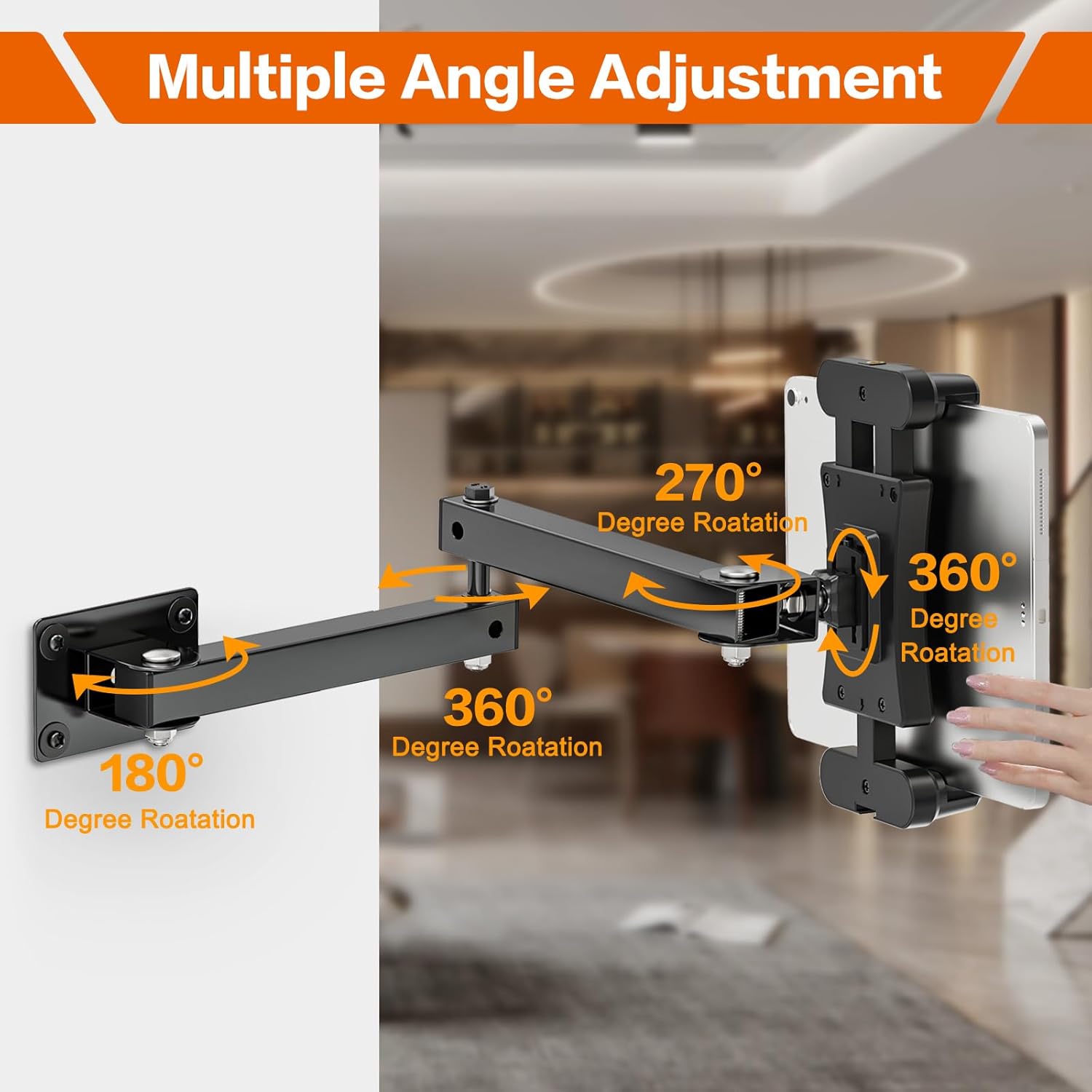
Image: A diagram highlighting the various rotational and swivel points of the mount, including 180°, 270°, and 360° adjustments.
Шайкештик
The BAISHUN Foldable Tablet Wall Mount is compatible with a wide range of devices:
- Tablets with screen sizes from 4.7 to 12.9 inches.
- Examples include: iPad Pro 12.9"/11", iPad Air, iPad Mini, various Galaxy Tabs.
- Smartphones such as iPhone, Galaxy S20, Fire Phone, Samsung Galaxy S3.
- Other devices like Nintendo Switch and e-Readers.
The adjustable width of the holder ranges from 5.3 to 11.81 inches (13.5 cm to 30 cm) to ensure a secure fit.

Image: The tablet holder displaying its adjustable width, indicating compatibility with devices from 5.3 to 11.81 inches (13.5 cm to 30 cm).
Техникалык тейлөө
To ensure the longevity and optimal performance of your BAISHUN Tablet Wall Mount:
- Тазалоо: монтажды жумшак менен сүртүңүз, гamp кездеме. Финишке зыян келтирүүчү абразивдүү тазалагычтардан же эриткичтерден качыңыз.
- Муундардын тыгыздыгы: Periodically check the tightness of all screws and joints. If the arm feels loose or does not hold its position, use the provided wrench to gently tighten the bolts until the desired resistance is achieved. Do not overtighten.
- Салмак чеги: Do not exceed the recommended weight limit for the mount. Overloading can cause damage to the mount or your device.
- Экологиялык шарттар: Avoid exposing the mount to extreme temperatures or high humidity, which can affect its material integrity.
Проблемаларды чечүү
| Көйгөй | Мүмкүн болгон себеп / Чечим |
|---|---|
| Mount arm is loose or sags. | The joint bolts may need tightening. Use the provided wrench to adjust the tightness of the arm joints. |
| Tablet does not fit securely in the holder. | Ensure your device's screen size is within the 4.7-12.9 inch range and its width is between 5.3 and 11.81 inches. Adjust the holder's expandable clamps to fit your device snugly. |
| Mount feels unstable on the wall. | Check that the wall mounting base screws are fully tightened. Ensure the mount was installed into a sturdy part of the wall, using appropriate anchors if necessary. |
| Difficulty rotating or adjusting the arm. | The joints might be too tight. Loosen the bolts slightly with the wrench until movement is smooth but still holds position. |
Кепилдик жана колдоо
For warranty information or technical support, please refer to the product packaging or contact BAISHUN customer service through the retailer where the product was purchased. Keep your purchase receipt as proof of purchase.