
1. Киришүү
This manual provides essential instructions for the safe and efficient operation, maintenance, and troubleshooting of the Nilfisk Advance SC450 Walk-Behind Automatic Scrubber. Please read this manual thoroughly before operating the machine to ensure proper usage and to prevent injury or damage.
The Nilfisk Advance SC450 is a compact, battery-powered walk-behind scrubber designed for daily cleaning tasks in various environments such as hospitals, schools, manufacturing plants, and warehouses. It offers high productivity, reliable operation, and ease of use.
2. Коопсуздук маалыматы
WARNING: Failure to follow these safety instructions may result in serious injury or damage to the machine.
- Always wear appropriate personal protective equipment (PPE) such as safety glasses and non-slip footwear during operation and maintenance.
- Ensure the machine is turned off and disconnected from the power source before performing any maintenance or adjustments.
- Do not operate the scrubber on inclines exceeding the manufacturer's recommendations.
- Колдорду, буттарды жана бош кийимдерди кыймылдуу бөлүктөрдөн алыс кармаңыз.
- Use only approved cleaning solutions and follow their safety guidelines.
- Do not allow untrained personnel to operate the machine.
- Колдонулбай турган учурда машинаны кургак, коопсуз жерде сактаңыз.
- Батареяларды заряддоодо туура желдетүүнү камсыз кылыңыз.
3. Орнотуу
3.1 Пакеттен чыгаруу
Carefully remove the scrubber and all accessories from the packaging. Inspect for any shipping damage. Retain packaging for future transport if needed.
3.2 Батареяны орнотуу жана заряддоо
The SC450 uses (2) 105 Ah wet batteries (part number 56206962). Ensure batteries are properly installed in the battery compartment (dimensions: 13.7 x 13.7 x 11.8 inches).
- Батарея уясынын капкагын ачыңыз.
- Place the batteries securely in the compartment, ensuring correct polarity when connecting.
- Connect the battery charger (115VAC/24VDC) to the machine and a suitable power outlet.
- Allow batteries to fully charge before first use. Refer to the battery charger manual for specific charging instructions.
3.3 Pad Holder and Pad Installation
The scrubber is equipped with a 20-inch disc pad holder (part number L08837018).
- Ensure the machine is off and the brush deck is raised.
- Align the cleaning pad (not included) with the pad holder.
- Attach the pad to the pad holder, ensuring it is centered and secure.
- Lower the brush deck into position.
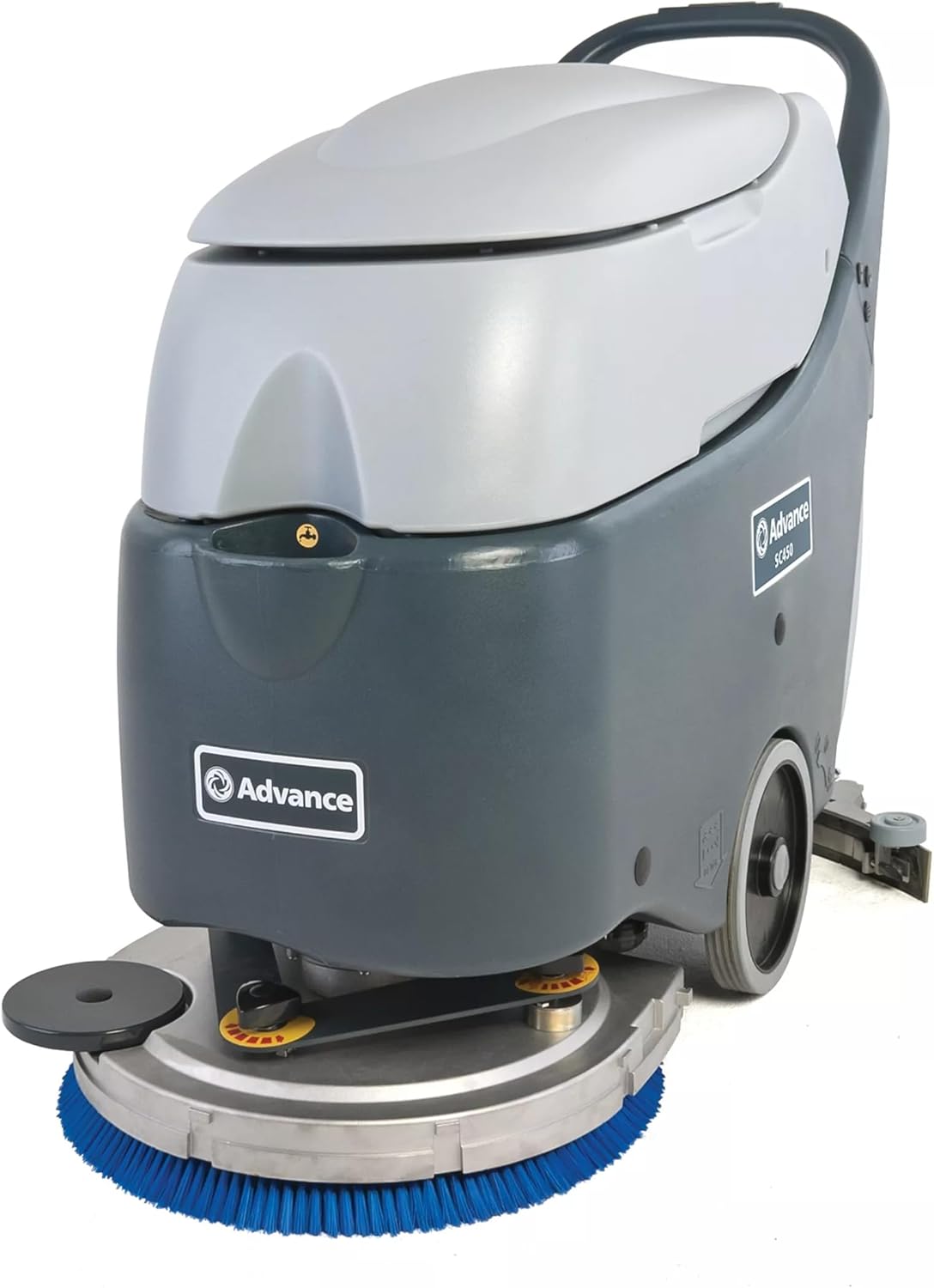
Сүрөт 1: Алдыңкы view of the Nilfisk Advance SC450 scrubber, showing the blue cleaning pad and disc.
3.4 Splash Guard Installation
Install the splash guard (part number 9096736000) to prevent water and solution from splashing during operation.
- Locate the mounting points for the splash guard.
- Securely attach the splash guard according to the machine's design.
3.5 Эритме куюучу бактын толтурулушу
- Open the solution tank cap.
- Fill the tank with clean water and the recommended cleaning solution. The solution tank capacity is 10.5 gallons (39.75 liters).
- Do not overfill. Close the cap securely.
4. Иштөө нускамалары
4.1 Controls Overview
Familiarize yourself with the control panel, typically located on the handle. This includes the power switch, brush engagement lever, solution flow control, and squeegee lift lever.

2-сүрөт: Арткы view of the Nilfisk Advance SC450 scrubber, showing the handle and control panel.
4.2 Машинаны ишке киргизүү
- Ensure the solution tank is filled and the recovery tank is empty.
- Lower the squeegee to the operating position.
- Негизги өчүргүчтү күйгүзүңүз.
- Engage the brush motor and adjust the solution flow as needed.
- Begin walking at a steady pace. The maximum speed is 3 mph (4.83 kph).
4.3 Scrubbing Procedure
Guide the machine in overlapping passes to ensure complete coverage. The scrubbing width is 20 inches (50.8 cm). The automatic squeegee release feature protects the squeegee when encountering obstacles.
4.4 Машинаны токтотуу
- Disengage the brush motor and turn off the solution flow.
- Чачты көтөрүңүз.
- Негизги өчүргүчтү өчүрүңүз.
4.5 Калыбына келтирүүчү резервуарды бошотуу
The recovery tank has a capacity of 11.9 gallons (45.05 liters). Empty it regularly to maintain optimal performance.
- Locate the drain hose or recovery tank lid.
- Drain the dirty water into an appropriate disposal area.
- The recovery tank features a removable lid for easy cleaning.
5. Техникалык тейлөө
Regular maintenance ensures the longevity and optimal performance of your SC450 scrubber.
5.1 Күнүмдүк тейлөө
- Clean Recovery Tank: After each use, empty and rinse the recovery tank thoroughly. The removable lid facilitates easy cleaning.
- Inspect Squeegee Blades: Check for wear, tears, or damage. Clean any debris from the squeegee.
- Clean Brushes/Pads: Remove and clean the scrubbing pad or brush. Replace if worn.
- Тиш жуугуч машина: Жарнама менен машинанын сыртын тазалаңызamp кездеме.
5.2 Батареяга кам көрүү
- Recharge After Each Use: Fully recharge the batteries after each use to maximize battery life.
- Check Water Levels (Wet Batteries): Periodically check the electrolyte levels in the wet batteries and top up with distilled water if necessary, following battery manufacturer guidelines.
- Терминалдарды таза кармоо: Батарея терминалдарынын таза жана дат баспагандыгын текшериңиз.
5.3 Мезгилдүү текшерүүлөр
- Түтүктөрдү жана туташтырууларды текшерүү: Check all hoses and connections for leaks or damage.
- Brush Deck Inspection: Ensure the brush deck operates smoothly and is free from obstructions.
6. Кыйынчылыктарды
This section provides solutions to common operational issues. For problems not listed here, contact authorized service personnel.
| Көйгөй | Мүмкүн себеп | Чечим |
|---|---|---|
| Машина иштебейт | Батарея заряды аз Main power switch off Батарея байланышы бош | Батареяларды заряддаңыз Кубат которгучун күйгүзүңүз Батарея байланыштарын текшерип, коопсуздандырыңыз |
| Начар тазалоо көрсөткүчү | Worn brush/pad Insufficient solution flow Incorrect cleaning solution | Replace brush/pad Adjust solution flow control Use recommended cleaning solution |
| Water left on floor | Worn or damaged squeegee blades Squeegee not properly adjusted Калыбына келтирүүчү резервуар толду | Чачтарды алмаштырыңыз Adjust squeegee angle/pressure Калыбына келтирүүчү резервуар бош |
| Reduced running time | Батареялар толук заряддалган эмес Aging batteries | Толук заряддоо циклин камсыз кылыңыз Батареяны алмаштырууну карап көрөлү |
7. Техникалык шарттар
Technical specifications for the Nilfisk Advance SC450 Walk-Behind Automatic Scrubber:
| Өзгөчөлүк | Нарк |
|---|---|
| Модел | SC450 |
| Өндүрүүчү | Nilfisk Advance |
| Тtage | 24 V |
| Brush Motor Power | 480 Вт |
| Вакуумдук мотор кубаттуулугу | 330 Вт |
| Scrubbing Width | 20 дюйм (50.8 см) |
| Скүргүчтүн кеңдиги | 30 дюйм (76.2 см) |
| Чечимдин сыйымдуулугу | 10.5 гал (39.75 л) |
| Калыбына келтирүү танкынын сыйымдуулугу | 11.9 гал (45.05 л) |
| Максималдуу иштөө убактысы | 140 мин |
| Brush Speed | 154 RPM |
| Үн басымынын деңгээли | 68 дБ(А) |
| Батареялар менен салмак | 285 фунт (129.27 кг) |
| Өлчөмдөрү (L x W x Y) | 46.2 дюйм x 22 дюйм x 38.6 дюйм (117.35 см x 55.88 см x 98.04 см) |
| Макс. Ылдамдык | 3 миль/саат (4.83 км/саат) |
| IP коргоо классы | IPX4 |
| Изоляция классы | I |
| Battery Compartment Size (L x W x H) | 13.7 x 13.7 x 11.8 in (34.80 cm x 34.80 cm x 29.97 cm) |
| Surface Recommendation | Катуу полдор, килемдер |
| Камтылган компоненттер | (1) Pad Holder, (2) 105 Ah Wet Battery, (1) Splash Guard, Battery Charger |
8. Кепилдик жана колдоо
For warranty information, please refer to the documentation provided with your purchase or contact your authorized Nilfisk Advance dealer. For technical support or service inquiries, please contact your local Nilfisk Advance service center or the dealer from whom the product was purchased.