
1. Киришүү
Thank you for choosing the EDSACE Weatherproof Light Bulb Security Camera. This innovative device combines the functionality of a standard light bulb with advanced security camera features, offering comprehensive surveillance for your home or property. Designed for outdoor use, it withstands various weather conditions and provides clear 2K HD video, two-way audio, motion detection, and night vision capabilities. This manual will guide you through the installation, operation, and maintenance of your new security camera.

Figure 1: EDSACE Weatherproof Light Bulb Security Camera and Mobile App
2. Продукциянын өзгөчөлүктөрү
- Аба ырайынын туруктуулугу: Designed to withstand outdoor conditions, including rain, snow, and extreme temperatures.
- 2K HD видео: Captures and transmits high-definition video with clarity and detail.
- Эки тараптуу аудио: Enables communication with people on the camera's end, allowing you to listen and speak remotely.
- Кыймылды аныктоо жана эскертүүлөр: Кыймыл аныкталганда смартфонуңузга заматта эскертмелерди алыңыз.
- Түнкү көрүнүш: Equipped with infrared LEDs for clear video recording in low-light or nighttime conditions.
- Сактоо параметрлери: Supports local storage via a microSD card (not included) or cloud storage (subscription may be required).
- Оңой орнотуу: Quick and hassle-free setup, no complex wiring required.
- AI Intelligent Features: Includes advanced features such as motion detection, facial recognition, or object tracking.
3. Орнотуу колдонмосу
3.1. Кутуда эмне бар
- EDSACE Weatherproof Light Bulb Security Camera
- Монтаждык аксессуарлар (эгер бар болсо)
- User Manual
3.2. Орнотуу
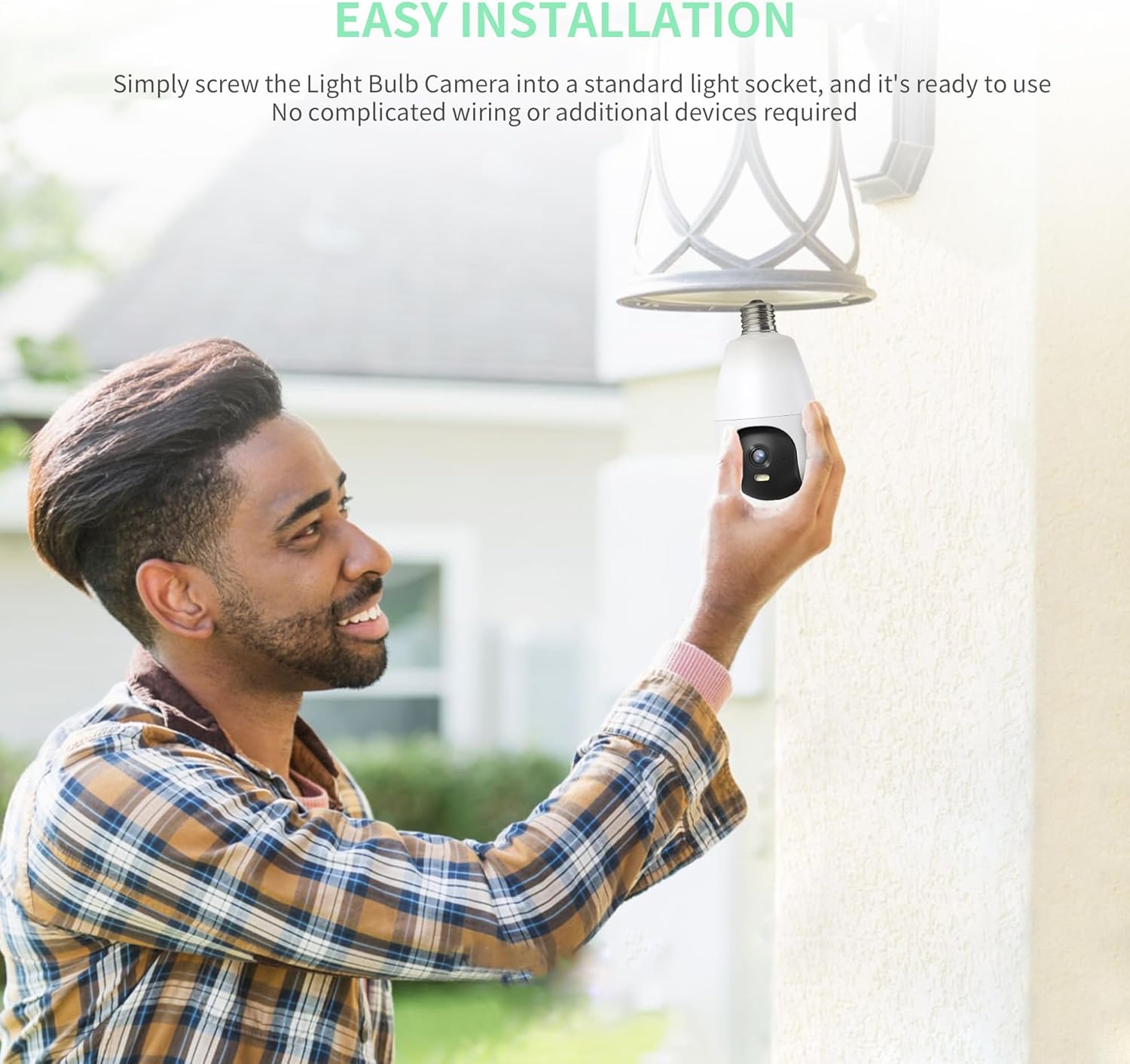
- Орнотуудан мурун жарык розеткасынын кубаты өчүрүлгөнүн текшериңиз.
- Carefully screw the Light Bulb Camera into a standard E27/E26 light socket. Ensure it is securely tightened.
- Turn on the power to the light socket. The camera will power on and indicate readiness for setup (e.g., a blinking light).

Figure 2: Easy Installation into a Standard Light Socket
3.3. Колдонмону жүктөп алуу жана туташуу
- жүктөп алыңыз Vicohome смартфонуңуздун колдонмолор дүкөнүнөн (iOS App Store же Google Play Store) колдонмону жүктөп алыңыз.
- Жаңы аккаунтка катталыңыз же сизде мурунтан эле бар болсо кириңиз.
- Follow the in-app instructions to add your new camera. This typically involves scanning a QR code on the camera or manually selecting the device type and connecting to your 2.4GHz Wi-Fi network.
- Ensure your Wi-Fi signal is strong at the camera's installation location for optimal performance.
4. Иштөө нускамалары
4.1. Түз эфир View жана Жаздыруу
Once connected, open the Vicohome app to access the live video feed from your camera. You can view реалдуу убакыт footage, take snapshots, and manually record video directly from the app.
4.2. High-Quality Video
The camera provides 2K HD resolution for clear and detailed surveillance. This high resolution ensures that important details are captured effectively.

Figure 3: Enhanced Clarity with 2K HD Video
4.3. Эки тараптуу аудио
Utilize the built-in microphone and speaker to communicate remotely. Tap the microphone icon in the app to speak, and listen through the camera's speaker. This feature is useful for greeting visitors or deterring unwanted guests.

4-сүрөт: Эки тараптуу аудио байланыш
4.4. Кыймылды аныктоо жана эскертүүлөр
The camera is equipped with intelligent motion detection. When movement is detected, the camera will automatically record and send instant notifications to your smartphone. You can adjust sensitivity settings within the app to minimize false alerts.
5-сүрөт: Иш-аракеттеги кыймылды аныктоо
Video 1: Demonstration of the security camera's motion detection and alert features, showing a user receiving a notification and viewing live footage of an event.
4.5. Түнкү көрүнүш
The camera's infrared night vision allows for clear surveillance even in complete darkness, providing round-the-clock monitoring capabilities.

Figure 6: Clear Night Vision Footage
4.6. Сактоо параметрлери
You have the flexibility to store your recorded footage either locally on a microSD card (up to 128GB, not included) or through cloud storage services (subscription may be required). Both options ensure your footage is securely saved and accessible.

Figure 7: Cloud and Local Storage Options
4.7. Customizable Settings
Adjust various camera settings within the app, including motion sensitivity, recording schedules, and camera angles (pan/tilt if supported by the model) to tailor the device to your specific needs.

Figure 8: Customizable Camera Angles and Settings
5. Техникалык тейлөө
- Тазалоо: Periodically wipe the camera lens with a soft, dry cloth to ensure clear image quality. Do not use harsh chemicals or abrasive materials.
- Программалык камсыздоонун жаңыртуулары: Check the Vicohome app regularly for firmware updates. Keeping your camera's firmware updated ensures optimal performance, security, and access to new features.
- Power Cycle: If the camera becomes unresponsive, try turning off the power to the light socket for 10 seconds, then turning it back on.

Figure 9: Weatherproof Design for Outdoor Durability
6. Кыйынчылыктарды
| Көйгөй | Мүмкүн себеп | Чечим |
|---|---|---|
| Камера оффлайн | Электр кубаты жок; Wi-Fi өчүрүлгөн; Роутерде көйгөй бар | Check power supply; Restart camera and router; Reconnect camera to Wi-Fi in app. |
| Видеонун сапаты начар | Wi-Fi сигналы начар; Кир линза | Ensure strong Wi-Fi signal; Clean camera lens; Reduce video quality setting in app if necessary. |
| Кыймыл эскертүүлөрү жок | Motion detection off; Sensitivity too low; App notifications disabled | Enable motion detection in app; Increase sensitivity; Check phone notification settings for Vicohome app. |
| MicroSD карта жаздырылбай жатат | Card full or corrupted; Incorrect format | Format the microSD card in the app; Replace card if corrupted; Ensure continuous recording is enabled. |
7. Техникалык шарттар
| Өзгөчөлүк | Деталь |
|---|---|
| Модел | B0CSP6VHH7 |
| Видео тартуунун резолюциясы | 3 MP, 2K |
| Connectivity Protocol | Wi-Fi (2.4 ГГц) |
| Power Source | Электр зымдары |
| Монтаж түрү | Шыпка орнотуу (бурама менен бекитүү) |
| Түнкү көрүү диапазону | 98 Фут |
| Сууга туруктуулук деңгээли | Суу өткөрбөйт (IP65) |
| Field Of View | 120 градус |
| Башкаруу ыкмасы | App (Vicohome) |
| Элемент Салмагы | 9.9 унция |
| Өндүрүүчү | EDSACE |
8. Кепилдик жана колдоо
For warranty information and technical support, please refer to the contact details provided on the product packaging or visit the official EDSACE webсайт. Сатып алуу квитанциясын кепилдик дооматтары үчүн сатып алуунун далили катары сактаңыз.