
1. Киришүү
The GREENKINDER Kids Instant Print Camera KC05 is designed to capture and instantly print memories. This digital camera features photo and video recording capabilities, a rotating lens for selfies, and thermal printing technology for immediate black and white prints. It is suitable for children aged 3-12 years.
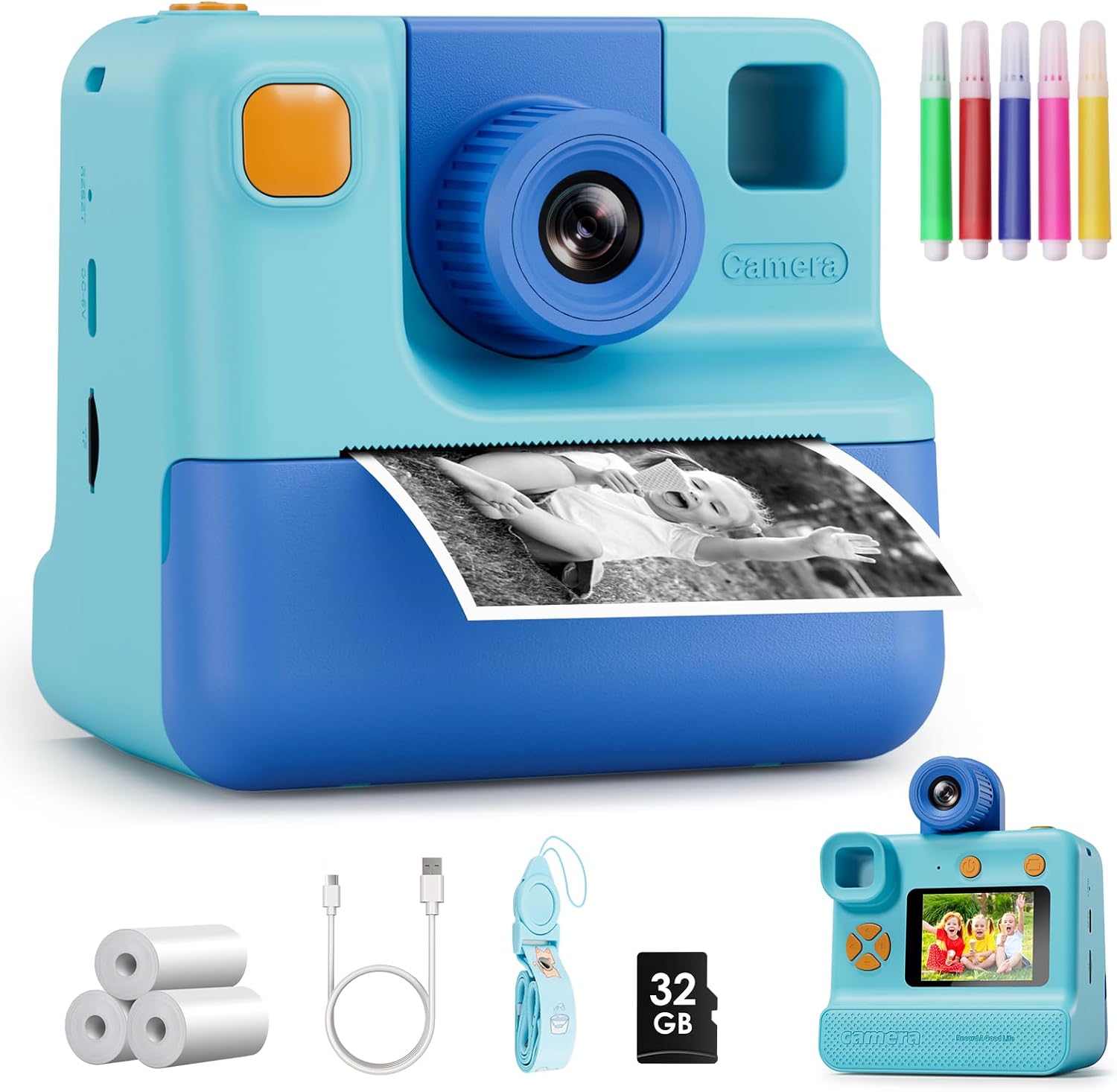
Image 1.1: The GREENKINDER Kids Instant Print Camera KC05, illustrating its instant print function.
2. Орнотуу
2.1. Кутудан чыгаруу жана компоненттер
Пакетте бардык компоненттер бар экенин текшериңиз:
- Kids Instant Print Camera KC05
- 3 rolls of thermal print paper
- 1x 32GB MicroSD card
- 1x Lanyard
- 1x USB Type-C заряддоо кабели
- 1x Sheet of cartoon stickers
- 1x Set of 5 colored pencils
Видео 2.1: Сатуучунун пикириview demonstrating the unboxing and contents of the Kids Instant Print Camera.
2.2. Камераны заряддоо
Connect the provided USB Type-C cable to the camera's charging port and to a compatible USB power source. The camera features a 1000mAh battery, providing approximately 3-4 hours of continuous use on a full charge.
2.3. Басма кагазын орнотуу
- Gently pull out the film guides on the front of the camera.
- Insert a roll of thermal print paper into the designated compartment, ensuring the paper feeds correctly. Leave about 1 to 2 inches of paper extending from the slot.
- Пленка эшигин бекем жабыңыз.

Image 2.1: Step-by-step guide for installing the thermal print paper.
2.4. MicroSD картасын салуу
Locate the MicroSD card slot on the side of the camera. Insert the provided 32GB MicroSD card until it clicks into place. This card stores photos and videos.
3. Иштөө нускамалары
3.1. Күйгүзүү/өчүрүү
Press and hold the power button (usually located on the top or side) for a few seconds to turn the camera on or off. A welcome screen will appear upon startup.
3.2. Навигация
Use the directional buttons (up, down, left, right) to navigate through the menu options displayed on the 2.0-inch screen. The menu typically includes options for Photo, Video, Gallery, and Settings.
3.3. Сүрөт тартуу
Select the 'Photo' icon from the main menu. Frame your shot using the screen. Press the shutter button (usually a prominent button on top) to capture a 24MP photo.
3.4. Видеолорду жаздыруу
Select the 'Video' icon from the main menu. Press the shutter button to start recording 1080p video. Press it again to stop recording.
3.5. Селфи режими
The camera features a 180-degree rotating lens. Flip the lens to face forward for regular photos or backward for selfies. This makes capturing self-portraits easier.

Image 3.1: The camera's 180-degree rotating lens facilitates easy selfies.
3.6. Instant Printing
After taking a photo, you can choose to print it instantly. The camera uses thermal printing technology, producing black and white prints in approximately 3 seconds without the need for ink cartridges. You can adjust print density in the settings for desired lightness or darkness.
Video 3.1: Demonstration of the instant printing function of the camera.
3.7. Creative Features
Explore various built-in photo frames and filters to add fun effects to your pictures. Use the included colored pencils to customize your black and white prints.

Image 3.2: Children can personalize their instant prints using the provided colored pencils.
4. Техникалык тейлөө
4.1. Replacing Print Paper
When the print paper runs out, follow the steps in Section 2.3 to install a new roll. The camera comes with 3 rolls, each capable of printing up to 60 photos.
4.2. Камераны тазалоо
Use a soft, dry cloth to clean the exterior of the camera. Avoid using liquid cleaners or abrasive materials. Keep the lens clean for optimal photo quality.
5. Кыйынчылыктарды
5.1. Камера күйбөй жатат
- Ensure the battery is charged. Connect the camera to a power source using the USB-C cable.
- Кубат баскычын узак убакытка (5-10 секунд) басып, кармап көрүңүз.
5.2. Printing Issues
- Check if the print paper is installed correctly and not jammed. Refer to Section 2.3.
- Ensure there is enough paper in the roll.
- Adjust print density in the camera settings if prints are too light or too dark.
5.3. Photo/Video Storage Issues
- Verify that the MicroSD card is properly inserted.
- Check if the MicroSD card has sufficient storage space. Delete unnecessary files керек болсо.
6. Техникалык шарттар
| Өзгөчөлүк | Деталь |
|---|---|
| Продукциянын өлчөмдөрү | 7.76 x 4.5 x 3.03 дюйм |
| Элемент Салмагы | 13.1 унция |
| Модель номери | KC05 |
| Батареялар | 1 Литий Полимер батарейкалары талап кылынат (кошулган) |
| Өндүрүүчү | GREENKINDER |
| Өзгөчө өзгөчөлүк | Ыкчам басып чыгаруу |
| Фильм форматынын түрү | 35mm (Thermal Paper) |
| Тасманын түсү | Кара жана ак |
| Шайкеш түзмөктөр | Камера |
| Камтылган компоненттер | Камеранын корпусу жана аксессуарлары |
7. Кепилдик жана колдоо
The GREENKINDER Kids Instant Print Camera KC05 includes a 2-year guarantee. For any product inquiries, technical support, or warranty claims, please refer to the contact information provided in your product packaging or visit the official GREENKINDER webсайт.