
1. Киришүү
This manual provides detailed instructions for the installation, operation, and maintenance of your TAFFIO TXH6701-4 Android Head Unit. This device integrates advanced navigation, communication, and entertainment features into your Porsche Macan, enhancing your driving experience.
2. Продукт бүтүп калдыview
The TAFFIO TXH6701-4 is a 12.3-inch touchscreen Android head unit designed to seamlessly integrate with Porsche Macan vehicles equipped with PCM 4.0. It offers a high-resolution display and a comprehensive suite of features.
Негизги өзгөчөлүктөрү:
- 1920 x 720 Full HD Video Resolution Capacitive Touchscreen Display
- Intuitive 3D User Interface
- Powered by a Snapdragon Qualcomm 668s 8-core processor (2.0 GHz) with 8 GB RAM and 128 GB internal storage
- Integrated Wireless Apple CarPlay and Android Auto functionality
- Built-in Wi-Fi for direct connection to hotspots
- 4G LTE SIM card slot for mobile internet connectivity
- FM/AM radio tuner with RDS
- USB slots for media playback
- Bluetooth A2DP for music streaming
- Supports original car functions including rearview camera and parking distance control (PDC)
- Automatic screen brightness adjustment (Day & Night Display function)
- Subwoofer output, 4x audio output, 2x video out, 1x AUX video in

Figure 2.1: The TAFFIO TXH6701-4 Android Head Unit displaying its main interface with various application icons.
3. Шайкештик
This head unit is compatible with Porsche Macan models from 2017 onwards that are equipped with the PCM 4.0 system. It is crucial to verify your vehicle's current system to ensure proper functionality.
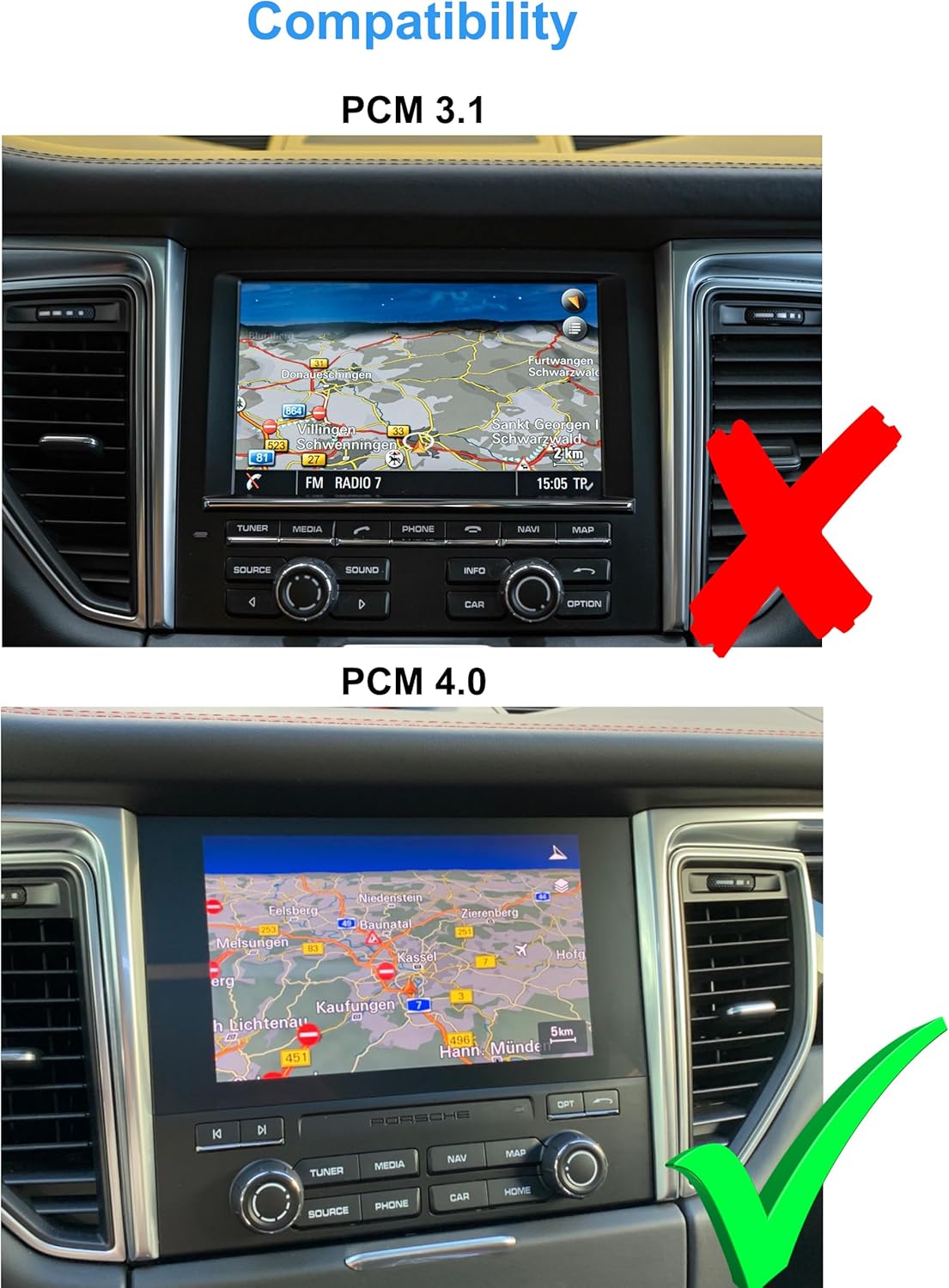
Figure 3.1: Visual guide for identifying PCM 3.1 (incompatible, marked with a red X) versus PCM 4.0 (compatible, marked with a green checkmark) in a Porsche Macan dashboard.
4. Пакеттин мазмуну
Please ensure all items listed below are present in your package before proceeding with installation.
- 1x Multimedia Display
- Panels and mounting accessories
- 1x Power cable with Canbus decoder
- 2x USB кабели
- 2x Radio antenna adapters
- 1x Audio/Video cable
- 1x GPS антеннасы
- 2x 4G antennas
- 1x PDF manual (available for download)
- 1x Invoice and 24 months warranty information

Сүрөт 4.1: An overview of all components included in the TAFFIO TXH6701-4 package, including the multimedia display, power cables, antennas, and various adapters.
5. Орнотуу жана орнотуу
The TAFFIO TXH6701-4 is designed for a Plug & Play installation, minimizing the need for additional adapters or mounting frames. However, professional installation is recommended to ensure correct wiring and functionality.
Орнотуу кадамдары (Жалпы колдонмо):
- Даярдоо: Унааны баштоодон мурун, анын от алдыруу системасы өчүрүлгөнүнө жана аккумулятору ажыратылганына ынаныңыз.
- Баштапкы блокту алып салуу: Carefully remove the existing PCM unit and associated trim panels from the dashboard. Refer to your vehicle's service manual for specific instructions on panel removal.
- Зымдарды туташтыруу: Connect the provided power cable with the Canbus decoder to the vehicle's wiring harness. Connect the GPS antenna, 4G antennas, USB cables, and audio/video cables as indicated in the wiring diagram.
- Жаңы блокту орнотуу: Secure the TAFFIO multimedia display using the provided mounting plates and frames. Ensure all connections are firm and properly routed to avoid pinching.
- Сыноо функциясы: Reconnect the battery and turn on the ignition. Test all functions of the new head unit, including touch response, audio, navigation, radio, and connectivity features.
- Кайра чогултуу: Бардык функциялар текшерилгенден кийин, башкаруу панелинин жасалгалоо панелдерин кылдаттык менен кайра чогултуңуз.

Figure 5.1: The Porsche Macan dashboard showing the original PCM unit before the installation of the TAFFIO Android Head Unit.
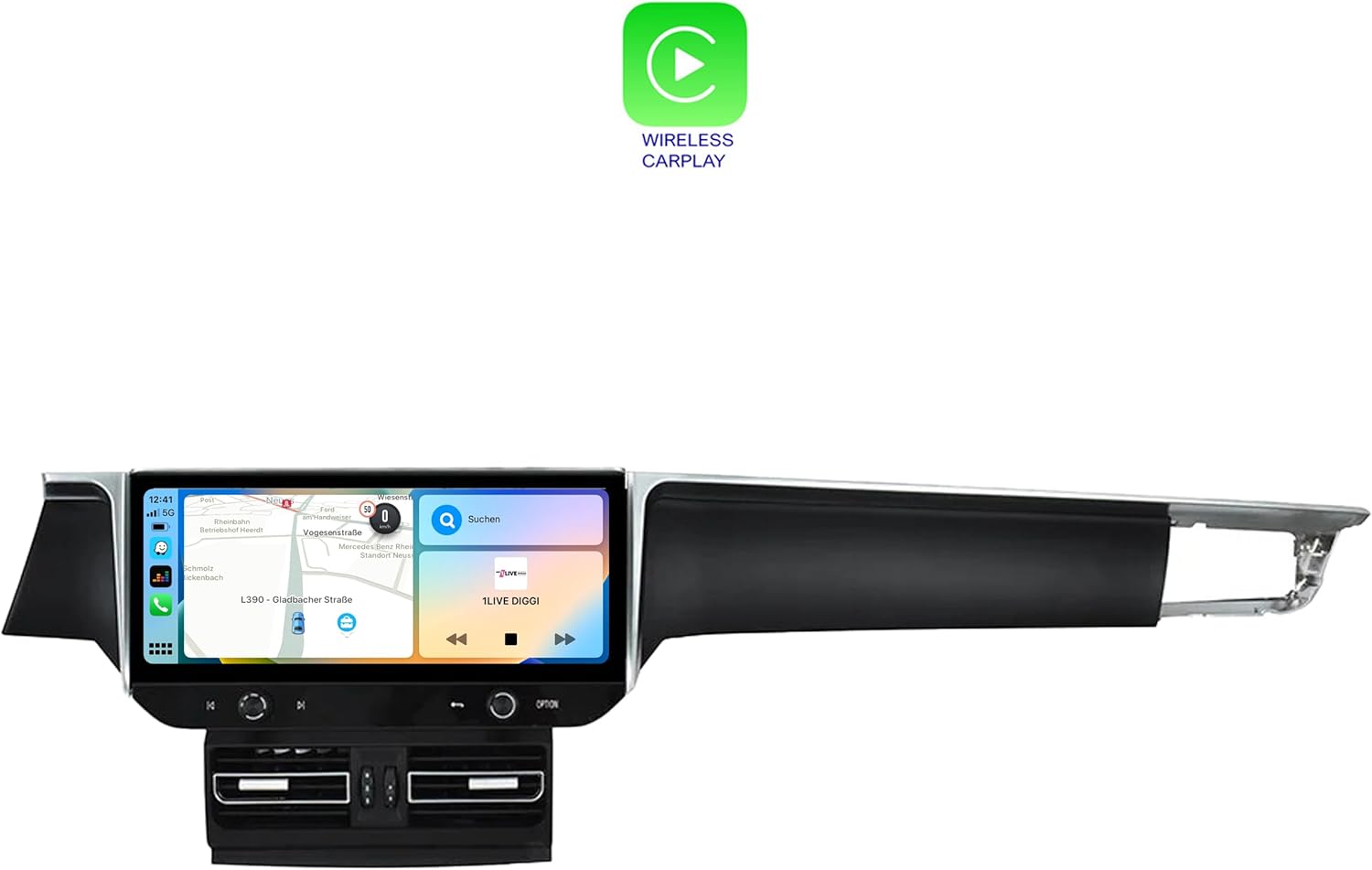
Figure 5.2: The Porsche Macan dashboard after the successful installation of the TAFFIO Android Head Unit, showcasing анын бирдиктүү көрүнүшү.

Figure 5.3: Detailed wiring diagram illustrating the connections for the TAFFIO TXH6701-4 head unit, including connections to the radio, GPS, 4G antennas, USB, and RCA plugs.
6. Иштөө нускамалары
The TAFFIO Android Head Unit features a user-friendly touchscreen interface. Navigate through menus by tapping icons and swiping across the screen.
6.1. Негизги навигация
- Башкы экран: Access primary functions like Navigation, Radio, Music, and Setup directly from the home screen.
- Колдонмо тартмасы: Өйдө сүрүңүз же колдонмонун сүрөтчөсүн таптаңыз view бардык орнотулган колдонмолор.
- Орнотуулар: Access system settings for display, sound, network, and vehicle-specific configurations.

Figure 6.1: The application menu of the TAFFIO Android Head Unit, showing various pre-installed and user-installed apps such as Chrome, Android Settings, Phone Link, and navigation applications.
6.2. Apple CarPlay жана Android Auto
The unit supports integrated Wireless Apple CarPlay and Android Auto. Connect your smartphone wirelessly to access navigation, music, messages, and other compatible apps directly on the head unit's display.
- Жандандыруу: Ensure Bluetooth and Wi-Fi are enabled on your smartphone. Follow the on-screen prompts on the head unit to pair your device.
- Функционалдык: Once connected, your phone's compatible apps will appear on the head unit's screen, allowing for voice control and touch interaction.

Figure 6.2: The Wireless Apple CarPlay interface displayed on the TAFFIO head unit, showing navigation, communication, and media applications.

Figure 6.3: The Android Auto interface displayed on the TAFFIO head unit, featuring navigation and media controls.
6.3. Радио
The unit includes an FM/AM radio tuner with RDS. Access the radio application from the home screen to tune into stations.
- Скандоо: Use the on-screen controls to scan for available stations.
- Алдын ала орнотуулар: Тез жетүү үчүн сүйүктүү станцияларыңызды сактаңыз.

Figure 6.4: The radio interface of the TAFFIO head unit, showing frequency display and controls for tuning and saving favorite stations.
6.4. Навигация
The unit comes with current GPS navigation map material and offers free lifetime updates. Access the navigation application from the home screen.
- көздөгөн кирүү: Input destinations via the touchscreen or voice command.
- Карта жаңыртуулары: Information on map updates will be provided by the manufacturer.
6.5. Connectivity (Wi-Fi & 4G LTE)
- Wi-Fi: Connect to available Wi-Fi hotspots or your smartphone's hotspot for internet access.
- 4G LTE: Insert a 4G LTE SIM card into the designated slot for mobile internet connectivity without relying on Wi-Fi.
7. Техникалык тейлөө
To ensure the longevity and optimal performance of your TAFFIO Android Head Unit, follow these maintenance guidelines:
- Экранды тазалоо: Электрондук экрандар үчүн атайын иштелип чыккан жумшак, мамыксыз кездемени колдонуңуз. Dampen the cloth slightly with water or a screen-cleaning solution if necessary. Avoid harsh chemicals or abrasive materials.
- Программалык камсыздоо жаңыртуулары: Periodically check for software updates provided by TAFFIO to ensure you have the latest features and security patches.
- Экологиялык шарттар: Аппаратты экстремалдык температурага, түз күн нуруна узак убакытка же ашыкча нымдуулукка дуушар кылуудан алыс болуңуз.
- Кабелдик байланыштар: Бардык кабелдер бекем туташып турганын текшериңиз. Кабелдерди күч менен тартпаңыз.
8. Кыйынчылыктарды
If you encounter issues with your TAFFIO Android Head Unit, refer to the following common troubleshooting steps. If the problem persists, contact customer support.
Жалпы маселелер жана чечимдер:
- Түзмөк күйбөйт:
- Бардык электр туташууларын текшерип, алардын бекем сайылганын текшериңиз.
- Verify the vehicle's battery is charged and connected.
- Check for blown fuses in the vehicle's fuse box related to the infotainment system.
- Үн жок:
- Үндүн үнү өчүп же өтө төмөн деңгээлге коюлбагандыгын текшериңиз.
- Аудио кабелдик байланыштарды текшериңиз.
- Verify the correct audio output source is selected in the settings.
- Сенсордук экран жооп бербейт:
- Restart the unit by turning off the vehicle's ignition and restarting after a few minutes.
- Экран таза жана таштандылардан таза экенин текшериңиз.
- GPS сигналы жоголду/так эмес:
- GPS антеннасынын туура орнотулганын жана ачык экенин текшериңиз view асмандын.
- GPS антеннасынын башкы блокко туташуусун текшериңиз.
- CarPlay/Android Auto туташпай жатат:
- Ensure Bluetooth and Wi-Fi are enabled on your smartphone and the head unit.
- Forget the device on both the phone and head unit, then attempt to re-pair.
- Смартфонуңуздун операциялык системасын эң акыркы версиясына жаңыртыңыз.
9. Техникалык шарттар
| Модель аты | TXH6701-4 |
| Дисплей өлчөмү | 12.3 дюйм |
| Резолюция | 1920 x 720 |
| Процессор | Snapdragon Qualcomm 668s 8x 2.0 GHz |
| RAM | 8 ГБ |
| Ички эс тутум | 128 ГБ |
| Операция системасы | Android 13 |
| Байланыш | Bluetooth, USB, Wi-Fi, 4G LTE |
| Өзгөчөлүктөр | Touchscreen, Integrated CarPlay & Android Auto |
| Карта түрү | Worldwide (with free lifetime updates) |
| Аудио чыгаруу режими | AUX |
| Монтаж түрү | Куралдар тактасы |
10. Кепилдик жана колдоо
The TAFFIO TXH6701-4 Android Head Unit comes with a 2 жылдык өндүрүүчүнүн кепилдиги. Бул кепилдик нормалдуу колдонуудагы материалдардагы жана жасалгадагы кемчиликтерди камтыйт.
For Warranty Claims and Technical Support:
Please retain your purchase invoice as proof of purchase for any warranty claims. For technical assistance, troubleshooting beyond this manual, or to initiate a warranty claim, please contact TAFFIO customer support through the retailer where the product was purchased or refer to the contact information provided with your product documentation.
11. Коопсуздук маалыматы
Observe the following safety symbols and guidelines for safe handling and disposal of the product.
Figure 11.1: Standard safety and handling symbols including 'This Way Up', 'Fragile', 'Keep Dry', CE Mark, FCC Mark, Recycling Symbol, and Waste Electrical and Electronic Equipment (WEEE) symbol.
- Орнотуу: Ensure installation is performed by qualified personnel to prevent damage to the unit or vehicle.
- Операция: Агрегатты айдоодон алаксыта тургандай иштетпеңиз. Ар дайым жол коопсуздугун биринчи орунга коюу.
- Жоюу: Dispose of this product responsibly at designated collection points for electronic waste, in accordance with local regulations. Do not dispose of with household waste.