
1. Киришүү
Сатып алганыңыз үчүн рахматasing the HANNLOMAX HX-129CR Alarm Clock Radio. This device combines a digital clock with dual alarms, PLL FM radio, Bluetooth streaming, and USB ports for both charging and MP3 playback. Please read this manual carefully before operating the unit and retain it for future reference.
2. Коопсуздук маалыматы
- Өрт же шок коркунучун болтурбоо үчүн бул аппаратты жамгырга же нымга тийгизбеңиз.
- Do not remove the cover or back. There are no user-serviceable parts inside. Refer servicing to qualified service personnel.
- Ensure the AC/DC adapter is easily accessible.
- Аппаратты радиаторлор, жылуулук регистрлери, мештер же башка аппараттар (анын ичинде) сыяктуу жылуулук булактарынын жанына коюудан алыс болуңуз. ampкөтөргүчтөр) жылуулукту пайда кылуучу.
- Кургак чүпүрөк менен гана тазалаңыз.
3. Пакеттин мазмуну
Сураныч, сиздин пакетиңизде төмөнкү заттар бар экенин текшериңиз:
- HANNLOMAX HX-129CR Alarm Clock Radio Unit
- AC/DC кубат адаптери
- Колдонуучунун Колдонмосу (бул документ)
4. Продукт бүтүп калдыview
The HANNLOMAX HX-129CR features a clear 0.6-inch green LED display and intuitive controls. Familiarize yourself with the layout for optimal use.
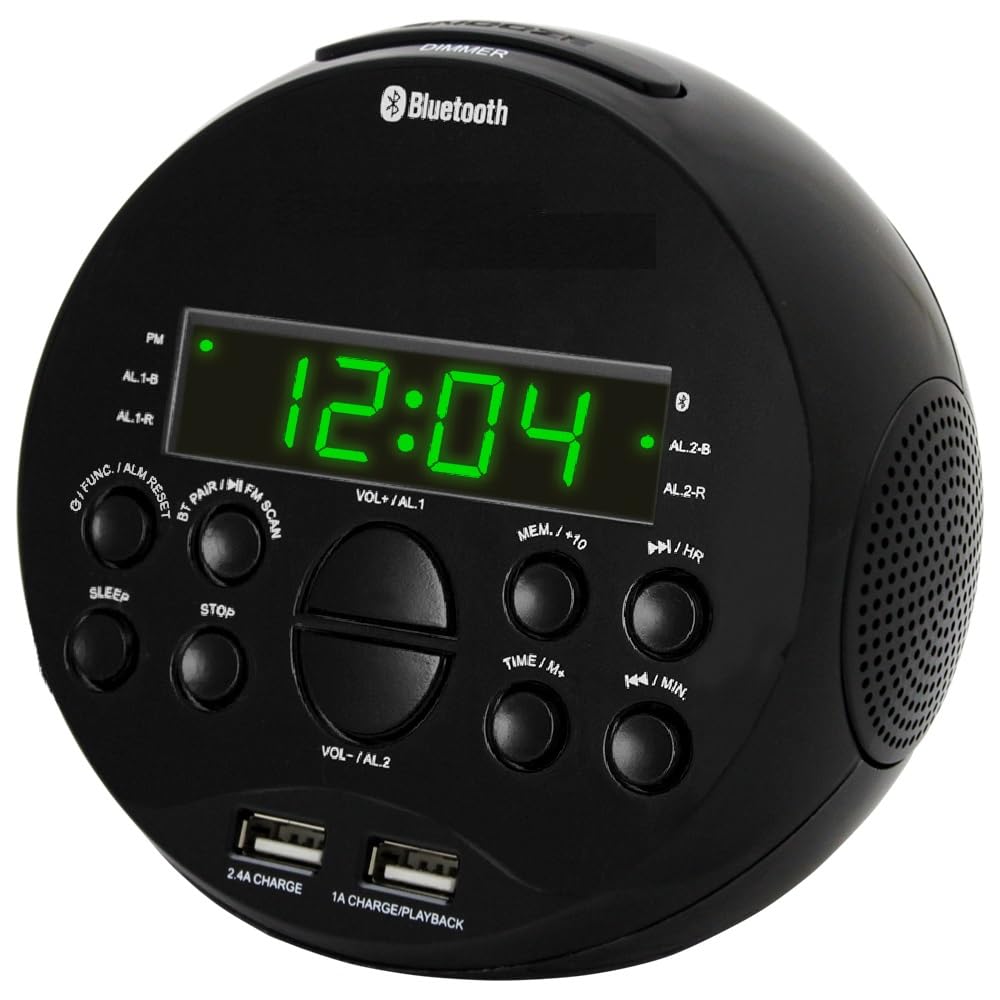
This image displays the HANNLOMAX HX-129CR Alarm Clock Radio, highlighting its 0.6-inch green LED display and front-facing control buttons for easy access to functions like alarm setting, radio tuning, and volume control. The compact design is suitable for bedside tables.
Негизги өзгөчөлүктөрү:
- 0.6" Green LED Display with Dimmer Function
- PLL FM Radio with Preset Stations and External Antenna
- Bluetooth Streaming Capability
- Dual USB Ports for Charging (2.4A and 1A)
- MP3 ойнотуу үчүн USB порту
- Dual Alarm Setting (Wake to Radio or Buzzer)
- Уйку жана тыным функциялары
- Memory Backup (requires batteries, not included)
5. Орнотуу
5.1 Кубат туташтыруу
- Plug the AC/DC adapter into the DC input jack located on the back of the unit.
- Адаптердин экинчи учун стандарттуу розеткага сайыңыз.
- Түзмөк күйүп, дисплей күйөт.
Эскертүү: For memory backup during power outages, insert 2 x AAA batteries (not included) into the battery compartment on the bottom of the unit. This will preserve time and alarm settings.
5.2 Убакытты коюу
- Күтүү режиминде басып, кармап туруңуз УБАКЫТТЫ ОРНОТУУ баскычы. Саат цифралары жарк этет.
- басыңыз HOUR саатты тууралоо үчүн баскычын кайра-кайра басыңыз.
- басыңыз MINUTE Мүнөттү тууралоо үчүн баскычын кайра-кайра басыңыз.
- басыңыз УБАКЫТТЫ ОРНОТУУ ырастоо жана убакыт орнотуу режиминен чыгуу үчүн кайра баскычын басыңыз.
5.3 Display Dimmer Function
To adjust the brightness of the 0.6" Green LED display, press the СОЮЗ button repeatedly. There are typically three levels of brightness (High, Medium, Low) and an Off setting to cycle through.
6. Иштөө нускамалары
6.1 FM радиосунун иштеши
- басыңыз КҮЧ баскычты басуу менен
- басыңыз РЕЖИМ FM радио режимин тандоо үчүн баскыч.
- Авто сканерлөө: басып, кармап туруңуз ОЙНОО/ТЫНЫТТЫРУ button (or similar scan button) to automatically scan and store available FM stations as presets.
- Кол менен жөндөө: басыңыз TUNE+ or КОНУН - жыштыкты кол менен жөндөө үчүн баскычтар.
- Алдын ала орнотууларды тандоо: басыңыз PRESET + or АЛДЫН АЛА- Сакталган станцияларды аралап өтүү үчүн баскычтарды басыңыз.
- Үнүн колдонуп, үнүн жөндөңүз VOLUME+ or VOLUME- баскычтар.
Кеңеш: Extend the external FM antenna fully for improved radio reception.
6.2 Bluetooth агымы
- басыңыз КҮЧ баскычты басуу менен
- басыңыз РЕЖИМ button to select Bluetooth mode. The display will show "BT" and flash, indicating it is ready for pairing.
- On your smartphone or Bluetooth-enabled device, enable Bluetooth and search for new devices.
- Select "HX-129CR" (or similar name) from the list of available devices.
- Once paired, the unit will emit a confirmation tone, and "BT" will stop flashing.
- You can now play music from your device through the alarm clock radio. Use the unit's VOLUME+/VOLUME- buttons or your device's volume controls.
6.3 USB MP3 ойнотуу
- Insert a USB memory stick containing MP3 audio files into the designated USB port for MP3 Playback (usually marked with a music note or specific icon).
- The unit should automatically switch to USB mode and begin playing the first track. If not, press the РЕЖИМ USB режимин тандоо үчүн баскыч.
- колдонуу SKIP +/ӨТКӨРҮҮ- тректер арасында өтүү үчүн баскычтар.
- басыңыз ОЙНОО/ТЫНЫТТЫРУ ойнотууну тындыруу же улантуу үчүн баскыч.
6.4 Dual Alarm Settings
Түзмөк эки көз карандысыз сигнализацияга ээ (1-сигнализация жана 2-сигнализация).
- Ойготкуч убактысын коюу: басып, кармап туруңуз 1-ДАБЛ or 2-ДАБЛ баскычы. Саат цифралары жарк этет.
- басыңыз HOUR саатты жөндөө үчүн баскыч.
- басыңыз MINUTE мүнөттү жөндөө үчүн баскыч.
- басыңыз 1-ДАБЛ or 2-ДАБЛ убакытты ырастоо үчүн баскычын кайра басыңыз.
- Сигнал булагын тандаңыз: Убакытты койгондон кийин басыңыз 1-ДАБЛ or 2-ДАБЛ button repeatedly to cycle through wake-up options: Buzzer (BUZ), FM Radio (RAD). The selected icon will appear on the display.
- To turn off an alarm, press the corresponding 1-ДАБЛ or 2-ДАБЛ сигнализация сүрөтчөсү дисплейден жок болгонго чейин баскычын басыңыз.
6.5 Уйку таймеринин функциясы
The sleep timer allows you to fall asleep to radio or music, which will automatically turn off after a set period.
- While the radio or music is playing, press the УЙКУ баскычы.
- кайра-кайра басыңыз УЙКУ button to cycle through available sleep times (e.g., 90, 60, 30, 15 minutes, OFF).
- The unit will automatically turn off after the selected duration.
6.6 Тындыруу функциясы
Ойготкуч чыкканда, басыңыз СОЮЗ Ойготкучту болжол менен 9 мүнөткө убактылуу басуу үчүн баскычты басыңыз. Ойготкуч тындыруу мезгилинен кийин кайра угулат.
6.7 USB заряддоо порттору
The unit features two USB ports for charging external devices:
- One 2.4A USB port for faster charging of compatible devices.
- One 1A USB port for standard charging.
Simply connect your device's USB charging cable to the appropriate port on the back of the alarm clock radio. Charging will begin automatically.
7. Техникалык тейлөө
- Тазалоо: Түзмөктүн сыртын тазалоо үчүн жумшак, кургак чүпүрөктү колдонуңуз. Абразивдүү тазалоочу каражаттарды же эриткичтерди колдонбоңуз.
- Электр кабели: Электр шнурунун бузулушуна дайыма текшерип туруңуз. Эгерде бузулса, колдонууну токтотуп, кардарларды колдоо кызматына кайрылыңыз.
- Батареяны алмаштыруу: If using memory backup, replace AAA batteries annually or when the unit frequently loses settings during power interruptions.
8. Кыйынчылыктарды
| Көйгөй | Мүмкүн себеп | Чечим |
|---|---|---|
| Кубат жок / Дисплей өчүк | Кубат адаптери туташкан эмес же туура эмес. | Ensure AC/DC adapter is securely plugged into the unit and a working wall outlet. |
| FM радиосун кабыл алуу начар | Антенна узартылган эмес же тоскоолдук. | Fully extend the external FM antenna. Try repositioning the unit. |
| Bluetooth жупташкан жок | Түзмөк жупташтыруу режиминде эмес же түзмөк өтө алыс. | Ensure the unit is in Bluetooth mode and flashing "BT". Move your device closer to the unit. Forget the device on your phone and try pairing again. |
| USB MP3 playback not working | USB stick not inserted correctly or unsupported file формат. | Ensure the USB stick is fully inserted into the MP3 playback port. Verify fileлар MP3 форматында. |
| Ойготкуч угулбайт | Ойготкуч иштетилген эмес же туура эмес коюлган. | Check that the alarm time is set correctly and the alarm icon (1 or 2) is visible on the display. Ensure the volume is not set to minimum if waking to radio. |
9. Техникалык шарттар
- Бренд: Hannlomax
- Модел: HX-129CR
- Дисплей түрү: Digital, 0.6" Green LED
- Кубат булагы: Corded Electric (AC/DC Adapter included)
- Эстутумдун камдык көчүрмөсү: 2 x AAA батарейкаларды талап кылат (киргизилген эмес)
- Байланыш: Bluetooth
- USB порттору: 1x 2.4A Charging, 1x 1A Charging/MP3 Playback
- Радио: PLL FM Radio with Presets
- Ойготкуч: Кош ойготкуч (Радио же Баззер менен ойгонуу)
- Функциялары: Sleep Timer, Snooze Function, Dimmer Function
- Продукциянын өлчөмдөрү: Болжол менен 5.24" туурасы x 5.12" бийиктиги
- Элемент Салмагы: Болжол менен 1.21 фунт
- Өндүрүүчү: Hannix Ltd.
10. Кепилдик жана колдоо
HANNLOMAX products are designed for reliability and performance. For specific warranty information, please refer to the warranty card included with your purchase or contact your retailer. For technical support or service inquiries, please visit the official HANNLOMAX webсайтка же кардарларды тейлөө бөлүмүнө кайрылыңыз.