
STF Kronos Trek Smartwatch User Manual
Model: ST-W78527
1. Киришүү
Thank you for choosing the STF Kronos Trek Smartwatch. This manual provides essential information for setting up, operating, maintaining, and troubleshooting your device. Please read it carefully to ensure optimal performance and longevity of your smartwatch.
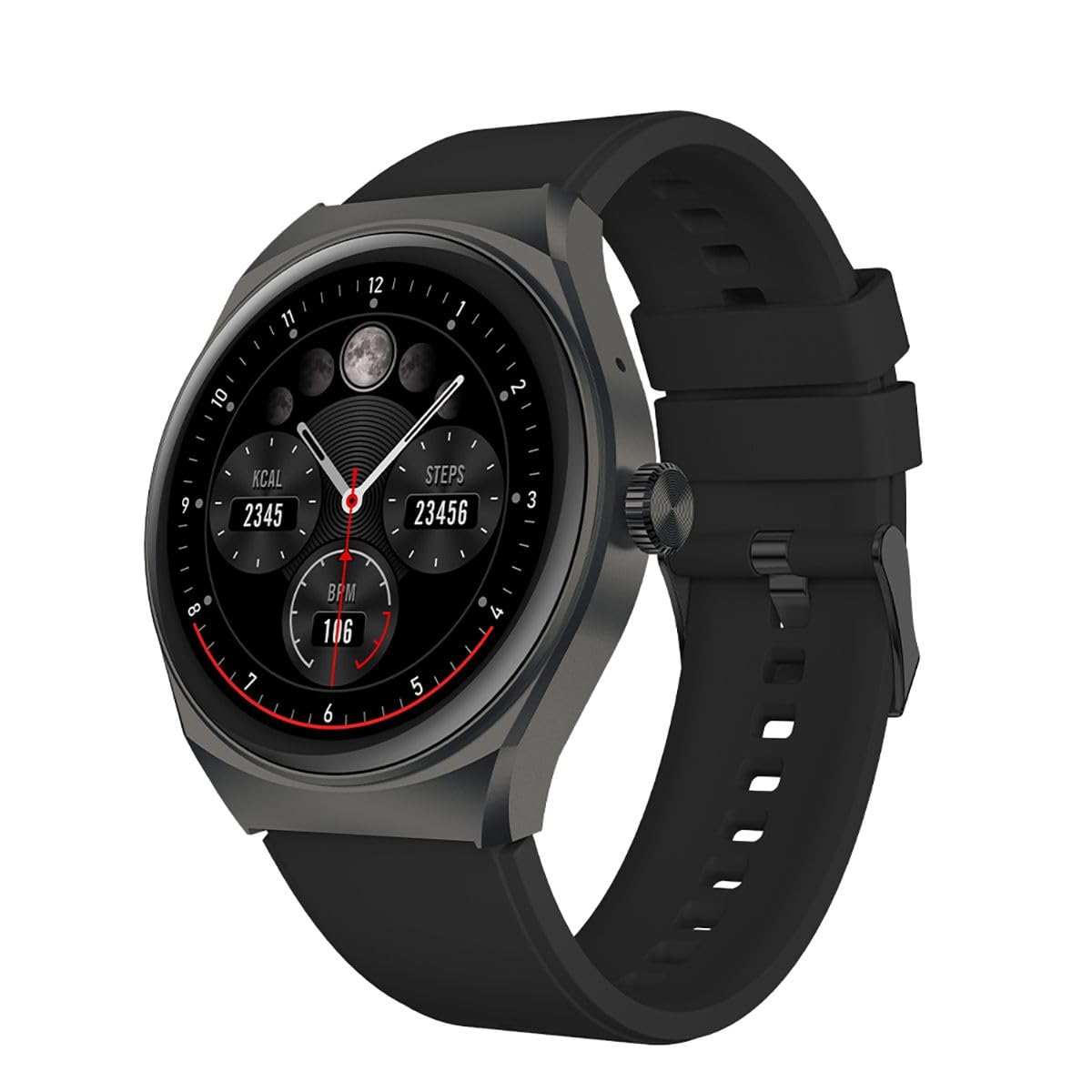
Сүрөт 1.1: Алдыңкы view of the STF Kronos Trek Smartwatch.
2. Пакеттин мазмуну
- STF Kronos Trek Smartwatch
- Заряддоо кабели
- Колдонуучунун Колдонмосу (бул документ)
3. Түзмөк бүттүview
The STF Kronos Trek Smartwatch features a 1.38-inch IPS display and a durable design. It includes various sensors for health monitoring and supports multiple sports modes.

Image 3.1: Smartwatch display showing health metrics like calories, steps, and BPM.

Сүрөт 3.2: Арткы view of the smartwatch, highlighting the health sensors and charging contacts.
4. Орнотуу
4.1 Акылдуу саатты кубаттоо
- Connect the charging cable to the charging pins on the back of the smartwatch.
- Plug the USB end of the charging cable into a compatible USB power adapter (not included) or a computer's USB port.
- The smartwatch display will indicate charging status.
- Allow approximately 2-3 hours for a full charge. A full charge provides up to 7 days of battery life under normal usage.
4.2 Смартфонуңуз менен жупташуу
- Download the official STF companion application from your smartphone's app store (iOS or Android).
- Смартфонуңузда Bluetooth иштетилгенин текшериңиз.
- Open the STF companion application and follow the on-screen instructions to create an account or log in.
- In the app, select 'Add Device' or 'Pair New Device' and choose 'Kronos Trek' from the list of available devices.
- Акылдуу саатыңызда да, смартфонуңузда да жупташтыруу өтүнүчүн ырастаңыз.
Note: For optimal performance, keep the smartwatch and smartphone within Bluetooth range during initial setup and regular use.
5. Иштөө нускамалары
5.1 Негизги навигация
- Сенсордук экран: Менюлар жана функциялар аркылуу өтүү үчүн солго, оңго, өйдө же ылдый серпиңиз. Параметрди тандоо үчүн таптаңыз.
- Каптал баскычы: Press the side button to return to the home screen or wake the device.
Video 5.1: Demonstrates basic interaction with the STF Kronos Trek Smartwatch, including screen navigation and multi-sport mode selection. This video highlights how to stay active and healthy by tracking your workouts.
5.2 Чалууларды кабыл алуу жана кабыл алуу
The Kronos Trek Smartwatch allows you to answer calls directly from your wrist when connected to your smartphone via Bluetooth.
- Чалууларга жооп берүү: When a call comes in, tap the green icon on the smartwatch screen.
- Чалууларды жасоо: Access the dialer or contact list through the smartwatch menu to initiate a call.

Image 5.2: The smartwatch screen indicating the ability to answer calls directly.
5.3 Көп спорт режими
The smartwatch supports over 100 multi-sport modes to track various physical activities. To access:
- Swipe on the home screen to find the 'Sports' or 'Workout' icon.
- үчүн сөлөкөтүн таптаңыз view the list of available sports modes (e.g., running, walking, cycling, swimming).
- Select your desired activity to start tracking. The watch will record duration, calories burned, and other relevant metrics.

Сүрөт 5.3: Бүттүview of the multi-sport mode feature with various activity icons.
Video 5.4: Illustrates how to use the multi-sport mode to time efforts and record progress during workouts. This video focuses on the male user's experience.
5.4 Ден соолуктун мониторинги
The Kronos Trek Smartwatch includes sensors to monitor various health metrics:
- Жүрөктүн кагышы: Күн бою жүрөктүн кагышын үзгүлтүксүз көзөмөлдөйт.
- Уйкуга көз салуу: Уйку режимиңизди, анын ичинде терең уйку, жеңил уйку жана ойгонуу убактысын талдайт.
- Активдүүлүккө көз салуу: Кадамдарды, аралыкты жана күйгөн калорияларды жазат.
Note: The health monitoring features are for general fitness and wellness purposes only and are not intended for medical diagnosis or treatment.
5.5 Билдируулер
Receive notifications from your smartphone directly on your smartwatch. Ensure the companion app is running in the background and notification permissions are granted.
5.6 Сууга туруктуулук (IP67)
The smartwatch is rated IP67, meaning it is resistant to dust and can withstand immersion in water up to 1 meter for 30 minutes. It is suitable for daily use and light water activities but not recommended for diving or high-pressure water exposure.

Image 5.5: Icon representing the IP67 water resistance feature.
6. Техникалык тейлөө
6.1 Тазалоо
- Акылдуу сааттын боосун жана аны жумшак чүпүрөк менен үзгүлтүксүз сүртүп туруңузamp кездеме.
- Катуу химиялык заттарды, абразивдүү тазалагычтарды же эриткичтерди колдонуудан алыс болуңуз.
- Заряддоодон мурун заряддоо контакттары таза жана кургак экенин текшериңиз.
6.2 Water Exposure
- After exposure to water, especially saltwater, rinse the smartwatch with fresh water and dry it thoroughly.
- Do not press buttons or operate the touchscreen underwater.
6.3 Батареяга кам көрүү
- Avoid extreme temperatures when charging or storing the device.
- Батареяны узак убакытка толук зарядсыз калтырбаңыз.
7. Кыйынчылыктарды
7.1 Түзмөк күйбөй жатат
- Акылдуу сааттын толук заряддалганын текшериңиз. Аны кубаттагычка кеминде 30 мүнөт туташтырыңыз.
- Мажбурлап кайра баштоо үчүн каптал баскычын 10-15 секунд басып туруңуз.
7.2 Жупташтыруу маселелери
- Смартфонуңузда жана акылдуу саатыңызда Bluetooth иштетилгенин текшериңиз.
- Смартфонуңузду да, акылдуу саатыңызды да өчүрүп күйгүзүңүз.
- Try unpairing the device from your smartphone's Bluetooth settings and then re-pairing through the STF companion app.
- Ensure the STF companion app is updated to the latest version.
7.3 Ден соолук боюнча так эмес маалыматтар
- Ensure the smartwatch is worn snugly on your wrist, but not too tight.
- Сааттын артындагы сенсорлорду тазалаңыз.
- Айлана-чөйрөнүн факторлору жана жеке физиология сенсордун тактыгына таасир этиши мүмкүн.
7.4 Батареянын иштөө мөөнөтү кыска
- Экран жарыктыгын азайтыңыз.
- Зарыл болбосо, жүрөктүн кагышын үзгүлтүксүз көзөмөлдөөнү өчүрүңүз.
- Алынган эскертмелердин санын чектөө.
- Ensure the smartwatch is not constantly searching for a Bluetooth connection.
8. Техникалык шарттар
| Өзгөчөлүк | Спецификация |
|---|---|
| Модель аты | ST-W78527 |
| Дисплей өлчөмү | 1.38 дюйм |
| Дисплей түрү | Санарип |
| Резолюция | 240 x 240 |
| Байланыш технологиясы | Bluetooth |
| Зымсыз байланыш стандарты | Bluetooth |
| Батареянын иштөө мөөнөтү (орточо) | 168 саат (7 күн) |
| Батарея сыйымдуулугу | 300 мАч |
| Батарея клеткасынын курамы | Литий полимери |
| Суу каршылык | IP67 |
| Өзгөчөлүктөр | Notifications, Multi-sport Mode, Health Monitors |
| Адам интерфейсинин киргизүү | Сенсордук экран |
| Продукциянын өлчөмдөрү | 25 x 3 x 2 см; 210 г |
9. Кепилдик жана колдоо
For warranty information and customer support, please refer to the documentation provided with your purchase or visit the official STF website. You may also contact the seller, Stuffactory, for assistance.
This product is eligible for a 30-day free return policy through Amazon. Please check Amazon's return policy for details.


