
Introduction
The RISING PHOENIX RP 50080 Deluxe Telescope is designed for observing celestial objects, distant landscapes, and wildlife. This manual provides essential information for the proper assembly, operation, and maintenance of your telescope to ensure optimal performance and longevity.
This telescope offers magnification up to 625x and features an 80mm objective lens, allowing for detailed viewing of distant objects such as Saturn and Jupiter, as well as terrestrial subjects. The robust stainless steel tripod is fully adjustable for height and viewбурчтар.
Пакеттин мазмуну
Төмөндө тизмеленген бардык компоненттер пакетиңизде бар экенин текшериңиз:
- RP® 50080 Telescope (80mm Objective)
- Adjustable Stainless Steel Tripod with Accessory Tray
- Смартфондун адаптери
- Bluetooth алыстан башкаруу
- 45-degree Erecting Prism
- Ташуу сумкасы
- Eyepieces: 4mm, 6mm, 10mm, 25mm
- Barlow Lenses: 3x, 5x
- Күн чыпкасы
- Lunar Filter
- 3 Color Filters
- Red Dot Finderscope
- Планисфера
- Star Finding Book
- Тазалоочу кездеме
- User Manual

Сүрөт: Бүттүview of all included accessories and telescope components.
Жайгашуу
The RISING PHOENIX RP 50080 Deluxe Telescope is designed for quick and easy assembly. Follow these steps to set up your telescope:
- Tripod жыйындысы: Extend the legs of the stainless steel tripod to your desired height. The tripod is fully height-adjustable and features pointed feet for stability on various terrains. Ensure the tripod is stable on a flat surface.
- Mounting the Telescope Tube: Securely attach the telescope optical tube to the equatorial mount on the tripod. Ensure all locking mechanisms are tightened.
- Attaching the Red Dot Finderscope: Mount the Red Dot Finderscope onto its designated slot on the telescope tube. This will assist in locating objects.
- Inserting the Erecting Prism: Insert the 45-degree erecting prism into the focuser. This prism ensures an upright image, which is beneficial for terrestrial viewing.
- Окулярды тандоо: Choose an eyepiece (e.g., 25mm for lower magnification and wider field of view) and insert it into the erecting prism. Secure it with the thumbscrew.
- Аксессуар лоток: Attach the accessory tray to the tripod for convenient storage of eyepieces and filters during observation.

Сүрөт: The telescope's adjustable height and 80mm objective lens for light gathering.
Телескопту иштетүү
Чоңойтууну тууралоо
The telescope comes with four eyepieces (4mm, 6mm, 10mm, 25mm) and two Barlow lenses (3x, 5x) to provide a wide range of magnifications. To change magnification, simply swap eyepieces or combine them with a Barlow lens. The 4 eyepieces offer 12 different magnification options when used with the Barlow lenses, allowing for up to 625x zoom.

Сүрөт: Various eyepieces and Barlow lenses for different magnifications.

Сүрөт: Examples of magnification levels up to 625x.
Using the Red Dot Finderscope
The Red Dot Finderscope simplifies locating objects in the night sky. To use it, first align the finderscope with the main telescope during daylight hours by pointing the main telescope at a distant, stationary object. Adjust the finderscope until the red dot is centered on the same object. When observing, simply point the red dot at your desired celestial object, then look through the main telescope's eyepiece for a magnified view.
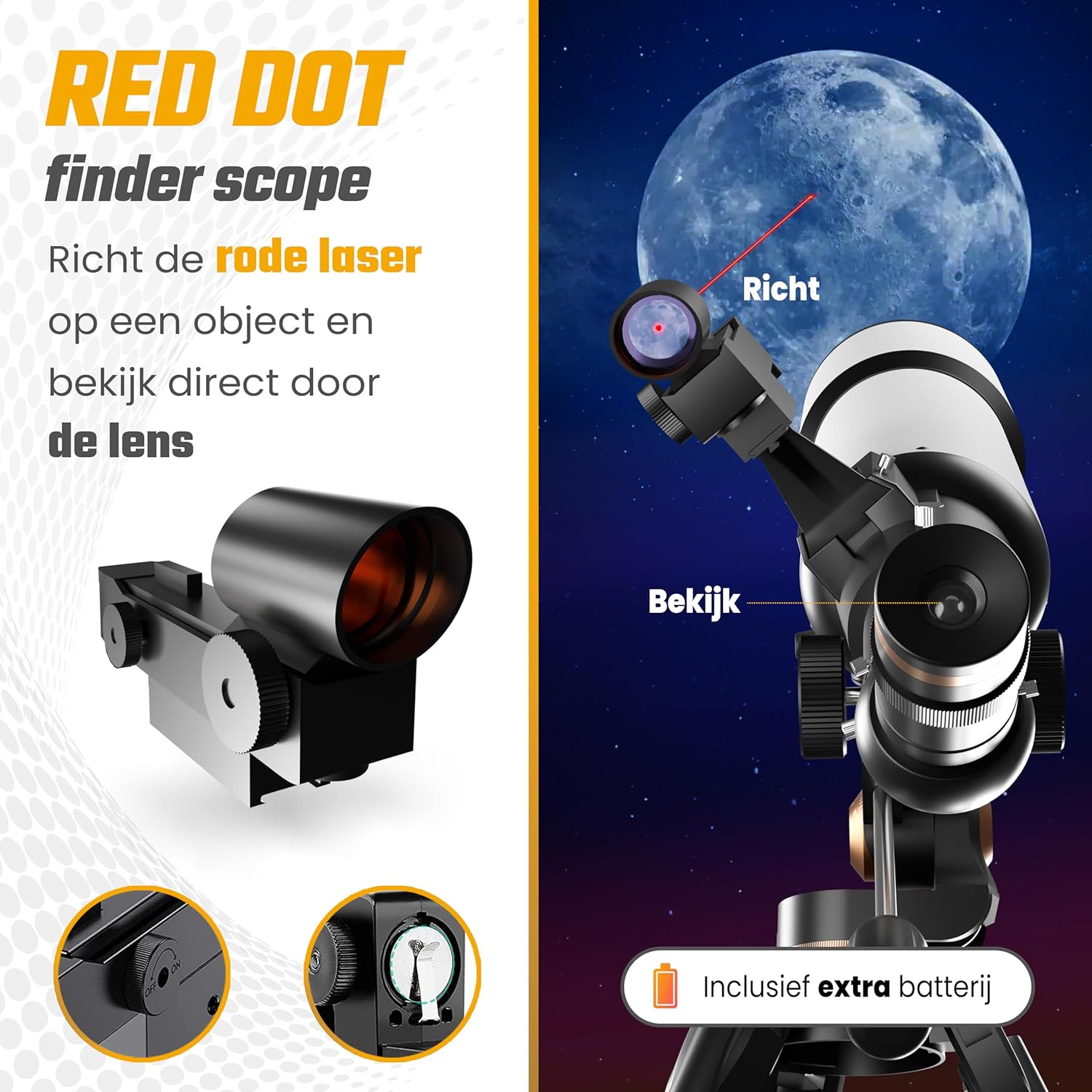
Сүрөт: The Red Dot Finderscope for easy object targeting.
Utilizing Filters
The complete filter kit enhances your viewing experience and protects your eyes. The solar filter is essential for safe solar observation (NEVER look directly at the sun without a certified solar filter). The lunar filter reduces glare from the moon, providing clearer, more detailed views. The three color filters can be used to enhance contrast and reveal subtle details on planets and other celestial bodies.

Сүрөт: Solar, Lunar, and Color Filters for enhanced viewing.
Tripod Adjustments and Slow Motion Control
The stainless steel tripod allows for 360-degree rotation and 180-degree tilt, providing flexibility in aiming. The equatorial mount includes slow-motion controls, enabling precise tracking of moving objects across the sky without needing to reposition the entire tripod.

Сүрөт: Tripod movement and slow-motion control for precise tracking.
Smartphone Photography
To capture images through your telescope, attach your smartphone to the included smartphone adapter. Connect the Bluetooth remote control to your phone. This allows you to take photos wirelessly, minimizing vibrations and ensuring sharp images. Simply place your phone in the adapter and use the remote to trigger the camera.
Окуу ресурстары
The included planisphere and Star Finding Book are valuable tools for navigating the night sky. The planisphere helps you identify visible constellations and celestial objects based on the date and time. The Star Finding Book provides guidance on locating constellations and galaxies, enhancing your astronomical knowledge.

Сүрөт: Planisphere and Star Finding Book for educational support.
Техникалык тейлөө
Телескопуңуздун узак мөөнөттүү иштешин жана иштешин туура тейлөө камсыз кылат:
- Тазалоочу линзалар: Use the provided cleaning cloth or a specialized lens cleaning kit to gently wipe dust and smudges from the objective lens and eyepieces. Avoid touching optical surfaces with bare hands.
- Сактагыч: When not in use, store the telescope and its accessories in the carrying bag in a dry, dust-free environment. Avoid extreme temperatures and humidity.
- Tripod Care: Keep the tripod legs clean and free of dirt. Periodically check and tighten any screws or bolts to maintain stability.
- Батареяны алмаштыруу: The Bluetooth remote control requires 2 CR2 batteries. Replace them as needed.
Проблемаларды чечүү
If you encounter issues with your telescope, consider the following common solutions:
- бүдөмүк сүрөттөр: Ensure the focuser is properly adjusted. Check that eyepieces and Barlow lenses are fully inserted and secured. Verify that the objective lens is clean.
- Объекттерди табуу кыйынчылыгы: Ensure the Red Dot Finderscope is correctly aligned with the main telescope. Start with the lowest magnification eyepiece (25mm) for a wider field of view.
- Сүрөт жок: Check that the dust caps have been removed from both the objective lens and the eyepiece. Ensure the eyepiece is properly inserted.
- Туруксуз View: Confirm that the tripod legs are fully extended and locked, and that the telescope tube is securely mounted. Observe from a stable surface.
- Bluetooth пультуна туташпай жатат: Ensure the remote's batteries are charged and correctly inserted. Check your smartphone's Bluetooth settings and ensure the remote is discoverable.
Техникалык шарттар
| Өзгөчөлүк | Спецификация |
|---|---|
| Модель номери | RP-TLSCP-50080-DELUXE-WH |
| Объективдүү линзанын диаметри | 80 миллиметр |
| Оптикалык түтүктүн узундугу | 500 миллиметр |
| Окулярдын сүрөттөмөсү | Huygens (4mm, 6mm, 10mm, 25mm) |
| Барлоу линзалары | 3x, 5x |
| Максималдуу чоңойтуу | 625x |
| Линза каптоо | Толугу менен көп капталган (FMC) |
| Finderscope | Red Dot Scope |
| Телескоптун сүрөттөлүшү | Экватордук тоо |
| Фокус түрү | Manual Focus |
| Power Source | Battery Powered (for Bluetooth remote) |
| Шайкеш түзмөктөр | Смартфон |
| Продукциянын өлчөмдөрү (L x W x Y) | 56 x 15 x 168 см |
| Элемент Салмагы | 5 килограмм |
Кепилдик жана колдоо
RISING PHOENIX offers a 100% Satisfaction Guarantee. If you are not completely satisfied with your telescope, you may return the product free of charge within 30 days for a full refund.
For any questions regarding your RISING PHOENIX RP 50080 Deluxe Telescope, please do not hesitate to contact our customer service. We are always available to assist you with product inquiries, technical support, or warranty claims.
Запастык бөлүктөргө 2 жыл кепилдик берилет.