
Introduction
This manual provides essential instructions for the proper setup, operation, and maintenance of your 3nStar PTA0157-432 All-in-One POS System. Please read this manual thoroughly before using the device to ensure optimal performance and longevity.
Коопсуздук маалыматы
Observe the following safety precautions to prevent damage to the device or injury to yourself and others:
- Аппаратты сууга же ашыкча нымдуулукка дуушар кылбаңыз.
- Аппаратты жылуулук булактарынын жанына же тике күн нуруна коюудан алыс болуңуз.
- Берилген AC адаптерин гана колдонуңуз.
- Аппаратты өзүңүз ачууга же оңдоого аракет кылбаңыз. Бардык тейлөөлөрдү квалификациялуу кызматкерлерге тапшырыңыз.
- Иштеп жаткан учурда аппараттын айланасында туура желдетүүнү камсыз кылыңыз.
Пакеттин мазмуну
Пакетте бардык буюмдар бар экенин текшериңиз:
- 3nStar PTA0157-432 All-in-One POS System
- AC адаптер
- Колдонуучунун Колдонмосу (бул документ)
Продукт бүттүview
The 3nStar PTA0157-432 is a 15.6-inch All-in-One Point of Sale system designed for various business environments. It features a 10-point capacitive touchscreen, runs on Android 11, and is powered by a Quad-Core processor with 4GB RAM and 32GB storage. Integrated Wi-Fi and Bluetooth connectivity are also included.

Сүрөт 1: Алдыңкы view of the 3nStar PTA0157-432 All-in-One POS System, showcasing the 15.6-inch display and integrated stand.

Figure 2: A user interacting with the 10-point capacitive touchscreen of the POS system, demonstrating its touch responsiveness.

3-сүрөт: Арткы view of the 3nStar POS System, showing the ventilation slots and the sturdy integrated stand.
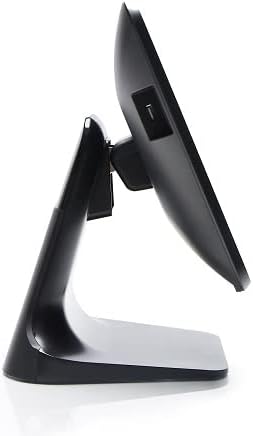
4-сүрөт: Side profile of the 3nStar POS System, highlighting its slim design and adjustable screen angle.
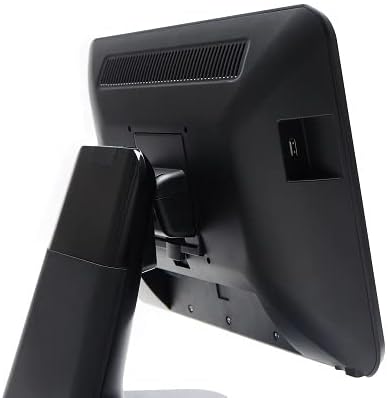
5-сүрөт: Арткы бети view of the 3nStar POS System, illustrating the location of various connectivity ports for peripherals.
Жайгашуу
- Системаны ачып алыңыз: Carefully remove the POS system and all accessories from the packaging.
- Системаны жайгаштыруу: Place the POS system on a stable, flat surface, ensuring adequate ventilation around the device.
- Туташуу кубаты: Connect the AC adapter to the power input port on the back of the POS system, then plug the adapter into a standard electrical outlet.
- Баштапкы күйгүзүү: Press the power button, usually located on the side or back of the display. The system will boot up to the Android 11 operating system.
- Баштапкы конфигурация: Follow the on-screen prompts to complete the initial Android setup, including language selection, Wi-Fi connection, and Google account setup (optional).
- Перифериялык түзүлүштөрдү туташтыруу: Connect any necessary peripherals such as barcode scanners, receipt printers, or cash drawers to the available USB or other designated ports. Refer to the peripheral's manual for specific connection instructions.
Иштөө нускамалары
The 3nStar PTA0157-432 operates on Android 11, providing a familiar and intuitive user experience.
Негизги навигация
- Сенсордук экран: Use your fingers to tap, swipe, pinch, and zoom on the 15.6-inch capacitive display.
- Башкы экран: Access your installed applications and widgets from the main home screen.
- Колдонмо тартмасы: Swipe up from the bottom of the screen or tap the app drawer icon to view бардык орнотулган колдонмолор.
- Эскертмелер: Эскертмелерге жана тез жөндөөлөргө жетүү үчүн экрандын өйдө жагынан ылдый сүрүңүз.
Wi-Fi'га туташууда
- барыңыз Орнотуулар > Тармак жана интернет > Wi-Fi.
- Wi-Fi которуштуруу On.
- Тизмеден каалаган тармакты тандап, суралса сырсөздү киргизиңиз.
Bluetooth түзмөктөрүн туташтыруу
- барыңыз Орнотуулар > Туташкан түзмөктөр > Туташуу артыкчылыктары > Bluetooth.
- Bluetooth которуштуруу On.
- Bluetooth түзмөгүңүз жупташтыруу режиминде экенин текшериңиз.
- Select the device from the list to pair.
Using POS Software
The system is designed to run various Android-compatible Point of Sale applications. Install your preferred POS software from the Google Play Store or other trusted sources. Refer to your specific POS software's documentation for detailed usage instructions.
Техникалык тейлөө
Аппаратты тазалоо
- Экран: Бир аз жумшак, түксүз кездемени колдонуңуз dampened with water or a screen cleaner specifically designed for electronic displays. Do not spray cleaner directly onto the screen.
- Дене: Сырткы беттерди жумшак, кургак чүпүрөк менен сүртүңүз. Абразивдүү тазалагычтардан же эриткичтерден качыңыз.
- Вентиляция: Ensure ventilation slots are free from dust and debris to prevent overheating. Use compressed air if necessary.
Программалык камсыздоо жаңыртуулары
Regularly check for and install system updates for Android 11 to ensure optimal performance, security, and compatibility. Go to Орнотуулар > Система > Системаны жаңыртуу.
Сактагычты башкаруу
Monitor the 32GB internal storage to ensure sufficient space for applications and data. Delete unnecessary files or uninstall unused applications to free up space. Go to Орнотуулар > Сактагыч.
Проблемаларды чечүү
| Көйгөй | Мүмкүн себеп | Чечим |
|---|---|---|
| Түзмөк күйбөйт. | Power cable not connected properly; AC adapter malfunction. | Ensure the AC adapter is securely connected to the device and a working power outlet. Test the outlet with another device. |
| Сенсордук экран жооп бербей жатат. | Software glitch; screen dirty; physical damage. | Restart the device. Clean the screen with a soft cloth. If the issue persists, contact support. |
| Wi-Fi туташуу маселелери. | Туура эмес сырсөз; диапазондон тышкары; роутер маселеси. | Verify Wi-Fi password. Ensure the device is within range of the router. Restart the router and the POS system. |
| Peripheral (e.g., printer) not detected. | Incorrect connection; driver issue; peripheral not powered on. | Check physical connections. Ensure the peripheral is powered on. Install necessary drivers or apps for the peripheral. Restart the POS system. |
Техникалык шарттар
| Өзгөчөлүк | Деталь |
|---|---|
| Модель номери | PTA0157-432 |
| Операция системасы | Android 11 |
| Screen Size | 15.6 дюйм |
| Screen Resolution | 1920 x 1080 пиксел |
| Сенсордук экран | 10 баллдык сыйымдуулук |
| Процессор | Quad-Core (Rockchip 3568, 2 GHz) |
| RAM | 4 ГБ LPDDR4 |
| Сактагыч | 32GB SSD (Flash Memory) |
| Графика | Интегралдык графика |
| Байланыш | Wi-Fi, Bluetooth |
| Продукциянын өлчөмдөрү (LxWxH) | 10 x 13 x 16 дюйм |
| Элемент Салмагы | 11 фунт |
| Түс | Кара |
Кепилдик жана колдоо
For warranty information, technical support, or service inquiries, please refer to the official 3nStar webсайтына кириңиз же ыйгарым укуктуу сатуучуга кайрылыңыз. Кепилдик талаптары үчүн сатып алуунун далили катары сатып алуу дүмүрчөгүңүздү сактап коюңуз.
Online resources and frequently asked questions may be available on the manufacturer's support page: 3nStar Support