
DieHard DH-20002-01
DieHard Portable Power Station 500-Watt User Manual
Model: DH-20002-01
1. Киришүү
This manual provides essential information for the safe and efficient operation of your DieHard Portable Power Station 500-Watt. Please read this manual thoroughly before using the product and keep it for future reference. This portable power station is designed to provide reliable power for various applications, including home backup, weather emergencies, outdoor recreation, and job site use.

Image 1.1: The DieHard Portable Power Station 500-Watt, a compact and powerful unit with a blue handle and multiple output ports.
2. Продукциянын өзгөчөлүктөрү
The DieHard Portable Power Station offers a range of features designed for versatility and reliability:
- DieHard Legacy: Over 50 years of providing dependable solutions for power needs, built on innovation, durability, and reliability.
- Кубаттуулугу: Equipped with a 519.48Wh lithium-ion battery, providing 500 Watts of continuous AC power with up to 1000-Watt peak abilities. Capable of running computer equipment, TVs/monitors, lights, fans, game consoles, kitchen appliances, and more.
- Көчүрүү мүмкүнчүлүгү: Designed to be compact, lightweight, and travel-friendly. Weighing 15 pounds and measuring 12.3" x 7.5" x 7.5", ideal for easy transport and most outdoor activities.
- Кубат киргизүү: Supports charging via optional DieHard Portable Solar Panels (120-Watt or 200-Watt), standard AC wall outlet, or DC car charger.
- Чыгуу кубаттуулугу: Features a 10-Watt Wireless Charging Pad, 2 AC outlets, 3 USB ports, 1 USB-C port, 2 DC ports, and 1 Car Charger port.
- Чыгуу толкун формасы: Pure Sine Wave optimized output, resulting in a stable and clean power supply ideal for powering sensitive electronics without interference or damage.
- Коопсуздук жана туруктуулук: Weather-Resistant and built to last, incorporates overcharging, temperature, and low battery protection, safeguarding your devices and the power station itself.
- Экологиялык жактан таза: Embrace sustainable energy with solar panel's green charging capabilities, reducing reliance on the grid and minimizing your carbon footprint.
3. Components Overview
Familiarize yourself with the various parts and ports of your DieHard Portable Power Station for optimal use.

Сүрөт 3.1: Детальдуу view of the DieHard Portable Power Station's smart display and various input/output ports.
- LCD экран дисплей: Батареянын деңгээлин, кириш/чыгыш ват көрсөтөтtage, жана абал көрсөткүчтөрү.
- Power ON/OFF баскычы: Аппаратты иштетет же өчүрөт.
- Жарыкты күйгүзүү/өчүрүү баскычы: Орнотулган LED жарыгын башкарат.
- AC ON/OFF баскычы: Activates or deactivates the AC output ports.
- DC киргизүү: Электр станциясын AC адаптери же унаа кубаттагычы аркылуу кубаттоо үчүн порт.
- PV Input (10-28V): Port for connecting compatible solar panels for charging.
- Cigarette Lighter Socket Output (12V 10A): Standard 12V DC output.
- DC чыгышы (12V 5A): Two dedicated 12V DC output ports.
- USB-A чыгаруу: Three standard USB ports for charging mobile devices.
- USB-C чыгышы: One USB-C port for faster charging of compatible devices.
- AC розеткалары: Two standard AC outlets for powering household appliances.
- Зымсыз заряддоо аянтчасы: Located on top for compatible devices.
- Anti-collision Strip: Protective strips on the sides for durability.
4. Орнотуу
Follow these steps for the initial setup of your DieHard Portable Power Station:
- Таңылганын ачуу: Электр станциясын жана бардык аксессуарларды таңгактан этияттык менен алып салыңыз.
- Текшерүү: Түзмөктүн кандайдыр бир көрүнүктүү бузулууларын текшериңиз. Эгерде бузулган болсо, колдонбоңуз жана кардарларды тейлөө кызматына кайрылыңыз.
- Баштапкы төлөм: Before first use, fully charge the power station using the provided AC adapter. Connect the AC adapter to the DC Input port and plug it into a wall outlet. The LCD screen will indicate charging status.
- Жайгашкан жери: Электр станциясын туруктуу, жалпак бетке, жакшы желдетилген жерге, түз күн нурунан, жылуулук булактарынан жана нымдан алыс жайгаштырыңыз.
5. Иштөө нускамалары
Operating your DieHard Portable Power Station is straightforward. Follow these guidelines to power your devices.

Image 5.1: The DieHard Power Station powering multiple devices for a family, demonstrating its versatility.
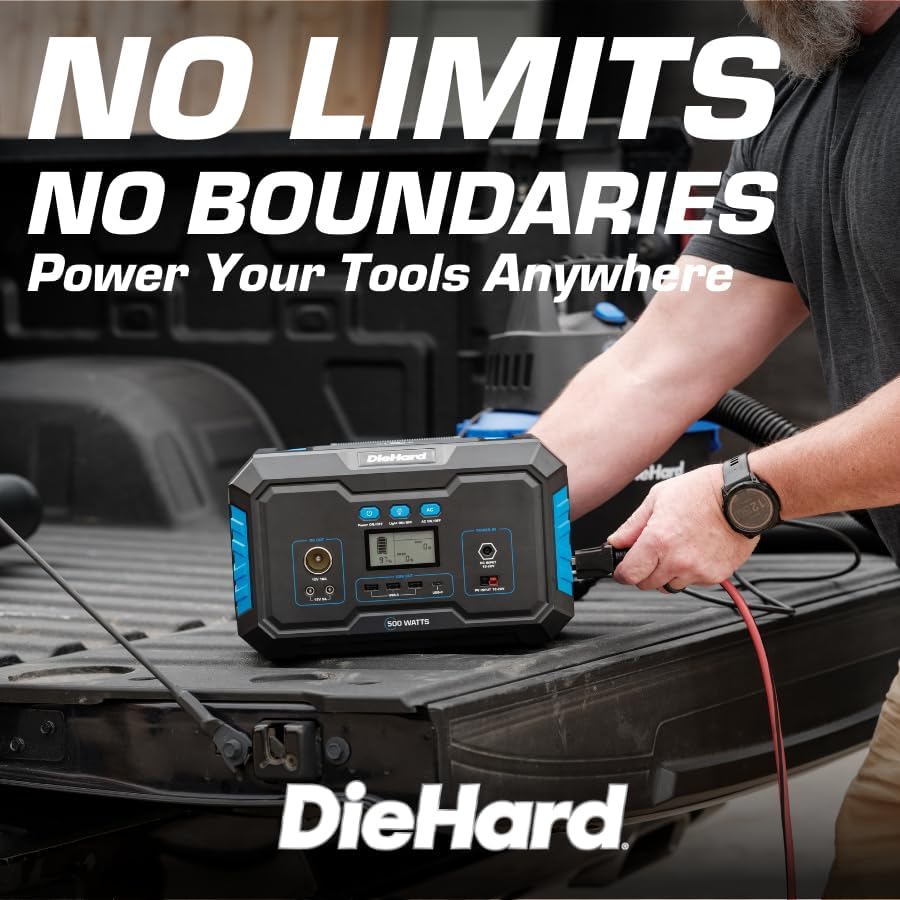
Image 5.2: A DieHard Power Station being used to power tools in a truck bed, highlighting its portability for job sites.

Сүрөт 5.3: Мисamples of device runtimes, showing the power station can run a 32" TV for 7 hours or a mini fridge for 5 hours.
- Күйгүзүү: Press and hold the 'Power ON/OFF' button for a few seconds until the LCD screen illuminates.
- Чыгарууну тандаңыз:
- For AC devices, press the 'AC ON/OFF' button. The AC icon will appear on the display.
- For DC devices (including car charger and 12V DC ports), ensure the unit is powered on. The DC output is typically active by default.
- For USB devices, simply plug them into the USB-A or USB-C ports. These are usually active when the unit is on.
- Зымсыз кубаттоо үчүн, шайкеш келген түзмөгүңүздү түзмөктүн үстүндөгү зымсыз кубаттоо тактасына коюңуз.
- Түзмөктөрдү туташтыруу: Plug your devices into the appropriate output ports. Monitor the LCD screen to see the output wattage and remaining battery life.
- Өчүрүү: When finished, disconnect all devices. Press and hold the 'Power ON/OFF' button until the LCD screen turns off. If AC output was used, press the 'AC ON/OFF' button to turn it off first.
6. Заряддоо маалыматы
Your DieHard Portable Power Station can be charged using multiple methods:

Image 6.1: The DieHard Power Station connected to solar panels, demonstrating its solar charging capability.

Image 6.2: Detailed chart showing estimated charging times for the 500W power station using different input methods.
- AC Adapter (Wall Outlet): Connect the provided AC adapter to the DC Input port.
- Күн панели (милдеттүү эмес): Connect a compatible DieHard 120-Watt or 200-Watt Portable Solar Panel to the PV Input port. Charging time will vary based on sunlight intensity and panel wattage.
- Car Charger (12V): Use the car charger cable to connect the power station to your vehicle's 12V cigarette lighter socket. This method is most efficient when the car engine is running.
Estimated Charging Times (500-Watt Model):
- From AC Adapter: Approximately 6 - 7 hours
- From Solar Charging 120W: Approximately 6 - 9 hours (depending on solar conditions)
- From Solar Charging 200W: Approximately 5 - 6 hours (depending on solar conditions)
- From Car Charger 12V: Approximately 7 - 8 hours (when car running)
7. Safety and Durability
Your DieHard Portable Power Station is built with multiple safety features. Please observe the following precautions:
- Аппаратты экстремалдык температурага, түз күн нуруна узак убакытка же жогорку нымдуулукка дуушар кылбаңыз.
- Ашыкча ысып кетүүнүн алдын алуу үчүн колдонуу жана заряддоо учурунда туура желдетүүнү камсыз кылыңыз.
- Түзмөктү түшүрүп алуудан же катуу соккуга кабылтуудан алыс болуңуз.
- Агрегатты өз алдынча ажыратпаңыз, оңдобоңуз же өзгөртпөңүз. Бардык оңдоо иштери үчүн квалификациялуу тейлөө кызматкерлерине кайрылыңыз.
- Балдар жана үй жаныбарлары жетпеген жерде сактаңыз.
- Түпнуска же тастыкталган шайкеш кубаттоо кабелдерин жана адаптерлерин гана колдонуңуз.
- The unit incorporates overcharging, temperature, and low battery protection to safeguard both the power station and connected devices.
8. Техникалык тейлөө
Proper maintenance will extend the lifespan and ensure optimal performance of your power station:
- Тазалоо: Түзмөктүн сыртын тазалоо үчүн жумшак, кургак чүпүрөктү колдонуңуз. Абразивдүү тазалоочу каражаттарды же эриткичтерди колдонбоңуз.
- Сактагыч: If storing for an extended period, charge the unit to approximately 50-80% every 3-6 months to maintain battery health. Store in a cool, dry place.
- Батареяга кам көрүү: Avoid fully discharging the battery frequently. Recharge promptly after use.
- Вентиляция: Вентиляция тешиктери чаңдан жана таштандыдан таза болушун текшериңиз.
9. Кыйынчылыктарды
If you encounter issues with your power station, refer to the table below for common problems and solutions:
| Көйгөй | Мүмкүн себеп | Чечим |
|---|---|---|
| Түзмөк күйбөйт. | Батарея толугу менен заряддалган. | Charge the power station using the AC adapter. |
| AC чыгаруу иштебейт. | AC чыгышы иштетилген эмес. | Press the 'AC ON/OFF' button to activate AC output. |
| Device not charging from USB/DC. | Unit not powered on; cable issue. | Ensure unit is on. Try a different cable or port. |
| Overload warning on display. | Connected device exceeds power station's output limit. | Disconnect the device. Check device wattage and ensure it's within the power station's limits. |
| Бирдиктин ысып кетиши. | Poor ventilation; prolonged high load. | Ensure vents are clear. Reduce load or allow unit to cool down. |
10. Техникалык шарттар
Detailed technical specifications for the DieHard Portable Power Station 500-Watt:

Image 10.1: Dimensions of the DieHard 500-Watt Portable Power Station.
| Спецификация | Нарк |
|---|---|
| Бренд | Аягына чейин туруу |
| Модель номери | DH-20002-01 |
| Ватtage (Үзгүлтүксүз) | 500 Ватт |
| Ватtage (чоку) | 1000 Ватт |
| Батарея сыйымдуулугу | 519.48Wh |
| Батарея түрү | Литий-ион |
| Элемент Салмагы | 15.1 фунт |
| Продукциянын өлчөмдөрү (L x W x Y) | 12.3" x 7.5" x 7.5" |
| AC Output Voltage | 110 вольт |
| AC чыгаруу жыштыгы | 60 Гц |
| Output Waveform | Таза синус толкуну |
| Жалпы электр розеткалары | 10 (2 AC, 3 USB-A, 1 USB-C, 2 DC, 1 Car Charger, 1 Wireless Charging Pad) |
| Charging Input Options | AC Adapter, Solar Panel (10-28V), Car Charger (12V) |
| Түс | Көк |
| UPC | 810133980120 |
11. Кепилдик жана колдоо
For warranty information, product registration, and customer support, please refer to the official DieHard webсайтка же кардарларды тейлөө бөлүмүнө кайрылыңыз. Сатып алуу квитанциясын кепилдик дооматтары үчүн сатып алуунун далили катары сактаңыз.
Официалдуу Webсайт: www.diehard.com
For further assistance, please reach out to DieHard customer support through the contact information provided on their official webсайт.
Ask a question about this manual
Ask about setup, troubleshooting, compatibility, parts, safety, or missing instructions. Manuals+ will review the question and use this page’s manual context to help answer it.