
1. Коопсуздук боюнча маанилүү маалымат
Read all instructions carefully before operating the appliance. Keep this manual for future reference.
- Бул шайман үй ичинде гана колдонуу үчүн.
- кубат менен камсыз кылуу Voltage рейтинг белгисинде көрсөтүлгөн.
- Do not operate the unit with a damaged cord or plug. If damaged, contact qualified service personnel.
- Keep the unit at least 50 cm away from walls and other objects to ensure proper airflow.
- Аба кирүүчү же чыгуучу жайга нерселерди салбаңыз.
- Тазалоодон же тейлөөдөн мурун дайыма розеткадан ажыратыңыз.
- Do not use chemical solvents or flammable liquids to clean the unit.
- Бул шайман физикалык, сезүү же акыл-эс жөндөмү начар же тажрыйбасы жана билими жок адамдар (анын ичинде балдар) үчүн, эгерде алардын коопсуздугуна жооптуу адам тарабынан көзөмөлсүз же шайманды колдонуу боюнча көрсөтмө болбосо, колдонууга арналбайт.
2. Продукт бүтүп калдыview
The Mistral MPAC1200R is a 12,000 BTU portable air conditioner designed for cooling, fan, and dry (dehumidification) operations. It features a silver ion filter for air sterilization, low noise operation, and a 24-hour timer, all controllable via a remote.
Негизги өзгөчөлүктөрү:
- 12,000 BTU Cooling Capacity
- Air Sterilisation (Silver Ion Filter)
- Low Noise Operation (55 Decibels)
- 24 саат таймер функциясы
- 2 желдеткич ылдамдыгы
- 3 Operating Modes: Cool, Fan, Dry
- Алыстан башкаруу камтылган
Бирдиктин компоненттери:

2.1-сүрөт: Фронт View. This image displays the front of the portable air conditioner, highlighting the air outlet grille at the top and the main body of the unit.
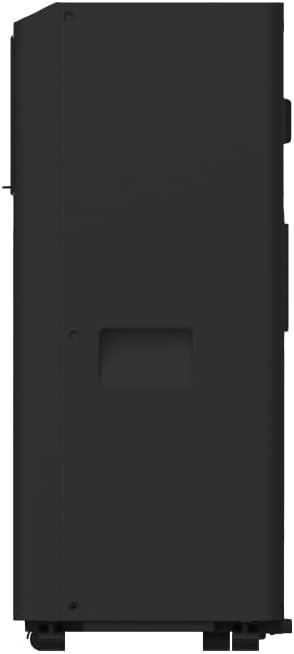
2.2-сүрөт: Side View. This image shows the side profile of the unit, including the exhaust air outlet and handles for portability.

2.3-сүрөт: Control Panel. This image details the top-mounted control panel with various function buttons and display.
3. Орнотуу жана орнотуу
3.1 Пакеттен чыгаруу
- Кондиционерди таңгагынан кылдаттык менен чыгарыңыз.
- Түпнуска таңгагын келечекте сактоо же ташуу үчүн сактаңыз.
- Check for any damage during transit. If damage is found, do not operate the unit and contact your retailer.
3.2 Орнотуу
- Place the unit on a firm, level surface in a location that can support its weight (20.8 kg).
- Ensure there is at least 50 cm of clear space around the unit for proper air circulation.
- Position the unit near a window or opening for exhaust hose installation.
3.3 Чыгаруучу түтүктү орнотуу
- Чыгаруучу шланг туташтыргычын аппараттын артындагы аба чыгуучу тешикке бекитиңиз.
- Чыгаруучу түтүктү сунуп, терезе комплектинин адаптерин экинчи учуна бекитиңиз.
- Install the window kit into a suitable window opening, ensuring a secure fit to prevent air leakage.
- Connect the window kit adapter to the installed window kit.
- Ensure the exhaust hose is as short and straight as possible to maximize efficiency. Avoid sharp bends.
3.4 Кубат туташтыруу
Plug the power cord into a grounded 220 Volt electrical outlet. Do not use extension cords or multi-plugs.
4. Иштөө нускамалары
Агрегатты аппараттын үстүндөгү башкаруу панели же камтылган пульту аркылуу башкарса болот.
4.1 Башкаруу панели (2.3-сүрөттү караңыз)
- ON/OFF баскычы: Бирдикти күйгүзүү же өчүрүү үчүн басыңыз.
- MODE баскычы: Press to cycle through Cool, Fan, and Dry modes.
- FAN SPEED баскычы: Press to select between Low and High fan speeds.
- TIMER баскычы: Press to set the auto-on or auto-off timer (up to 24 hours). Use the Up/Down arrows to adjust the time.
- Up/Down Arrows (Temperature/Time): Adjust the desired temperature in Cool mode or set the timer duration.
- Дисплей: Коюлган температураны же таймер орнотууларын көрсөтөт.
4.2 Алыстан башкаруу
The remote control duplicates the functions of the control panel, allowing convenient operation from a distance. Ensure batteries are correctly inserted.
4.3 Иштөө режимдери
- Муздак режим: Provides cooling. Set desired temperature using Up/Down arrows.
- Күйөрман режими: Circulates air without cooling. Select fan speed (Low/High).
- Кургак режим (нымсыздандыруу): Reduces humidity. The fan operates at a low speed, and the compressor cycles on and off.
4.4 Air Sterilization (Silver Ion Filter)
The unit is equipped with a silver ion filter to help sterilize the air. This feature operates automatically when the unit is running.
5. Техникалык тейлөө
Үзгүлтүксүз тейлөө оптималдуу иштешин камсыз кылат жана кондиционериңиздин иштөө мөөнөтүн узартат.
5.1 Аба чыпкасын тазалоо
- Аба чыпкасын колдонууга жараша ар бир эки жумада же андан көп жолу тазалап туруу керек.
- Агрегатты өчүрүп, розеткадан ажыратыңыз.
- Аба чыпкасын түзмөктүн арткы же каптал жагынан таап, алып салыңыз.
- Фильтрди жылуу суу жана жумшак жуучу каражат менен жууңуз. Жакшылап чайкаңыз.
- Кайра орнотуудан мурун чыпканы толугу менен кургатыңыз. Түз күн нуруна тийгизбеңиз.
5.2 Сууну агызуу
During cooling and dehumidifying operations, water will accumulate inside the unit. The unit has a self-evaporative system, but in high humidity conditions, manual draining may be required.
- When the internal water tank is full, the unit may stop operating and display an error code.
- Агрегатты өчүрүп, розеткадан ажыратыңыз.
- Түзмөктүн арткы ылдый жагындагы дренаждык тешиктин астына тайыз көмөч казан же табак коюңуз.
- Суунун агып чыгышы үчүн дренаждык тығынды алып салыңыз.
- Агызгандан кийин, дренаждык тығынды бекем алмаштырыңыз.
5.3 Агрегаттын сыртын тазалоо
- сыртын жумшак менен сүртүңүз, гamp кездеме.
- Do not use abrasive cleaners, waxes, or polishes.
5.4 Сактоо
- Before storing, ensure all water is drained from the unit.
- Аба чыпкасын жана сыртын тазалаңыз.
- Wrap the power cord and store it neatly.
- Түзмөктү кургак, тик абалда, мүмкүн болсо, баштапкы таңгагында сактаңыз.
6. Кыйынчылыктарды
Кызматка кайрылуудан мурун, кайраview төмөнкү жалпы маселелер жана чечимдер:
| Көйгөй | Мүмкүн себеп | Чечим |
|---|---|---|
| Түзмөк күйбөйт | Электр энергиясы жок Электр зымы сайылган эмес Internal water tank full | Электр розеткасын текшериңиз Шнурдун бекем сайылганын текшериңиз Сууну агрегаттан агызыңыз |
| Аппарат жетишсиз муздайт | Аба чыпкасы кир Бөлмө өтө чоң Терезелер/эшиктер ачык Чыгаруучу шланг бөгөттөлгөн/бүгүрүлгөн | Таза аба чыпкасы Бөлмөнүн көлөмүнө ылайыктуулугун текшериңиз Бардык терезелерди жана эшиктерди жабыңыз Чыгаруучу түтүктү текшерип, тазалаңыз |
| Бирдиги ызы -чуу | Агрегат түз жерде эмес Аба чыпкасы кир | Агрегатты тегиз, туруктуу бетке кой Таза аба чыпкасы |
| Суунун агып чыгышы | Агуучу сайгыч бош Бирдик ийилген | Ensure drain plug is securely in place Агрегатты түз бетке коюңуз |
7. Техникалык шарттар
| Өзгөчөлүк | Спецификация |
|---|---|
| Бренд | MISTRAL |
| Модель аты | MPAC1200R |
| Муздатуу кубаттуулугу | 12,000 BTU |
| Продукциянын өлчөмдөрү (D x W x Y) | 28D x 29W x 67.5H сантиметр |
| Элемент Салмагы | 20.8 килограмм |
| Тtage | 220 вольт |
| Ватtage | 1650 ватт |
| Ызы-чуу деңгээли | 55 децибел |
| Башкаруу ыкмасы | Алыстан башкаруу |
| Камтылган компоненттер | Алыстан башкаруу |
| Компрессордун түрү | Reciprocating |
| Is Outdoor Unit Required | Жок |
8. Кепилдик маалыматы
This Mistral MPAC1200R Portable Air Conditioner comes with a 1 жылдык Чектелген Кепилдик on the entire unit and an additional 5 жылдык кепилдик specifically for the compressor only.
For detailed warranty terms and conditions, please refer to the warranty card included with your product or contact Mistral customer support.
9. Кардарларды колдоо кызматы
If you have any questions, require technical assistance, or need to report an issue with your Mistral MPAC1200R Portable Air Conditioner, please contact Mistral customer support through their official webсайт же продукт документациясында көрсөтүлгөн байланыш маалыматы.