
Taffio CH7102-F6A
Taffio CH7102-F6A 10.25-inch Android Car Radio GPS CarPlay User Manual
Compatible with Mazda 6 (2020-2024)
1. Киришүү
This manual provides comprehensive instructions for the installation, operation, and maintenance of your Taffio CH7102-F6A Android Car Radio. This multimedia system is designed to integrate seamlessly with Mazda 6 models from 2020 to 2024, enhancing your in-car experience with advanced navigation, entertainment, and connectivity features.
2. Продукциянын өзгөчөлүктөрү
- Операция системасы: Android 12
- Процессор: 8-core CPU (Cortex-A75 x 2, Cortex-A55 x 6) at 1.80 GHz
- Эстутум: 4GB RAM / 64GB Internal Storage
- Дисплей: 10.25 дюймдук сенсордук экран
- Навигация: Integrated 3D GPS with up-to-date map material and free lifetime updates
- Смартфон интеграциясы: Built-in Wireless CarPlay and Android Auto functionality (no additional adapter required)
- Байланыш: Integrated Wi-Fi (W-LAN), 3G/4G LTE SIM card slot for faster navigation and streaming, Bluetooth, USB, Ethernet
- Original System Retention: Easy switching between the original system and the Android system; original radio functions, controller, steering wheel controls, vehicle displays, and settings are fully preserved.
- Орнотуу: Plug-and-play design without modification, restriction, or coding of the original system. Simple installation with only one screen and connection cable.
3. Орнотуу жана орнотуу
3.1. Пакеттин мазмуну
Орнотууну баштоодон мурун, пакетиңизде төмөндө келтирилген бардык компоненттер бар экенин текшериңиз:

Сүрөт: бүттүview of the Taffio CH7102-F6A Android Car Radio package contents, including the Android display, main unit, power cable, LVDS cable, speaker cables, USB cable, mic cable, aux adapter, screws, display cable, GPS antenna, and 4G antenna.
- 1x Android Display Unit
- 1x негизги бирдиги
- 1x Frame (if applicable)
- 1x Кубат кабели
- 1x LVDS Cable
- Динамик кабельдер
- 1x USB кабели
- 1x Microphone Cable
- 1x Aux Adapter
- Бурамалардын топтому
- 1x Display Cable
- 1x GPS антеннасы
- 1x 4G Antenna
- 1x PDF Assembly Instructions (digital)
- 1x Invoice with VAT + 2-year Warranty
3.2. Орнотуу боюнча колдонмо
The Taffio CH7102-F6A is designed for plug-and-play installation. No external housing or complex modifications are required. Refer to the diagram below for connection points.
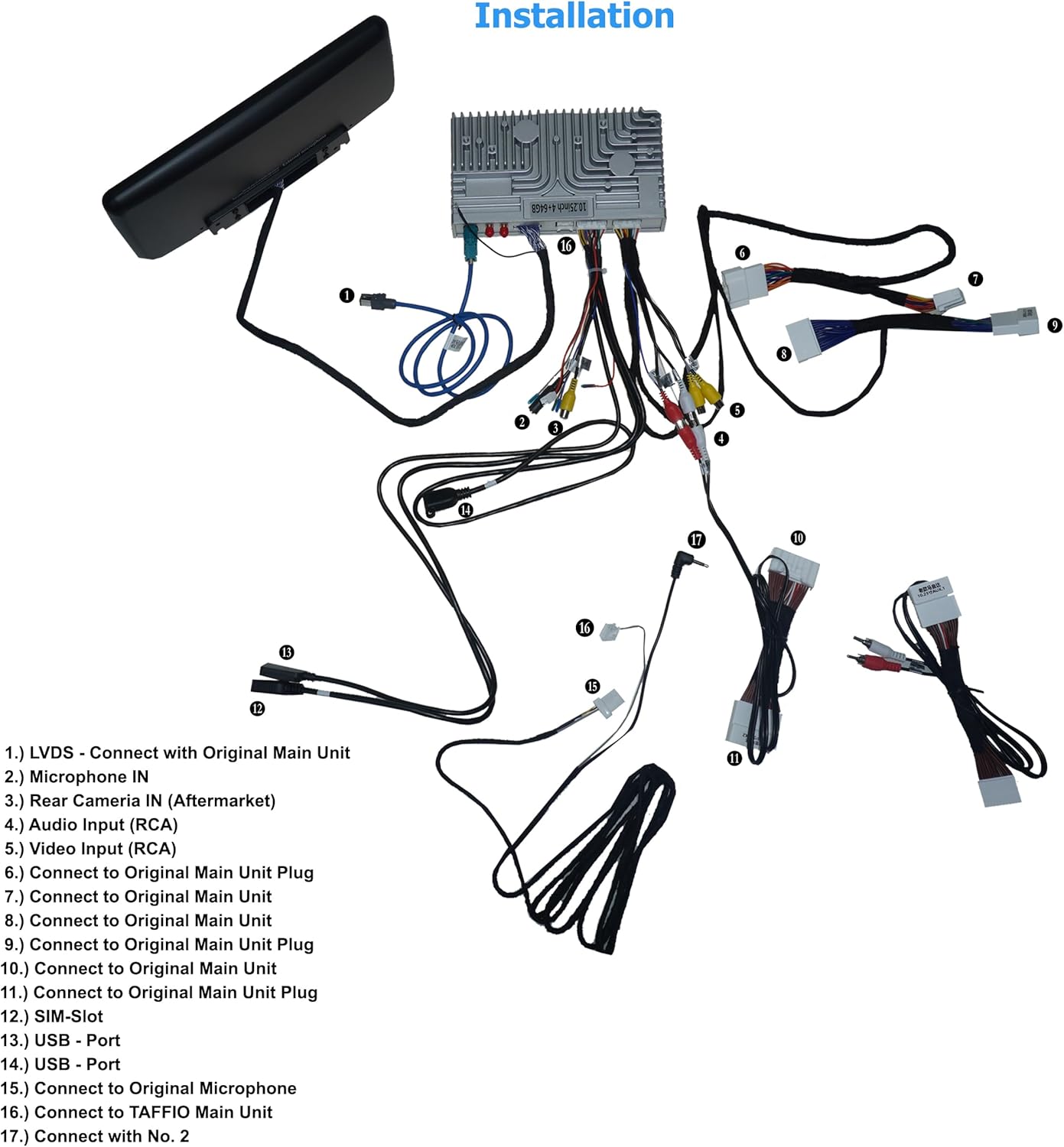
Image: Detailed wiring diagram for the Taffio CH7102-F6A Android Car Radio, showing connections for LVDS, microphone, rear camera, audio input, video input, original main unit plugs, SIM slot, USB ports, and connections to the Taffio main unit.
- LVDS: Connect with the Original Main Unit.
- Microphone IN: Connect the external microphone.
- Rear Camera IN (Aftermarket): Connect an aftermarket rear view camera if desired.
- Аудио киргизүү (RCA): For external audio sources.
- Video Input (RCA): Тышкы видео булактары үчүн.
- Connect to Original Main Unit Plug: Connect the provided cable to the original main unit plug.
- Connect to Original Main Unit: Connect the provided cable to the original main unit.
- Connect to Original Main Unit: Connect the provided cable to the original main unit.
- Connect to Original Main Unit Plug: Connect the provided cable to the original main unit plug.
- Connect to Original Main Unit Plug: Connect the provided cable to the original main unit plug.
- Connect to Original Main Unit Plug: Connect the provided cable to the original main unit plug.
- SIM-Slot: Insert your 3G/4G LTE SIM card here.
- USB - Port: USB түзмөктөрүн туташтырыңыз.
- USB - Port: USB түзмөктөрүн туташтырыңыз.
- Connect to Original Microphone: Connect to the vehicle's original microphone.
- Connect to TAFFIO Main Unit: Connect the display cable to the Taffio main unit.
- Connect with No. 2: Refer to the diagram for specific connection point.
For detailed vehicle-specific disassembly instructions, please refer to the provided PDF assembly instructions.

Image: A comparison showing the dashboard of a Mazda 6 before installation with the original smaller screen, and after installation with the larger Taffio 10.25-inch Android Car Radio seamlessly integrated.
4. Иштөө нускамалары
4.1. Колдонуучу интерфейси бүттүview
The Taffio CH7102-F6A features an intuitive Android interface, allowing access to various functions and applications.

Image: The main home screen of the Taffio Android Car Radio, displaying large circular icons for key functions like applications, music, navigation, vehicle settings, and general settings.
Navigate through the interface by swiping left or right on the touchscreen to access different screens with various applications.

Image: A screen from the Taffio Android Car Radio showing icons for Gallery, Google, Maps, Music Player, Navi, Operation Guide, Play Store, Screen Master, Settings, and Touch-Assistant.

Image: Another screen from the Taffio Android Car Radio displaying icons for Vehicle Settings, Video Player, Voice Search, and YouTube.

Image: A third screen from the Taffio Android Car Radio showing icons for AUX, Bluetooth, Calculator, Car Link 2.0, Car UI, CarbitLink, Chrome, Control, Equalizer, and File менеджер.
4.2. CarPlay жана Android Auto
The unit supports both Wireless CarPlay and Android Auto, allowing seamless integration with your smartphone for navigation, communication, and entertainment.
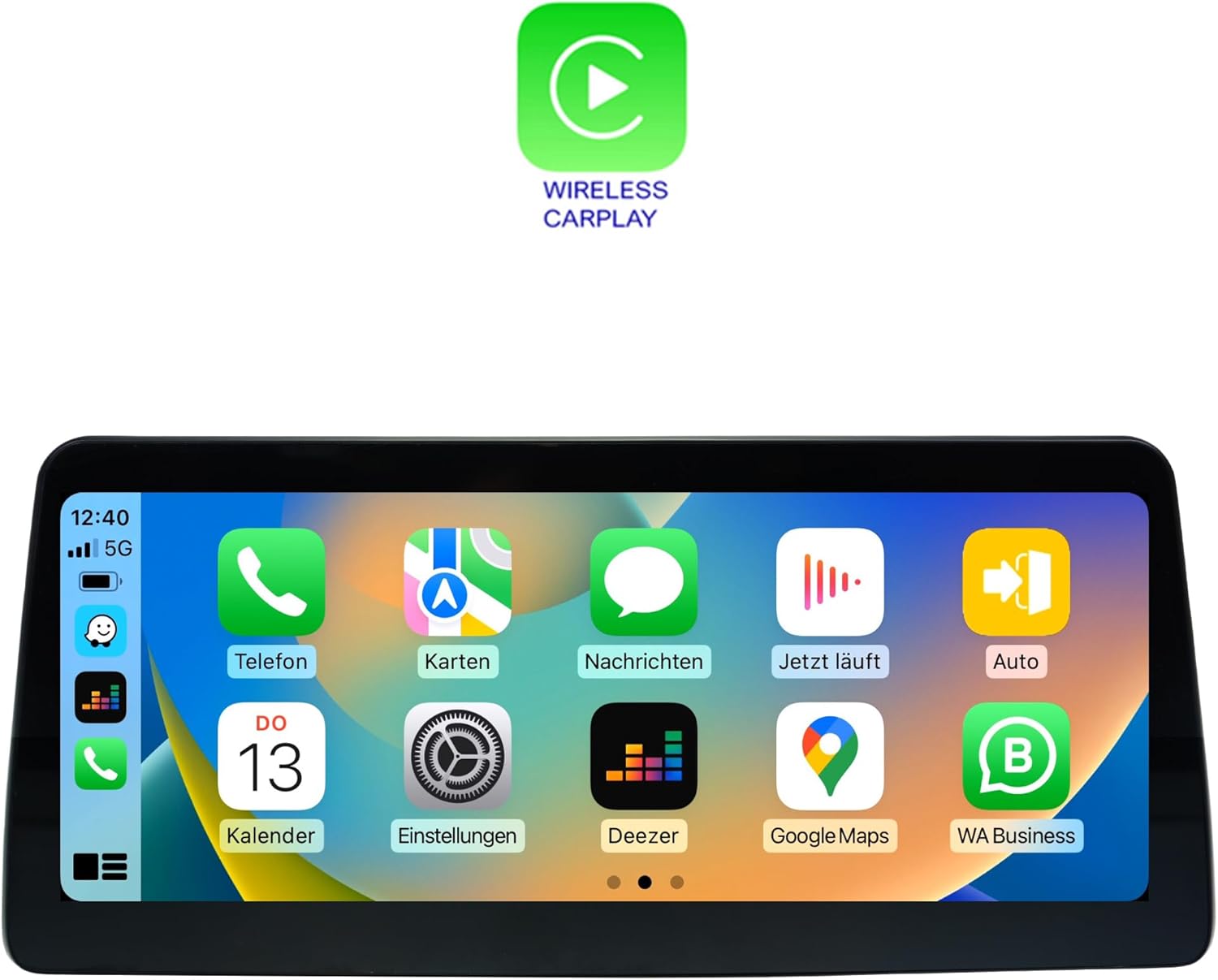
Image: The Taffio Android Car Radio display showing the Wireless CarPlay interface, with familiar iOS app icons such as Phone, Maps, Messages, Now Playing, Auto, Calendar, Settings, Deezer, Google Maps, and WA Business.

Image: The Taffio Android Car Radio display showing the Android Auto interface, featuring Google apps like Maps, Messages, Calendar, and other compatible applications in a car-optimized layout.
To activate CarPlay or Android Auto, connect your compatible smartphone via USB or wirelessly through Bluetooth and Wi-Fi. Follow the on-screen prompts to complete the setup.
4.3. Навигация
The system comes with pre-installed 3D GPS navigation and map material. Updates are available free of charge for the lifetime of the product. Access the navigation application from the main menu.
4.4. Байланыш
- Wi-Fi: Connect to Wi-Fi hotspots or your smartphone's hotspot for internet access.
- 3G/4G LTE: Insert a SIM card into the designated slot for mobile data connectivity.
- Bluetooth: Колсуз чалуулар жана аудио агымы үчүн смартфонуңузду жупташтырыңыз.
- USB: Медиа ойнотуу же кубаттоо үчүн USB дисктерди туташтырыңыз.
5. Техникалык шарттар
| Өзгөчөлүк | Спецификация |
|---|---|
| Бренд | Taffio |
| Модель аты | CH7102-F6A |
| Унаа кызматынын түрү | Машина |
| Screen Size | 10.25 дюйм |
| Өзгөчө өзгөчөлүк | Сенсордук экран |
| Байланыш технологиясы | Bluetooth, Ethernet, USB, Wi-Fi |
| Карта түрү | Бүткүл дүйнөлүк |
| Аудио чыгаруу режими | Баяндамачы |
| Монтаж түрү | Куралдар тактасы |
6. Кыйынчылыктарды
Бул бөлүмдө сиз кабылышы мүмкүн болгон жалпы маселелерди чечүү жолдору каралган.
- Кубат жок: Ensure all power cables are securely connected. Check the vehicle's fuse box for any blown fuses related to the car radio.
- Үн жок: Verify speaker connections. Check volume levels on both the unit and your vehicle's original system. Ensure the correct audio output source is selected.
- GPS сигналын жоготуу: Ensure the GPS antenna is installed correctly and has a clear view асмандан. Эгерде сигнал начар болсо, унааны ачык жерге жылдырыңыз.
- CarPlay/Android Auto туташпай жатат: Ensure your smartphone is compatible and has the latest software updates. Try restarting both the car radio and your phone. Check USB cable connection if using wired connection, or Bluetooth/Wi-Fi settings for wireless.
- Сенсордук экран жооп бербейт: Түзмөктү өчүрүп-күйгүзүп көрүңүз. Эгерде көйгөй чечилбесе, кардарларды колдоо кызматына кайрылыңыз.
- System Slow or Freezing: Close unnecessary applications. Clear cache or perform a factory reset (note: this will erase all user data).
If you encounter issues not covered here, please refer to the digital PDF assembly instructions or contact customer support.
7. Техникалык тейлөө
To ensure the longevity and optimal performance of your Taffio CH7102-F6A Android Car Radio, follow these general maintenance guidelines:
- Тазалоо: Use a soft, dry, anti-static cloth to clean the touchscreen and unit. Avoid abrasive cleaners or solvents that could damage the display or finish.
- Программалык камсыздоо жаңыртуулары: Periodically check for software updates to ensure you have the latest features and bug fixes. Updates can typically be found in the system settings or through the manufacturer's webсайт.
- Температура: Түзмөктү узак убакыт бою өтө жогорку температурага дуушар кылбаңыз.
- Кабелдик байланыштар: Periodically check that all cables are securely connected to prevent intermittent issues.
8. Кепилдик жана колдоо
Your Taffio CH7102-F6A Android Car Radio comes with a 2 жылдык кепилдик from the date of purchase. This warranty covers manufacturing defects and ensures repair or replacement of faulty components.
For warranty claims, technical support, or any inquiries, please contact the seller, REALMEDIASHOP, directly through your purchase platform. Please have your proof of purchase and product model number (CH7102-F6A) ready when contacting support.
Ask a question about this manual
Ask about setup, troubleshooting, compatibility, parts, safety, or missing instructions. Manuals+ will review the question and use this page’s manual context to help answer it.